[Steam Deck] Trying to launch Plutonium Deck Launcher via the game's official Steam library page
-
I'm trying to get the Plutonium Deck Launcher to launch straight from CoD's (whichever Plutonium supported CoD game I'm playing at the time) official Steam library page. For example when I click play on Black Ops 2 Zombies on Steam I want it to launch the Plutonium Deck Launcher. I was able to get this working on my Windows PC easily but it's a lot harder on a Steam Deck considering Plutonium doesn't support Linux. Which is the reason I'm using the Deck Launcher (it also allows me to play the client offline easily). However if i try to launch it via Steam Launch options it isn't working since it needs access to the rest of the files.
I tried making dragging the PlutoniumDeckLauncher.exe to the Black Ops 2 Steam folder and selected "Link here" then used this in the launch options.
cmd=( %command% ); cmd[-1]="$STEAM_COMPAT_INSTALL_PATH/PlutoniumDeckLauncher.exe"; "${cmd[@]}"
However it left me with this
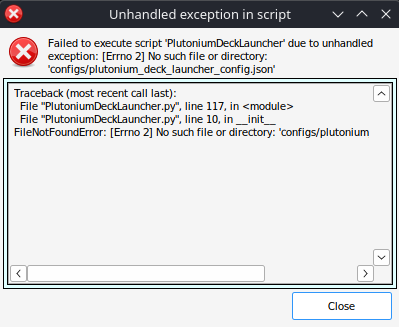
Is there any way I can get Steam to recognize all of the files for the Client Launcher via the Launch Options?
I'm not too familiar with Steam Launch options so any help would be much appreciated

PS: Yes I'm aware that I can just add it as non-steam game (which I am doing for now) I just thought it would be nice if I could launch it and have all my playtime connected.
Edit: I also need to add this command to the launch options.
PROTON_NO_ESYNC=1 PROTON_NO_FSYNC=1 %command%
Just not sure how I would navigate around using multiple commands simultaneously either.
Also I'm needing to use GE-Proton10-25 in the Steam compatibility options which isn't an issue. Just mentioning it as I'm not sure if this will effect anything.
