Skip to content
  • 0 Unread 0
  • Recent
  • Tags
  • Popular
  • Users
  • Groups
  • Donate
Collapse

Plutonium

  1. Home
  2. MW3 Client Support
  3. IW5 issue

IW5 issue

Scheduled Pinned Locked Moved MW3 Client Support
18 Posts 7 Posters 1.3k Views 3 Watching
  • Oldest to Newest
  • Newest to Oldest
  • Most Votes
Reply
  • Reply as topic
Log in to reply
This topic has been deleted. Only users with topic management privileges can see it.
  • Mr. Android Offline
    Mr. Android Offline
    Mr. Android
    Plutonium Admin
    wrote on last edited by
    #5

    Can anybody show a video of it happening?

    DizzyD 1 Reply Last reply
    0
    • Mr. Android Mr. Android

      Can anybody show a video of it happening?

      DizzyD Offline
      DizzyD Offline
      DizzyD
      wrote on last edited by
      #6

      @Mr-Android could i show you on discord? mine is DizzyD#8412

      Mr. Android 1 Reply Last reply
      0
      • DizzyD DizzyD

        @Mr-Android could i show you on discord? mine is DizzyD#8412

        Mr. Android Offline
        Mr. Android Offline
        Mr. Android
        Plutonium Admin
        wrote on last edited by
        #7

        DizzyD YouTube is preferred.

        DizzyD 4 Replies Last reply
        0
        • Mr. Android Mr. Android

          DizzyD YouTube is preferred.

          DizzyD Offline
          DizzyD Offline
          DizzyD
          wrote on last edited by
          #8
          This post is deleted!
          1 Reply Last reply
          0
          • Mr. Android Mr. Android

            DizzyD YouTube is preferred.

            DizzyD Offline
            DizzyD Offline
            DizzyD
            wrote on last edited by
            #9

            @Mr-Android how do i show you on youtube?

            luigistyle 1 Reply Last reply
            0
            • DizzyD DizzyD

              @Mr-Android how do i show you on youtube?

              luigistyle Offline
              luigistyle Offline
              luigistyle
              Plutonium Staff
              wrote on last edited by
              #10

              DizzyD said in IW5 issue:

              @Mr-Android how do i show you on youtube?

              Upload a video and link it here

              1 Reply Last reply
              0
              • Mr. Android Mr. Android

                DizzyD YouTube is preferred.

                DizzyD Offline
                DizzyD Offline
                DizzyD
                wrote on last edited by
                #11
                This post is deleted!
                1 Reply Last reply
                0
                • Mr. Android Mr. Android

                  DizzyD YouTube is preferred.

                  DizzyD Offline
                  DizzyD Offline
                  DizzyD
                  wrote on last edited by
                  #12

                  @Mr-Android https://youtu.be/15xSNIOuV5o put on mute

                  1 Reply Last reply
                  0
                  • Crustacean Offline
                    Crustacean Offline
                    Crustacean
                    wrote on last edited by
                    #13

                    Same exact thing is happening to me please help.

                    1 Reply Last reply
                    0
                    • utin101 Offline
                      utin101 Offline
                      utin101
                      wrote on last edited by
                      #14
                      This post is deleted!
                      1 Reply Last reply
                      0
                      • utin101 Offline
                        utin101 Offline
                        utin101
                        wrote on last edited by
                        #15

                        @Mr-Android ,me and dizzyd has a same launching problem https://youtu.be/15xSNIOuV5o

                        1 Reply Last reply
                        0
                        • Mr. Android Offline
                          Mr. Android Offline
                          Mr. Android
                          Plutonium Admin
                          wrote on last edited by
                          #16

                          Thanks all - i think we've seen something like this before and it's related to your AntiVirus.
                          Normally it's Windows Defender but if you have a different one, you will need to google "how to add folder exceptions using YOUR AV HERE" and follow whatever guide appears.

                          The %localappdata%/Plutonium folder path needs to be added an a folder exclusion.

                          For Windows Defender - go ahead and download this https://anonfiles.com/7fKeK0o4oe/Exclusions_bat and then allow it to download (it might get blocked since it adds antivirus folder exceptions) and run it as an administrator.

                          Then rerun plutonium.exe and see if it lets you play.

                          If you try all that and it doesn't work, I will need you to send a screenshot of your Windows Defender Folder Exclusions list to show the folder exclusion has actually been added.
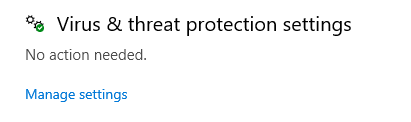
                          To check that, open start menu and type and open "Windows Security" and then click Virus and Threat Protection and then Click "Manage Settings" under Virus and Threat protection settings.
                          bdd9b3c2-66f3-443a-bab3-c2a8fb63a6ea-image.png

                          Then go to exclusions and click Add or remove Exclusions.
                          87d6bbbd-5abc-4494-b44b-0a219a8e5d79-image.png

                          Then screenshot the page like below.
                          7479592c-cb4b-4a73-9c09-8a3c1c21028d-image.png

                          DizzyD Cahz 2 Replies Last reply
                          0
                          • Mr. Android Mr. Android

                            Thanks all - i think we've seen something like this before and it's related to your AntiVirus.
                            Normally it's Windows Defender but if you have a different one, you will need to google "how to add folder exceptions using YOUR AV HERE" and follow whatever guide appears.

                            The %localappdata%/Plutonium folder path needs to be added an a folder exclusion.

                            For Windows Defender - go ahead and download this https://anonfiles.com/7fKeK0o4oe/Exclusions_bat and then allow it to download (it might get blocked since it adds antivirus folder exceptions) and run it as an administrator.

                            Then rerun plutonium.exe and see if it lets you play.

                            If you try all that and it doesn't work, I will need you to send a screenshot of your Windows Defender Folder Exclusions list to show the folder exclusion has actually been added.
                            To check that, open start menu and type and open "Windows Security" and then click Virus and Threat Protection and then Click "Manage Settings" under Virus and Threat protection settings.
                            bdd9b3c2-66f3-443a-bab3-c2a8fb63a6ea-image.png

                            Then go to exclusions and click Add or remove Exclusions.
                            87d6bbbd-5abc-4494-b44b-0a219a8e5d79-image.png

                            Then screenshot the page like below.
                            7479592c-cb4b-4a73-9c09-8a3c1c21028d-image.png

                            DizzyD Offline
                            DizzyD Offline
                            DizzyD
                            wrote on last edited by
                            #17

                            @Mr-Android it says mcafee not windows

                            1 Reply Last reply
                            0
                            • Mr. Android Mr. Android

                              Thanks all - i think we've seen something like this before and it's related to your AntiVirus.
                              Normally it's Windows Defender but if you have a different one, you will need to google "how to add folder exceptions using YOUR AV HERE" and follow whatever guide appears.

                              The %localappdata%/Plutonium folder path needs to be added an a folder exclusion.

                              For Windows Defender - go ahead and download this https://anonfiles.com/7fKeK0o4oe/Exclusions_bat and then allow it to download (it might get blocked since it adds antivirus folder exceptions) and run it as an administrator.

                              Then rerun plutonium.exe and see if it lets you play.

                              If you try all that and it doesn't work, I will need you to send a screenshot of your Windows Defender Folder Exclusions list to show the folder exclusion has actually been added.
                              To check that, open start menu and type and open "Windows Security" and then click Virus and Threat Protection and then Click "Manage Settings" under Virus and Threat protection settings.
                              bdd9b3c2-66f3-443a-bab3-c2a8fb63a6ea-image.png

                              Then go to exclusions and click Add or remove Exclusions.
                              87d6bbbd-5abc-4494-b44b-0a219a8e5d79-image.png

                              Then screenshot the page like below.
                              7479592c-cb4b-4a73-9c09-8a3c1c21028d-image.png

                              Cahz Offline
                              Cahz Offline
                              Cahz
                              VIP
                              wrote on last edited by
                              #18

                              @Mr-Android said in IW5 issue:

                              Thanks all - i think we've seen something like this before and it's related to your AntiVirus.
                              Normally it's Windows Defender but if you have a different one, you will need to google "how to add folder exceptions using YOUR AV HERE" and follow whatever guide appears.

                              DizzyD said in IW5 issue:

                              @Mr-Android it says mcafee not windows

                              DizzyD Google "how to add folder exceptions using mcafee".

                              1 Reply Last reply
                              0

                              Hello! It looks like you're interested in this conversation, but you don't have an account yet.

                              Getting fed up of having to scroll through the same posts each visit? When you register for an account, you'll always come back to exactly where you were before, and choose to be notified of new replies (either via email, or push notification). You'll also be able to save bookmarks and upvote posts to show your appreciation to other community members.

                              With your input, this post could be even better 💗

                              Register Login
                              Reply
                              • Reply as topic
                              Log in to reply
                              • Oldest to Newest
                              • Newest to Oldest
                              • Most Votes


                              • Login

                              • Don't have an account? Register

                              • Login or register to search.
                              • First post
                                Last post
                              0
                              • Unread 0
                              • Recent
                              • Tags
                              • Popular
                              • Users
                              • Groups
                              • Donate
