Skip to content
  • 0 Unread 0
  • Recent
  • Tags
  • Popular
  • Users
  • Groups
Collapse

Plutonium

  1. Home
  2. BO2 Client Support
  3. I need help with my login

I need help with my login

Scheduled Pinned Locked Moved BO2 Client Support
4 Posts 3 Posters 928 Views 1 Watching
  • Oldest to Newest
  • Newest to Oldest
  • Most Votes
Reply
  • Reply as topic
Log in to reply
This topic has been deleted. Only users with topic management privileges can see it.
  • donpollo3042undefined Offline
    donpollo3042undefined Offline
    donpollo3042
    wrote on last edited by donpollo3042
    #1

    The thing is, I used to have Plutonium on this very same PC but with another account. I lost the original account because I lost the e-mail due to hackers. No big deal, I just made another account using my current e-mail. However when I put in the new credentials, this error pops up: [system: 10060 at C:\ci-libs\boost_1_82_0\boost\asi\in function 'connect']. Tried everything, from uninstalling the launcher to deleting all my old plutonium files which could be tampering with the current launchers settings. However, I haven't been abled to even just login to the launcher. Can anyone tell me if they had the same error and how they solved it
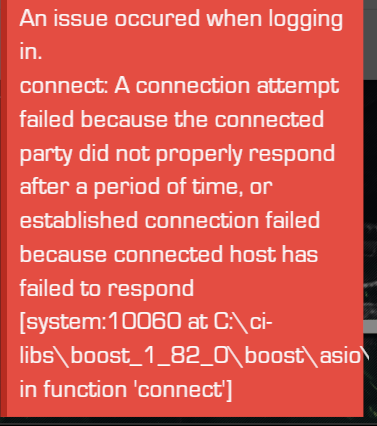
    ERROR.png

    1 Reply Last reply
    0
    • Trejos.-undefined Offline
      Trejos.-undefined Offline
      Trejos.-
      wrote on last edited by
      #2

      Same Issue, I tried to perform some troubleshooting that I found in the MS site: https://learn.microsoft.com/en-us/troubleshoot/windows-client/networking/10060-connection-timed-out-with-proxy-server

      But it didn't work for me.

      Trejos.-undefined 1 Reply Last reply
      0
      • Trejos.-undefined Trejos.-

        Same Issue, I tried to perform some troubleshooting that I found in the MS site: https://learn.microsoft.com/en-us/troubleshoot/windows-client/networking/10060-connection-timed-out-with-proxy-server

        But it didn't work for me.

        Trejos.-undefined Offline
        Trejos.-undefined Offline
        Trejos.-
        wrote on last edited by
        #3

        Update from this comment.

        I have been searching for hours, and just solved it by changing my DNS to the ones of google (8.8.8.8 and 8.8.4.4)

        Here is the guide:
        https://www.windowscentral.com/how-change-your-pcs-dns-settings-windows-10

        Hope it also works for you (👉゚ヮ゚)👉

        1 Reply Last reply
        0
        • swagger4444undefined Offline
          swagger4444undefined Offline
          swagger4444
          wrote on last edited by
          #4

          i love you bro ty

          1 Reply Last reply
          0

          Hello! It looks like you're interested in this conversation, but you don't have an account yet.

          Getting fed up of having to scroll through the same posts each visit? When you register for an account, you'll always come back to exactly where you were before, and choose to be notified of new replies (either via email, or push notification). You'll also be able to save bookmarks and upvote posts to show your appreciation to other community members.

          With your input, this post could be even better 💗

          Register Login
          Reply
          • Reply as topic
          Log in to reply
          • Oldest to Newest
          • Newest to Oldest
          • Most Votes


          • Login

          • Don't have an account? Register

          • Login or register to search.
          • First post
            Last post
          0
          • Unread 0
          • Recent
          • Tags
          • Popular
          • Users
          • Groups
