Skip to content
  • 0 Unread 0
  • Recent
  • Tags
  • Popular
  • Users
  • Groups
  • Donate
Collapse

Plutonium

  1. Home
  2. BO1 Modding Releases & Resources
  3. [ZM] Zombie + Health Counter BO1

[ZM] Zombie + Health Counter BO1

Scheduled Pinned Locked Moved BO1 Modding Releases & Resources
16 Posts 13 Posters 18.9k Views 6 Watching
  • Oldest to Newest
  • Newest to Oldest
  • Most Votes
Reply
  • Reply as topic
Log in to reply
This topic has been deleted. Only users with topic management privileges can see it.
  • coder x64 Offline
    coder x64 Offline
    coder x64
    Contributor
    wrote on last edited by
    #5

    UPDATE: Fixed the zombie total value overlapping the zombie text and added health bar and styles.

    1 Reply Last reply
    0
    • CringeNormie Offline
      CringeNormie Offline
      CringeNormie
      wrote on last edited by
      #6

      Style 3 & 4 gets overlapped by the perk icon for me. Is this supposed to happen?

      coder x64 1 Reply Last reply
      0
      • CringeNormie CringeNormie

        Style 3 & 4 gets overlapped by the perk icon for me. Is this supposed to happen?

        coder x64 Offline
        coder x64 Offline
        coder x64
        Contributor
        wrote on last edited by
        #7

        CringeNormie Sorry I haven't notice that I have updated the script to change the health bar position

        1 Reply Last reply
        0
        • coder x64 coder x64

          Preview.png

          How to install:
          Download the GSC script from here: https://github.com/coderx64-cyber/Bo1ZombieCounter/releases/tag/Release_V1.1
          Then move the script to: %localappdata%\Plutonium\storage\t5\scripts\sp

          Source code: https://github.com/coderx64-cyber/Bo1ZombieCounter

          UPDATE: How to change the style:
          Open counter_script.gsc with any text editor then go init() function you will find level.style variable change the value to any available style from (0-4) the default one is 0 and you can change bHealthBarRed value to true to change the health bar color to red.

          Preview of the styles:

          Default style (0):
          2022-06-19 (1).png

          style 1:
          2022-06-19 (2).png

          style 2:
          2022-06-19 (3).png

          style 3:
          2022-06-29.png

          style 4:
          2022-06-29 (1).png

          bHealthBarRed = true:
          2022-06-29 (2).png

          deadgalaxy606 Offline
          deadgalaxy606 Offline
          deadgalaxy606
          wrote on last edited by
          #8

          coder x64 hey I have a slight problem I put the file where it was supposed to go , then load it but nothing happens no counter nothing i tried other ways people have said to try online , but im at a lost
          alt text

          LordC03 1 Reply Last reply
          1
          • deadgalaxy606 deadgalaxy606

            coder x64 hey I have a slight problem I put the file where it was supposed to go , then load it but nothing happens no counter nothing i tried other ways people have said to try online , but im at a lost
            alt text

            LordC03 Offline
            LordC03 Offline
            LordC03
            wrote on last edited by LordC03
            #9

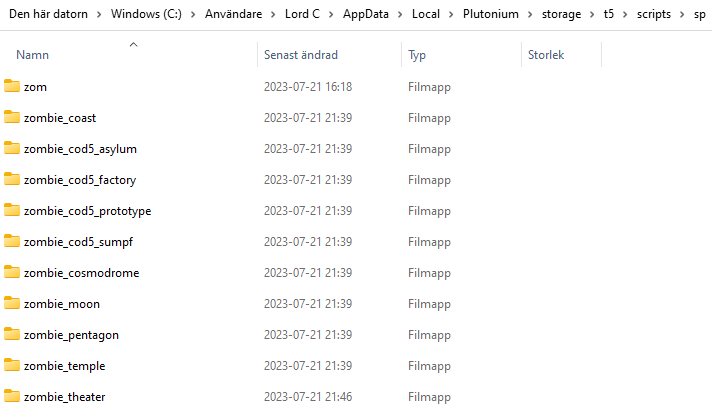
            deadgalaxy606 Scripts like this one, and many others, need to be placed in separate foldes that corresponds to each specific map (these folders should be in the "sp" folder). I was in the same situation as you earlier with another script, but discoved the fix through another script where its uploader had already split up the folders with their correct names. I copied the folders over and pasted my script to the the folders where I wanted it to be active when playing the corresponding maps, and it worked! Here's a photo of all of the folder names.Skärmbild 2023-07-21 221240.png

            1 Reply Last reply
            1
            • coder x64 coder x64

              Preview.png

              How to install:
              Download the GSC script from here: https://github.com/coderx64-cyber/Bo1ZombieCounter/releases/tag/Release_V1.1
              Then move the script to: %localappdata%\Plutonium\storage\t5\scripts\sp

              Source code: https://github.com/coderx64-cyber/Bo1ZombieCounter

              UPDATE: How to change the style:
              Open counter_script.gsc with any text editor then go init() function you will find level.style variable change the value to any available style from (0-4) the default one is 0 and you can change bHealthBarRed value to true to change the health bar color to red.

              Preview of the styles:

              Default style (0):
              2022-06-19 (1).png

              style 1:
              2022-06-19 (2).png

              style 2:
              2022-06-19 (3).png

              style 3:
              2022-06-29.png

              style 4:
              2022-06-29 (1).png

              bHealthBarRed = true:
              2022-06-29 (2).png

              SourPatchCx Offline
              SourPatchCx Offline
              SourPatchCx
              wrote on last edited by
              #10
              This post is deleted!
              1 Reply Last reply
              0
              • EddxCr20 Offline
                EddxCr20 Offline
                EddxCr20
                wrote on last edited by
                #11

                Stupid question man. How can I add this to my own T5 server?

                1 Reply Last reply
                1
                • Xerxes Offline
                  Xerxes Offline
                  Xerxes
                  Plutonium Staff
                  wrote on last edited by
                  #12

                  Exactly as written in the install section in the first post.

                  1 Reply Last reply
                  0
                  • bhfff bhfff referenced this topic on
                  • TheZombieNoob Offline
                    TheZombieNoob Offline
                    TheZombieNoob
                    wrote on last edited by
                    #13

                    is it possible to remove the health bar and just have the timer?

                    1 Reply Last reply
                    0
                    • Florida_Man_69 Offline
                      Florida_Man_69 Offline
                      Florida_Man_69
                      wrote on last edited by
                      #14

                      Anyone know how to fix the weird health overlay bug when playing on coop? Like my health will always display 100 and when I get damage the valve changes but it gets overlayed by the 100 hp making it distracting and annoying.

                      1 Reply Last reply
                      1
                      • Kingtonio Offline
                        Kingtonio Offline
                        Kingtonio
                        wrote on last edited by
                        #15

                        can you do a version removing the health bar and replacing it with a game + a round timer?

                        1 Reply Last reply
                        0
                        • Miaa_ Miaa_ referenced this topic on
                        • StarGold Offline
                          StarGold Offline
                          StarGold
                          wrote on last edited by
                          #16

                          i having the same issue as Florida_Man_69

                          1 Reply Last reply
                          0

                          Hello! It looks like you're interested in this conversation, but you don't have an account yet.

                          Getting fed up of having to scroll through the same posts each visit? When you register for an account, you'll always come back to exactly where you were before, and choose to be notified of new replies (either via email, or push notification). You'll also be able to save bookmarks and upvote posts to show your appreciation to other community members.

                          With your input, this post could be even better đź’—

                          Register Login
                          Reply
                          • Reply as topic
                          Log in to reply
                          • Oldest to Newest
                          • Newest to Oldest
                          • Most Votes


                          • Login

                          • Don't have an account? Register

                          • Login or register to search.
                          • First post
                            Last post
                          0
                          • Unread 0
                          • Recent
                          • Tags
                          • Popular
                          • Users
                          • Groups
                          • Donate