Skip to content
  • Recent
  • Tags
  • Popular
  • Users
  • Groups
  • Donate
Collapse

Plutonium

  1. Home
  2. MW3 Client Support
  3. IW5 Error message: Direct3DDevice9:: Present failed: An invalid paramater was passed to the returning function
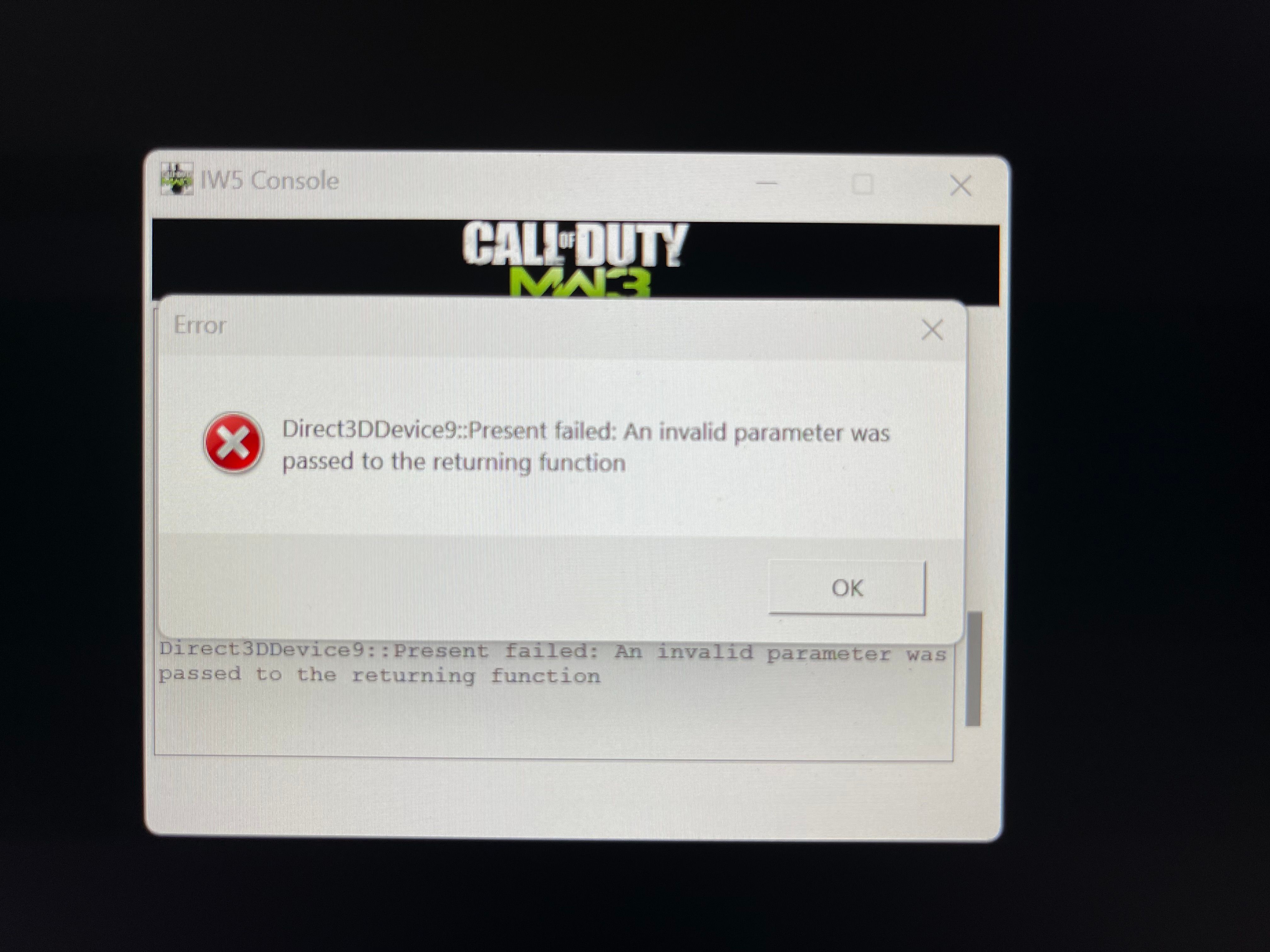
IW5 Error message: Direct3DDevice9:: Present failed: An invalid paramater was passed to the returning function

Scheduled Pinned Locked Moved MW3 Client Support
23 Posts 7 Posters 8.0k Views 1 Watching
  • Oldest to Newest
  • Newest to Oldest
  • Most Votes
Reply
  • Reply as topic
Log in to reply
This topic has been deleted. Only users with topic management privileges can see it.
  • Resxtundefined Offline
    Resxtundefined Offline
    Resxt
    Plutonium Staff
    wrote on last edited by
    #4

    Try installing DirectX and updating your GPU drivers. Restart your PC afterward

    1 Reply Last reply
    1
    • Xerxesundefined Xerxes

      With which exact steps in our guides are you struggling with?

      AF thinkerundefined Offline
      AF thinkerundefined Offline
      AF thinker
      wrote on last edited by
      #5

      Xerxes hey asshole, are you going to tell me how to fix MW3 or just keep deleting my posts?

      WolflexZundefined 1 Reply Last reply
      0
      • AF thinkerundefined AF thinker

        Xerxes hey asshole, are you going to tell me how to fix MW3 or just keep deleting my posts?

        WolflexZundefined Offline
        WolflexZundefined Offline
        WolflexZ
        Contributor
        wrote on last edited by
        #6

        @SadPackersFan What issue are you even having.

        AF thinkerundefined 1 Reply Last reply
        0
        • WolflexZundefined WolflexZ

          @SadPackersFan What issue are you even having.

          AF thinkerundefined Offline
          AF thinkerundefined Offline
          AF thinker
          wrote on last edited by
          #7

          WolflexZ whenever I try to launch the game, I get an error message saying “ Direct3DDevice9:: Present failed: An invalid paramater was passed to the returning function”

          All my drivers are updated and this is the only game this happens on

          WolflexZundefined 1 Reply Last reply
          0
          • AF thinkerundefined AF thinker

            WolflexZ whenever I try to launch the game, I get an error message saying “ Direct3DDevice9:: Present failed: An invalid paramater was passed to the returning function”

            All my drivers are updated and this is the only game this happens on

            WolflexZundefined Offline
            WolflexZundefined Offline
            WolflexZ
            Contributor
            wrote on last edited by
            #8

            @SadPackersFan Have you tried reinstalling directx

            AF thinkerundefined 1 Reply Last reply
            0
            • AF thinkerundefined Offline
              AF thinkerundefined Offline
              AF thinker
              wrote on last edited by
              #9

              Yes I installed the latest version and it still doesn't work

              1 Reply Last reply
              0
              • WolflexZundefined WolflexZ

                @SadPackersFan Have you tried reinstalling directx

                AF thinkerundefined Offline
                AF thinkerundefined Offline
                AF thinker
                wrote on last edited by
                #10

                WolflexZ Anything else I can do to fix it?

                WolflexZundefined 1 Reply Last reply
                0
                • AF thinkerundefined AF thinker

                  WolflexZ Anything else I can do to fix it?

                  WolflexZundefined Offline
                  WolflexZundefined Offline
                  WolflexZ
                  Contributor
                  wrote on last edited by
                  #11

                  @SadPackersFan Did you reset your pc after reinstalling? Reinstall or verify MW3? Software conflicting issues etc? It can be a multiple of issues if it isn't directx or gpu drivers.

                  AF thinkerundefined 1 Reply Last reply
                  0
                  • WolflexZundefined WolflexZ

                    @SadPackersFan Did you reset your pc after reinstalling? Reinstall or verify MW3? Software conflicting issues etc? It can be a multiple of issues if it isn't directx or gpu drivers.

                    AF thinkerundefined Offline
                    AF thinkerundefined Offline
                    AF thinker
                    wrote on last edited by
                    #12

                    WolflexZ Did all of these things and it still doesn't work. What else can I do?

                    1 Reply Last reply
                    0
                    • AF thinkerundefined Offline
                      AF thinkerundefined Offline
                      AF thinker
                      wrote on last edited by
                      #13

                      Is there anyone who can help me fix this? I haven't been able to play this game for over a month because it still won't launch

                      1 Reply Last reply
                      0
                      • AF thinkerundefined Offline
                        AF thinkerundefined Offline
                        AF thinker
                        wrote on last edited by AF thinker
                        #14

                        Still not working

                        1 Reply Last reply
                        0
                        • AF thinkerundefined Offline
                          AF thinkerundefined Offline
                          AF thinker
                          wrote on last edited by
                          #15

                          So what's the deal, can someone help me fix this or what?

                          1 Reply Last reply
                          0
                          • UniverSixundefined Offline
                            UniverSixundefined Offline
                            UniverSix
                            wrote on last edited by
                            #16

                            the same happens here: https://zombiemodding.com/index.php?topic=14342.0

                            AF thinkerundefined 1 Reply Last reply
                            0
                            • UniverSixundefined UniverSix

                              the same happens here: https://zombiemodding.com/index.php?topic=14342.0

                              AF thinkerundefined Offline
                              AF thinkerundefined Offline
                              AF thinker
                              wrote on last edited by
                              #17

                              @NicePanxiety Doesn't offer any solution. All my graphics drivers are updated, and this is the only game I get this error message

                              1 Reply Last reply
                              0
                              • AF thinkerundefined Offline
                                AF thinkerundefined Offline
                                AF thinker
                                wrote on last edited by
                                #18

                                Update: still not working. If I wasn't the only person on here having this issue, then maybe there would be a fix by now

                                UniverSixundefined 1 Reply Last reply
                                0
                                • AF thinkerundefined AF thinker

                                  Update: still not working. If I wasn't the only person on here having this issue, then maybe there would be a fix by now

                                  UniverSixundefined Offline
                                  UniverSixundefined Offline
                                  UniverSix
                                  wrote on last edited by
                                  #19

                                  @SadPackersFan
                                  Did you read everything on the website I mentioned? Bcz its say its a drive problem, and probably the post has stoped bcz the problem its solved, so......

                                  AF thinkerundefined 1 Reply Last reply
                                  0
                                  • UniverSixundefined UniverSix

                                    @SadPackersFan
                                    Did you read everything on the website I mentioned? Bcz its say its a drive problem, and probably the post has stoped bcz the problem its solved, so......

                                    AF thinkerundefined Offline
                                    AF thinkerundefined Offline
                                    AF thinker
                                    wrote on last edited by
                                    #20

                                    @NicePanxiety All of my drivers are updated like I said before. If that was the problem, I wouldn't be able to play my other games which I'm able to do.


                                    1 Reply Last reply
                                    0
                                    • AF thinkerundefined Offline
                                      AF thinkerundefined Offline
                                      AF thinker
                                      wrote on last edited by
                                      #21
                                      This post is deleted!
                                      1 Reply Last reply
                                      0
                                      • dedsegueundefined Offline
                                        dedsegueundefined Offline
                                        dedsegue
                                        wrote on last edited by
                                        #22

                                        Hello

                                        I got the same error message and i managed to fix it.

                                        Right-click on plutonium.exe → Properties
                                        Go to the Compatibility tab
                                        Check: Run this program in compatibility mode for: Select Windows 8 from the list

                                        it fixed it for me.

                                        Hope it can help some people

                                        1 Reply Last reply
                                        0
                                        • cryektorundefined Offline
                                          cryektorundefined Offline
                                          cryektor
                                          wrote last edited by
                                          #23

                                          I got the same problem here, did you already resolved yet?

                                          1 Reply Last reply
                                          0
                                          Reply
                                          • Reply as topic
                                          Log in to reply
                                          • Oldest to Newest
                                          • Newest to Oldest
                                          • Most Votes


                                          • 1
                                          • 2
                                          • Login

                                          • Don't have an account? Register

                                          • Login or register to search.
                                          • First post
                                            Last post
                                          0
                                          • Recent
                                          • Tags
                                          • Popular
                                          • Users
                                          • Groups
                                          • Donate