Skip to content
  • Recent
  • Tags
  • Popular
  • Users
  • Groups
  • Donate
Collapse

Plutonium

  1. Home
  2. BO1 Modding Releases & Resources
  3. [MP] EnCoRe V8 - Mod Menu

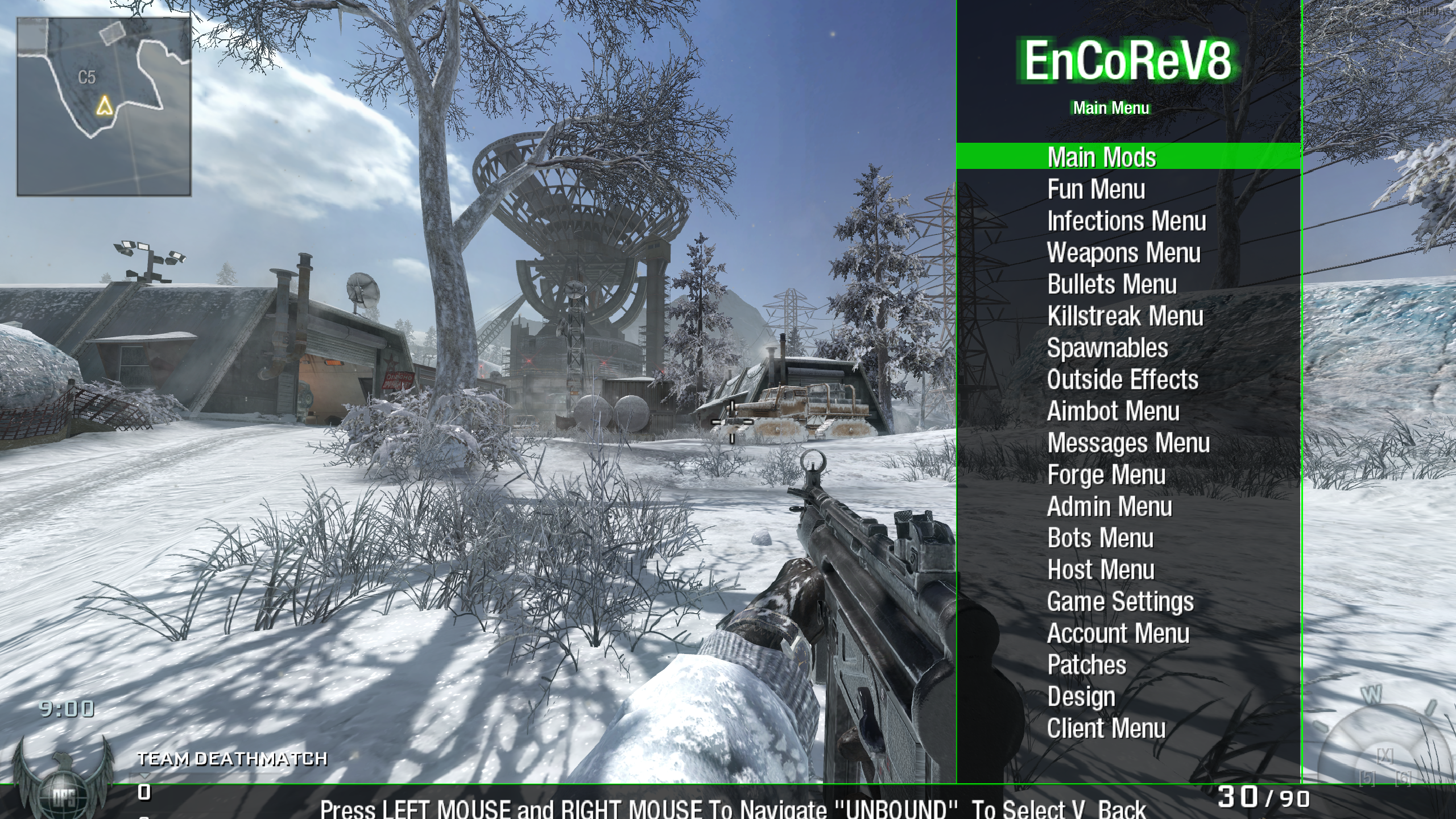
[MP] EnCoRe V8 - Mod Menu

Scheduled Pinned Locked Moved BO1 Modding Releases & Resources
32 Posts 19 Posters 25.6k Views 1 Watching
  • Oldest to Newest
  • Newest to Oldest
  • Most Votes
Reply
  • Reply as topic
Log in to reply
This topic has been deleted. Only users with topic management privileges can see it.
  • KingWafflesundefined KingWaffles

    Resxt i did, but it went over my head that bo1 itself isn't controller compatible

    Resxtundefined Offline
    Resxtundefined Offline
    Resxt
    Plutonium Staff
    wrote on last edited by
    #13

    KingWaffles that's false. You can play with a controller on all Plutonium games
    https://plutonium.pw/docs/controllers/

    1 Reply Last reply
    0
    • YEETNADE2000undefined Offline
      YEETNADE2000undefined Offline
      YEETNADE2000
      wrote on last edited by YEETNADE2000
      #14

      yo Resxt do you know a way to change the keybinds? shooting for scrolling down is kinda scuffed for me

      Resxtundefined 1 Reply Last reply
      0
      • YEETNADE2000undefined YEETNADE2000

        yo Resxt do you know a way to change the keybinds? shooting for scrolling down is kinda scuffed for me

        Resxtundefined Offline
        Resxtundefined Offline
        Resxt
        Plutonium Staff
        wrote on last edited by Resxt
        #15

        YEETNADE2000 you'd have to edit the .gsc scripts and find how the keys are handled but I'm not willing to do this since it has a lot of files and the code looks terrible
        Maybe maps\mp\cabcon\system_base.gsc is what you need to edit since it has if(self attackButtonPressed())

        YEETNADE2000undefined sergeant nahuelundefined 2 Replies Last reply
        0
        • Resxtundefined Resxt

          YEETNADE2000 you'd have to edit the .gsc scripts and find how the keys are handled but I'm not willing to do this since it has a lot of files and the code looks terrible
          Maybe maps\mp\cabcon\system_base.gsc is what you need to edit since it has if(self attackButtonPressed())

          YEETNADE2000undefined Offline
          YEETNADE2000undefined Offline
          YEETNADE2000
          wrote on last edited by
          #16

          Resxt I'll try it, thank you so much

          harlowngundefined 1 Reply Last reply
          0
          • YEETNADE2000undefined YEETNADE2000

            Resxt I'll try it, thank you so much

            harlowngundefined Offline
            harlowngundefined Offline
            harlowng
            wrote on last edited by
            #17

            YEETNADE2000 what happened? what'd you try?

            1 Reply Last reply
            0
            • Resxtundefined Resxt

              YEETNADE2000 you'd have to edit the .gsc scripts and find how the keys are handled but I'm not willing to do this since it has a lot of files and the code looks terrible
              Maybe maps\mp\cabcon\system_base.gsc is what you need to edit since it has if(self attackButtonPressed())

              sergeant nahuelundefined Offline
              sergeant nahuelundefined Offline
              sergeant nahuel
              wrote on last edited by
              #18

              Resxt hey dude, how you do that, how do you change the keybinds?, idk how to edit one of these files

              Resxtundefined 1 Reply Last reply
              0
              • sergeant nahuelundefined sergeant nahuel

                Resxt hey dude, how you do that, how do you change the keybinds?, idk how to edit one of these files

                Resxtundefined Offline
                Resxtundefined Offline
                Resxt
                Plutonium Staff
                wrote on last edited by
                #19

                sergeant nahuel I provided all the info for you to look it up. I won't do it myself

                1 Reply Last reply
                0
                • S_o_Lundefined Offline
                  S_o_Lundefined Offline
                  S_o_L
                  wrote on last edited by
                  #20
                  This post is deleted!
                  S_o_Lundefined 1 Reply Last reply
                  0
                  • S_o_Lundefined S_o_L

                    This post is deleted!

                    S_o_Lundefined Offline
                    S_o_Lundefined Offline
                    S_o_L
                    wrote on last edited by
                    #21
                    This post is deleted!
                    1 Reply Last reply
                    0
                    • bhfffundefined bhfff referenced this topic on
                    • Zed09undefined Offline
                      Zed09undefined Offline
                      Zed09
                      wrote on last edited by
                      #22

                      the level up and prestige settings don't work in private games or combat training. i select them and then finish the game (either normally or with the menu) and it doesnt work afterwards :[

                      ItsMacroundefined 1 Reply Last reply
                      0
                      • Zed09undefined Zed09

                        the level up and prestige settings don't work in private games or combat training. i select them and then finish the game (either normally or with the menu) and it doesnt work afterwards :[

                        ItsMacroundefined Offline
                        ItsMacroundefined Offline
                        ItsMacro
                        wrote on last edited by
                        #23

                        Zed09 you have to do console command /unlockall to be max level and have everything, do not use the menu. you can open console by pressing the button near 1 on the left of the keyboard. it is the \ | key .

                        Zed09undefined 1 Reply Last reply
                        0
                        • ItsMacroundefined ItsMacro

                          Zed09 you have to do console command /unlockall to be max level and have everything, do not use the menu. you can open console by pressing the button near 1 on the left of the keyboard. it is the \ | key .

                          Zed09undefined Offline
                          Zed09undefined Offline
                          Zed09
                          wrote on last edited by
                          #24
                          This post is deleted!
                          1 Reply Last reply
                          0
                          • nfk Veteranaundefined Offline
                            nfk Veteranaundefined Offline
                            nfk Veterana
                            wrote on last edited by
                            #25

                            i put the folder in mods but when i load it it says the mod is loaded but nothing happens

                            1 Reply Last reply
                            0
                            • zFertikundefined Offline
                              zFertikundefined Offline
                              zFertik
                              wrote on last edited by
                              #26

                              I cant play private match: [ERROR]:compiler:swa_x_ijhon/mp/gametypes/_rank.gsc:793:1:missing ;` ?
                              It shows that

                              1 Reply Last reply
                              0
                              • PeachyyPooundefined Offline
                                PeachyyPooundefined Offline
                                PeachyyPoo
                                wrote on last edited by
                                #27

                                It's currently not working for me,it says when loading into a game "Error Server Script Compile Error Unkown function" has there been a work around at all?

                                1 Reply Last reply
                                0
                                • Mielisbackundefined Offline
                                  Mielisbackundefined Offline
                                  Mielisback
                                  wrote on last edited by
                                  #28

                                  not working for me. When i press the tactical grenade button the menu doesnt show up

                                  1 Reply Last reply
                                  0
                                  • NotDextraundefined Offline
                                    NotDextraundefined Offline
                                    NotDextra
                                    wrote last edited by
                                    #29

                                    is this bannable? 2026

                                    Resxtundefined 1 Reply Last reply
                                    0
                                    • NotDextraundefined NotDextra

                                      is this bannable? 2026

                                      Resxtundefined Offline
                                      Resxtundefined Offline
                                      Resxt
                                      Plutonium Staff
                                      wrote last edited by
                                      #30

                                      NotDextra No. 2026

                                      1 Reply Last reply
                                      0
                                      • GhostEterxalsundefined Offline
                                        GhostEterxalsundefined Offline
                                        GhostEterxals
                                        wrote last edited by
                                        #31

                                        i dont know if its me but when i press the button to open the menu it does not work

                                        1 Reply Last reply
                                        0
                                        • deanski5kundefined Offline
                                          deanski5kundefined Offline
                                          deanski5k
                                          wrote last edited by
                                          #32

                                          ^ same here. followed all the steps; menu just won't open.

                                          1 Reply Last reply
                                          0
                                          Reply
                                          • Reply as topic
                                          Log in to reply
                                          • Oldest to Newest
                                          • Newest to Oldest
                                          • Most Votes


                                          • 1
                                          • 2
                                          • Login

                                          • Don't have an account? Register

                                          • Login or register to search.
                                          • First post
                                            Last post
                                          0
                                          • Recent
                                          • Tags
                                          • Popular
                                          • Users
                                          • Groups
                                          • Donate