Skip to content
  • 0 Unread 0
  • Recent
  • Tags
  • Popular
  • Users
  • Groups
Collapse

Plutonium

  1. Home
  2. BO2 Modding Support & Discussion
  3. CUSTOM CAMOS ON T6 ARENT WORKING!!
CUSTOM CAMOS ON T6 ARENT WORKING!!

Scheduled Pinned Locked Moved BO2 Modding Support & Discussion
6 Posts 2 Posters 872 Views 1 Watching
  • Oldest to Newest
  • Newest to Oldest
  • Most Votes
Reply
  • Reply as topic
Log in to reply
This topic has been deleted. Only users with topic management privileges can see it.
  • J0HN P0RKundefined Offline
    J0HN P0RKundefined Offline
    J0HN P0RK
    wrote on last edited by
    #1

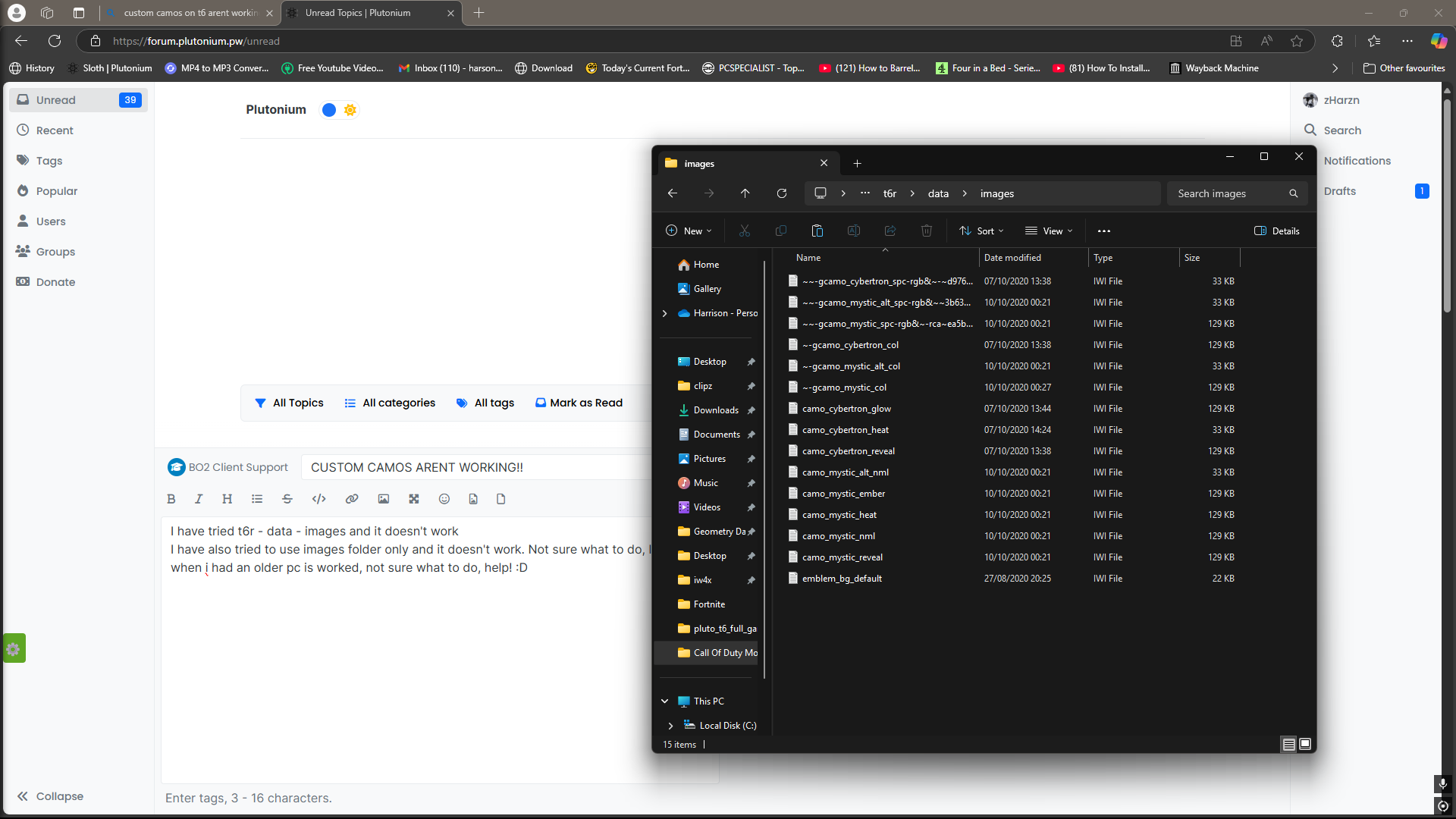
    Tried t6r - data - images wont work,
    Tried just an images folder, wont work, if anyone could help pls do!! 😄 many thanksDesktop Screenshot 2025.02.27 - 20.40.42.84.png

    1 Reply Last reply
    0
    • DirkRockfaceundefined Offline
      DirkRockfaceundefined Offline
      DirkRockface
      Contributor
      wrote on last edited by DirkRockface
      #2

      t6r folder isn't a thing... just follow the actual plutonium instructions in the forum... it's quite easy! 😄

      https://plutonium.pw/docs/modding/loading-textures/

      J0HN P0RKundefined 1 Reply Last reply
      0
      • DirkRockfaceundefined DirkRockface

        t6r folder isn't a thing... just follow the actual plutonium instructions in the forum... it's quite easy! 😄

        https://plutonium.pw/docs/modding/loading-textures/

        J0HN P0RKundefined Offline
        J0HN P0RKundefined Offline
        J0HN P0RK
        wrote on last edited by
        #3

        DirkRockface i tried it didnt work just now

        1 Reply Last reply
        0
        • DirkRockfaceundefined Offline
          DirkRockfaceundefined Offline
          DirkRockface
          Contributor
          wrote on last edited by DirkRockface
          #4

          can you show what folder you put them in... the full path?

          J0HN P0RKundefined 1 Reply Last reply
          0
          • DirkRockfaceundefined DirkRockface

            can you show what folder you put them in... the full path?

            J0HN P0RKundefined Offline
            J0HN P0RKundefined Offline
            J0HN P0RK
            wrote on last edited by
            #5

            DirkRockface C:\Users\harso\AppData\Local\Plutonium\storage\t6\T6R\data\images (Do u have discord, i need to wait 10mins each post)

            1 Reply Last reply
            0
            • DirkRockfaceundefined Offline
              DirkRockfaceundefined Offline
              DirkRockface
              Contributor
              wrote on last edited by DirkRockface
              #6

              yes, dirkrockface

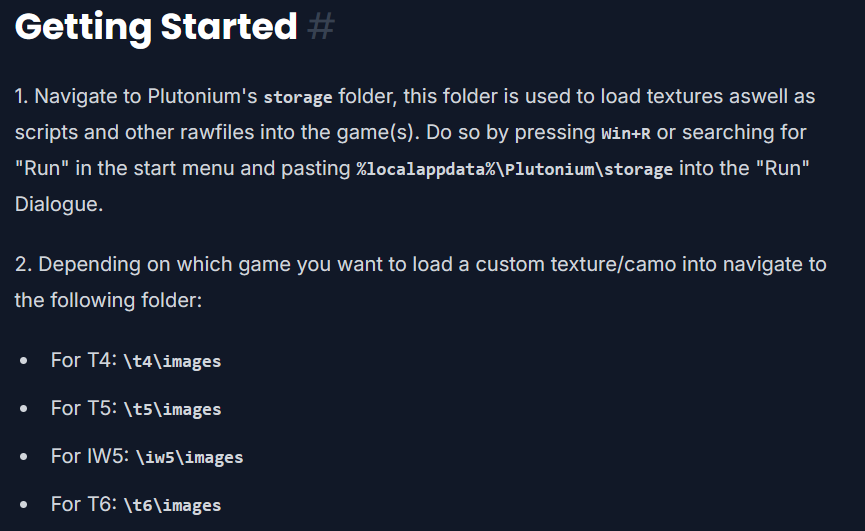
              but you won't need 10 minutes, you didn't do it like the guide said, that's why it isn't working. that is the wrong path... like i said, t6r isn't a thing... follow the guide my friend!!
              64b0c28f-9f38-4315-beea-4671540832b5-image.png

              EDIT: solved in discord... enjoy your textures!!

              1 Reply Last reply
              0

              Hello! It looks like you're interested in this conversation, but you don't have an account yet.

              Getting fed up of having to scroll through the same posts each visit? When you register for an account, you'll always come back to exactly where you were before, and choose to be notified of new replies (either via email, or push notification). You'll also be able to save bookmarks and upvote posts to show your appreciation to other community members.

              With your input, this post could be even better 💗

              Register Login
              Reply
              • Reply as topic
              Log in to reply
              • Oldest to Newest
              • Newest to Oldest
              • Most Votes


              • Login

              • Don't have an account? Register

              • Login or register to search.
              • First post
                Last post
              0
              • Unread 0
              • Recent
              • Tags
              • Popular
              • Users
              • Groups
