Skip to content
  • 0 Unread 0
  • Recent
  • Tags
  • Popular
  • Users
  • Groups
  • Donate
Collapse

Plutonium

  1. Home
  2. BO2 Modding Releases & Resources
  3. [Release] [ZM] Select your character options for solo custom game

[Release] [ZM] Select your character options for solo custom game

Scheduled Pinned Locked Moved BO2 Modding Releases & Resources
30 Posts 22 Posters 22.7k Views 9 Watching
  • Oldest to Newest
  • Newest to Oldest
  • Most Votes
Reply
  • Reply as topic
Log in to reply
This topic has been deleted. Only users with topic management privileges can see it.
  • Esue Offline
    Esue Offline
    Esue
    wrote on last edited by
    #17

    it does work for me either

    1 Reply Last reply
    0
    • iliketrees Offline
      iliketrees Offline
      iliketrees
      wrote on last edited by
      #18

      neither

      1 Reply Last reply
      0
      • EternalBlade21 Offline
        EternalBlade21 Offline
        EternalBlade21
        wrote on last edited by
        #19

        Not working for me either, both options
        custom maps and character select aren't showing in custom games

        1 Reply Last reply
        0
        • Hadi77KSA Offline
          Hadi77KSA Offline
          Hadi77KSA
          Contributor
          wrote on last edited by Hadi77KSA
          #20

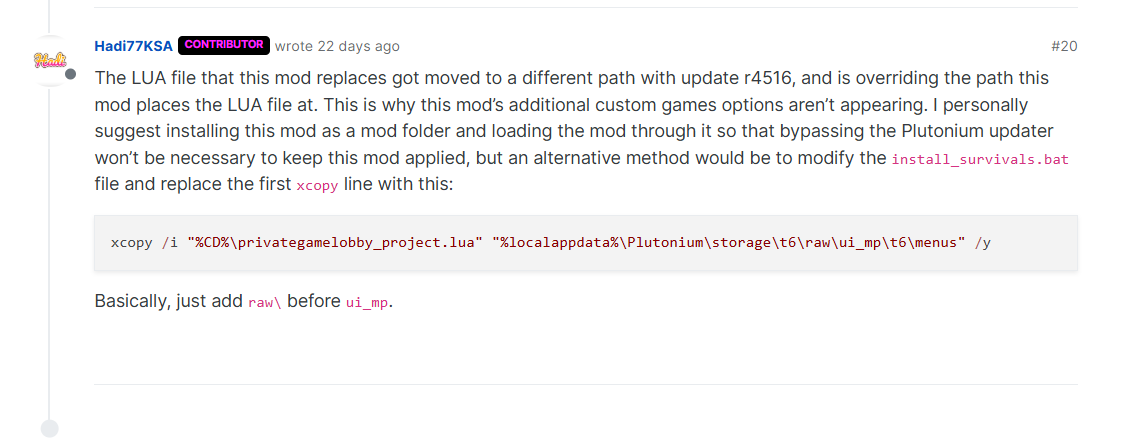
          The LUA file that this mod replaces got moved to a different path with update r4516, and is overriding the path this mod places the LUA file at. This is why this mod’s additional custom games options aren’t appearing. I personally suggest installing this mod as a mod folder and loading the mod through it so that bypassing the Plutonium updater won’t be necessary to keep this mod applied, but an alternative method would be to modify the install_survivals.bat file and replace the first xcopy line with the lines from here.

          Astroolean 1 Reply Last reply
          3
          • Retr0_official Offline
            Retr0_official Offline
            Retr0_official
            wrote on last edited by
            #21

            hate to revive a dead thread but just letting anyone know now before they install, no matter what you do it doesn't work anymore. I've tried legit everything and it still doesn't load in

            1 Reply Last reply
            0
            • Dr.S1lent Offline
              Dr.S1lent Offline
              Dr.S1lent
              wrote on last edited by Dr.S1lent
              #22

              hello; i had this mod working before but now i updated plutoniom by mistake and it doesnt seem like working anymore, any fix for this? or can someone update the mod maybe its outdated please and thank you.

              edit: i followed this very nice person's instructions in a previous reply and it actually worked.Screenshot_1.png

              1 Reply Last reply
              0
              • Hadi77KSA Hadi77KSA

                The LUA file that this mod replaces got moved to a different path with update r4516, and is overriding the path this mod places the LUA file at. This is why this mod’s additional custom games options aren’t appearing. I personally suggest installing this mod as a mod folder and loading the mod through it so that bypassing the Plutonium updater won’t be necessary to keep this mod applied, but an alternative method would be to modify the install_survivals.bat file and replace the first xcopy line with the lines from here.

                Astroolean Offline
                Astroolean Offline
                Astroolean
                wrote on last edited by
                #23

                Hadi77KSA I still cant get this to work... followed your advice step by step. This is an amazing mod I hope it gets revived...

                Hadi77KSA Oppai_San 2 Replies Last reply
                0
                • Astroolean Astroolean

                  Hadi77KSA I still cant get this to work... followed your advice step by step. This is an amazing mod I hope it gets revived...

                  Hadi77KSA Offline
                  Hadi77KSA Offline
                  Hadi77KSA
                  Contributor
                  wrote on last edited by
                  #24

                  Astroolean install the mod into a mod folder and load it from the in-game mods menu.

                  xcopy /i "%CD%\privategamelobby_project.lua" "%localappdata%\Plutonium\storage\t6\mods\zm_player_select\ui_mp\t6\menus" /y 
                  
                  xcopy /i "%CD%\scripts" "%localappdata%\Plutonium\storage\t6\mods\zm_player_select\scripts\zm" /e /y
                  
                  Astroolean 1 Reply Last reply
                  0
                  • Hadi77KSA Hadi77KSA

                    Astroolean install the mod into a mod folder and load it from the in-game mods menu.

                    xcopy /i "%CD%\privategamelobby_project.lua" "%localappdata%\Plutonium\storage\t6\mods\zm_player_select\ui_mp\t6\menus" /y 
                    
                    xcopy /i "%CD%\scripts" "%localappdata%\Plutonium\storage\t6\mods\zm_player_select\scripts\zm" /e /y
                    
                    Astroolean Offline
                    Astroolean Offline
                    Astroolean
                    wrote on last edited by
                    #25

                    Hadi77KSA That worked, thanks!

                    1 Reply Last reply
                    0
                    • elmendez_2.0 Offline
                      elmendez_2.0 Offline
                      elmendez_2.0
                      wrote on last edited by elmendez_2.0
                      #26
                      This post is deleted!
                      1 Reply Last reply
                      0
                      • Astroolean Astroolean

                        Hadi77KSA I still cant get this to work... followed your advice step by step. This is an amazing mod I hope it gets revived...

                        Oppai_San Offline
                        Oppai_San Offline
                        Oppai_San
                        wrote on last edited by
                        #27

                        Astroolean it actually worked

                        all you have to do is edit the [install_survival.bat] and replace the first xcopy with
                        xcopy /i "%CD%\privategamelobby_project.lua" "%localappdata%\Plutonium\storage\t6\raw\ui_mp\t6\menus" /y

                        and ctrl+S to save it and then open the game from [Start Plutonium without update.bat]

                        in my case what i did is i put the mod in %localappdata%\Plutonium\storage\t6 -> mods (create new folder for the mod) and did the above instruction and it worked

                        1 Reply Last reply
                        0
                        • Oppai_San Offline
                          Oppai_San Offline
                          Oppai_San
                          wrote on last edited by
                          #28

                          for anyone who cannot seem to make this mod work

                          all you have to do is edit the [install_survival.bat] and replace the first xcopy with
                          xcopy /i "%CD%\privategamelobby_project.lua" "%localappdata%\Plutonium\storage\t6\raw\ui_mp\t6\menus" /y

                          and ctrl+S to save it and then open the game from [Start Plutonium without update.bat]

                          in my case what i did is i put the mod in %localappdata%\Plutonium\storage\t6 -> mods (create new folder for the mod) and did the above instruction and it worked

                          Credit to: Hadi77KSA

                          1 Reply Last reply
                          0
                          • Tito_Chuy Offline
                            Tito_Chuy Offline
                            Tito_Chuy
                            wrote on last edited by
                            #29

                            Already did everything mentioned in the thread but can't make the mod work, anyone have a definitive solution pls?

                            1 Reply Last reply
                            0
                            • Hadi77KSA Offline
                              Hadi77KSA Offline
                              Hadi77KSA
                              Contributor
                              wrote on last edited by
                              #30

                              With r5304, you need to load a fs_game mod (which you can do so by selecting a mod from the mods menu) for the custom .lua file to load. With that, I recommend pasting the files in a mod folder. You can achieve this by changing the install_survivals.bat file’s xcopy lines to be this, as previously mentioned in comment 24:

                              xcopy /i "%CD%\privategamelobby_project.lua" "%localappdata%\Plutonium\storage\t6\mods\zm_player_select\ui_mp\t6\menus" /y
                              
                              xcopy /i "%CD%\scripts" "%localappdata%\Plutonium\storage\t6\mods\zm_player_select\scripts\zm" /e /y
                              
                              1 Reply Last reply
                              0

                              Hello! It looks like you're interested in this conversation, but you don't have an account yet.

                              Getting fed up of having to scroll through the same posts each visit? When you register for an account, you'll always come back to exactly where you were before, and choose to be notified of new replies (either via email, or push notification). You'll also be able to save bookmarks and upvote posts to show your appreciation to other community members.

                              With your input, this post could be even better 💗

                              Register Login
                              Reply
                              • Reply as topic
                              Log in to reply
                              • Oldest to Newest
                              • Newest to Oldest
                              • Most Votes


                              • 1
                              • 2
                              • Login

                              • Don't have an account? Register

                              • Login or register to search.
                              • First post
                                Last post
                              0
                              • Unread 0
                              • Recent
                              • Tags
                              • Popular
                              • Users
                              • Groups
                              • Donate