Skip to content
  • 0 Unread 0
  • Recent
  • Tags
  • Popular
  • Users
  • Groups
  • Donate
Collapse

Plutonium

  1. Home
  2. BO2 Client Support
  3. BO2 Stuttering

BO2 Stuttering

Scheduled Pinned Locked Moved BO2 Client Support
18 Posts 2 Posters 2.8k Views
  • Oldest to Newest
  • Newest to Oldest
  • Most Votes
Reply
  • Reply as topic
Log in to reply
This topic has been deleted. Only users with topic management privileges can see it.
  • Dss0 Dss0

    Rexxy There should be an option to manually add an application, add the t6mp/t6zm.exe that is in

    C:\Users\YOURUSERNAME\AppData\Local\Plutonium\games

    
    Rexxy Offline
    Rexxy Offline
    Rexxy
    wrote on last edited by
    #8

    Dss0 said in BO2 Stuttering:

    C:\Users\YOURUSERNAME\AppData\Local\Plutonium\games

    run with graphic processor -> High Performance Nvidia Processor, is that correct bro ?

    Dss0 1 Reply Last reply
    0
    • Rexxy Rexxy

      Dss0 said in BO2 Stuttering:

      C:\Users\YOURUSERNAME\AppData\Local\Plutonium\games

      run with graphic processor -> High Performance Nvidia Processor, is that correct bro ?

      Dss0 Offline
      Dss0 Offline
      Dss0
      Plutonium Staff
      wrote on last edited by
      #9

      Rexxy yes

      1 Reply Last reply
      0
      • Dss0 Dss0

        Rexxy There should be an option to manually add an application, add the t6mp/t6zm.exe that is in

        C:\Users\YOURUSERNAME\AppData\Local\Plutonium\games
        
        Rexxy Offline
        Rexxy Offline
        Rexxy
        wrote on last edited by
        #10

        Dss0 not working, still lag ( 15 fps )

        Dss0 1 Reply Last reply
        0
        • Rexxy Rexxy

          Dss0 not working, still lag ( 15 fps )

          Dss0 Offline
          Dss0 Offline
          Dss0
          Plutonium Staff
          wrote on last edited by
          #11

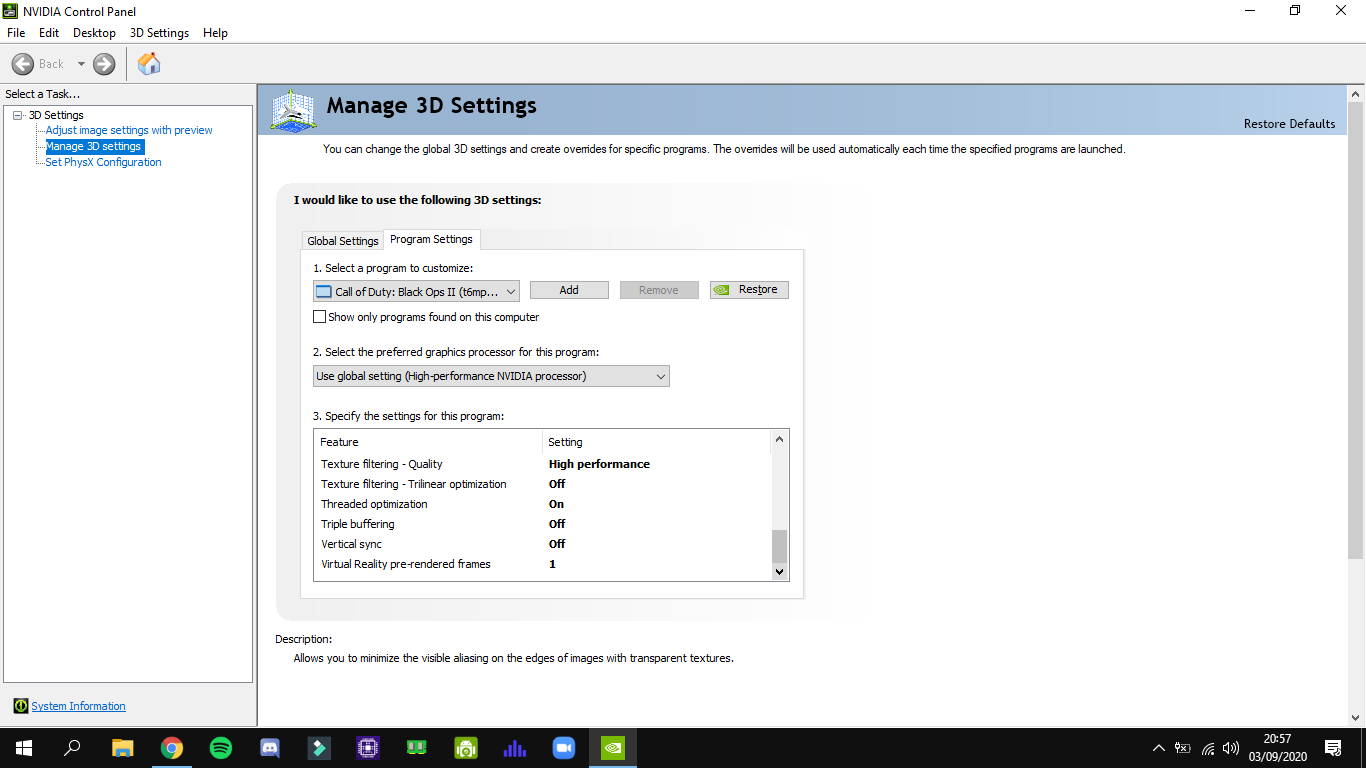
          Rexxy Can you post a screenshot of the nvidia control panel settings?

          Rexxy 1 Reply Last reply
          0
          • Dss0 Dss0

            Rexxy Can you post a screenshot of the nvidia control panel settings?

            Rexxy Offline
            Rexxy Offline
            Rexxy
            wrote on last edited by
            #12

            Dss0 Screenshot (157).png Screenshot (156).png Screenshot (155).png Screenshot (154).png

            1 Reply Last reply
            0
            • Rexxy Offline
              Rexxy Offline
              Rexxy
              wrote on last edited by
              #13

              is it the game or my pc can't handle it ?

              Dss0 1 Reply Last reply
              0
              • Rexxy Rexxy

                is it the game or my pc can't handle it ?

                Dss0 Offline
                Dss0 Offline
                Dss0
                Plutonium Staff
                wrote on last edited by
                #14

                Rexxy The game is using your intel hd graphics still, can you show the filepath to t6mp.exe? normally it should show smth like:
                "call of duty black ops II(C:\users......\t6mp.exe) but in your case it just says t6mp.exe? Also is there a setting for "use high performance nvidia processor" in the dropdown menu? Try that instead of "Use global setting". If it still doesn't work try adding plutonium-bootstrapper-win32.exe (it's in the "bin" subfolder in the plutonium folder in appdata) and the plutonium launcher itself.

                Rexxy 1 Reply Last reply
                0
                • Rexxy Offline
                  Rexxy Offline
                  Rexxy
                  wrote on last edited by
                  #15

                  Rexxy said in BO2 Stuttering:

                  C:\Users\YOURUSERNAME\AppData\Local\Plutonium\games

                  Screenshot (158).png

                  1 Reply Last reply
                  0
                  • Dss0 Dss0

                    Rexxy The game is using your intel hd graphics still, can you show the filepath to t6mp.exe? normally it should show smth like:
                    "call of duty black ops II(C:\users......\t6mp.exe) but in your case it just says t6mp.exe? Also is there a setting for "use high performance nvidia processor" in the dropdown menu? Try that instead of "Use global setting". If it still doesn't work try adding plutonium-bootstrapper-win32.exe (it's in the "bin" subfolder in the plutonium folder in appdata) and the plutonium launcher itself.

                    Rexxy Offline
                    Rexxy Offline
                    Rexxy
                    wrote on last edited by
                    #16

                    Dss0 thank you bro, work flawlessly, btw how to play with bots, i want to train my aim ?

                    Dss0 1 Reply Last reply
                    0
                    • Rexxy Rexxy

                      Dss0 thank you bro, work flawlessly, btw how to play with bots, i want to train my aim ?

                      Dss0 Offline
                      Dss0 Offline
                      Dss0
                      Plutonium Staff
                      wrote on last edited by
                      #17

                      Rexxy You add bots normally through the private match menu and then you start the match by typing

                      xpartygo
                      

                      into the console (you can open the console with the tilde key).
                      Rexxy 1 Reply Last reply
                      0
                      • Dss0 Dss0

                        Rexxy You add bots normally through the private match menu and then you start the match by typing

                        xpartygo
                        

                        into the console (you can open the console with the tilde key).

                        Rexxy Offline
                        Rexxy Offline
                        Rexxy
                        wrote on last edited by
                        #18

                        Dss0 thank u for the help m8

                        1 Reply Last reply
                        0

                        Hello! It looks like you're interested in this conversation, but you don't have an account yet.

                        Getting fed up of having to scroll through the same posts each visit? When you register for an account, you'll always come back to exactly where you were before, and choose to be notified of new replies (either via email, or push notification). You'll also be able to save bookmarks and upvote posts to show your appreciation to other community members.

                        With your input, this post could be even better 💗

                        Register Login
                        Reply
                        • Reply as topic
                        Log in to reply
                        • Oldest to Newest
                        • Newest to Oldest
                        • Most Votes


                        • Login

                        • Don't have an account? Register

                        • Login or register to search.
                        • First post
                          Last post
                        0
                        • Unread 0
                        • Recent
                        • Tags
                        • Popular
                        • Users
                        • Groups
                        • Donate