I open Plutonium.exe and it doesn't respond
-
Exactly what the title says, I have tried everything that was similar, deleted plutonium folder in %appdata% and redownloaded it and such and nothing has changed.... anyone that had this problem mind helping? Thanks in advance!
-
Show a screenshot please.
-

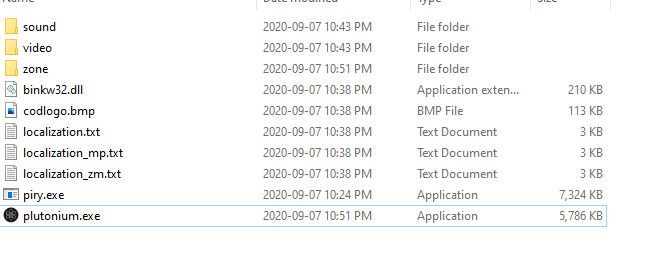
The path is D:/Bo2..... not sure if I need it in a certain drive or folder. -
No clue, you're launching it via pluto.exe right? That's the correct process of launching it, but just for the sake of troubleshooting, can you go to %localappdata%/Plutonium/bin and launch the plutonium-launcher-win32.exe? See if that works. Also try installing the redists and directx https://drive.google.com/u/0/uc?id=1gG_DXaZfAUETfXaYJzCP36ImvE_bO_x9&export=download
-
Neither of these are working either, my computer has done this before on another game but I don't understand why it does this. I'm thinking it's probably just that and end it at that note. Thanks again for the help!
-
Did you run dxsetup.exe inside directx folder as well?


Hello! It looks like you're interested in this conversation, but you don't have an account yet.
Getting fed up of having to scroll through the same posts each visit? When you register for an account, you'll always come back to exactly where you were before, and choose to be notified of new replies (either via email, or push notification). You'll also be able to save bookmarks and upvote posts to show your appreciation to other community members.
With your input, this post could be even better 💗
Register Login