How to have Custom Sounds w/o editing game files - WAW Tutorial
-

This is practically the same as the BO1 tutorial but i knew that this would work and it did, so im copying the tutorial for WAW
We will use the WAW Coversion kit for this, but there are other sound converters out there.
You can open .iwds with WinRAR, and VLC Media Player can play them directly.You will want to convert your sound (ill put images from the WAW Sound Comprehensive Guide cause it would get really confusing for me)
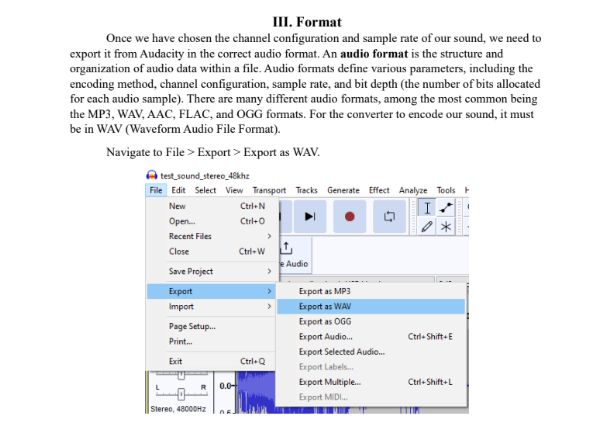
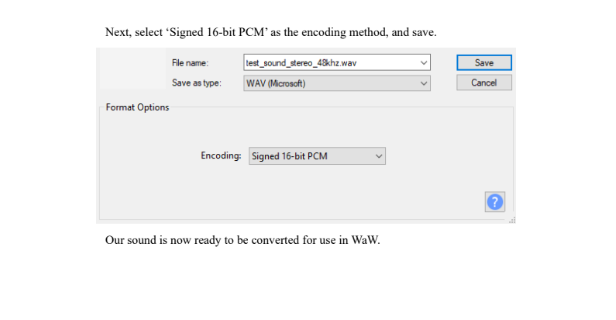
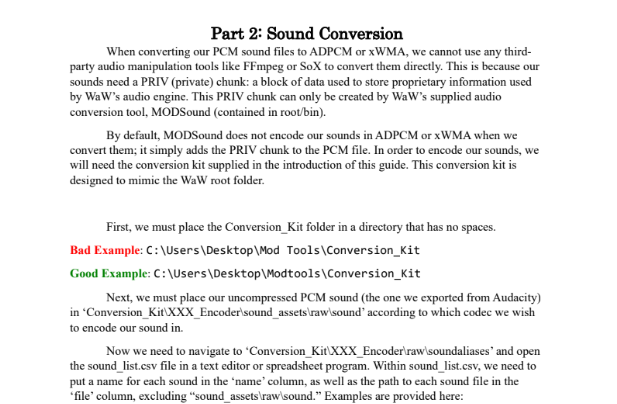
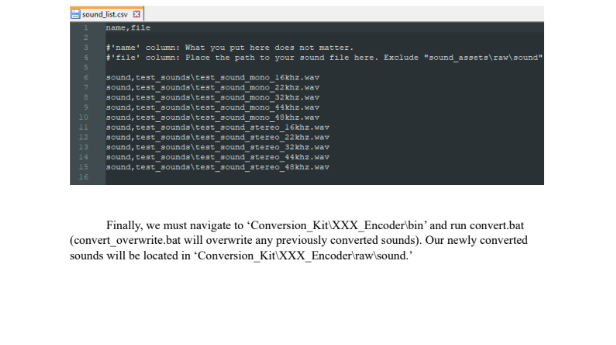
go to your WAW game directory folder and go into main. You will see all the images and sound files in .iwd format (you can open them with Winrar as said).
The Iwd with just the numbers are sounds, the one with localized_english or your language are voice lines.Now, go to C:\Users\YOU\AppData\Local\Plutonium\storage\t4\raw What you want to do is make the folders that replicate the .iwd filesystem. So if you want to change, lets say the round change (found in iwd 27), you will have to do:
sound\SFX\Levels\zombie\chalk
Take your converted .wav sound and rename it to what the sound you want to replace is called:
chalk_v2.wav \ round_over.wav
And place it in the chalk folder.Run the game and wait until the sound plays and it should work. This should work for Voice Lines, Songs, and SFX. Looped sounds may not work. This is not bannable for public servers either
Not every map uses the same filesystem for the same sounds. The round change i referenced only works on Der Riese and custom maps for example.
-

When I got it to convert the file it turned the sound I had into static and Idk why, anyone know why it would do this?
Hello! It looks like you're interested in this conversation, but you don't have an account yet.
Getting fed up of having to scroll through the same posts each visit? When you register for an account, you'll always come back to exactly where you were before, and choose to be notified of new replies (either via email, or push notification). You'll also be able to save bookmarks and upvote posts to show your appreciation to other community members.
With your input, this post could be even better 💗
Register Login