Skip to content
  • 0 Unread 0
  • Recent
  • Popular
  • Users
  • Donate
Collapse
Home Docs Stats Discord Donate
Download
  1. Home
  2. BO2 Modding Releases & Resources
  3. ZM-Background packs for the main menu

ZM-Background packs for the main menu

Scheduled Pinned Locked Moved BO2 Modding Releases & Resources
backgroundbo2moddingzombie
24 Posts 12 Posters 22.1k Views 3 Watching
  • Oldest to Newest
  • Newest to Oldest
  • Most Votes
Reply
  • Reply as topic
Log in to reply
This topic has been deleted. Only users with topic management privileges can see it.
  • LizsJ0 LizsJ0

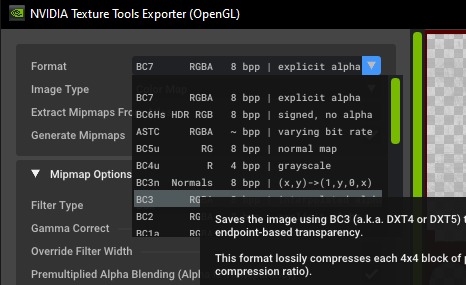
    xNando Uso el BC3
    1647663491228-desktop-screenshot-2022.03.18-23.50.35.59.png

    En tu caso seria el BC3 (sRGB, DX 10+)

    xNando
    xNando
    xNando
    wrote on last edited by
    #15

    @CrissJ0 okey, gracias!!

    1 Reply Last reply
    0
    • LizsJ0 LizsJ0
      • 1 Method
        To use them you have to copy the .iwi files in the %LocalAppData%/Plutonium/storage/t6/images folder if you don't have it create the folder.

      metodo1.gif

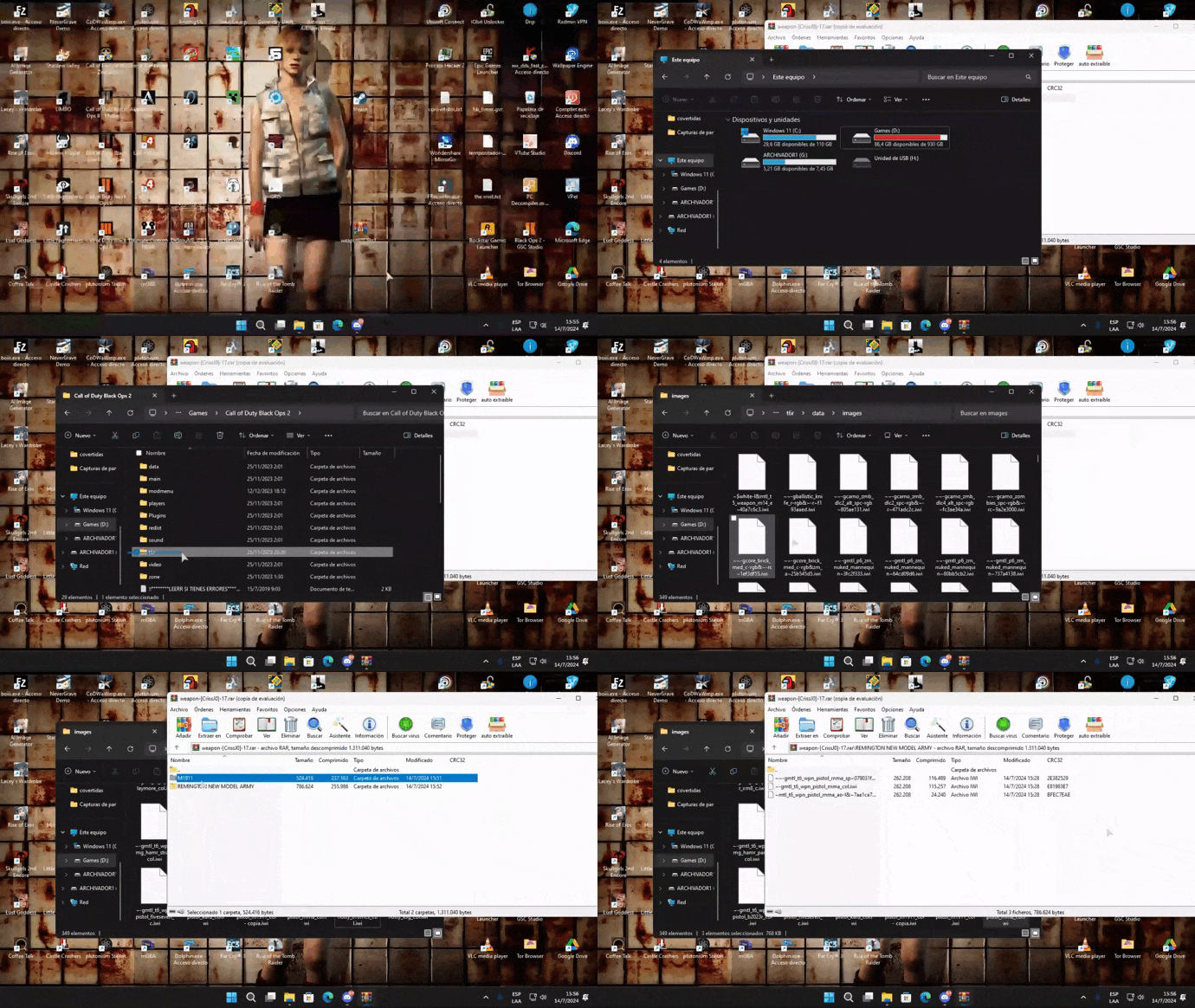
      • 2 Method
        Enter the root folder of the game and create the folders t6r\data\images,place the .iwi files in images.
      metodo21.gif

      1.Abigail Misty Briarton

      Abigail Misty Briarton.png

      2.GoG Sword art Online

      GoG.png

      3.killing zombies

      killing zombies.png

      4.Primis

      Primis.png

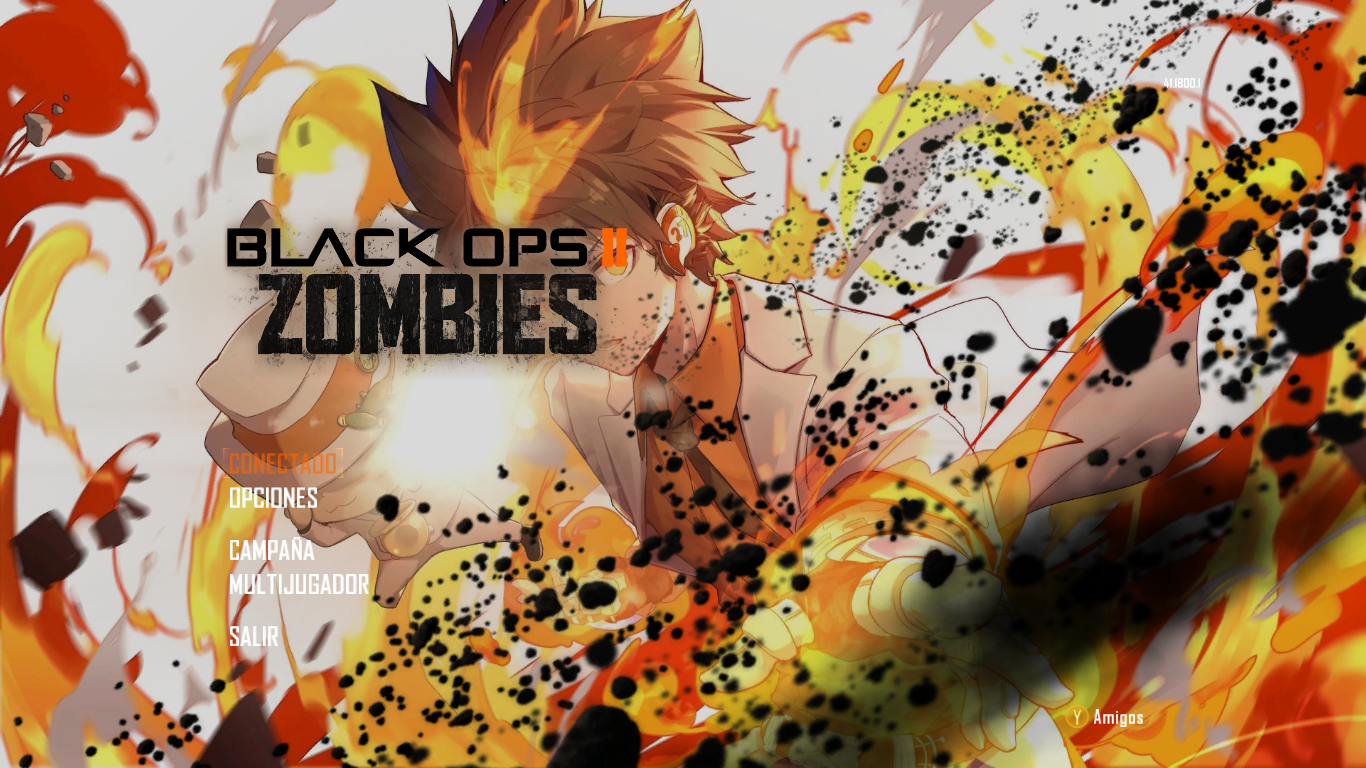
      5.Tsunayoshi&Rebor

      Tsunayoshi&Rebor.png

      6.Ultimis

      Ultimis.png

      7.Victis

      Victis.png

      🟢MediaFire

      🔴Mega

      Pd: Favored xd pasa Pack xD

      MaouDragon
      MaouDragon
      MaouDragon
      wrote on last edited by
      #16

      @CrissJ0 muy buenos fondos, me gusto "Primis", sigue haciendo mas de este tipo

      1 Reply Last reply
      1
      • LizsJ0 LizsJ0
        • 1 Method
          To use them you have to copy the .iwi files in the %LocalAppData%/Plutonium/storage/t6/images folder if you don't have it create the folder.

        metodo1.gif

        • 2 Method
          Enter the root folder of the game and create the folders t6r\data\images,place the .iwi files in images.

        metodo21.gif

        1.Abigail Misty Briarton

        Abigail Misty Briarton.png

        2.GoG Sword art Online

        GoG.png

        3.killing zombies

        killing zombies.png

        4.Primis

        Primis.png

        5.Tsunayoshi&Rebor

        Tsunayoshi&Rebor.png

        6.Ultimis

        Ultimis.png

        7.Victis

        Victis.png

        🟢MediaFire

        🔴Mega

        Pd: Favored xd pasa Pack xD

        Chunkychunga
        Chunkychunga
        Chunkychunga
        wrote on last edited by
        #17

        @CrissJ0 is there any chance you can convert and share the files to a different viewable format like pdf or jpg I've been looking for a hd version of the following images for desktop backgrounds and had no luck finding anything but these ones.

        LizsJ0 1 Reply Last reply
        0
        • Chunkychunga Chunkychunga

          @CrissJ0 is there any chance you can convert and share the files to a different viewable format like pdf or jpg I've been looking for a hd version of the following images for desktop backgrounds and had no luck finding anything but these ones.

          LizsJ0
          LizsJ0
          LizsJ0
          wrote on last edited by
          #18

          Chunkychunga Let me get this straight.
          Do you want me to send you the backgrounds in ".png" format to put them as wallpaper for your pc?

          9997-tsukasa-points.png

          Chunkychunga 1 Reply Last reply
          0
          • LizsJ0 LizsJ0

            Chunkychunga Let me get this straight.
            Do you want me to send you the backgrounds in ".png" format to put them as wallpaper for your pc?
            9997-tsukasa-points.png

            Chunkychunga
            Chunkychunga
            Chunkychunga
            wrote on last edited by
            #19

            @CrissJ0 yeah lol, if you could I'd appreciate it

            LizsJ0 1 Reply Last reply
            0
            • Chunkychunga Chunkychunga

              @CrissJ0 yeah lol, if you could I'd appreciate it

              LizsJ0
              LizsJ0
              LizsJ0
              wrote on last edited by
              #20

              Chunkychunga Sure, no problem, but I don't have the Victis wallpaper anymore. https://mega.nz/file/aiQCyJgb#qxz9GF3ruekXPH3FJFCwi3oCgWhS5xvY4buHoO6PO1w

              Chunkychunga 1 Reply Last reply
              0
              • LizsJ0 LizsJ0

                Chunkychunga Sure, no problem, but I don't have the Victis wallpaper anymore. https://mega.nz/file/aiQCyJgb#qxz9GF3ruekXPH3FJFCwi3oCgWhS5xvY4buHoO6PO1w

                Chunkychunga
                Chunkychunga
                Chunkychunga
                wrote on last edited by Chunkychunga
                #21

                @CrissJ0 no worries, appreciate it

                1 Reply Last reply
                0
                • LizsJ0 LizsJ0 referenced this topic on
                • waxh
                  waxh
                  waxh
                  wrote on last edited by
                  #22

                  Hello, I put a background on the main menu but it comes off when I go to the room there must be a second file thank you for your help.

                  1 Reply Last reply
                  0
                  • GhostForLifeTTV
                    GhostForLifeTTV
                    GhostForLifeTTV
                    wrote on last edited by
                    #23

                    the thing u have is unsafe

                    1 Reply Last reply
                    0
                    • McMoffett
                      McMoffett
                      McMoffett
                      wrote on last edited by
                      #24

                      Funny how Ultimis and Primis are mislabeled.

                      1 Reply Last reply
                      0
                      • LizsJ0 LizsJ0 referenced this topic on

                      Hello! It looks like you're interested in this conversation, but you don't have an account yet.

                      Getting fed up of having to scroll through the same posts each visit? When you register for an account, you'll always come back to exactly where you were before, and choose to be notified of new replies (either via email, or push notification). You'll also be able to save bookmarks and upvote posts to show your appreciation to other community members.

                      With your input, this post could be even better 💗

                      Register Login
                      Reply
                      • Reply as topic
                      Log in to reply
                      • Oldest to Newest
                      • Newest to Oldest
                      • Most Votes


                      • Login

                      • Don't have an account? Register

                      • Login or register to search.
                      • First post
                        Last post
                      0
                      • Unread 0
                      • Recent
                      • Popular
                      • Users
                      • Donate