Skip to content
  • 0 Unread 0
  • Recent
  • Tags
  • Popular
  • Users
  • Groups
  • Donate
Collapse

Plutonium

  1. Home
  2. BO2 Client Support
  3. How to fix Unable to load import

How to fix Unable to load import

Scheduled Pinned Locked Moved BO2 Client Support
6 Posts 6 Posters 2.3k Views
  • Oldest to Newest
  • Newest to Oldest
  • Most Votes
Reply
  • Reply as topic
Log in to reply
This topic has been deleted. Only users with topic management privileges can see it.
  • splinter Offline
    splinter Offline
    splinter
    wrote on last edited by
    #1

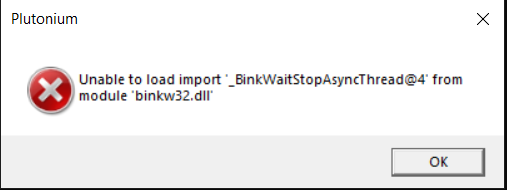
    Hallo i have a freind who try to dowload plutonium but he got this massege every time anyone who can help to fix the problem thx 🙂 and have a nice day 🙂

    asdada.png

    CookieJar 1 Reply Last reply
    0
    • luigistyle Offline
      luigistyle Offline
      luigistyle
      Plutonium Staff
      wrote on last edited by
      #2

      https://forum.plutonium.pw/topic/9/common-issues-and-frequently-asked-questions-t6/9

      1 Reply Last reply
      0
      • Mr. Android Offline
        Mr. Android Offline
        Mr. Android
        Plutonium Admin
        wrote on last edited by
        #3

        Your friend has selected the wrong folder for his BO2 game. Tell them to make sure they are selecting the folder that has zone, t6rmp.exe and piry.exe in it.

        1 Reply Last reply
        0
        • splinter splinter

          Hallo i have a freind who try to dowload plutonium but he got this massege every time anyone who can help to fix the problem thx 🙂 and have a nice day 🙂

          asdada.png

          CookieJar Offline
          CookieJar Offline
          CookieJar
          wrote on last edited by
          #4

          splinter bro i was facing the same problem in my case i noticed all the required files were there only in download folder so after opening the plutonium launcher i simply changed the directory to downloads folder and launched the game and it started working try this once maybe it solves this problem for your friend

          1 Reply Last reply
          0
          • Govv Offline
            Govv Offline
            Govv
            wrote on last edited by
            #5

            I have the exact same issue. I honestly don't know what could possibly going on because I ensured that I am using the right folder. This is what my folder looks like:bd56be86-f57c-4ed0-9fff-c824ecd3a493-image.png. Yet I still have the issue of not being able to use the program. I just wanna play Bo2!!! Anyone, please help.

            1 Reply Last reply
            0
            • HannesC Offline
              HannesC Offline
              HannesC
              Plutonium Staff
              wrote on last edited by
              #6

              Govv Click on game settings in the launcher and screenshot. Get another screenshot of your bo2 folder(whole screen please) since I can't really see your path.

              1 Reply Last reply
              0

              Hello! It looks like you're interested in this conversation, but you don't have an account yet.

              Getting fed up of having to scroll through the same posts each visit? When you register for an account, you'll always come back to exactly where you were before, and choose to be notified of new replies (either via email, or push notification). You'll also be able to save bookmarks and upvote posts to show your appreciation to other community members.

              With your input, this post could be even better 💗

              Register Login
              Reply
              • Reply as topic
              Log in to reply
              • Oldest to Newest
              • Newest to Oldest
              • Most Votes


              • Login

              • Don't have an account? Register

              • Login or register to search.
              • First post
                Last post
              0
              • Unread 0
              • Recent
              • Tags
              • Popular
              • Users
              • Groups
              • Donate