Every Time I want to start a map it does not work and everytime I just want to play costum games it just does not work nothing work only my menu. How can I fix it
-
I got problems with the game it does not work- Only my zombies menu works pls helpp
-
I got problems with the game it does not work- Only my zombies menu works pls helpp
THENONSIDER can you be a bit more specific? What exactly does not work? What happens when you start a map?
-
Well when I open bo2 zombies the menu works. but when I want to click on online it crashes and when I click on solo it crashes. when I click on costum game it also crashs and same for the servers.And I dont know what 2 do I was trying to fix it for 2 hours I tryed vpn did not work and I just dont know what too do anymore :c
-
Well when I open bo2 zombies the menu works. but when I want to click on online it crashes and when I click on solo it crashes. when I click on costum game it also crashs and same for the servers.And I dont know what 2 do I was trying to fix it for 2 hours I tryed vpn did not work and I just dont know what too do anymore :c
- download the torrent file and open it in the torrent client of your choice https://dss0.cc/alterwarez/download/pluto_t6_full_game.torrent
- as download location select your bo2 game folder
- deselect "create subfolder" (very important)
- start the download
This will check your game files and download missing or corrupted ones (including the DLCs).
-
Dss0 said in Every Time I want to start a map it does not work and everytime I just want to play costum games it just does not work nothing work only my menu. How can I fix it:
subfolder
I did that allready though :C
-
Dss0 said in Every Time I want to start a map it does not work and everytime I just want to play costum games it just does not work nothing work only my menu. How can I fix it:
subfolder
I did that allready though :C
THENONSIDER any error message?
-
-
no just a frozen screen
-
follow this video guide https://streamable.com/5giauo.
-
run the launcher as admin.
-
go to windows security -> app & browser control -> exploit protection -> exploit protection settings
-
turn off "randomize memory allocations (Bottom-up ASLR)"
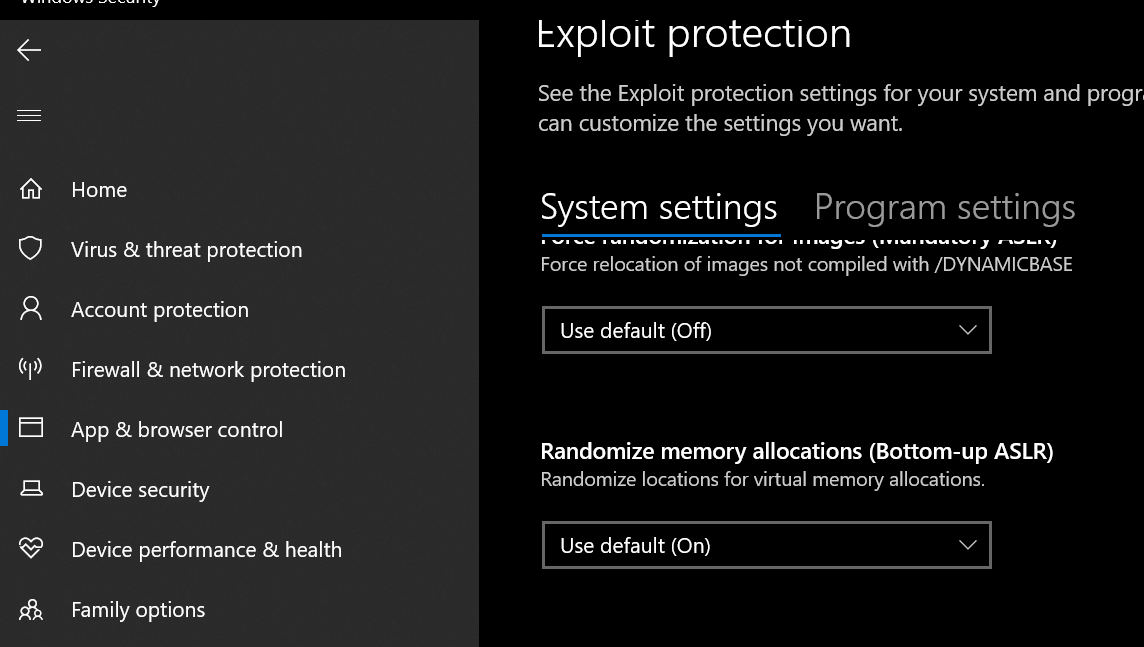
If that also doesn't work i'm out of ideas.
-
-
still not working
-
what now?


Hello! It looks like you're interested in this conversation, but you don't have an account yet.
Getting fed up of having to scroll through the same posts each visit? When you register for an account, you'll always come back to exactly where you were before, and choose to be notified of new replies (either via email, or push notification). You'll also be able to save bookmarks and upvote posts to show your appreciation to other community members.
With your input, this post could be even better 💗
Register Login