Annoying problem on Plutonium Launcher (3D D11)
-
Hello everyone, well, i'd like to play MW3 online. I've installed Direct X11 updates on my PC, what's the problem? Plutonium Launcher don't start, when i launch it the error screen said:
GPU Driver 3DD11::CreateTexture,unable to create texture.
GPU Driver 3DD11::CreateTexture,unable to create shader resource view for texture.
GPU Driver 3DD11::CreateRenderBuffer,unable to create render target.Processor: Intel Core Duo E7500 2,93 GHZ
RAM: 8 GB
GPU: Intel Q43/Q45 express ChipsetSo guys, can i have hope to play MW3 online? There's something that i can do? Please i'm waiting your response, thanks a lot and good game to everyone!
-
MikySlayer98 said in Annoying problem on Plutonium Launcher (3D D11):
Intel Q43/Q45 express Chipset
That sounds like an integrated GPU, so your PC might not have enough resources to play the game. Are you able to play other games?
-
MikySlayer98 said in Annoying problem on Plutonium Launcher (3D D11):
Intel Q43/Q45 express Chipset
That sounds like an integrated GPU, so your PC might not have enough resources to play the game. Are you able to play other games?
homura Yeah man, is an integrated CPU in fact. Yes yes, i can play other games. Well, maybe not too much latest games like Cod WW2, i give you an example, I Play Black Ops 1, World At War and MW1,MW2 and MW3 with a low resolution and low settings if i wish to play without lagging ehe xD
-
WIN10 PRO
-
homura yeah his graphics card doesn't support dx11
MikySlayer98 this should fix it, however you may encounter crashes at random times
Download this file https://drive.google.com/file/d/1fTzQtshdqhoUziaHpwxUY7gN0BidStnR/view?usp=sharing
Run it
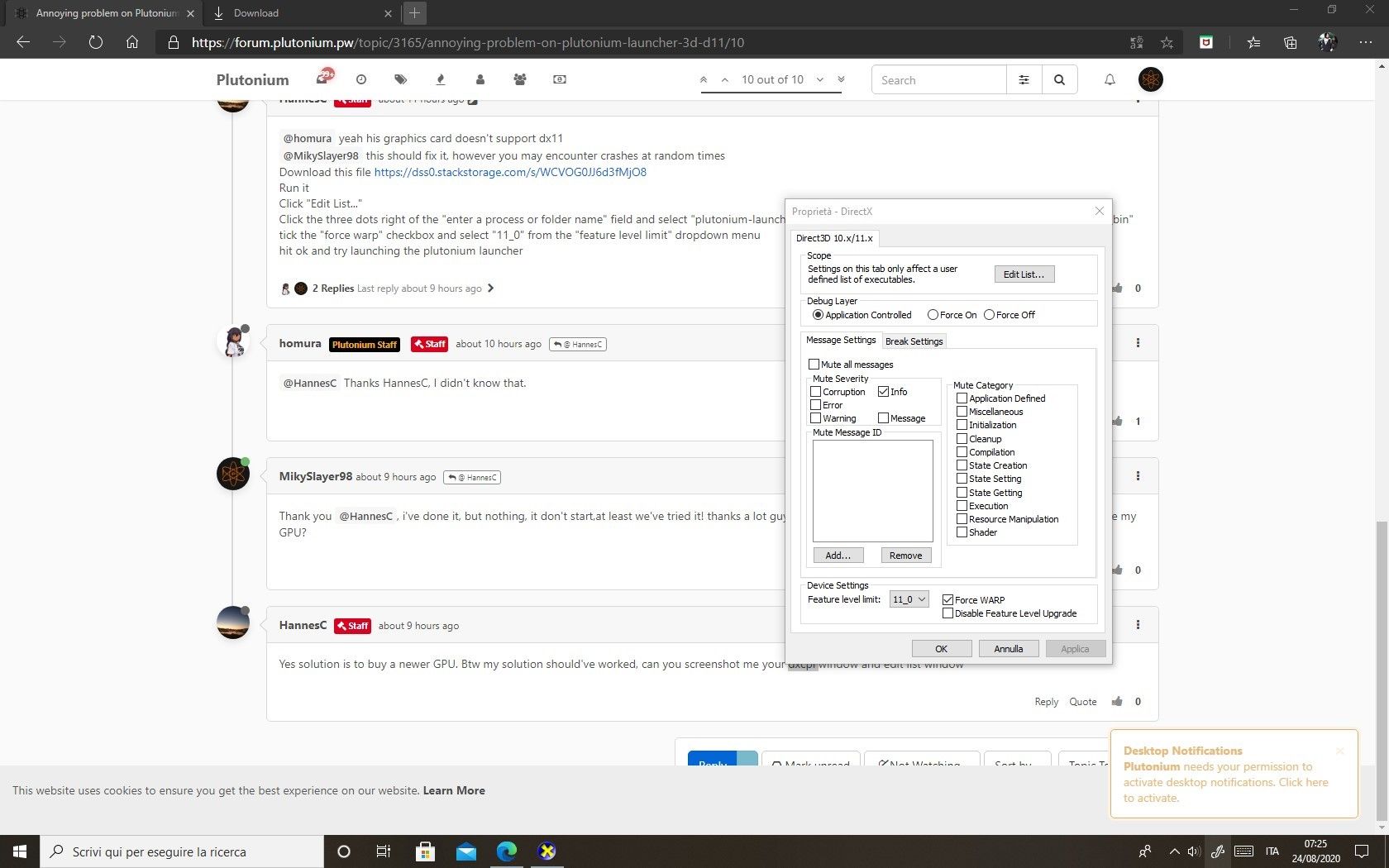
Click "Edit List..."
Click the three dots right of the "enter a process or folder name" field and select "plutonium-launcher-win32.exe" located in "C:\Users\al\AppData\Local\Plutonium\bin"
tick the "force warp" checkbox and select "11_0" from the "feature level limit" dropdown menu
hit ok and try launching the plutonium launcher -
homura yeah his graphics card doesn't support dx11
MikySlayer98 this should fix it, however you may encounter crashes at random times
Download this file https://drive.google.com/file/d/1fTzQtshdqhoUziaHpwxUY7gN0BidStnR/view?usp=sharing
Run it
Click "Edit List..."
Click the three dots right of the "enter a process or folder name" field and select "plutonium-launcher-win32.exe" located in "C:\Users\al\AppData\Local\Plutonium\bin"
tick the "force warp" checkbox and select "11_0" from the "feature level limit" dropdown menu
hit ok and try launching the plutonium launcher -
homura yeah his graphics card doesn't support dx11
MikySlayer98 this should fix it, however you may encounter crashes at random times
Download this file https://drive.google.com/file/d/1fTzQtshdqhoUziaHpwxUY7gN0BidStnR/view?usp=sharing
Run it
Click "Edit List..."
Click the three dots right of the "enter a process or folder name" field and select "plutonium-launcher-win32.exe" located in "C:\Users\al\AppData\Local\Plutonium\bin"
tick the "force warp" checkbox and select "11_0" from the "feature level limit" dropdown menu
hit ok and try launching the plutonium launcherThank you HannesC, i've done it, but nothing, it don't start,at least we've tried it! thanks a lot guys! So the only one solution is to buy a Graphic Card and improve my GPU?
-
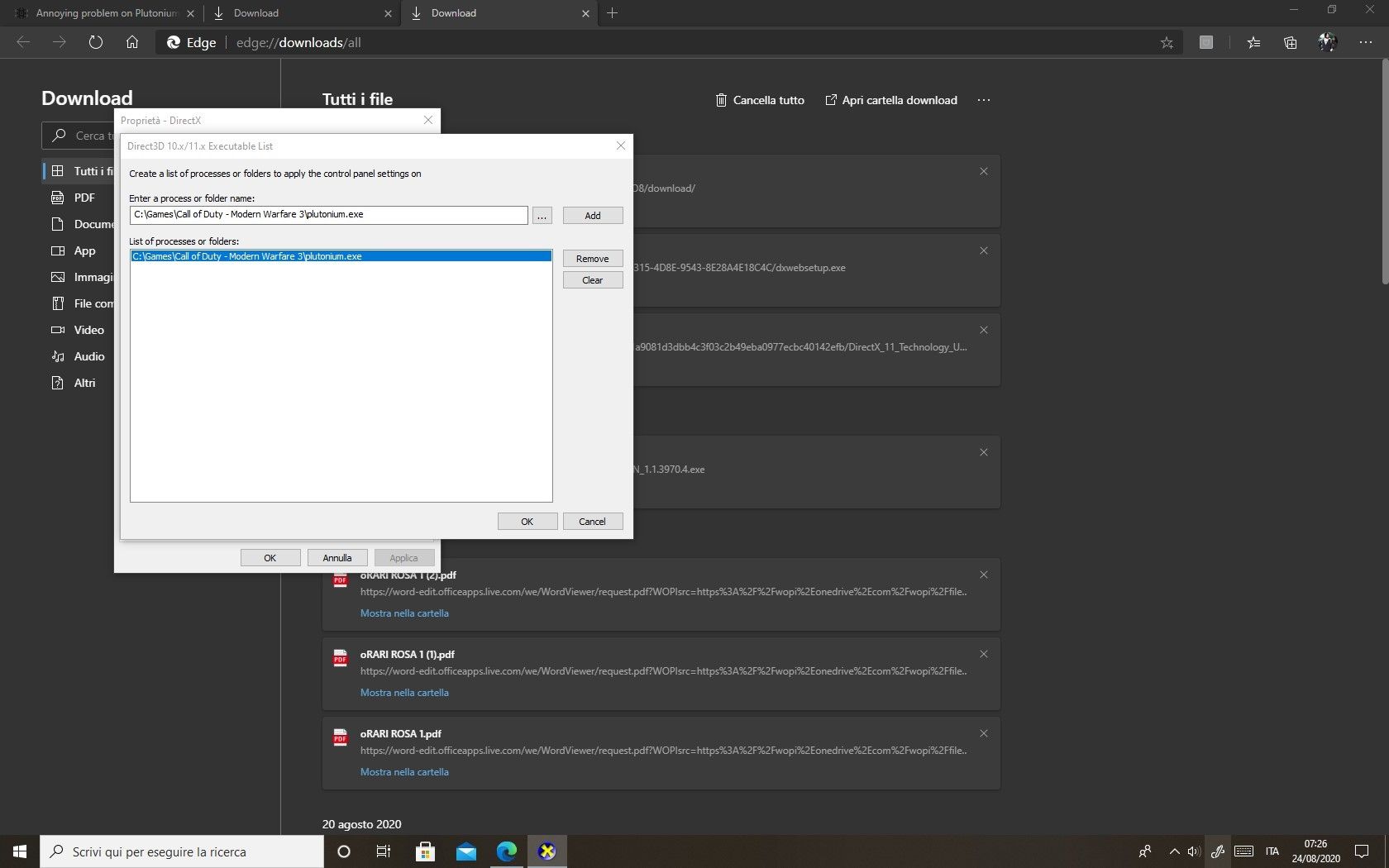
Yes solution is to buy a newer GPU. Btw my solution should've worked, can you screenshot me your dxcpl window and edit list window
-
MikySlayer98 yeah as I predicted, you did it wrong in the edit list. Google how to show hidden files and folders, then go to C:/Users/your name then appdata, local, Plutonium, bin and choose plutonium-bootstrapper-win32.exe. oh and remove the pluto.exe from the list, it isn't needed
-
MikySlayer98 yeah as I predicted, you did it wrong in the edit list. Google how to show hidden files and folders, then go to C:/Users/your name then appdata, local, Plutonium, bin and choose plutonium-bootstrapper-win32.exe. oh and remove the pluto.exe from the list, it isn't needed
HannesC Hello, the same thing happens to me that he did not understand very well, you could send a screenshot to know how to do it.
-
No I won't, I literally spoonfed you in my earlier reply, re read it. If you still can't figure it out, I don't think you should use a computer tbh.



Hello! It looks like you're interested in this conversation, but you don't have an account yet.
Getting fed up of having to scroll through the same posts each visit? When you register for an account, you'll always come back to exactly where you were before, and choose to be notified of new replies (either via email, or push notification). You'll also be able to save bookmarks and upvote posts to show your appreciation to other community members.
With your input, this post could be even better 💗
Register Login