Skip to content
  • 0 Unread 0
  • Recent
  • Tags
  • Popular
  • Users
  • Groups
  • Donate
Collapse

Plutonium

  1. Home
  2. WAW Server Hosting Support
  3. Server seems to be up, but can't connect or see it on server list

Server seems to be up, but can't connect or see it on server list

Scheduled Pinned Locked Moved WAW Server Hosting Support
21 Posts 3 Posters 3.6k Views 2 Watching
  • Oldest to Newest
  • Newest to Oldest
  • Most Votes
Reply
  • Reply as topic
Log in to reply
This topic has been deleted. Only users with topic management privileges can see it.
  • RektInator Offline
    RektInator Offline
    RektInator
    Plutonium Admin
    wrote on last edited by
    #2

    You need a key for your server before it shows up on the serverlist, please read the T4 dedicated server guide.

    NullParadox 1 Reply Last reply
    0
    • RektInator RektInator

      You need a key for your server before it shows up on the serverlist, please read the T4 dedicated server guide.

      NullParadox Offline
      NullParadox Offline
      NullParadox
      wrote on last edited by
      #3

      RektInator I have setup my server key via the key site already, I have read the guide in order to set it all up correctly.

      1 Reply Last reply
      0
      • Xerxes Offline
        Xerxes Offline
        Xerxes
        Plutonium Staff
        wrote on last edited by
        #4

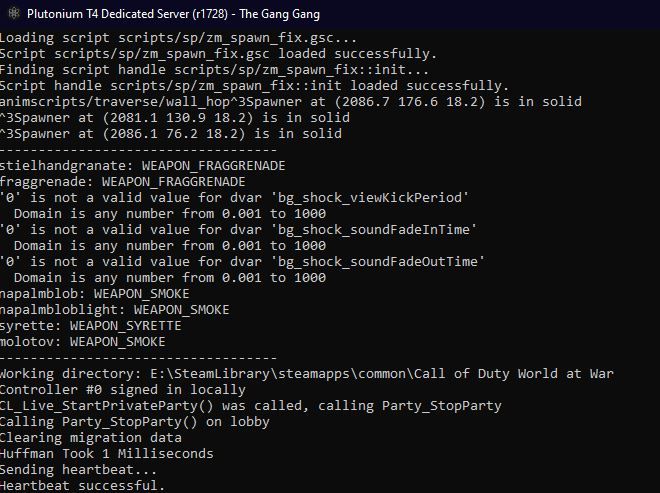
        Post a screenshot from your server console.

        NullParadox 1 Reply Last reply
        0
        • NullParadox Offline
          NullParadox Offline
          NullParadox
          wrote on last edited by
          #5

          Capture.JPG

          1 Reply Last reply
          0
          • Xerxes Xerxes

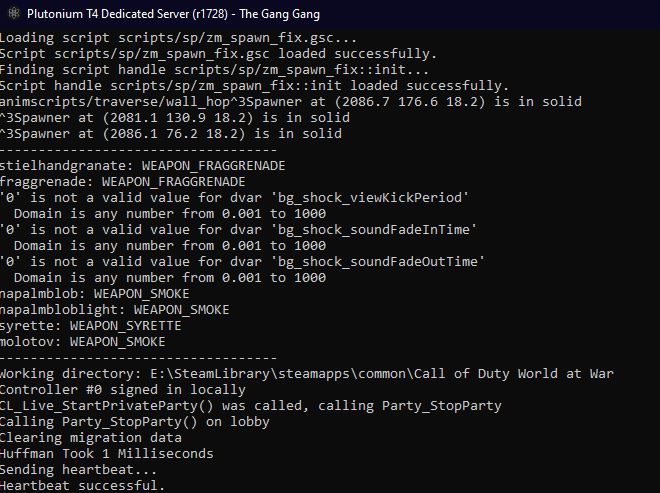
            Post a screenshot from your server console.

            NullParadox Offline
            NullParadox Offline
            NullParadox
            wrote on last edited by
            #6

            Xerxes Capture.JPG

            1 Reply Last reply
            0
            • Straz Straz

              hello, i have the same problem, how i can start the game to check if the server is up after i have done this?

              NullParadox said in Server seems to be up, but can't connect or see it on server list:

              Xerxes Capture.JPG

              NullParadox Offline
              NullParadox Offline
              NullParadox
              wrote on last edited by
              #7
              This post is deleted!
              1 Reply Last reply
              0
              • RektInator RektInator

                Straz status shows the status of the dedi.

                NullParadox Offline
                NullParadox Offline
                NullParadox
                wrote on last edited by
                #8

                RektInator you got any solution for my issue just yet?

                1 Reply Last reply
                0
                • Xerxes Offline
                  Xerxes Offline
                  Xerxes
                  Plutonium Staff
                  wrote on last edited by
                  #9

                  Check if status if the server is running.
                  If that's the case you either did not portforward correctly, your firewall is blocking it or your router does not support NAT Loopback.

                  If that's not the case its an issue with your server config.

                  NullParadox 1 Reply Last reply
                  0
                  • Xerxes Xerxes

                    Check if status if the server is running.
                    If that's the case you either did not portforward correctly, your firewall is blocking it or your router does not support NAT Loopback.

                    If that's not the case its an issue with your server config.

                    NullParadox Offline
                    NullParadox Offline
                    NullParadox
                    wrote on last edited by
                    #10

                    Xerxes the only changed port of any config is the port in my zm bat file, also where do i check for status

                    1 Reply Last reply
                    0
                    • Xerxes Offline
                      Xerxes Offline
                      Xerxes
                      Plutonium Staff
                      wrote on last edited by
                      #11

                      Literally just enter status into your server console.

                      1 Reply Last reply
                      0
                      • NullParadox Offline
                        NullParadox Offline
                        NullParadox
                        wrote on last edited by
                        #12

                        it is running, i have portforwarded the port 28961 UDP on both my router and my firewall

                        1 Reply Last reply
                        0
                        • Xerxes Offline
                          Xerxes Offline
                          Xerxes
                          Plutonium Staff
                          wrote on last edited by Xerxes
                          #13

                          Either your router does not support NAT Loopback or you don't have a public IPv4 address. Ask a friend if the can see the server or let us know the server name.

                          NullParadox 1 Reply Last reply
                          0
                          • Xerxes Xerxes

                            Either your router does not support NAT Loopback or you don't have a public IPv4 address. Ask a friend if the can see the server or let us know the server name.

                            NullParadox Offline
                            NullParadox Offline
                            NullParadox
                            wrote on last edited by
                            #14

                            Xerxes no-one can see it hmm

                            1 Reply Last reply
                            0
                            • Xerxes Offline
                              Xerxes Offline
                              Xerxes
                              Plutonium Staff
                              wrote on last edited by
                              #15

                              Check your router's webinterface if you have a public IPv4.

                              NullParadox 1 Reply Last reply
                              0
                              • Xerxes Xerxes

                                Check your router's webinterface if you have a public IPv4.

                                NullParadox Offline
                                NullParadox Offline
                                NullParadox
                                wrote on last edited by
                                #16

                                Xerxes I do have one, ive thought about redoing this whole process, but we still don't know what has gone wrong, as i do seem to have a public ipv4

                                1 Reply Last reply
                                0
                                • Xerxes Offline
                                  Xerxes Offline
                                  Xerxes
                                  Plutonium Staff
                                  wrote on last edited by Xerxes
                                  #17

                                  The server should be fine, can you connect with the connect command and the internal IP? Do you have a second System you could test that from?

                                  NullParadox 1 Reply Last reply
                                  0
                                  • Xerxes Xerxes

                                    The server should be fine, can you connect with the connect command and the internal IP? Do you have a second System you could test that from?

                                    NullParadox Offline
                                    NullParadox Offline
                                    NullParadox
                                    wrote on last edited by
                                    #18

                                    Xerxes dont have a second system, and /connect does nothing either

                                    NullParadox 1 Reply Last reply
                                    0
                                    • Xerxes Offline
                                      Xerxes Offline
                                      Xerxes
                                      Plutonium Staff
                                      wrote on last edited by
                                      #19

                                      And you did provide the correct local ip and port?
                                      eg connect 10.0.0.1:28961 ?

                                      1 Reply Last reply
                                      0
                                      • NullParadox NullParadox

                                        Xerxes dont have a second system, and /connect does nothing either

                                        NullParadox Offline
                                        NullParadox Offline
                                        NullParadox
                                        wrote on last edited by
                                        #20

                                        NullParadox scratch that, i fixed it lmao, a mf restart did it apparently

                                        1 Reply Last reply
                                        0
                                        • Xerxes Offline
                                          Xerxes Offline
                                          Xerxes
                                          Plutonium Staff
                                          wrote on last edited by
                                          #21

                                          So what was the issue or did it just magically work after the restart?

                                          1 Reply Last reply
                                          0

                                          Hello! It looks like you're interested in this conversation, but you don't have an account yet.

                                          Getting fed up of having to scroll through the same posts each visit? When you register for an account, you'll always come back to exactly where you were before, and choose to be notified of new replies (either via email, or push notification). You'll also be able to save bookmarks and upvote posts to show your appreciation to other community members.

                                          With your input, this post could be even better 💗

                                          Register Login
                                          Reply
                                          • Reply as topic
                                          Log in to reply
                                          • Oldest to Newest
                                          • Newest to Oldest
                                          • Most Votes


                                          • 1
                                          • 2
                                          • Login

                                          • Don't have an account? Register

                                          • Login or register to search.
                                          • First post
                                            Last post
                                          0
                                          • Unread 0
                                          • Recent
                                          • Tags
                                          • Popular
                                          • Users
                                          • Groups
                                          • Donate