Skip to content
  • 0 Unread 0
  • Recent
  • Tags
  • Popular
  • Users
  • Groups
  • Donate
Collapse

Plutonium

  1. Home
  2. BO2 Client Support
  3. crash reference: cb5aa88bb48729a6

crash reference: cb5aa88bb48729a6

Scheduled Pinned Locked Moved BO2 Client Support
5 Posts 2 Posters 423 Views 1 Watching
  • Oldest to Newest
  • Newest to Oldest
  • Most Votes
Reply
  • Reply as topic
Log in to reply
This topic has been deleted. Only users with topic management privileges can see it.
  • Billa_ Offline
    Billa_ Offline
    Billa_
    wrote on last edited by
    #1

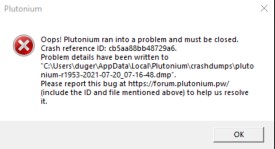
    Just downloaded the dlcs and tried playing them then this happened.
    3 times already in the first few minutes of being in the game.
    988be34e-0d10-4198-ae10-deebcf192cd7-image.png

    Dss0 1 Reply Last reply
    0
    • Billa_ Billa_

      Just downloaded the dlcs and tried playing them then this happened.
      3 times already in the first few minutes of being in the game.

      988be34e-0d10-4198-ae10-deebcf192cd7-image.png

      Dss0 Offline
      Dss0 Offline
      Dss0
      Plutonium Staff
      wrote on last edited by
      #2

      Billa_ Upload the crash dump file to google drive and post the drive link here. It tells you in the error message what to do and where the crash dump file is.

      Billa_ 1 Reply Last reply
      0
      • Dss0 Dss0

        Billa_ Upload the crash dump file to google drive and post the drive link here. It tells you in the error message what to do and where the crash dump file is.

        Billa_ Offline
        Billa_ Offline
        Billa_
        wrote on last edited by
        #3

        Dss0 https://drive.google.com/drive/folders/1ApIhcGPJPjIFGsX4KlbtW9FpkTr6cLY0?usp=sharing i hope i did it right

        Dss0 1 Reply Last reply
        0
        • Billa_ Billa_

          Dss0 https://drive.google.com/drive/folders/1ApIhcGPJPjIFGsX4KlbtW9FpkTr6cLY0?usp=sharing i hope i did it right

          Dss0 Offline
          Dss0 Offline
          Dss0
          Plutonium Staff
          wrote on last edited by
          #4

          Billa_ it crashes in nvwgf2um.dll so this is related to your graphics driver. Try updating that.

          Billa_ 1 Reply Last reply
          0
          • Dss0 Dss0

            Billa_ it crashes in nvwgf2um.dll so this is related to your graphics driver. Try updating that.

            Billa_ Offline
            Billa_ Offline
            Billa_
            wrote on last edited by
            #5

            Dss0 I already did update my drivers before downloading it if memory serves. Anyway now it's working for some reason.

            Maybe I should have mentioned that the loading screen was a white blue checkered pattern but it's back to a normal loading screen.

            Thanks for the help either way 😄

            1 Reply Last reply
            0

            Hello! It looks like you're interested in this conversation, but you don't have an account yet.

            Getting fed up of having to scroll through the same posts each visit? When you register for an account, you'll always come back to exactly where you were before, and choose to be notified of new replies (either via email, or push notification). You'll also be able to save bookmarks and upvote posts to show your appreciation to other community members.

            With your input, this post could be even better 💗

            Register Login
            Reply
            • Reply as topic
            Log in to reply
            • Oldest to Newest
            • Newest to Oldest
            • Most Votes


            • Login

            • Don't have an account? Register

            • Login or register to search.
            • First post
              Last post
            0
            • Unread 0
            • Recent
            • Tags
            • Popular
            • Users
            • Groups
            • Donate