Skip to content
  • 0 Unread 0
  • Recent
  • Tags
  • Popular
  • Users
  • Groups
  • Donate
Collapse

Plutonium

  1. Home
  2. BO2 Client Support
  3. Port forwarding assistance, if possible
Port forwarding assistance, if possible

Scheduled Pinned Locked Moved BO2 Client Support
14 Posts 2 Posters 943 Views 1 Watching
  • Oldest to Newest
  • Newest to Oldest
  • Most Votes
Reply
  • Reply as topic
Log in to reply
This topic has been deleted. Only users with topic management privileges can see it.
  • Resxt Resxt

    gabrieljim

    uPnP being enabled on your router isn't important. What is important is whether it is enabled in-game or not (in the Network tab on the Plutonium overlay)
    If it is not then port forward is required.

    uPnP is basically automatic port forwarding so if your uPnP is enabled it already opens the port so you can't forward it and since your uPnP is disabled in game it's not working. What you need to do is disable uPnP and port forward. If you disable uPnP the "port already in use" error you got shouldn't be an issue anymore

    gabrieljim Offline
    gabrieljim Offline
    gabrieljim
    wrote on last edited by
    #3

    @lResxt Thanks a lot for the reply! I'll give it a shot and report back

    1 Reply Last reply
    0
    • Resxt Resxt

      gabrieljim

      uPnP being enabled on your router isn't important. What is important is whether it is enabled in-game or not (in the Network tab on the Plutonium overlay)
      If it is not then port forward is required.

      uPnP is basically automatic port forwarding so if your uPnP is enabled it already opens the port so you can't forward it and since your uPnP is disabled in game it's not working. What you need to do is disable uPnP and port forward. If you disable uPnP the "port already in use" error you got shouldn't be an issue anymore

      gabrieljim Offline
      gabrieljim Offline
      gabrieljim
      wrote on last edited by
      #4

      @lResxt Hey, what if uPnP does show as enabled on the network tab? Should I still turn it off and forward the port?

      It shows as enabled, but my friend can't join my server regardless, kinda weird

      Resxt 1 Reply Last reply
      0
      • gabrieljim gabrieljim

        @lResxt Hey, what if uPnP does show as enabled on the network tab? Should I still turn it off and forward the port?

        It shows as enabled, but my friend can't join my server regardless, kinda weird

        Resxt Offline
        Resxt Offline
        Resxt
        Plutonium Staff
        wrote on last edited by
        #5

        gabrieljim try to check your firewall/antivirus firewall it could be blocking the connection. If nothing works you could try port forward with uPnP disabled yes

        gabrieljim 1 Reply Last reply
        0
        • Resxt Resxt

          gabrieljim try to check your firewall/antivirus firewall it could be blocking the connection. If nothing works you could try port forward with uPnP disabled yes

          gabrieljim Offline
          gabrieljim Offline
          gabrieljim
          wrote on last edited by
          #6

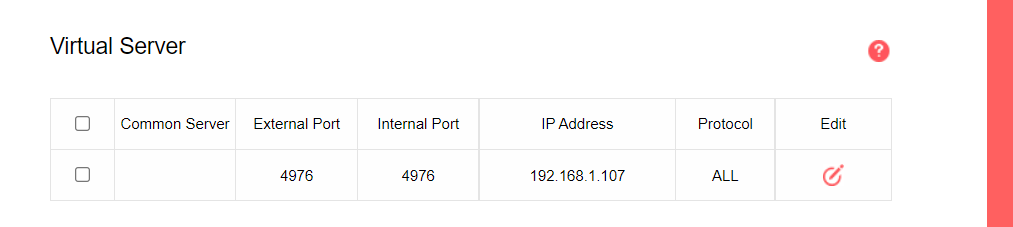
          @lResxt fe7d2798-1543-40fe-b3fb-b902dbb352b7-image.png

          This should be it, no?

          Resxt 1 Reply Last reply
          0
          • gabrieljim gabrieljim

            @lResxt fe7d2798-1543-40fe-b3fb-b902dbb352b7-image.png

            This should be it, no?

            Resxt Offline
            Resxt Offline
            Resxt
            Plutonium Staff
            wrote on last edited by
            #7

            gabrieljim I'm not sure but I think you should allow both UDP and TCP protocol since the guide doesn't mention any protocol. Yes this looks good if you are sure that the IP Address is your PC

            gabrieljim 1 Reply Last reply
            0
            • Resxt Resxt

              gabrieljim I'm not sure but I think you should allow both UDP and TCP protocol since the guide doesn't mention any protocol. Yes this looks good if you are sure that the IP Address is your PC

              gabrieljim Offline
              gabrieljim Offline
              gabrieljim
              wrote on last edited by
              #8

              @lResxt Can't seem to get it to work
              Untitled.png
              This is my network tab after turning off uPnP
              0ae76a16-53ca-4232-b8e7-2bd2eb94d7c7-image.png
              My local IP
              8e7299c9-c55e-40f2-8067-1b30661f5219-image.png

              Resxt 1 Reply Last reply
              0
              • gabrieljim gabrieljim

                @lResxt Can't seem to get it to work
                Untitled.png
                This is my network tab after turning off uPnP
                0ae76a16-53ca-4232-b8e7-2bd2eb94d7c7-image.png
                My local IP
                8e7299c9-c55e-40f2-8067-1b30661f5219-image.png

                Resxt Offline
                Resxt Offline
                Resxt
                Plutonium Staff
                wrote on last edited by
                #9

                gabrieljim your either need uPnP enabled or port forward. If you port forward this won't enable uPnP but will work as if uPnP was enabled because as I said uPnP is just automatic port forwarding, it does the same than enabling uPnP

                gabrieljim 2 Replies Last reply
                0
                • Resxt Resxt

                  gabrieljim your either need uPnP enabled or port forward. If you port forward this won't enable uPnP but will work as if uPnP was enabled because as I said uPnP is just automatic port forwarding, it does the same than enabling uPnP

                  gabrieljim Offline
                  gabrieljim Offline
                  gabrieljim
                  wrote on last edited by gabrieljim
                  #10
                  This post is deleted!
                  1 Reply Last reply
                  0
                  • Resxt Resxt

                    gabrieljim your either need uPnP enabled or port forward. If you port forward this won't enable uPnP but will work as if uPnP was enabled because as I said uPnP is just automatic port forwarding, it does the same than enabling uPnP

                    gabrieljim Offline
                    gabrieljim Offline
                    gabrieljim
                    wrote on last edited by
                    #11
                    This post is deleted!
                    1 Reply Last reply
                    0
                    • gabrieljim Offline
                      gabrieljim Offline
                      gabrieljim
                      wrote on last edited by
                      #12

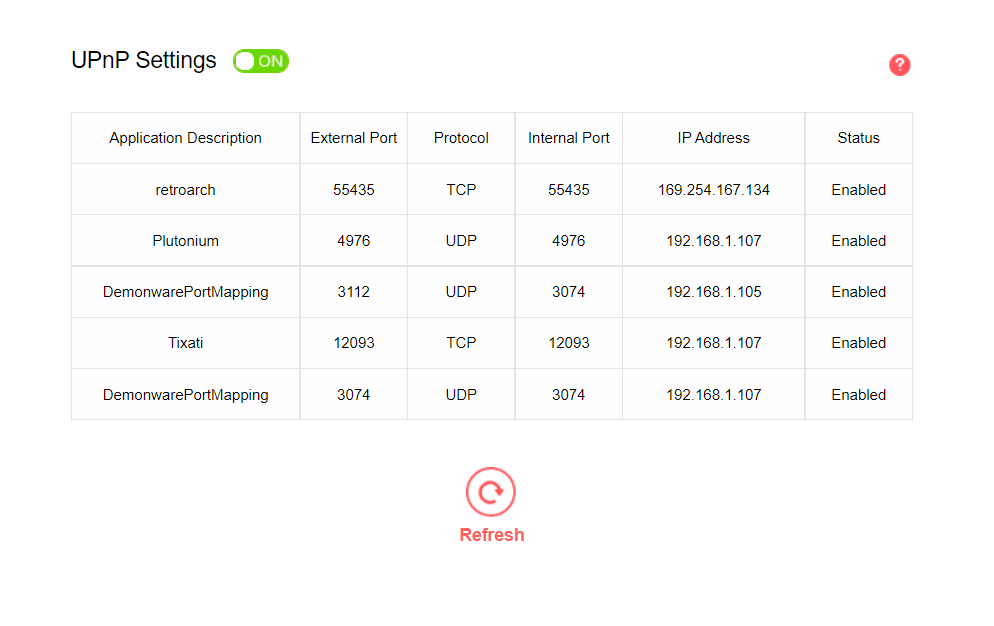
                      @lResxt This is how my network tab looks like if I delete the port forwarding rule and enable uPnP

                      Untitled.png

                      However, my friend still can't join, not sure what's happening here

                      Resxt 1 Reply Last reply
                      0
                      • gabrieljim gabrieljim

                        @lResxt This is how my network tab looks like if I delete the port forwarding rule and enable uPnP

                        Untitled.png

                        However, my friend still can't join, not sure what's happening here

                        Resxt Offline
                        Resxt Offline
                        Resxt
                        Plutonium Staff
                        wrote on last edited by
                        #13

                        gabrieljim this means the host either did something wrong (like not being in-game while the others join, uPnP disabled or bad port forward etc.) or has something still blocking the connection (firewall, antivirus firewall etc.). Make sure to allow Plutonium through your firewall (some antivirus have firewalls too!) or uPnP is buggy for some reason and you should use port forward instead but if it says enabled in-game I doubt that this would be the issue

                        gabrieljim 1 Reply Last reply
                        0
                        • Resxt Resxt

                          gabrieljim this means the host either did something wrong (like not being in-game while the others join, uPnP disabled or bad port forward etc.) or has something still blocking the connection (firewall, antivirus firewall etc.). Make sure to allow Plutonium through your firewall (some antivirus have firewalls too!) or uPnP is buggy for some reason and you should use port forward instead but if it says enabled in-game I doubt that this would be the issue

                          gabrieljim Offline
                          gabrieljim Offline
                          gabrieljim
                          wrote on last edited by
                          #14

                          @lResxt Thanks a lot for all the help man! Let me keep trying with the firewall thing then, thanks again


                          1 Reply Last reply
                          0

                          Hello! It looks like you're interested in this conversation, but you don't have an account yet.

                          Getting fed up of having to scroll through the same posts each visit? When you register for an account, you'll always come back to exactly where you were before, and choose to be notified of new replies (either via email, or push notification). You'll also be able to save bookmarks and upvote posts to show your appreciation to other community members.

                          With your input, this post could be even better 💗

                          Register Login
                          Reply
                          • Reply as topic
                          Log in to reply
                          • Oldest to Newest
                          • Newest to Oldest
                          • Most Votes


                          • Login

                          • Don't have an account? Register

                          • Login or register to search.
                          • First post
                            Last post
                          0
                          • Unread 0
                          • Recent
                          • Tags
                          • Popular
                          • Users
                          • Groups
                          • Donate