Skip to content
  • 0 Unread 0
  • Recent
  • Tags
  • Popular
  • Users
  • Groups
  • Donate
Collapse

Plutonium

  1. Home
  2. BO2 Client Support
  3. I cant or they cant join me in zombies/multiplayer

I cant or they cant join me in zombies/multiplayer

Scheduled Pinned Locked Moved BO2 Client Support
16 Posts 4 Posters 1.5k Views 1 Watching
  • Oldest to Newest
  • Newest to Oldest
  • Most Votes
Reply
  • Reply as topic
Log in to reply
This topic has been deleted. Only users with topic management privileges can see it.
  • HannesC Offline
    HannesC Offline
    HannesC
    Plutonium Staff
    wrote on last edited by
    #7

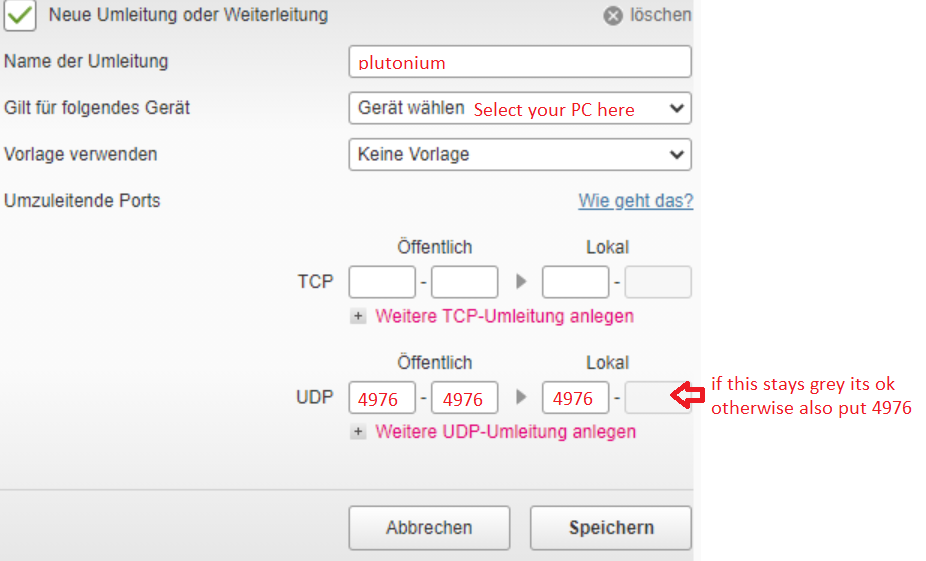
    That's not how you do that? You need to port-forward 4976 UDP through your router first, every router's different. Google how to port forward <insert router's name and model> . Once you're done, whitelist the port in defender as well and you should be fine (Granted you don't have anything other on your PC/3rd party firewalls blocking Pluto).

    1 Reply Last reply
    0
    • Zen I Guess Offline
      Zen I Guess Offline
      Zen I Guess
      wrote on last edited by
      #8

      Ahh okay. Thanks a lot. I will do that and let you know 🙂

      1 Reply Last reply
      0
      • Zen I Guess Offline
        Zen I Guess Offline
        Zen I Guess
        wrote on last edited by
        #9

        Hey Hannes! I have a question. So I would like to do the port forwarding. How do I know the number of the port? Someone says something about 4976 and this is the last step. Just no idea what number to put in

        1 Reply Last reply
        0
        • Xerxes Offline
          Xerxes Offline
          Xerxes
          Plutonium Staff
          wrote on last edited by
          #10

          When you start the game, which port does it bind to according to the console? But yes, usually its 4976 UDP.

          1 Reply Last reply
          0
          • Zen I Guess Offline
            Zen I Guess Offline
            Zen I Guess
            wrote on last edited by Zen I Guess
            #11

            Where do I see the port when I start the game? Thanks for your help by the way!
            And where should I put that in:

            Look: 80e00db9-f76e-4d8d-9040-9d826fb11a21-image.png

            1 Reply Last reply
            0
            • Zen I Guess Offline
              Zen I Guess Offline
              Zen I Guess
              wrote on last edited by
              #12

              3cd5f3f4-19ff-4727-b1d2-3e4b2ec9ba05-image.png

              1 Reply Last reply
              0
              • Zen I Guess Offline
                Zen I Guess Offline
                Zen I Guess
                wrote on last edited by
                #13

                Could you help me here really quick 🙂

                1 Reply Last reply
                0
                • Zen I Guess Offline
                  Zen I Guess Offline
                  Zen I Guess
                  wrote on last edited by
                  #14

                  Hello? Anyone?

                  Dss0 1 Reply Last reply
                  0
                  • Zen I Guess Zen I Guess

                    Hello? Anyone?

                    Dss0 Offline
                    Dss0 Offline
                    Dss0
                    Plutonium Staff
                    wrote on last edited by
                    #15

                    Zen I Guess
                    alt text

                    1 Reply Last reply
                    0
                    • Zen I Guess Offline
                      Zen I Guess Offline
                      Zen I Guess
                      wrote on last edited by
                      #16

                      thank you very much

                      1 Reply Last reply
                      0

                      Hello! It looks like you're interested in this conversation, but you don't have an account yet.

                      Getting fed up of having to scroll through the same posts each visit? When you register for an account, you'll always come back to exactly where you were before, and choose to be notified of new replies (either via email, or push notification). You'll also be able to save bookmarks and upvote posts to show your appreciation to other community members.

                      With your input, this post could be even better 💗

                      Register Login
                      Reply
                      • Reply as topic
                      Log in to reply
                      • Oldest to Newest
                      • Newest to Oldest
                      • Most Votes


                      • Login

                      • Don't have an account? Register

                      • Login or register to search.
                      • First post
                        Last post
                      0
                      • Unread 0
                      • Recent
                      • Tags
                      • Popular
                      • Users
                      • Groups
                      • Donate