[Release] Haisa's Camo Pack V1
-

Hey,
since I am constantly creating and changing my Custom Camos, I decided to upload a few of them so that you can enjoy them too.
I think most of you are familiar with how you install custom camos, but in case you don't know, drag all of the .iwi files in your Plutonium>t6r>data>images folder. If you don't have these folders, just create them! But be aware that these camos replace the camos which are already in the game!

Black Tiger replaces your Bacon Camo
Retro replaces your Gold Camo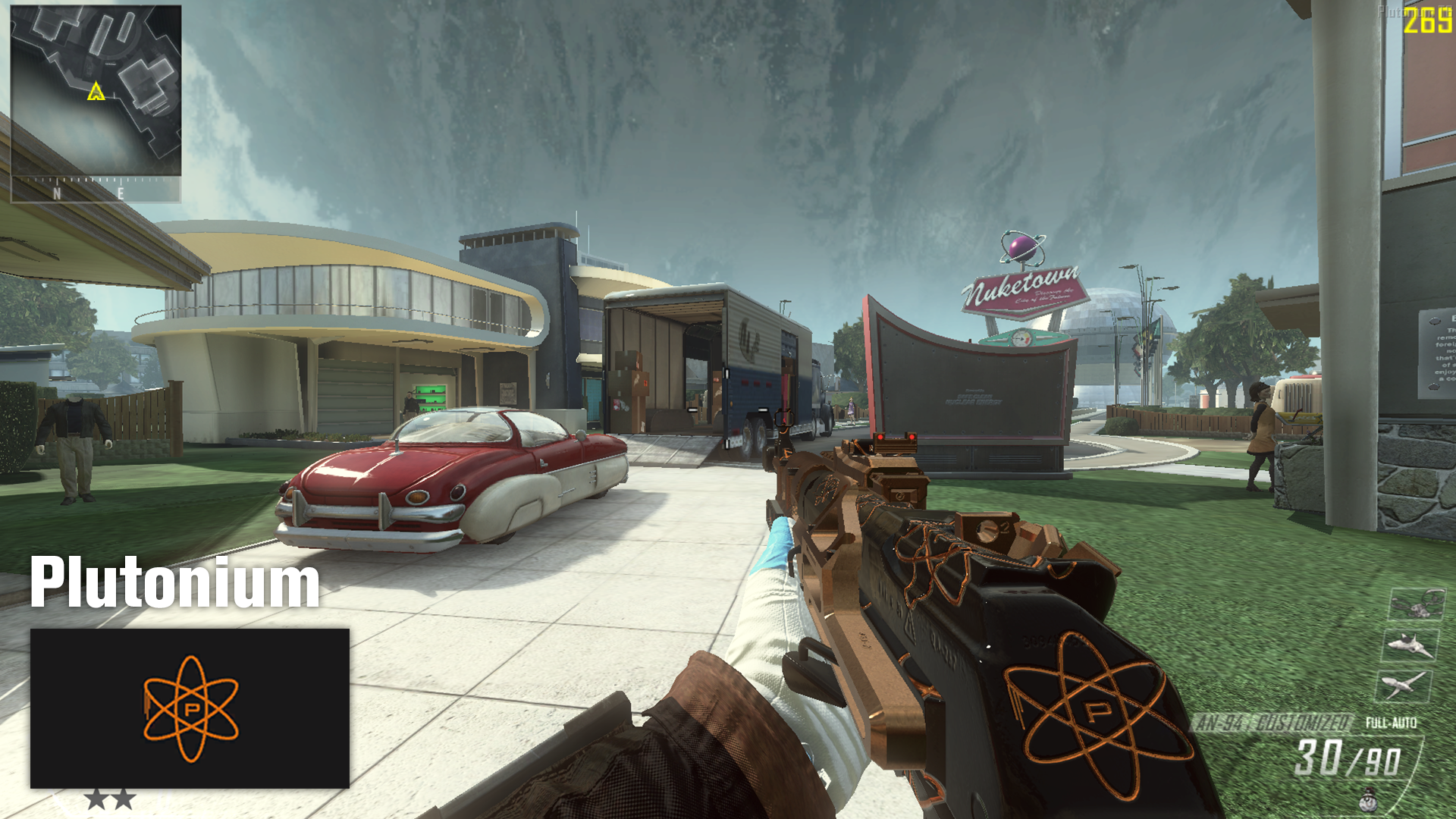
Plutonium replaces your Paladin Camo
Red Diamond replaces your Diamond Camo
Galaxy replaces your Weaponized 115 Camo (not in Zombies)I have also created a little video with no music, which showcases you all of the camos, so that you can see them in action: https://youtu.be/ad9a_n2hcGU
And here is the Dropbox Link for the Camos: https://www.dropbox.com/sh/5nxqwts5nhk0cr7/AAAsALI5jIc_m9rHkJpMTHDEa?dl=0
And also a big thanks to:
Scobalula for Greyhound
kokole for the dds to iwi Converter
Treyarch for the camos
Plutonium Team for PlutoniumI hope you like them and have so much fun with Plutonium as I do!
Greetings, Haisa -

They are very clean, I like them. They are well made and well detailed great work. I really like the style you use, I would like to see more of camos.
Good Job Haisa

-
They are very clean, I like them. They are well made and well detailed great work. I really like the style you use, I would like to see more of camos.
Good Job Haisa
-

Nice release, I like the Pluto camo

-
-
what about the gloves?
@Berserk-Saiint These are my custom made gloves inspired by the OFF-White UNCs, I don't have any plans to release custom gloves at the moment (working on camos is the priority), as I am not sure if they are working correctly across all maps. But if I get them to work properly I will release a few gloves alongside the next camo pack and a photoshop template to create your own gloves.
-
-
Hey,
since I am constantly creating and changing my Custom Camos, I decided to upload a few of them so that you can enjoy them too.
I think most of you are familiar with how you install custom camos, but in case you don't know, drag all of the .iwi files in your Plutonium>t6r>data>images folder. If you don't have these folders, just create them! But be aware that these camos replace the camos which are already in the game!
Black Tiger replaces your Bacon Camo
Retro replaces your Gold Camo
Plutonium replaces your Paladin Camo
Red Diamond replaces your Diamond Camo
Galaxy replaces your Weaponized 115 Camo (not in Zombies)I have also created a little video with no music, which showcases you all of the camos, so that you can see them in action: https://youtu.be/ad9a_n2hcGU
And here is the Dropbox Link for the Camos: https://www.dropbox.com/sh/5nxqwts5nhk0cr7/AAAsALI5jIc_m9rHkJpMTHDEa?dl=0
And also a big thanks to:
Scobalula for Greyhound
kokole for the dds to iwi Converter
Treyarch for the camos
Plutonium Team for PlutoniumI hope you like them and have so much fun with Plutonium as I do!
Greetings, Haisa -
Hey,
since I am constantly creating and changing my Custom Camos, I decided to upload a few of them so that you can enjoy them too.
I think most of you are familiar with how you install custom camos, but in case you don't know, drag all of the .iwi files in your Plutonium>t6r>data>images folder. If you don't have these folders, just create them! But be aware that these camos replace the camos which are already in the game!
Black Tiger replaces your Bacon Camo
Retro replaces your Gold Camo
Plutonium replaces your Paladin Camo
Red Diamond replaces your Diamond Camo
Galaxy replaces your Weaponized 115 Camo (not in Zombies)I have also created a little video with no music, which showcases you all of the camos, so that you can see them in action: https://youtu.be/ad9a_n2hcGU
And here is the Dropbox Link for the Camos: https://www.dropbox.com/sh/5nxqwts5nhk0cr7/AAAsALI5jIc_m9rHkJpMTHDEa?dl=0
And also a big thanks to:
Scobalula for Greyhound
kokole for the dds to iwi Converter
Treyarch for the camos
Plutonium Team for PlutoniumI hope you like them and have so much fun with Plutonium as I do!
Greetings, Haisa -
Haisa It's gonna be a stupid question ig; but can I store all my camos in folders in the t6r/data/images/ ?
If I let the iwi files in the folder they won't interfere with each other or cause any issues ?
Oh and, I love you camo and skin packs

@XxVectrumxX yes you can except they have the same name ofc.
-
-
Haisa I got a question can you do this the exact same way with animated camos I wanted to reach out to you about this.
-
syp Sorry, I haven't tried anything with animated camos and am not planning to, because I don't really like them
-
-
So as I was trying to create my own camo using this method, whilst putting it in paint.net, my specular file turns black. If you have a fix to this problem I would love to know it.
-
Hey,
since I am constantly creating and changing my Custom Camos, I decided to upload a few of them so that you can enjoy them too.
I think most of you are familiar with how you install custom camos, but in case you don't know, drag all of the .iwi files in your Plutonium>t6r>data>images folder. If you don't have these folders, just create them! But be aware that these camos replace the camos which are already in the game!
Black Tiger replaces your Bacon Camo
Retro replaces your Gold Camo
Plutonium replaces your Paladin Camo
Red Diamond replaces your Diamond Camo
Galaxy replaces your Weaponized 115 Camo (not in Zombies)I have also created a little video with no music, which showcases you all of the camos, so that you can see them in action: https://youtu.be/ad9a_n2hcGU
And here is the Dropbox Link for the Camos: https://www.dropbox.com/sh/5nxqwts5nhk0cr7/AAAsALI5jIc_m9rHkJpMTHDEa?dl=0
And also a big thanks to:
Scobalula for Greyhound
kokole for the dds to iwi Converter
Treyarch for the camos
Plutonium Team for PlutoniumI hope you like them and have so much fun with Plutonium as I do!
Greetings, Haisa
Haisa I love them !!!
-
-
Hey man, I really love these camos! I especially love the Retro camo, but I noticed that the purple detailing ends up on other guns/camos (e.g. purple shows with Cyborg camo). Do you have any idea why this happens?
-
Hey,
since I am constantly creating and changing my Custom Camos, I decided to upload a few of them so that you can enjoy them too.
I think most of you are familiar with how you install custom camos, but in case you don't know, drag all of the .iwi files in your Plutonium>t6r>data>images folder. If you don't have these folders, just create them! But be aware that these camos replace the camos which are already in the game!
Black Tiger replaces your Bacon Camo
Retro replaces your Gold Camo
Plutonium replaces your Paladin Camo
Red Diamond replaces your Diamond Camo
Galaxy replaces your Weaponized 115 Camo (not in Zombies)I have also created a little video with no music, which showcases you all of the camos, so that you can see them in action: https://youtu.be/ad9a_n2hcGU
And here is the Dropbox Link for the Camos: https://www.dropbox.com/sh/5nxqwts5nhk0cr7/AAAsALI5jIc_m9rHkJpMTHDEa?dl=0
And also a big thanks to:
Scobalula for Greyhound
kokole for the dds to iwi Converter
Treyarch for the camos
Plutonium Team for PlutoniumI hope you like them and have so much fun with Plutonium as I do!
Greetings, Haisa





Hello! It looks like you're interested in this conversation, but you don't have an account yet.
Getting fed up of having to scroll through the same posts each visit? When you register for an account, you'll always come back to exactly where you were before, and choose to be notified of new replies (either via email, or push notification). You'll also be able to save bookmarks and upvote posts to show your appreciation to other community members.
With your input, this post could be even better 💗
Register Login