Skip to content
  • 0 Unread 0
  • Recent
  • Tags
  • Popular
  • Users
  • Groups
  • Donate
Collapse

Plutonium

  1. Home
  2. BO2 Client Support
  3. error invalid folder with the right folder and not changed

error invalid folder with the right folder and not changed

Scheduled Pinned Locked Moved BO2 Client Support
9 Posts 5 Posters 1.1k Views 1 Watching
  • Oldest to Newest
  • Newest to Oldest
  • Most Votes
Reply
  • Reply as topic
Log in to reply
This topic has been deleted. Only users with topic management privileges can see it.
  • Doupty Offline
    Doupty Offline
    Doupty
    wrote on last edited by
    #1

    hi, i started plutonium's black ops 2 and there was an invalid folder error, and i put the right folder and didn't change anything, and in the morning it worked, and i entered discord.

    Dss0 1 Reply Last reply
    0
    • Doupty Doupty

      hi, i started plutonium's black ops 2 and there was an invalid folder error, and i put the right folder and didn't change anything, and in the morning it worked, and i entered discord.

      Dss0 Offline
      Dss0 Offline
      Dss0
      Plutonium Staff
      wrote on last edited by
      #2

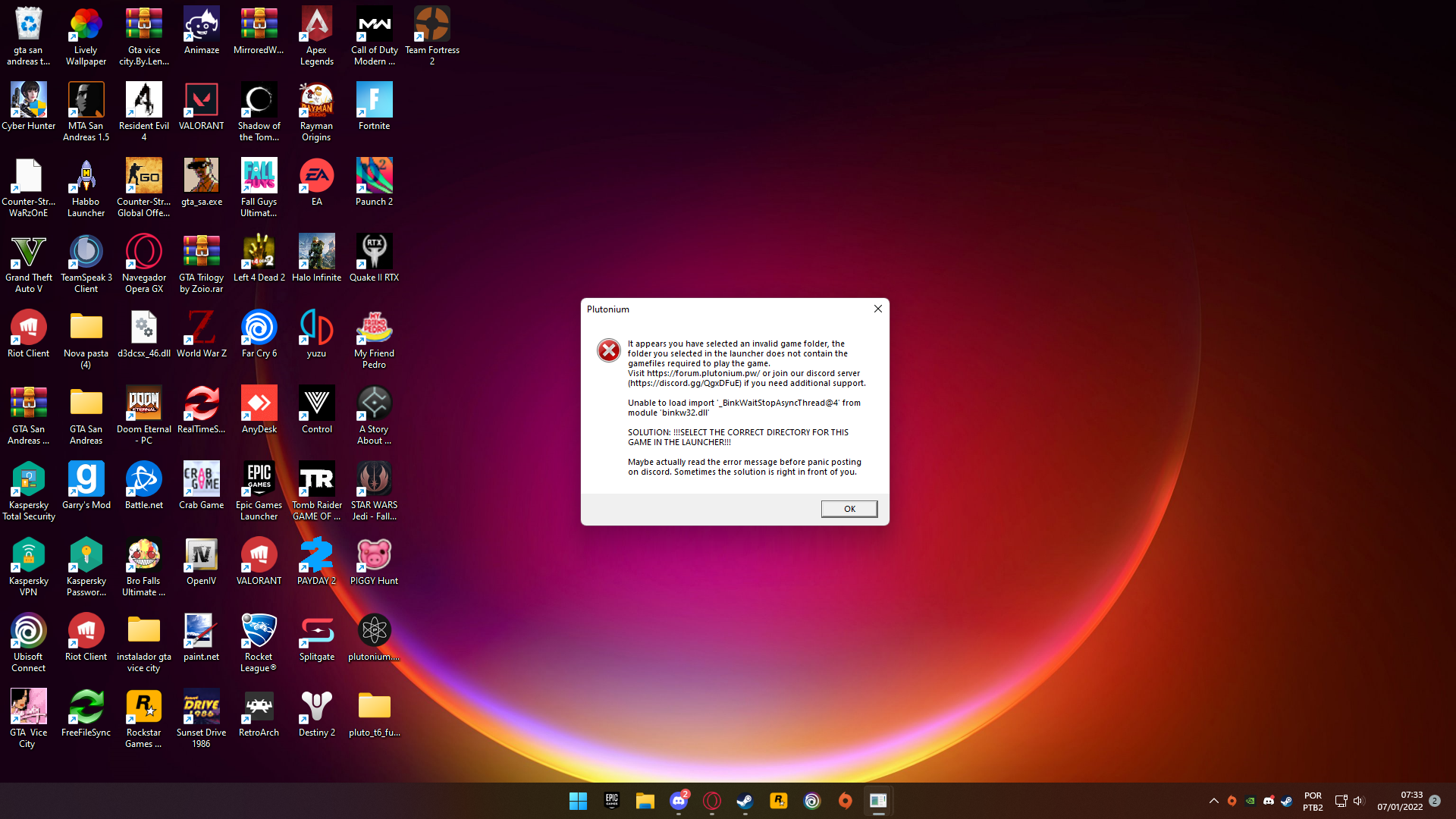
      Doupty post a screenshot of the error message. there are multiple ones that all say invalid folder, what comes afterwards is important.

      1 Reply Last reply
      0
      • Doupty Offline
        Doupty Offline
        Doupty
        wrote on last edited by
        #3

        eb523a0a-003a-441c-9ecb-9f04af6cf18a-2022-01-07.png

        coder x64 1 Reply Last reply
        0
        • Doupty Doupty

          eb523a0a-003a-441c-9ecb-9f04af6cf18a-2022-01-07.png

          coder x64 Offline
          coder x64 Offline
          coder x64
          Contributor
          wrote on last edited by
          #4

          Doupty The error is saying that binkw32.dll is missing and this dll come with the game so you should try repair your game files https://plutonium.pw/docs/repair/

          Doupty 1 Reply Last reply
          0
          • HannesC Offline
            HannesC Offline
            HannesC
            Plutonium Staff
            wrote on last edited by
            #5

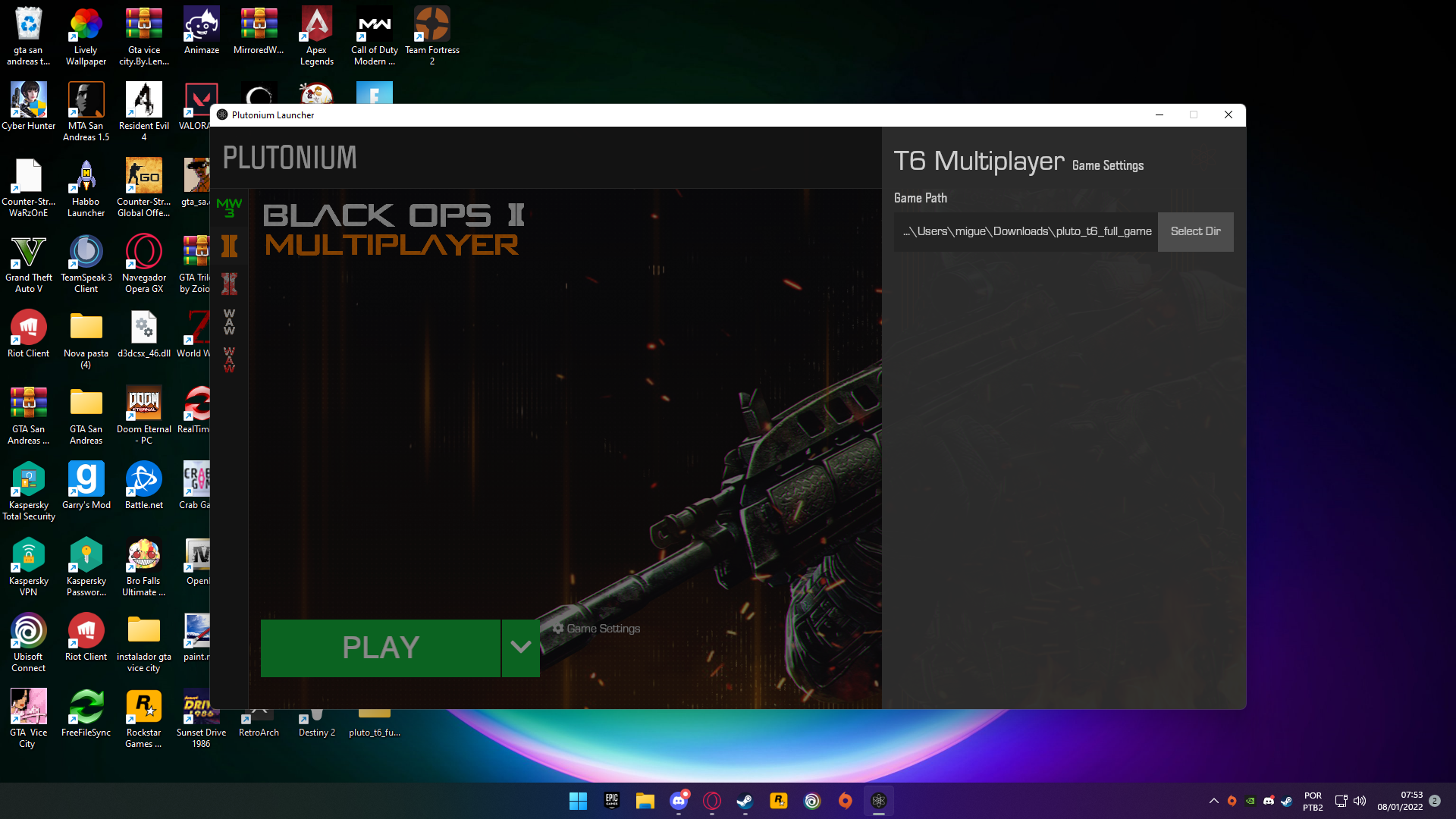
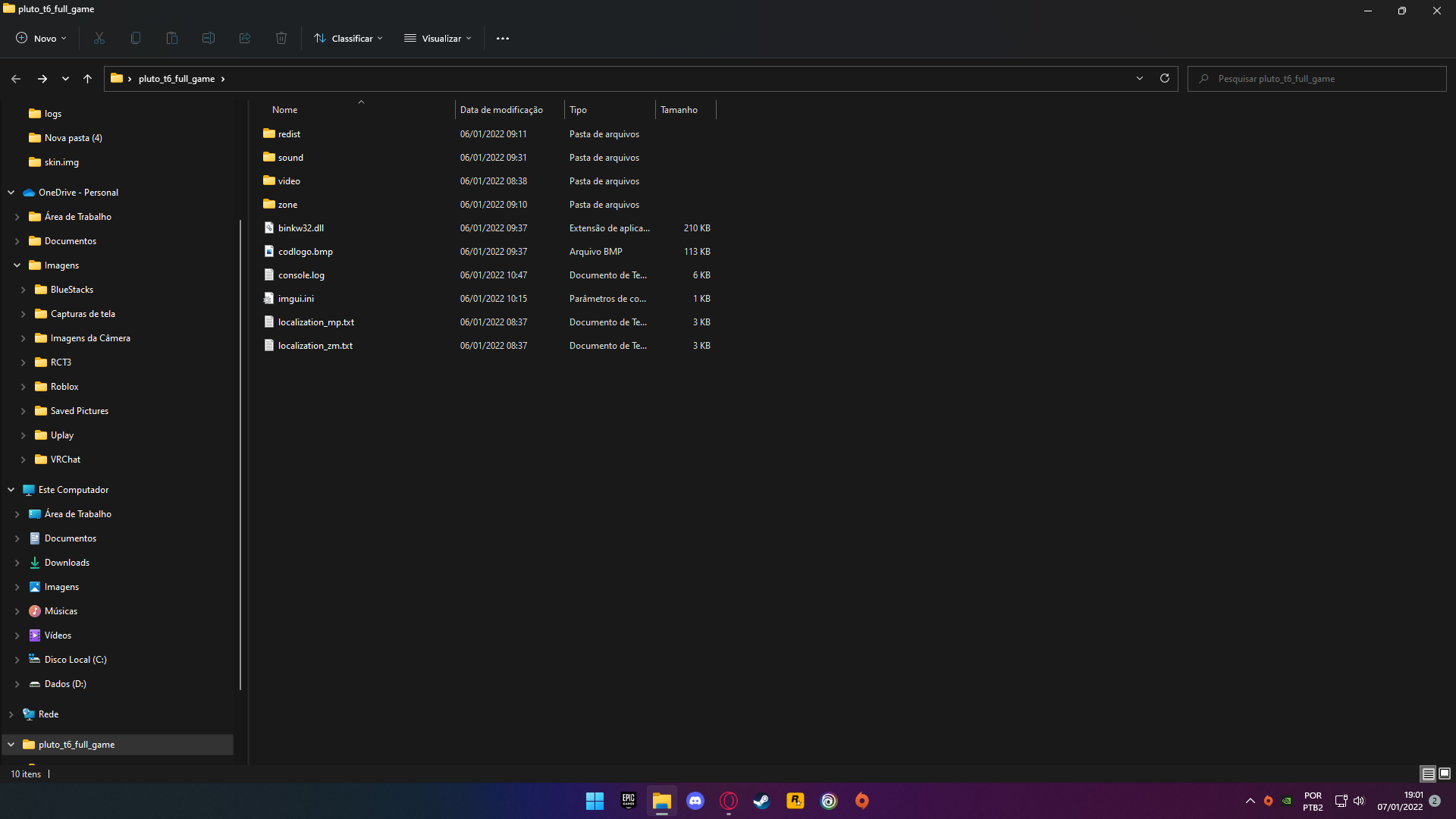
            Screenshot your bo2 folder and game settings of the launcher.

            Also please don't create multiple threads for the same issue.

            1 Reply Last reply
            0
            • coder x64 coder x64

              Doupty The error is saying that binkw32.dll is missing and this dll come with the game so you should try repair your game files https://plutonium.pw/docs/repair/

              Doupty Offline
              Doupty Offline
              Doupty
              wrote on last edited by
              #6

              the worst is that I don't remember changing the game and if you have a file that's doing this, tell me what it is and the print is here 9e0b1829-c6ae-433c-aba1-f67fc3a977b3-2022-01-07 (1).png
              Resxt 1 Reply Last reply
              0
              • Doupty Doupty

                the worst is that I don't remember changing the game and if you have a file that's doing this, tell me what it is and the print is here 9e0b1829-c6ae-433c-aba1-f67fc3a977b3-2022-01-07 (1).png

                Resxt Offline
                Resxt Offline
                Resxt
                Plutonium Staff
                wrote on last edited by
                #7

                Doupty You didn't do what Hannes said. Launcher screenshot missing.
                Also show your path in file explorer you're hiding it

                1 Reply Last reply
                0
                • Doupty Offline
                  Doupty Offline
                  Doupty
                  wrote on last edited by
                  #8

                  76c4aca5-739d-4a8b-8f57-8321049cf984-2022-01-08.png

                  1 Reply Last reply
                  0
                  • HannesC Offline
                    HannesC Offline
                    HannesC
                    Plutonium Staff
                    wrote on last edited by
                    #9

                    Move the game outta Downloads to somewhere else, like C:/Games or so, then change the path in the launcher as well. Also try running this, restarting PC then launching the game again.

                    https://github.com/ChxseH/Redist-Installer/releases/download/latest/Redist-Installer.bat

                    1 Reply Last reply
                    0

                    Hello! It looks like you're interested in this conversation, but you don't have an account yet.

                    Getting fed up of having to scroll through the same posts each visit? When you register for an account, you'll always come back to exactly where you were before, and choose to be notified of new replies (either via email, or push notification). You'll also be able to save bookmarks and upvote posts to show your appreciation to other community members.

                    With your input, this post could be even better 💗

                    Register Login
                    Reply
                    • Reply as topic
                    Log in to reply
                    • Oldest to Newest
                    • Newest to Oldest
                    • Most Votes


                    • Login

                    • Don't have an account? Register

                    • Login or register to search.
                    • First post
                      Last post
                    0
                    • Unread 0
                    • Recent
                    • Tags
                    • Popular
                    • Users
                    • Groups
                    • Donate