Skip to content
  • 0 Unread 0
  • Recent
  • Tags
  • Popular
  • Users
  • Groups
  • Donate
Collapse

Plutonium

  1. Home
  2. BO2 Modding Releases & Resources
  3. BO2 zombies - EZ 2 SEE Parts (Origins Retexture)

BO2 zombies - EZ 2 SEE Parts (Origins Retexture)

Scheduled Pinned Locked Moved BO2 Modding Releases & Resources
26 Posts 16 Posters 12.6k Views 3 Watching
  • Oldest to Newest
  • Newest to Oldest
  • Most Votes
Reply
  • Reply as topic
Log in to reply
This topic has been deleted. Only users with topic management privileges can see it.
  • Hilling_Walsh Hilling_Walsh

    (Download Link at the bottom)

    Ever looked for shield part in all their spawn location and never finding them and then you go back to the first location you've looked and it was there...?

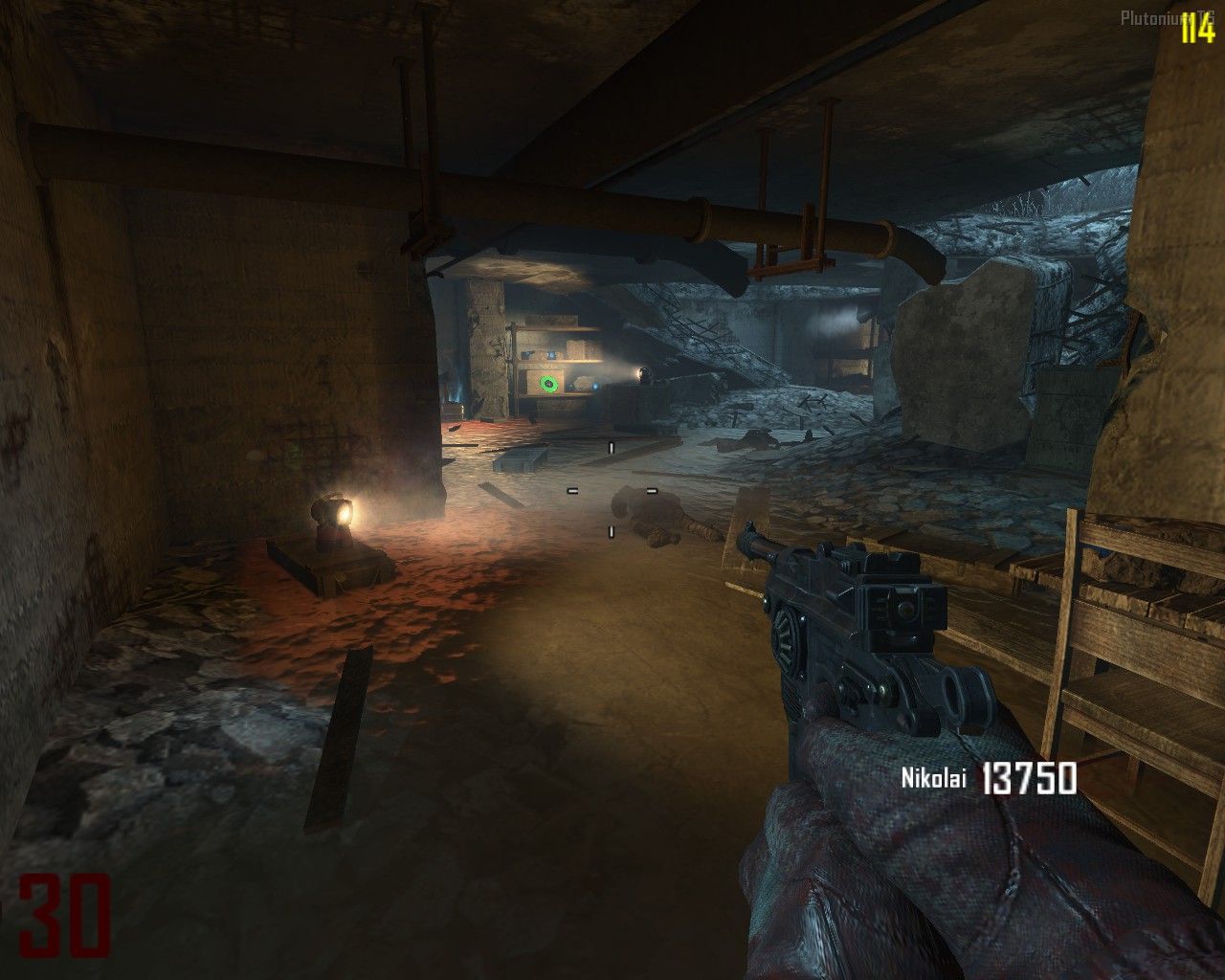
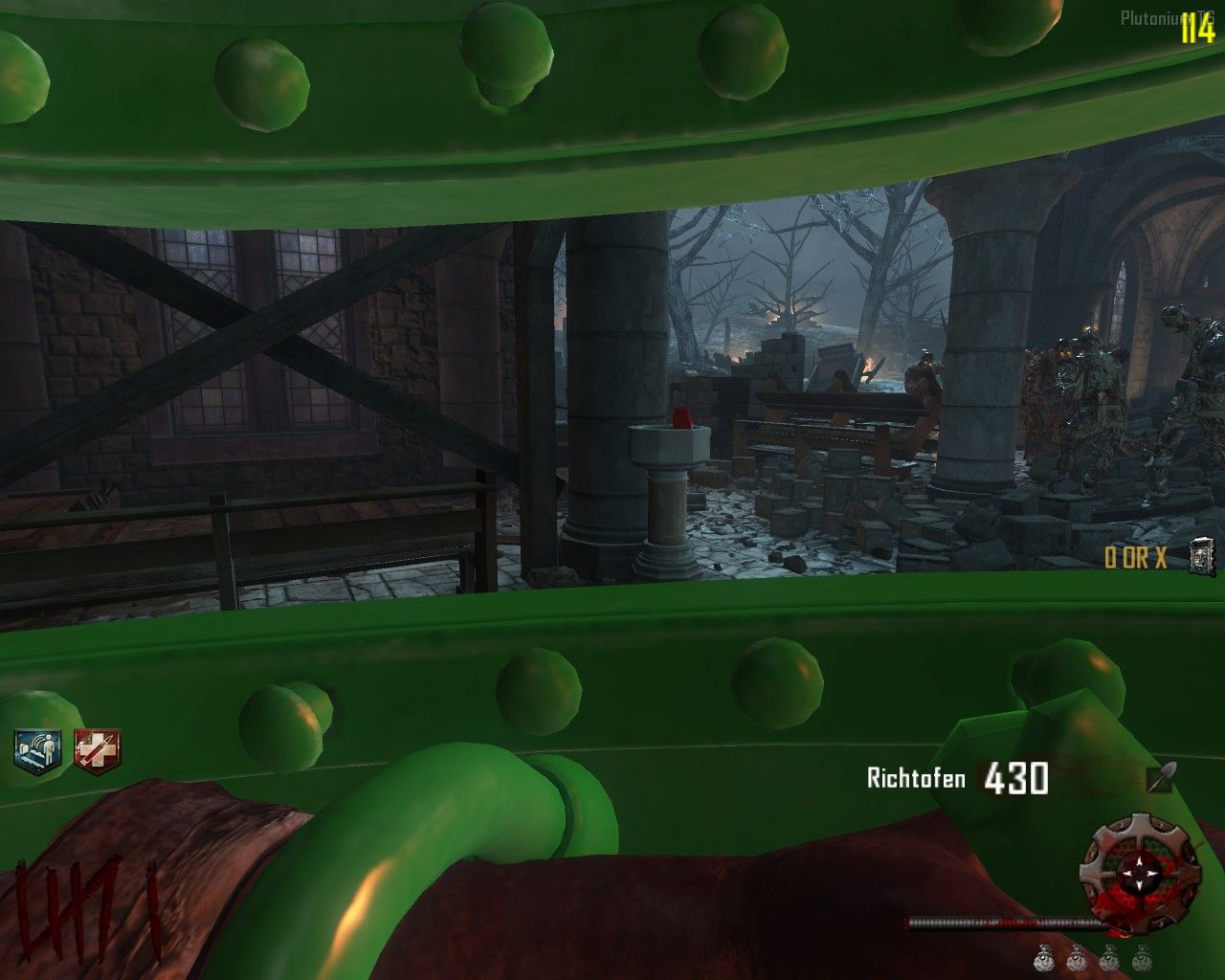
    Well this mod makes all pickable parts in Origins BRIGHT GREEN so that you never miss those parts again : 20211204144540_1.jpg 20211204144511_1.jpg

    But it doesn't stop there !

    it also makes some changes to quality of life. for exemple, this : tomb_medal_economy.png Turns into this :tomb_medal_economy.png so ontomb_medal_level.png and so ontomb_medal_kill.png tomb_medal_team.png

    You know those little tablets you need in order to get the G-strike or Napalms ? (Or however you call that).

    Well... :20211204145913_1.jpg 20211204150035_1.jpg

    The cool thing is that it turns bright green when it's done

    20211204152853_1.jpg 20211204153034_1.jpg

    You might think i forgot about the Maxis Drone and/or the gramophone....

    20211204144702_1.jpg

    (sorry about the lighting in this one)
    20211204144626_1.jpg
    What about those pesky Disks ?

    20211204144653_1.jpg 20211204144647_1.jpg 20211204144606_1.jpg 20211204144532_1.jpg 20211204144448_1.jpg

    Known problem :

    The Shield and the Maxis Drone will stay Bright green even when built :20211204145058_1.jpg 20211204152622_1.jpg

    Download ------------------------------------------

    https://www.mediafire.com/file/6du4mcy6kzzaj2v/EZ_2_SEE_Parts_%2528Origins%2529.rar/file

    How to download ?

    Simply drag and drop all the .iwi files into :

    pluto_t6_full_game\t6r\data\Images

    If you do not have the "Images" file, create it yourself.

    If you have any questions or requests, i'm all eyes 👀

    ZakharAsli Offline
    ZakharAsli Offline
    ZakharAsli
    Banned
    wrote on last edited by
    #4

    Hilling_Walsh FBI OPEN UP🗿

    1 Reply Last reply
    1
    • uniqorn Offline
      uniqorn Offline
      uniqorn
      wrote on last edited by
      #5

      t6r? you mean t6 or sum

      Hilling_Walsh 1 Reply Last reply
      0
      • Hook1234 Offline
        Hook1234 Offline
        Hook1234
        wrote on last edited by
        #6

        me encanto, para quienes vienen empezando en origins esta buenisimo

        Hilling_Walsh 1 Reply Last reply
        0
        • uniqorn uniqorn

          t6r? you mean t6 or sum

          Hilling_Walsh Offline
          Hilling_Walsh Offline
          Hilling_Walsh
          wrote on last edited by
          #7

          uniqorn Capture d’écran 2021-12-06 162724.png

          Evolight 1 Reply Last reply
          1
          • Hook1234 Hook1234

            me encanto, para quienes vienen empezando en origins esta buenisimo

            Hilling_Walsh Offline
            Hilling_Walsh Offline
            Hilling_Walsh
            wrote on last edited by
            #8

            Hook1234 Speak english bruv

            1 Reply Last reply
            0
            • Hilling_Walsh Hilling_Walsh

              uniqorn Capture d’écran 2021-12-06 162724.png

              Evolight Offline
              Evolight Offline
              Evolight
              wrote on last edited by
              #9

              Hilling_Walsh "%localappdata%/plutonium/storage/t6 is now the official directory for all purposes such as
              mods, demos, logs, and player save data."

              t6r will be removed at some point so please recommend people to use the correct folder

              1 Reply Last reply
              0
              • Count Dooku Offline
                Count Dooku Offline
                Count Dooku
                wrote on last edited by
                #10

                Downloads as a rar, do i need to convert it to iwl or will it work as a rar file?

                Kraestian 1 Reply Last reply
                0
                • Count Dooku Count Dooku

                  Downloads as a rar, do i need to convert it to iwl or will it work as a rar file?

                  Kraestian Offline
                  Kraestian Offline
                  Kraestian
                  wrote on last edited by
                  #11

                  Count Dooku go to any rar file viewer and extract it to your game direcory shown here: pluto_t6_full_game\t6r\data\Images
                  have a nice day!

                  Count Dooku 1 Reply Last reply
                  0
                  • Kraestian Kraestian

                    Count Dooku go to any rar file viewer and extract it to your game direcory shown here: pluto_t6_full_game\t6r\data\Images
                    have a nice day!

                    Count Dooku Offline
                    Count Dooku Offline
                    Count Dooku
                    wrote on last edited by
                    #12

                    Kraestian Hey, i figured that out however only half of this works for me. Do i need to be host for this to work, as well the reward box pop ups such as it shows max ammo double tap work however all of the parts for everything are the same color. Any fixes?

                    Hilling_Walsh 1 Reply Last reply
                    0
                    • Hilling_Walsh Hilling_Walsh

                      (Download Link at the bottom)

                      Ever looked for shield part in all their spawn location and never finding them and then you go back to the first location you've looked and it was there...?

                      Well this mod makes all pickable parts in Origins BRIGHT GREEN so that you never miss those parts again : 20211204144540_1.jpg 20211204144511_1.jpg

                      But it doesn't stop there !

                      it also makes some changes to quality of life. for exemple, this : tomb_medal_economy.png Turns into this :tomb_medal_economy.png so ontomb_medal_level.png and so ontomb_medal_kill.png tomb_medal_team.png

                      You know those little tablets you need in order to get the G-strike or Napalms ? (Or however you call that).

                      Well... :20211204145913_1.jpg 20211204150035_1.jpg

                      The cool thing is that it turns bright green when it's done

                      20211204152853_1.jpg 20211204153034_1.jpg

                      You might think i forgot about the Maxis Drone and/or the gramophone....

                      20211204144702_1.jpg

                      (sorry about the lighting in this one)
                      20211204144626_1.jpg
                      What about those pesky Disks ?

                      20211204144653_1.jpg 20211204144647_1.jpg 20211204144606_1.jpg 20211204144532_1.jpg 20211204144448_1.jpg

                      Known problem :

                      The Shield and the Maxis Drone will stay Bright green even when built :20211204145058_1.jpg 20211204152622_1.jpg

                      Download ------------------------------------------

                      https://www.mediafire.com/file/6du4mcy6kzzaj2v/EZ_2_SEE_Parts_%2528Origins%2529.rar/file

                      How to download ?

                      Simply drag and drop all the .iwi files into :

                      pluto_t6_full_game\t6r\data\Images

                      If you do not have the "Images" file, create it yourself.

                      If you have any questions or requests, i'm all eyes 👀

                      Xegone Offline
                      Xegone Offline
                      Xegone
                      wrote on last edited by
                      #13

                      Hilling_Walsh Hello I know I'm quite late to the post but do you think you can do the same but make all of the parts a bright white I think it would look really nice also love the texture pack 🙂

                      1 Reply Last reply
                      0
                      • TTvligmaballsboi Offline
                        TTvligmaballsboi Offline
                        TTvligmaballsboi
                        wrote on last edited by
                        #14

                        I’m trying to find the t6r folder but I don’t have one

                        Hilling_Walsh 1 Reply Last reply
                        0
                        • TTvligmaballsboi TTvligmaballsboi

                          I’m trying to find the t6r folder but I don’t have one

                          Hilling_Walsh Offline
                          Hilling_Walsh Offline
                          Hilling_Walsh
                          wrote on last edited by
                          #15

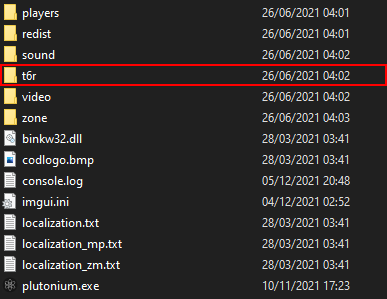
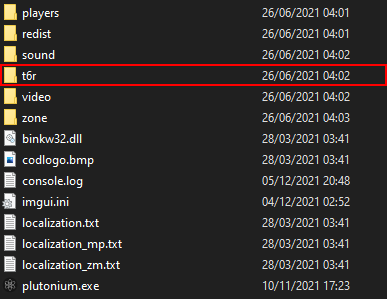
                          TTvligmaballsboi If you don't have the "t6r" file, simply create it. You then create another file called "data" inside the "t6r" file, and inside that "data" file, you create ANOTHER file called "Images". Now just drag and drop all the mods inside the "Images" file and voila!

                          Capture d’écran 2022-02-20 085152.png

                          Capture d’écran 2021-12-06 162724.png

                          Someone told me that you needed to rename the "t6r" to something else after an update but this still works perfectly for me.

                          Hope i helped. 🙂

                          1 Reply Last reply
                          0
                          • Count Dooku Count Dooku

                            Kraestian Hey, i figured that out however only half of this works for me. Do i need to be host for this to work, as well the reward box pop ups such as it shows max ammo double tap work however all of the parts for everything are the same color. Any fixes?

                            Hilling_Walsh Offline
                            Hilling_Walsh Offline
                            Hilling_Walsh
                            wrote on last edited by
                            #16

                            Count Dooku Sorry for the VERY late response, do you still have a problem ? if so, i'm gonna need a screenshot because i have no idea what you're talking about.

                            Everything is retextured bright green so you can see it better from afar (or even up close).

                            ------------if you need to be host for it to work------------

                            No.

                            It is a simple retexture mod, you can use it on any servers, there is no scripting involved in this mod.

                            1 Reply Last reply
                            0
                            • TTvligmaballsboi Offline
                              TTvligmaballsboi Offline
                              TTvligmaballsboi
                              wrote on last edited by
                              #17

                              Screenshot (6).png

                              TTvligmaballsboi 1 Reply Last reply
                              0
                              • TTvligmaballsboi TTvligmaballsboi

                                Screenshot (6).png

                                TTvligmaballsboi Offline
                                TTvligmaballsboi Offline
                                TTvligmaballsboi
                                wrote on last edited by
                                #18

                                I've done everything but still doesn't work do have to use anything to make it work?

                                Hermitus 1 Reply Last reply
                                0
                                • Hilling_Walsh Hilling_Walsh

                                  (Download Link at the bottom)

                                  Ever looked for shield part in all their spawn location and never finding them and then you go back to the first location you've looked and it was there...?

                                  Well this mod makes all pickable parts in Origins BRIGHT GREEN so that you never miss those parts again : 20211204144540_1.jpg 20211204144511_1.jpg

                                  But it doesn't stop there !

                                  it also makes some changes to quality of life. for exemple, this : tomb_medal_economy.png Turns into this :tomb_medal_economy.png so ontomb_medal_level.png and so ontomb_medal_kill.png tomb_medal_team.png

                                  You know those little tablets you need in order to get the G-strike or Napalms ? (Or however you call that).

                                  Well... :20211204145913_1.jpg 20211204150035_1.jpg

                                  The cool thing is that it turns bright green when it's done

                                  20211204152853_1.jpg 20211204153034_1.jpg

                                  You might think i forgot about the Maxis Drone and/or the gramophone....

                                  20211204144702_1.jpg

                                  (sorry about the lighting in this one)
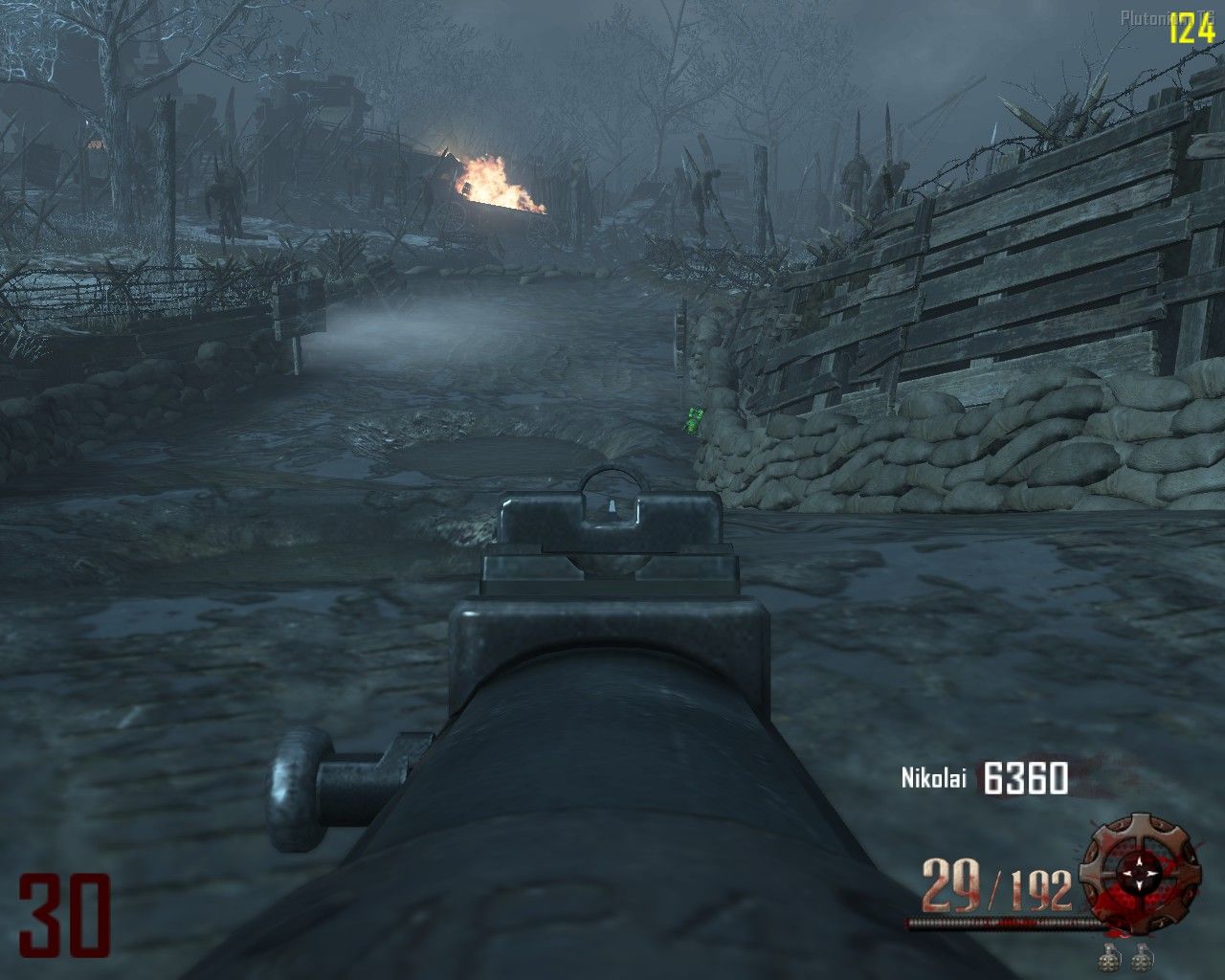
                                  20211204144626_1.jpg
                                  What about those pesky Disks ?

                                  20211204144653_1.jpg 20211204144647_1.jpg 20211204144606_1.jpg 20211204144532_1.jpg 20211204144448_1.jpg

                                  Known problem :

                                  The Shield and the Maxis Drone will stay Bright green even when built :20211204145058_1.jpg 20211204152622_1.jpg

                                  Download ------------------------------------------

                                  https://www.mediafire.com/file/6du4mcy6kzzaj2v/EZ_2_SEE_Parts_%2528Origins%2529.rar/file

                                  How to download ?

                                  Simply drag and drop all the .iwi files into :

                                  pluto_t6_full_game\t6r\data\Images

                                  If you do not have the "Images" file, create it yourself.

                                  If you have any questions or requests, i'm all eyes 👀

                                  Narrow223 Offline
                                  Narrow223 Offline
                                  Narrow223
                                  wrote on last edited by
                                  #19

                                  Hilling_Walsh buzzlightyear shield lol

                                  1 Reply Last reply
                                  0
                                  • TTvligmaballsboi TTvligmaballsboi

                                    I've done everything but still doesn't work do have to use anything to make it work?

                                    Hermitus Offline
                                    Hermitus Offline
                                    Hermitus
                                    wrote on last edited by
                                    #20

                                    TTvligmaballsboi mate, sorry to inform you but you need WinRAR
                                    for it to work, and then extract everything from it then to the folder

                                    1 Reply Last reply
                                    0
                                    • Luxder Offline
                                      Luxder Offline
                                      Luxder
                                      wrote on last edited by
                                      #21

                                      bro u cant make the same retexture but for another maps please?

                                      hindercanrun Hilling_Walsh 2 Replies Last reply
                                      0
                                      • Luxder Luxder

                                        bro u cant make the same retexture but for another maps please?

                                        hindercanrun Offline
                                        hindercanrun Offline
                                        hindercanrun
                                        Contributor
                                        wrote on last edited by
                                        #22

                                        Luxder you can

                                        Luxder 1 Reply Last reply
                                        0
                                        • hindercanrun hindercanrun

                                          Luxder you can

                                          Luxder Offline
                                          Luxder Offline
                                          Luxder
                                          wrote on last edited by
                                          #23

                                          hindercanrun yah i know but its too hard 4 me

                                          1 Reply Last reply
                                          0

                                          Hello! It looks like you're interested in this conversation, but you don't have an account yet.

                                          Getting fed up of having to scroll through the same posts each visit? When you register for an account, you'll always come back to exactly where you were before, and choose to be notified of new replies (either via email, or push notification). You'll also be able to save bookmarks and upvote posts to show your appreciation to other community members.

                                          With your input, this post could be even better 💗

                                          Register Login
                                          Reply
                                          • Reply as topic
                                          Log in to reply
                                          • Oldest to Newest
                                          • Newest to Oldest
                                          • Most Votes


                                          • 1
                                          • 2
                                          • Login

                                          • Don't have an account? Register

                                          • Login or register to search.
                                          • First post
                                            Last post
                                          0
                                          • Unread 0
                                          • Recent
                                          • Tags
                                          • Popular
                                          • Users
                                          • Groups
                                          • Donate