Skip to content
  • 0 Unread 0
  • Recent
  • Tags
  • Popular
  • Users
  • Groups
  • Donate
Collapse

Plutonium

  1. Home
  2. WAW Modding Support & Discussion
  3. Waw custom maps arent working

Waw custom maps arent working

Scheduled Pinned Locked Moved WAW Modding Support & Discussion
17 Posts 6 Posters 3.5k Views 2 Watching
  • Oldest to Newest
  • Newest to Oldest
  • Most Votes
Reply
  • Reply as topic
Log in to reply
This topic has been deleted. Only users with topic management privileges can see it.
  • zylicks zylicks

    Ive dowoaded a custom map and its showing up in the game but when I try to load them it crashes the game.
    Hav I done something wrong?

    Resxt Offline
    Resxt Offline
    Resxt
    Plutonium Staff
    wrote on last edited by
    #4

    @G2SF Where did you download your game files from?
    Steam, CD, our torrent or somewhere else?

    1 Reply Last reply
    0
    • zylicks Offline
      zylicks Offline
      zylicks
      wrote on last edited by
      #5

      from the plutonium download site using qbittorrent

      Resxt 1 Reply Last reply
      0
      • zylicks zylicks

        from the plutonium download site using qbittorrent

        Resxt Offline
        Resxt Offline
        Resxt
        Plutonium Staff
        wrote on last edited by
        #6

        @G2SF Can you try this map and tell me the result https://callofdutyrepo.com/2021/11/21/kino-the-rebirth/

        Wanna make sure it's not a map specific issue

        You can also repair your game
        https://plutonium.pw/docs/repair/

        Finally can you screenshot the content of these folders (if they exist)
        %localappdata%\Activision\CoDWaW\mods and %localappdata%\Plutonium\storage\t4\mods

        zylicks 1 Reply Last reply
        0
        • Resxt Resxt

          @G2SF Can you try this map and tell me the result https://callofdutyrepo.com/2021/11/21/kino-the-rebirth/

          Wanna make sure it's not a map specific issue

          You can also repair your game
          https://plutonium.pw/docs/repair/

          Finally can you screenshot the content of these folders (if they exist)
          %localappdata%\Activision\CoDWaW\mods and %localappdata%\Plutonium\storage\t4\mods

          zylicks Offline
          zylicks Offline
          zylicks
          wrote on last edited by zylicks
          #7

          Resxt I don't have the Activision folder if that's the problem,
          Here's the plutonium mods folder
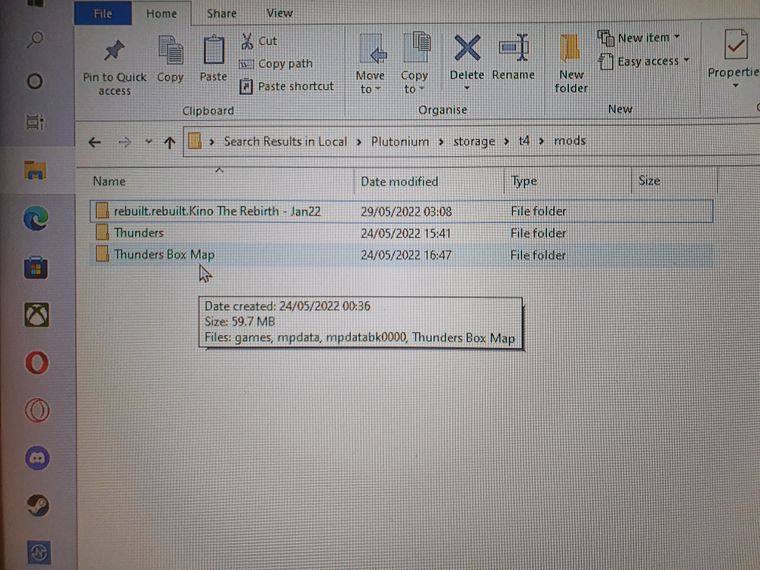
          20220529_031516.jpg

          And sorry for the wait

          1 Reply Last reply
          0
          • zylicks Offline
            zylicks Offline
            zylicks
            wrote on last edited by
            #8

            And now when I load the Kino mod my game looks like this
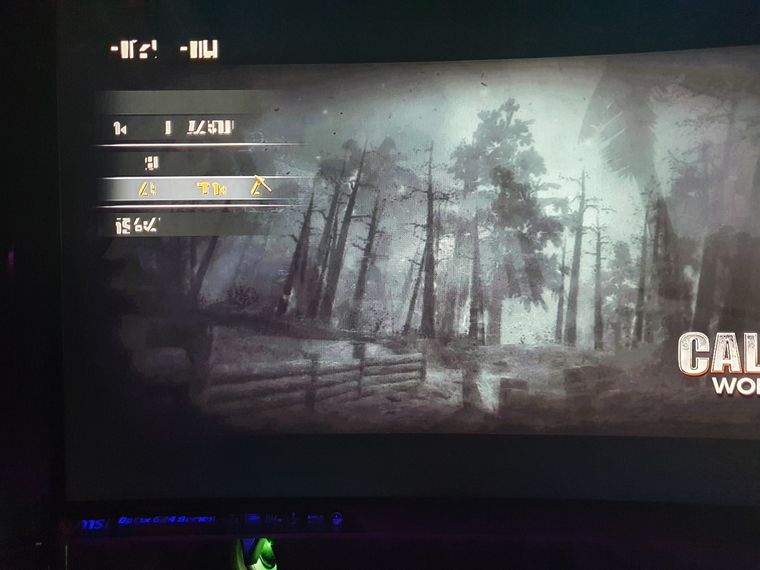
            16537915983214780294058530273507.jpg

            Resxt 1 Reply Last reply
            0
            • zylicks zylicks

              And now when I load the Kino mod my game looks like this
              16537915983214780294058530273507.jpg

              Resxt Offline
              Resxt Offline
              Resxt
              Plutonium Staff
              wrote on last edited by
              #9

              @G2SF your mod is called rebuilt.rebuilt so you most likely did something weird.
              Can you explain exactly what you did?
              Also show the content of kino folder

              1 Reply Last reply
              0
              • zylicks Offline
                zylicks Offline
                zylicks
                wrote on last edited by
                #10

                I couldn't extract the file so I used winrar to fix it then used the folder it gave me, I did it twice tho accidently

                Resxt 1 Reply Last reply
                0
                • zylicks Offline
                  zylicks Offline
                  zylicks
                  wrote on last edited by
                  #11
                  This post is deleted!
                  1 Reply Last reply
                  0
                  • zylicks Offline
                    zylicks Offline
                    zylicks
                    wrote on last edited by
                    #12

                    16538399907065127596784526559321.jpg

                    1 Reply Last reply
                    0
                    • YaF3li Offline
                      YaF3li Offline
                      YaF3li
                      wrote on last edited by
                      #13

                      It looks like there are files missing. I'd suggest deleting the mod and re-installing it.

                      1 Reply Last reply
                      0
                      • zylicks zylicks

                        I couldn't extract the file so I used winrar to fix it then used the folder it gave me, I did it twice tho accidently

                        Resxt Offline
                        Resxt Offline
                        Resxt
                        Plutonium Staff
                        wrote on last edited by
                        #14

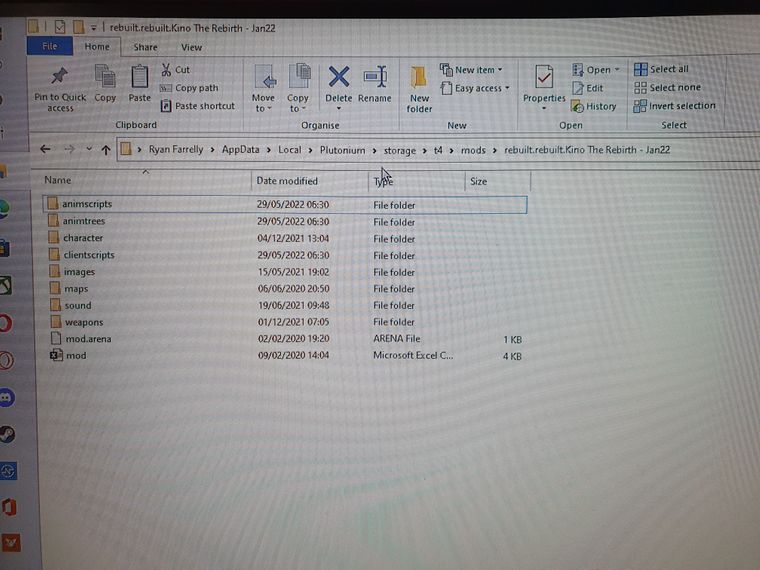
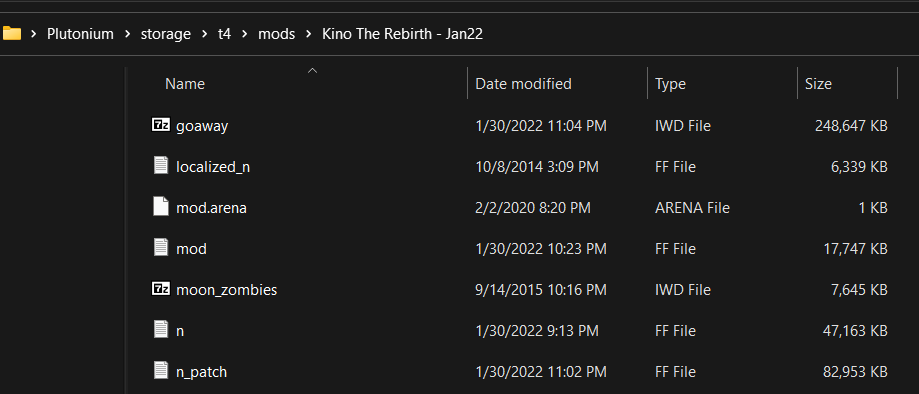
                        @G2SF I have no idea what you're doing but looks like you're completely missing how to install a map
                        Your folder name is weird and you seem to have the source files instead of the normal map

                        Stop whatever you are doing and install the map normally.
                        Either double click on the installer and follow the instructions or if you extract the map do it normally.

                        This is what I get when extracting the map normally

                        20986e81-0b33-4c8b-b201-1f34956ad7b0-image.png
                        37904d57-5d6e-41cb-8642-3f1dfa4813c3-image.png

                        Right click the exe and open it with an archiver, I recommend 7-Zip then take the map folder inside and drag it into your mods folder and nothing else

                        1 Reply Last reply
                        0
                        • zylicks Offline
                          zylicks Offline
                          zylicks
                          wrote on last edited by
                          #15

                          nvm iv figured it out, thanks for tryna help

                          1 Reply Last reply
                          0
                          • Dss0 Dss0

                            @G2SF post a screenshot of the custom map's folder, pls make sure to screenshot the entire explorer window so we can see the filepath.
                            Also are there any error messages that pop up?

                            CT_lucifer Offline
                            CT_lucifer Offline
                            CT_lucifer
                            wrote on last edited by
                            #16

                            Dss0 sorry if I get an error I enter the map and the error appears and the game gets stuck.
                            I will leave the address where the map is located.
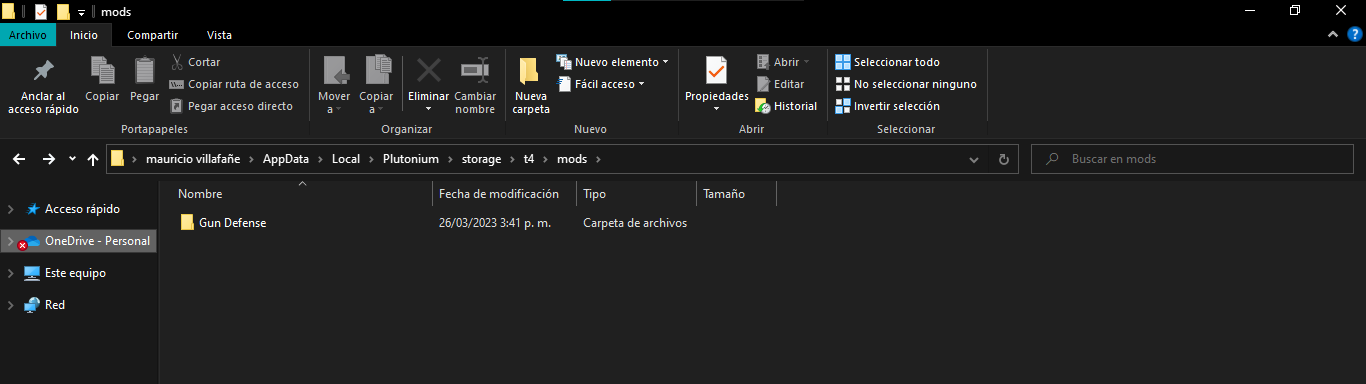
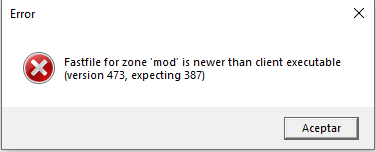
                            54de2e15-9992-4c6c-a39b-e107fadc9533-image.png

                            c8177f8e-5309-4917-a180-f583b5fe8fa2-image.png

                            JezuzLizard 1 Reply Last reply
                            0
                            • CT_lucifer CT_lucifer

                              Dss0 sorry if I get an error I enter the map and the error appears and the game gets stuck.
                              I will leave the address where the map is located.

                              54de2e15-9992-4c6c-a39b-e107fadc9533-image.png

                              c8177f8e-5309-4917-a180-f583b5fe8fa2-image.png

                              JezuzLizard Offline
                              JezuzLizard Offline
                              JezuzLizard
                              Plutonium Staff
                              wrote on last edited by
                              #17

                              CT_lucifer The error is pretty self explanatory. It means that the mod used a linker that linked the fastfile for a higher version than T4 supports. This mod was likely made for T5 and is therefore not backwards compatible.

                              Next time make your own topic instead of necroing some random unrelated one.

                              //Locked

                              1 Reply Last reply
                              0

                              Hello! It looks like you're interested in this conversation, but you don't have an account yet.

                              Getting fed up of having to scroll through the same posts each visit? When you register for an account, you'll always come back to exactly where you were before, and choose to be notified of new replies (either via email, or push notification). You'll also be able to save bookmarks and upvote posts to show your appreciation to other community members.

                              With your input, this post could be even better 💗

                              Register Login
                              Reply
                              • Reply as topic
                              Log in to reply
                              • Oldest to Newest
                              • Newest to Oldest
                              • Most Votes


                              • Login

                              • Don't have an account? Register

                              • Login or register to search.
                              • First post
                                Last post
                              0
                              • Unread 0
                              • Recent
                              • Tags
                              • Popular
                              • Users
                              • Groups
                              • Donate