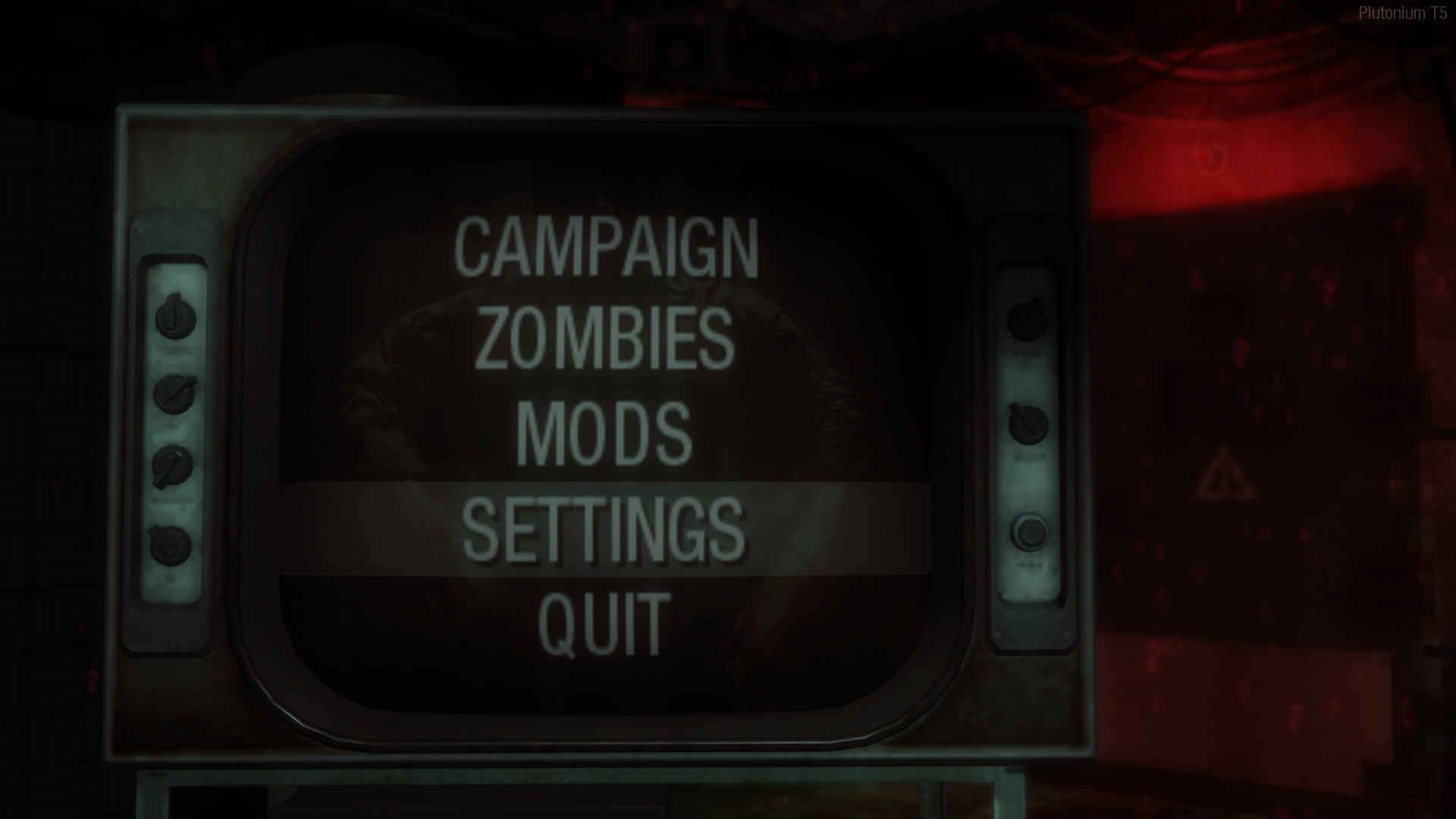
Black Ops T5 screen is zoomed in
-
Does anyone have any idea on how to fix this? Already restarted checked settings; it only happens in this game and I can't get to fix the sudden zoom in of the screen.
-
hi ive tried this and it has not worked, please help
-
hi ive tried this and it has not worked, please help
PEACHMELBA97 the game menu uses your fov so simply change your fov
cg_fov 90;cg_fov_default 90 -
For me it was that the screen resolution was not saved. Take a second look on that. Also check the frame rate (Hz)
-
Got to fix it with \cg_fov 90 and \cg_fov_default 90 in the `~ commands, the discord chat of plutonium is an actual savior join it.
Mystical Walter yo bro thx alot i was in trouble for this for a very long time
thx alot man really appreciate it


Hello! It looks like you're interested in this conversation, but you don't have an account yet.
Getting fed up of having to scroll through the same posts each visit? When you register for an account, you'll always come back to exactly where you were before, and choose to be notified of new replies (either via email, or push notification). You'll also be able to save bookmarks and upvote posts to show your appreciation to other community members.
With your input, this post could be even better 💗
Register Login