Skip to content
  • 0 Unread 0
  • Recent
  • Popular
  • Users
  • Donate
Collapse
Home Docs Stats Discord Donate
Download
  1. Home
  2. MW3 Client Support
  3. GAME FREEZES WHEN I CHANGE THE RESOLUTION

GAME FREEZES WHEN I CHANGE THE RESOLUTION

Scheduled Pinned Locked Moved MW3 Client Support
6 Posts 2 Posters 1.1k Views
  • Oldest to Newest
  • Newest to Oldest
  • Most Votes
Reply
  • Reply as topic
Log in to reply
This topic has been deleted. Only users with topic management privileges can see it.
  • LTBK
    LTBK
    LTBK
    wrote on last edited by
    #1

    I have a big issue I can't play the game at 1080p or even at 720p because when I change the resolution in the options Plutonium freezes ! Help pls

    1 Reply Last reply
    0
    • Mr. Android
      Mr. Android
      Mr. Android
      Plutonium Admin
      wrote on last edited by
      #2

      Open the game, change only the resolution, then apply changes and exit the game, then reopen the game and change any other options you want to change.

      From what I'm aware, the freeze happens if you apply changes twice in one session.

      LTBK 1 Reply Last reply
      0
      • LTBK
        LTBK
        LTBK
        wrote on last edited by
        #3

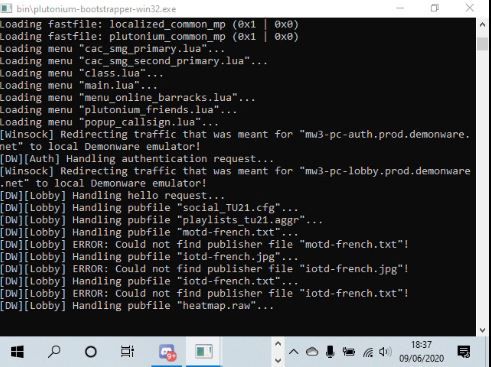
        I apply once and the second I click on Apply it freezes with the Plutonium Boostrap commands on the screen; it does this everytime and I don't wont to play at 600p lol

        1 Reply Last reply
        0
        • LTBK
          LTBK
          LTBK
          wrote on last edited by
          #4
          This post is deleted!
          1 Reply Last reply
          0
          • Mr. Android Mr. Android

            Open the game, change only the resolution, then apply changes and exit the game, then reopen the game and change any other options you want to change.

            From what I'm aware, the freeze happens if you apply changes twice in one session.

            LTBK
            LTBK
            LTBK
            wrote on last edited by
            #5

            @Mr-Android scr.JPG

            1 Reply Last reply
            0
            • Mr. Android
              Mr. Android
              Mr. Android
              Plutonium Admin
              wrote on last edited by Mr. Android
              #6

              OK - try opening your MW3 folder, go to players2 and then edit plutonium.cfg and search for seta r_mode.

              Change the value to "1920x1080" and save the file. The game should read this and open in 1920x1080 🙂

              1 Reply Last reply
              0

              Hello! It looks like you're interested in this conversation, but you don't have an account yet.

              Getting fed up of having to scroll through the same posts each visit? When you register for an account, you'll always come back to exactly where you were before, and choose to be notified of new replies (either via email, or push notification). You'll also be able to save bookmarks and upvote posts to show your appreciation to other community members.

              With your input, this post could be even better 💗

              Register Login
              Reply
              • Reply as topic
              Log in to reply
              • Oldest to Newest
              • Newest to Oldest
              • Most Votes


              • Login

              • Don't have an account? Register

              • Login or register to search.
              • First post
                Last post
              0
              • Unread 0
              • Recent
              • Popular
              • Users
              • Donate