Skip to content
  • Recent
  • Tags
  • Popular
  • Users
  • Groups
Collapse

Plutonium

  1. Home
  2. BO2 Modding Support & Discussion
  3. Need help with the mpClassSets file

Need help with the mpClassSets file

Scheduled Pinned Locked Moved BO2 Modding Support & Discussion
6 Posts 5 Posters 1.4k Views 1 Watching
  • Oldest to Newest
  • Newest to Oldest
  • Most Votes
Reply
  • Reply as topic
Log in to reply
This topic has been deleted. Only users with topic management privileges can see it.
  • Smigg.yundefined Offline
    Smigg.yundefined Offline
    Smigg.y
    wrote on last edited by Smigg.y
    #1

    So, I wanted to add some color to my custom classes and I did a little bit of searching for where the custom class info was held, that led me to the mpClassSets file located in AppData\Local\Plutonium\storage\demonware\18397\user

    But, it's encoded and I don't know how I would go about decoding it...

    If anyone has any tips on how I would go about doing this, I would very much appreciate it 😄

    Cahzundefined 1 Reply Last reply
    0
    • Smigg.yundefined Smigg.y

      So, I wanted to add some color to my custom classes and I did a little bit of searching for where the custom class info was held, that led me to the mpClassSets file located in AppData\Local\Plutonium\storage\demonware\18397\user

      But, it's encoded and I don't know how I would go about decoding it...

      If anyone has any tips on how I would go about doing this, I would very much appreciate it 😄

      Cahzundefined Offline
      Cahzundefined Offline
      Cahz
      VIP
      wrote on last edited by
      #2

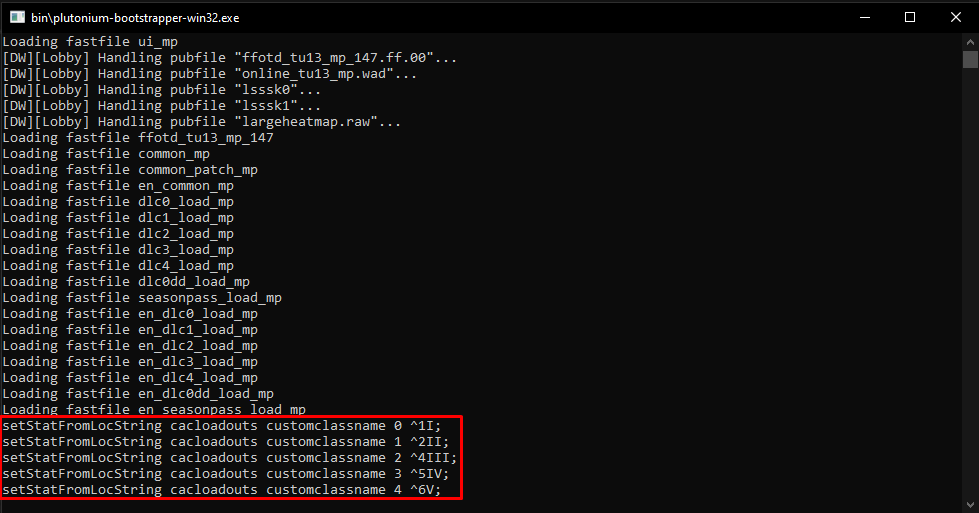
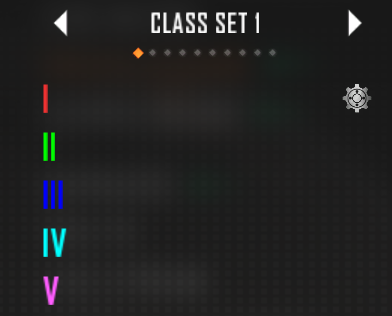
      @Smigg-y You can set colored class names by using
      setStatFromLocString cacloadouts customclassname 0 ^1CUSTOM^2NAME
      The only issue with trying to set colored class names is that the console will not allow the use of ^'s properly.
      To get around this just simply enter the command into your bootstrapper window instead. (see pic)
      5b0b8c60-268e-4aea-90f7-6441d6035839-image.png
      424ecd8a-e770-4de4-9fac-a0f5da729841-image.png
      Hope this helps

      Smigg.yundefined 1 Reply Last reply
      0
      • Fryundefined Offline
        Fryundefined Offline
        Fry
        Plutonium Staff
        wrote on last edited by
        #3

        If you want to do spaces you might need to do this.

        setStatFromLocString cacloadouts customclassname 0 "^1Custom 1";
        
        1 Reply Last reply
        1
        • Cahzundefined Cahz

          @Smigg-y You can set colored class names by using
          setStatFromLocString cacloadouts customclassname 0 ^1CUSTOM^2NAME
          The only issue with trying to set colored class names is that the console will not allow the use of ^'s properly.
          To get around this just simply enter the command into your bootstrapper window instead. (see pic)
          5b0b8c60-268e-4aea-90f7-6441d6035839-image.png
          424ecd8a-e770-4de4-9fac-a0f5da729841-image.png
          Hope this helps

          Smigg.yundefined Offline
          Smigg.yundefined Offline
          Smigg.y
          wrote on last edited by
          #4

          Cahz Thank you very much 😄

          1 Reply Last reply
          0
          • anthony.cueundefined Offline
            anthony.cueundefined Offline
            anthony.cue
            wrote on last edited by
            #5
            This post is deleted!
            1 Reply Last reply
            0
            • Retro99orteRundefined Offline
              Retro99orteRundefined Offline
              Retro99orteR
              wrote on last edited by
              #6

              What do i press to code

              1 Reply Last reply
              0
              • Xerxesundefined Xerxes locked this topic on

              Hello! It looks like you're interested in this conversation, but you don't have an account yet.

              Getting fed up of having to scroll through the same posts each visit? When you register for an account, you'll always come back to exactly where you were before, and choose to be notified of new replies (either via email, or push notification). You'll also be able to save bookmarks and upvote posts to show your appreciation to other community members.

              With your input, this post could be even better 💗

              Register Login
              Reply
              • Reply as topic
              Log in to reply
              • Oldest to Newest
              • Newest to Oldest
              • Most Votes


              • Login

              • Don't have an account? Register

              • Login or register to search.
              • First post
                Last post
              0
              • Recent
              • Tags
              • Popular
              • Users
              • Groups