Skip to content
  • 0 Unread 0
  • Recent
  • Tags
  • Popular
  • Users
  • Groups
  • Donate
Collapse

Plutonium

  1. Home
  2. BO2 Client Support
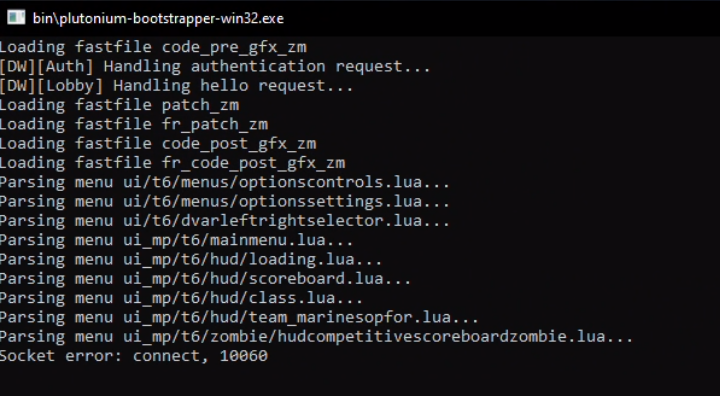
  3. Socket error: connect, 10060

Socket error: connect, 10060

Scheduled Pinned Locked Moved BO2 Client Support
19 Posts 12 Posters 4.4k Views 4 Watching
  • Oldest to Newest
  • Newest to Oldest
  • Most Votes
Reply
  • Reply as topic
Log in to reply
This topic has been deleted. Only users with topic management privileges can see it.
  • StormGGZ StormGGZ

    Dss0 I dont have a vpn and ive tried changing DNS, but it still wont launch the game. I'm stuck on a black screen.

    Dss0 Offline
    Dss0 Offline
    Dss0
    Plutonium Staff
    wrote on last edited by
    #6

    StormGGZ that's not the same issue tho, pls create your own topic or search for "black screen" using the search function, there are already topics on this.

    StormGGZ 1 Reply Last reply
    0
    • Dss0 Dss0

      StormGGZ that's not the same issue tho, pls create your own topic or search for "black screen" using the search function, there are already topics on this.

      StormGGZ Offline
      StormGGZ Offline
      StormGGZ
      wrote on last edited by
      #7

      Dss0 it still gives the the socket error along with what I said before.

      Dss0 1 Reply Last reply
      0
      • StormGGZ StormGGZ

        Dss0 it still gives the the socket error along with what I said before.

        Dss0 Offline
        Dss0 Offline
        Dss0
        Plutonium Staff
        wrote on last edited by
        #8

        StormGGZ are you using any 3rd party firewall or antivirus software? If yes make sure the game isn't blocked by it, also try disabling windows firewall.

        StormGGZ 2 Replies Last reply
        0
        • Dss0 Dss0

          StormGGZ are you using any 3rd party firewall or antivirus software? If yes make sure the game isn't blocked by it, also try disabling windows firewall.

          StormGGZ Offline
          StormGGZ Offline
          StormGGZ
          wrote on last edited by
          #9

          Dss0 ok let me check

          1 Reply Last reply
          0
          • Dss0 Dss0

            StormGGZ are you using any 3rd party firewall or antivirus software? If yes make sure the game isn't blocked by it, also try disabling windows firewall.

            StormGGZ Offline
            StormGGZ Offline
            StormGGZ
            wrote on last edited by
            #10

            Dss0 it still didnt work

            meow_xdd 1 Reply Last reply
            0
            • StormGGZ StormGGZ

              Dss0 it still didnt work

              meow_xdd Offline
              meow_xdd Offline
              meow_xdd
              wrote on last edited by
              #11

              StormGGZ i have the same issue and it only just began happening.

              StormGGZ 1 Reply Last reply
              0
              • meow_xdd meow_xdd

                StormGGZ i have the same issue and it only just began happening.

                StormGGZ Offline
                StormGGZ Offline
                StormGGZ
                wrote on last edited by
                #12

                meow_xdd glad its not only me and my roommate lol

                1 Reply Last reply
                0
                • PapaProvnik Offline
                  PapaProvnik Offline
                  PapaProvnik
                  wrote on last edited by
                  #13

                  Same issue here. But is it a critical error or i can still play the game? Since for some reason my friends list is empty and server list is empty as well even tho couple of days ago i could play normally with the socket error

                  1 Reply Last reply
                  0
                  • ThePlainOlBussy Offline
                    ThePlainOlBussy Offline
                    ThePlainOlBussy
                    wrote on last edited by
                    #14

                    I have the same problem and I have no clue on how to fix it tbh.

                    1 Reply Last reply
                    0
                    • meow_xdd Offline
                      meow_xdd Offline
                      meow_xdd
                      wrote on last edited by
                      #15

                      i still have the same issue. tried with my vpn on and off, switched ports of my ethernet cable on my router, switched dns, reinstalled/retorrented. rip 😕

                      1 Reply Last reply
                      0
                      • ChromeHrtsPants Offline
                        ChromeHrtsPants Offline
                        ChromeHrtsPants
                        wrote on last edited by
                        #16
                        This post is deleted!
                        1 Reply Last reply
                        0
                        • Kenshin9977 Offline
                          Kenshin9977 Offline
                          Kenshin9977
                          wrote on last edited by Kenshin9977
                          #17

                          A friend has the same issue
                          Discord_FS4aJhyzW3.png

                          Battle Mage 1 Reply Last reply
                          0
                          • Its_Noti Offline
                            Its_Noti Offline
                            Its_Noti
                            wrote on last edited by
                            #18

                            I was able to get my game to load from the same socket error. I downloaded a vpn and turned it on when I went to launch the game and it worked. So it was a problem with my internet. Once I was loaded into the game I was able to turn my vpn off and use my internet with no problems. I'd assume it was a problem with my internet

                            1 Reply Last reply
                            0
                            • Kenshin9977 Kenshin9977

                              A friend has the same issue
                              Discord_FS4aJhyzW3.png

                              Battle Mage Offline
                              Battle Mage Offline
                              Battle Mage
                              wrote on last edited by
                              #19

                              Kenshin9977 i had this same error and i solved by Enabling WAN IPV6 on my route

                              1 Reply Last reply
                              0

                              Hello! It looks like you're interested in this conversation, but you don't have an account yet.

                              Getting fed up of having to scroll through the same posts each visit? When you register for an account, you'll always come back to exactly where you were before, and choose to be notified of new replies (either via email, or push notification). You'll also be able to save bookmarks and upvote posts to show your appreciation to other community members.

                              With your input, this post could be even better 💗

                              Register Login
                              Reply
                              • Reply as topic
                              Log in to reply
                              • Oldest to Newest
                              • Newest to Oldest
                              • Most Votes


                              • Login

                              • Don't have an account? Register

                              • Login or register to search.
                              • First post
                                Last post
                              0
                              • Unread 0
                              • Recent
                              • Tags
                              • Popular
                              • Users
                              • Groups
                              • Donate