Dedicated Server closed or dropped
-
Need help, cant open my dedicated server.
My pluto games files is there :
E:\Games\pluto_t6_full_gameMy start_zm_server is there :
E:\Gameserver\T6My script inside start_zm_server: (without my key --> hidden)
Echo off
::Paste the server key from https://platform.plutonium.pw/serverkeys here
set key= hidden
::Name of the config file the server should use. (default: dedicated_zm.cfg)
set cfg=dedicated_zm.cfg
::Name of the server shown in the title of the cmd window. This will NOT bet shown ingame.
set name=ALCATRAZ - OFFICIAL SERVER
::Port used by the server (default: 4976)
set port=4978
::Only change this when you don't want to keep the bat files in the game folder. MOST WON'T NEED TO EDIT THIS!
set gamepath=%cd%title PlutoniumT6 - %name% - Server restarter
echo Visit plutonium.pw / Join the Discord (a6JM2Tv) for NEWS and Updates!
echo Server "%name%" will load %cfg% and listen on port %port% UDP!
echo To shut down the server close this window first!
echo (%date%) - (%time%) %name% server start.cd C:\Users\danai\AppData\Local\Plutonium
:server
start /wait /abovenormal bin\plutonium-bootstrapper-win32.exe t6zm "%gamepath%" -dedicated +set key %key% +sv_config %cfg% +net_port %port%
echo (%date%) - (%time%) WARNING: %name% server closed or dropped... server restarts.
goto serverAnd my !updatePluto script :
::plutonium.exe -install-dir ./plutonium -update-only
plutonium.exe -update-only**Port-Fowarding is set up with my firewall and my router, dont think this is the problem. But maybe, I dont know.
Please help me to fix this

-
Need help, cant open my dedicated server.
My pluto games files is there :
E:\Games\pluto_t6_full_gameMy start_zm_server is there :
E:\Gameserver\T6My script inside start_zm_server: (without my key --> hidden)
Echo off
::Paste the server key from https://platform.plutonium.pw/serverkeys here
set key= hidden
::Name of the config file the server should use. (default: dedicated_zm.cfg)
set cfg=dedicated_zm.cfg
::Name of the server shown in the title of the cmd window. This will NOT bet shown ingame.
set name=ALCATRAZ - OFFICIAL SERVER
::Port used by the server (default: 4976)
set port=4978
::Only change this when you don't want to keep the bat files in the game folder. MOST WON'T NEED TO EDIT THIS!
set gamepath=%cd%title PlutoniumT6 - %name% - Server restarter
echo Visit plutonium.pw / Join the Discord (a6JM2Tv) for NEWS and Updates!
echo Server "%name%" will load %cfg% and listen on port %port% UDP!
echo To shut down the server close this window first!
echo (%date%) - (%time%) %name% server start.cd C:\Users\danai\AppData\Local\Plutonium
:server
start /wait /abovenormal bin\plutonium-bootstrapper-win32.exe t6zm "%gamepath%" -dedicated +set key %key% +sv_config %cfg% +net_port %port%
echo (%date%) - (%time%) WARNING: %name% server closed or dropped... server restarts.
goto serverAnd my !updatePluto script :
::plutonium.exe -install-dir ./plutonium -update-only
plutonium.exe -update-only**Port-Fowarding is set up with my firewall and my router, dont think this is the problem. But maybe, I dont know.
Please help me to fix this
-
@crockys why is your server bat not in the game files?
-
[[topic:post-is-deleted]]
@crockys the documentation gives you an example
This is what your folder should look like
Putting .bat files without any game files in the same folder doesn't work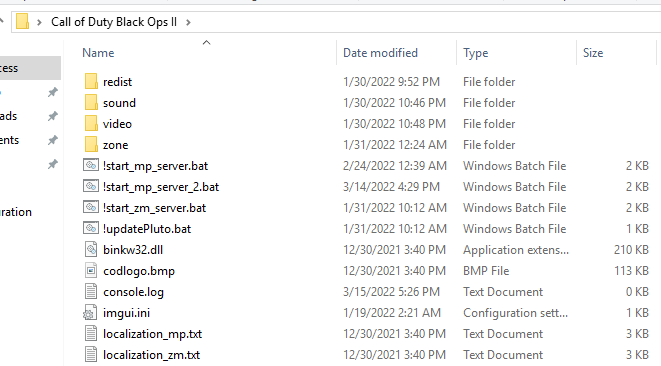
Then depending on whether you're on your PC or on a VPS you open the right port
-
@crockys the documentation gives you an example
This is what your folder should look like
Putting .bat files without any game files in the same folder doesn't workThen depending on whether you're on your PC or on a VPS you open the right port
Resxt ahhh okok, make sense, thanks u for ur help, it worked.
*** I put back the original config in the !start_zm_server :
cd C:\Users\danai\AppData\Local\Plutonium
cd /D %LOCALAPPDATA%\Plutonium


Hello! It looks like you're interested in this conversation, but you don't have an account yet.
Getting fed up of having to scroll through the same posts each visit? When you register for an account, you'll always come back to exactly where you were before, and choose to be notified of new replies (either via email, or push notification). You'll also be able to save bookmarks and upvote posts to show your appreciation to other community members.
With your input, this post could be even better 💗
Register Login