Skip to content
  • 0 Unread 0
  • Recent
  • Tags
  • Popular
  • Users
  • Groups
  • Donate
Collapse

Plutonium

  1. Home
  2. BO2 Client Support
  3. Cannot join friend

Cannot join friend

Scheduled Pinned Locked Moved BO2 Client Support
10 Posts 3 Posters 718 Views 1 Watching
  • Oldest to Newest
  • Newest to Oldest
  • Most Votes
Reply
  • Reply as topic
Log in to reply
This topic has been deleted. Only users with topic management privileges can see it.
  • User76 Offline
    User76 Offline
    User76
    wrote on last edited by
    #1

    Using a vpn I'm trying to use LAN play to join my friend, when I connect and use his ip, it ends up in nothing. And the traditional way to play, UPNP shows as disabled, I've tried port forwarding and everything, it's just unable to join.

    Dss0 1 Reply Last reply
    0
    • User76 User76

      Using a vpn I'm trying to use LAN play to join my friend, when I connect and use his ip, it ends up in nothing. And the traditional way to play, UPNP shows as disabled, I've tried port forwarding and everything, it's just unable to join.

      Dss0 Offline
      Dss0 Offline
      Dss0
      Plutonium Staff
      wrote on last edited by
      #2

      User76 direct connect in lan mode is currently broken, try it in online mode.

      User76 2 Replies Last reply
      0
      • Dss0 Dss0

        User76 direct connect in lan mode is currently broken, try it in online mode.

        User76 Offline
        User76 Offline
        User76
        wrote on last edited by
        #3

        Dss0 Ah, like I said in online mode it doesn't work, also when will it be fixed?

        1 Reply Last reply
        0
        • Dss0 Dss0

          User76 direct connect in lan mode is currently broken, try it in online mode.

          User76 Offline
          User76 Offline
          User76
          wrote on last edited by
          #4

          Dss0 Can you help me setup online mode? I've tried port forwarding and marking my router as private but the game still says that UPNP is disabled, I would appreciate it a lot.

          Dss0 1 Reply Last reply
          0
          • User76 User76

            Dss0 Can you help me setup online mode? I've tried port forwarding and marking my router as private but the game still says that UPNP is disabled, I would appreciate it a lot.

            Dss0 Offline
            Dss0 Offline
            Dss0
            Plutonium Staff
            wrote on last edited by
            #5

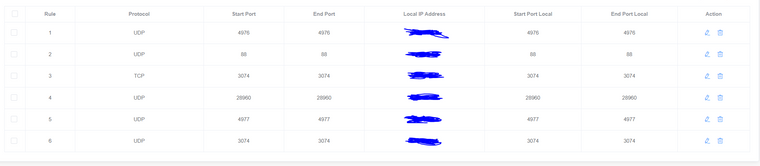
            User76 idk when it'll be fixed. That upnp check no longer works i think also if you port forward upnp is no longer relvant. Post a screenshot of your port forwarding settings.

            Additionally if you're trying to connect via the built in friends feature of bo2 you may have to forward port 3074 udp.

            User76 1 Reply Last reply
            0
            • User76 Offline
              User76 Offline
              User76
              wrote on last edited by
              #6

              I'll send it in a bit

              1 Reply Last reply
              0
              • Dss0 Dss0

                User76 idk when it'll be fixed. That upnp check no longer works i think also if you port forward upnp is no longer relvant. Post a screenshot of your port forwarding settings.

                Additionally if you're trying to connect via the built in friends feature of bo2 you may have to forward port 3074 udp.

                User76 Offline
                User76 Offline
                User76
                wrote on last edited by
                #7

                Dss0 4fc6af9b-bbb5-471c-b079-ebad742d695a-image.png

                1 Reply Last reply
                0
                • User76 Offline
                  User76 Offline
                  User76
                  wrote on last edited by
                  #8

                  Okay it seems I have fixed it, I didn't use the built in bo2 friends system but instead plutonium's system, everything seems to be fine now.

                  1 Reply Last reply
                  0
                  • afrogangster1 Offline
                    afrogangster1 Offline
                    afrogangster1
                    wrote on last edited by
                    #9

                    how did you inv your freind using plutonium though?

                    Dss0 1 Reply Last reply
                    0
                    • afrogangster1 afrogangster1

                      how did you inv your freind using plutonium though?

                      Dss0 Offline
                      Dss0 Offline
                      Dss0
                      Plutonium Staff
                      wrote on last edited by
                      #10

                      afrogangster1 you follow each other on the forum, then you can invite or join each other via the built in friends system of bo2 (not the f10 menu).


                      1 Reply Last reply
                      0

                      Hello! It looks like you're interested in this conversation, but you don't have an account yet.

                      Getting fed up of having to scroll through the same posts each visit? When you register for an account, you'll always come back to exactly where you were before, and choose to be notified of new replies (either via email, or push notification). You'll also be able to save bookmarks and upvote posts to show your appreciation to other community members.

                      With your input, this post could be even better 💗

                      Register Login
                      Reply
                      • Reply as topic
                      Log in to reply
                      • Oldest to Newest
                      • Newest to Oldest
                      • Most Votes


                      • Login

                      • Don't have an account? Register

                      • Login or register to search.
                      • First post
                        Last post
                      0
                      • Unread 0
                      • Recent
                      • Tags
                      • Popular
                      • Users
                      • Groups
                      • Donate