Launcher does not open MW3
-
So I had a fresh install of MW3 dedicated server tool from steam, followed all the steps, Opened the launcher, logged in, clicked on play, and it froze and closed.
I made a copy of my TeknoMW3 folder(that works absolutely fine) and put plutonium.exe followed the steps again, and the same error. It just closes, no errors or pop-ups.
Any one with the same errors or someone who knows a fix?
Thanks. -
Can either of you show a video of what is happening?
-
Can either of you show a video of what is happening?
-
Can you show a screenshot of your MW3 folder?
-
Can you show a screenshot of your MW3 folder?
-
Thanks, it might be worth starting the MW3 Dedi server via Steam as steam will install any dependencies it needs. Then once the server opens, you can close it and then try hitting play from the Plutonium launcher again.
-
That sounds more like a basegame problem then. Try to verify the game via Steam (maybe some of it is corrupted).
Let me know if that helps, do you have Discord?
-
I am experiencing the same issue, I can go into the Pluto launcher, but when i launch Iw5 it just says "launching iw5 multiplayer" for like 3 seconds (in the Pluto client), then it freezes and the launcher exits but the game doesnt launch

-
I am experiencing the same issue, I can go into the Pluto launcher, but when i launch Iw5 it just says "launching iw5 multiplayer" for like 3 seconds (in the Pluto client), then it freezes and the launcher exits but the game doesnt launch
FLINTNIEL Did it work before Friday?
-
FLINTNIEL Did it work before Friday?
@Mr-Android Umm, yes I think so since this has never happened to me before. I just experienced it on 28th and now again on the 29th
Edit: ive also seen others starting to have the exact same issue, some of my friends for example. This started just around 2 days ago
-
I am experiencing the same issue, I can go into the Pluto launcher, but when i launch Iw5 it just says "launching iw5 multiplayer" for like 3 seconds (in the Pluto client), then it freezes and the launcher exits but the game doesnt launch
-
OK thanks guys - i'll investigate.
-
Hello all.
This might be caused by Windows detecting our new update as a virus. This is a false positive.
Follow the below screenshot to try and solve it.
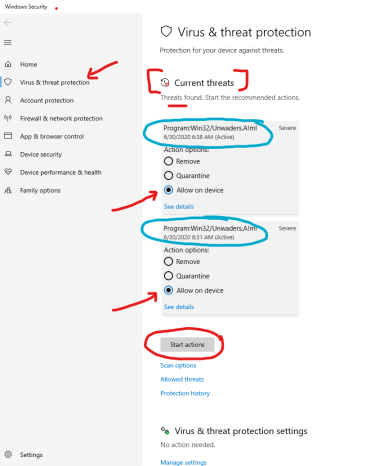
The long term solution would be to add %appdata%/plutonium as a folder exception in Windows Defender or any other antivirus product you have.
-
Hello all.
This might be caused by Windows detecting our new update as a virus. This is a false positive.
Follow the below screenshot to try and solve it.
The long term solution would be to add %appdata%/plutonium as a folder exception in Windows Defender or any other antivirus product you have.
-
This worked for me too. (well I disabled defender but same thing).
-
This worked for me too. (well I disabled defender but same thing).
my choppa eat bro mine still doesn't work, iceberg been having the same issue what do I do
-
Hello all.
This might be caused by Windows detecting our new update as a virus. This is a false positive.
Follow the below screenshot to try and solve it.
The long term solution would be to add %appdata%/plutonium as a folder exception in Windows Defender or any other antivirus product you have.




Hello! It looks like you're interested in this conversation, but you don't have an account yet.
Getting fed up of having to scroll through the same posts each visit? When you register for an account, you'll always come back to exactly where you were before, and choose to be notified of new replies (either via email, or push notification). You'll also be able to save bookmarks and upvote posts to show your appreciation to other community members.
With your input, this post could be even better 💗
Register Login