BO2 DLCs not working
-
So I have the steam version of bo2, bought it with no dlcs. I installed t6 into my folders, didn't create a subfolder and whenever I launch the game nothing is still there. No extra zombie maps or anything just the default town, farm, and tranzit.
-
So I have the steam version of bo2, bought it with no dlcs. I installed t6 into my folders, didn't create a subfolder and whenever I launch the game nothing is still there. No extra zombie maps or anything just the default town, farm, and tranzit.
@Balena can you post screenshots of how you installed the dlcs? or just post a screenshot of your game folder and zone/all.
-
You're starting the game on Plutonium right?
You can't just take DLC files and play on Steam servers directly. The DLC files are just for Plutonium (works with Steam files but only for Plutonium)If yes then you didn't install the DLCs correctly and screenshots of your files will help
-
So I have the steam version of bo2, bought it with no dlcs. I installed t6 into my folders, didn't create a subfolder and whenever I launch the game nothing is still there. No extra zombie maps or anything just the default town, farm, and tranzit.
@Balena it’s possible that you didn’t do this while installing the dlc files
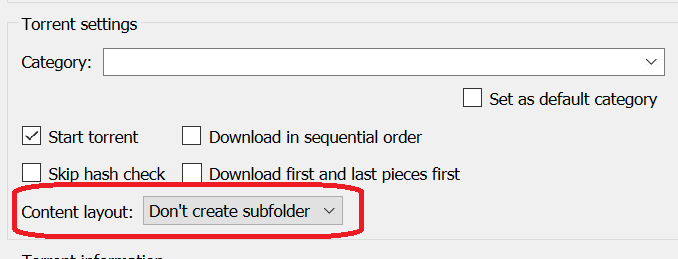
If you didn’t, you must have a t6_dlcs folder in your game files. In that case open up your game directory for black ops 2 and you should have a folder called t6_dlcs. Double click the folder to look inside the contents and you should see more folders or files. Pull those folders/files back where your main files are and it should work correctly. After that you can delete the t6_dlcs folder.




Hello! It looks like you're interested in this conversation, but you don't have an account yet.
Getting fed up of having to scroll through the same posts each visit? When you register for an account, you'll always come back to exactly where you were before, and choose to be notified of new replies (either via email, or push notification). You'll also be able to save bookmarks and upvote posts to show your appreciation to other community members.
With your input, this post could be even better 💗
Register Login