could someone help me with this
-
could someone help me with this, when i open plutonium.exe it appears, i tried to run it as administrator but it didn't work
Error while downloading file storage/iw5/zone/mp_rust.ff: context deadline exceeded (Client.Timeout or context cancellation while reading body)
-
Shift+right click in the folder wherever pluto is in, open powershell window here, type .\plutonium.exe -timeout 600
-
Shift+right click in the folder wherever pluto is in, open powershell window here, type .\plutonium.exe -timeout 600
HannesC this appears
\ Plutonium.exe-timeout600: The term '\ Plutonium.exe-timeout600' is not recognized as a cmdlet name, function, file
script or operable program. Check the spelling of the name or, if a path has been included, see if the path
is correct and try again.
In line: 1 character: 2- \ Plutonium.exe-timeout600
-
   + CategoryInfo: ObjectNotFound: (\ Plutonium.exe-timeout600: String) [], CommandNotFoundException
   + FullyQualifiedErrorId: CommandNotFoundException
-
HannesC this appears
\ Plutonium.exe-timeout600: The term '\ Plutonium.exe-timeout600' is not recognized as a cmdlet name, function, file
script or operable program. Check the spelling of the name or, if a path has been included, see if the path
is correct and try again.
In line: 1 character: 2- \ Plutonium.exe-timeout600
-
   + CategoryInfo: ObjectNotFound: (\ Plutonium.exe-timeout600: String) [], CommandNotFoundException
   + FullyQualifiedErrorId: CommandNotFoundException
HannesC said in could someone help me with this:
.\plutonium.exe -timeout 600
_TioFer_ said in could someone help me with this:
Plutonium.exe-timeout600
Do you notice anything?
-
HannesC said in could someone help me with this:
.\plutonium.exe -timeout 600
_TioFer_ said in could someone help me with this:
Plutonium.exe-timeout600
Do you notice anything?
-
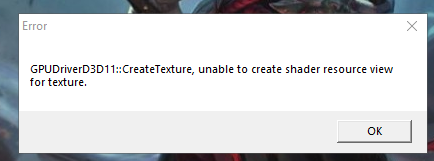
Could you screenshot the error?
-
Your gpu is too old, you might wanna consider upgrading it. Here's a workaround-
This should fix it, however you may encounter crashes at random times
Download this file https://drive.google.com/file/d/1fTzQtshdqhoUziaHpwxUY7gN0BidStnR/view?usp=sharing
Run it
Click "Edit List..."
Click the three dots right of the "enter a process or folder name" field and select "plutonium-launcher-win32.exe" located in "C:\Users\al\AppData\Local\Plutonium\bin"
tick the "force warp" checkbox and select "11_0" from the "feature level limit" dropdown menu
hit ok and try launching the plutonium launcher -
Your gpu is too old, you might wanna consider upgrading it. Here's a workaround-
This should fix it, however you may encounter crashes at random times
Download this file https://drive.google.com/file/d/1fTzQtshdqhoUziaHpwxUY7gN0BidStnR/view?usp=sharing
Run it
Click "Edit List..."
Click the three dots right of the "enter a process or folder name" field and select "plutonium-launcher-win32.exe" located in "C:\Users\al\AppData\Local\Plutonium\bin"
tick the "force warp" checkbox and select "11_0" from the "feature level limit" dropdown menu
hit ok and try launching the plutonium launcher





Hello! It looks like you're interested in this conversation, but you don't have an account yet.
Getting fed up of having to scroll through the same posts each visit? When you register for an account, you'll always come back to exactly where you were before, and choose to be notified of new replies (either via email, or push notification). You'll also be able to save bookmarks and upvote posts to show your appreciation to other community members.
With your input, this post could be even better 💗
Register Login