Skip to content
  • 0 Unread 0
  • Recent
  • Tags
  • Popular
  • Users
  • Groups
Collapse

Plutonium

  1. Home
  2. MW3 Client Support
  3. game freezes after pressing play.

game freezes after pressing play.

Scheduled Pinned Locked Moved MW3 Client Support
9 Posts 3 Posters 452 Views 1 Watching
  • Oldest to Newest
  • Newest to Oldest
  • Most Votes
Reply
  • Reply as topic
Log in to reply
This topic has been deleted. Only users with topic management privileges can see it.
  • Sloppuundefined Offline
    Sloppuundefined Offline
    Sloppu
    wrote on last edited by
    #1

    After i press play the console shows up, runs through some things then just freezes with these last things showing and will sit there until i kill it. plutonium-bootstrapper-win32_2020-09-14_12-16-36.png
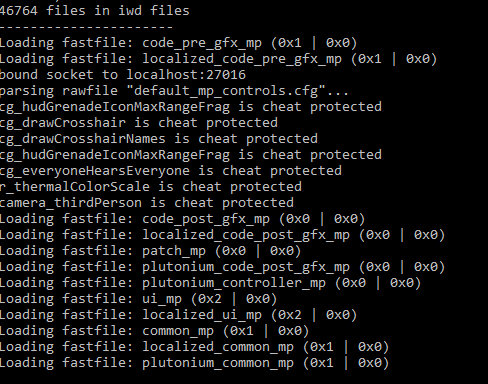
    Any and all help would be appreciated, i have also allowed it through windows defender and i am on Windows 10.

    hehenoobs20undefined 1 Reply Last reply
    0
    • Sloppuundefined Sloppu

      After i press play the console shows up, runs through some things then just freezes with these last things showing and will sit there until i kill it. plutonium-bootstrapper-win32_2020-09-14_12-16-36.png
      Any and all help would be appreciated, i have also allowed it through windows defender and i am on Windows 10.

      hehenoobs20undefined Offline
      hehenoobs20undefined Offline
      hehenoobs20
      wrote on last edited by
      #2

      Sloppu yeah mine does the same thing. When i hit play on bo2 it loads but i get kicked from the launcher is this some bug plz help me too.

      1 Reply Last reply
      0
      • Sloppuundefined Offline
        Sloppuundefined Offline
        Sloppu
        wrote on last edited by
        #3

        I have tried a fresh install after deleting everything this time excluding the DLC, still same issue.

        1 Reply Last reply
        0
        • HannesCundefined Offline
          HannesCundefined Offline
          HannesC
          Plutonium Staff
          wrote on last edited by Dss0
          #4

          Not sure, try installing these redists and dxsetup.exe inside the directx folder https://drive.google.com/u/0/uc?id=1gG_DXaZfAUETfXaYJzCP36ImvE_bO_x9&export=download

          1 Reply Last reply
          0
          • Sloppuundefined Offline
            Sloppuundefined Offline
            Sloppu
            wrote on last edited by
            #5

            i ran the DXSETUP.exe in the folder, installed some components i was supposedly missing, even clicked on the two VC redist.exe in the main folder, they asked if i wanted to repair or uninstall. Launched Pluto, still stuck on same image as above. Been reading thread for past couple hours and trying various methods. nothing has worked so far. I am sure its something on my end as you guys do amazing work as noted by TGD and his amazing skill to show off pluto in all its glory.

            1 Reply Last reply
            0
            • HannesCundefined Offline
              HannesCundefined Offline
              HannesC
              Plutonium Staff
              wrote on last edited by
              #6

              You've downloaded your game from steam right? The MW3 dedicated server tools?

              1 Reply Last reply
              0
              • Sloppuundefined Offline
                Sloppuundefined Offline
                Sloppu
                wrote on last edited by
                #7

                i have yes, following the instructions provided by the team

                1 Reply Last reply
                0
                • HannesCundefined Offline
                  HannesCundefined Offline
                  HannesC
                  Plutonium Staff
                  wrote on last edited by
                  #8

                  Try adding pluto to exclusions. Also you don't have any overlay apps running in the background do you? msi afterburner/rivatuner for example

                  1 Reply Last reply
                  0
                  • Sloppuundefined Offline
                    Sloppuundefined Offline
                    Sloppu
                    wrote on last edited by
                    #9

                    i have added pluto to windows defender exclusion list as well as malware bytes, only programs i have open are chrome, (closed when i launch pluto) steam, discord and task manager.

                    1 Reply Last reply
                    0

                    Hello! It looks like you're interested in this conversation, but you don't have an account yet.

                    Getting fed up of having to scroll through the same posts each visit? When you register for an account, you'll always come back to exactly where you were before, and choose to be notified of new replies (either via email, or push notification). You'll also be able to save bookmarks and upvote posts to show your appreciation to other community members.

                    With your input, this post could be even better 💗

                    Register Login
                    Reply
                    • Reply as topic
                    Log in to reply
                    • Oldest to Newest
                    • Newest to Oldest
                    • Most Votes


                    • Login

                    • Don't have an account? Register

                    • Login or register to search.
                    • First post
                      Last post
                    0
                    • Unread 0
                    • Recent
                    • Tags
                    • Popular
                    • Users
                    • Groups