
Skip to content
  • Recent
  • Tags
  • Popular
  • Users
  • Groups
  • Donate
Collapse

Plutonium

  1. Home
  2. BO2 Client Support
  3. No DLC's

No DLC's

Scheduled Pinned Locked Moved BO2 Client Support
8 Posts 2 Posters 2.4k Views
  • Oldest to Newest
  • Newest to Oldest
  • Most Votes
Reply
  • Reply as topic
Log in to reply
This topic has been deleted. Only users with topic management privileges can see it.
  • Lil Swanundefined Offline
    Lil Swanundefined Offline
    Lil Swan
    wrote on last edited by
    #1

    Hi, I've been playing this for a couple of days and I've played a lot of zombies, today when I tried to log in it appears that I have no DLC's, I guess because the DLC maps don't work, the core ones does.
    This is what happens if I for example go into the buried map in mapselect.

    Anyone know what the problem is?
    Screenshot 2020-10-28 152638.png

    Dss0undefined 1 Reply Last reply
    0
    • Lil Swanundefined Lil Swan

      Hi, I've been playing this for a couple of days and I've played a lot of zombies, today when I tried to log in it appears that I have no DLC's, I guess because the DLC maps don't work, the core ones does.
      This is what happens if I for example go into the buried map in mapselect.

      Anyone know what the problem is?
      Screenshot 2020-10-28 152638.png

      Dss0undefined Offline
      Dss0undefined Offline
      Dss0
      Plutonium Staff
      wrote on last edited by
      #2

      Lil Swan

      • download the torrent file and open it in the torrent client of your choice https://dss0.cc/alterwarez/download/pluto_t6_full_game.torrent
      • as download location select your bo2 game folder
      • deselect "create subfolder/keep top level folder" (very important)
      • start the download

      This will check your game files and download missing or corrupted ones (including the DLCs).

      1 Reply Last reply
      0
      • Lil Swanundefined Offline
        Lil Swanundefined Offline
        Lil Swan
        wrote on last edited by
        #3

        I've downloaded it and just opened it, I'm in the folder with the Plutonium in it, this is where you loose me, do I start it and in the client choose where my ACTUAL BO2 is at?
        On your 3rd step you loose me too, I don't understand, I'm very bad at stuff like this 😄

        Dss0undefined 1 Reply Last reply
        0
        • Lil Swanundefined Lil Swan

          I've downloaded it and just opened it, I'm in the folder with the Plutonium in it, this is where you loose me, do I start it and in the client choose where my ACTUAL BO2 is at?
          On your 3rd step you loose me too, I don't understand, I'm very bad at stuff like this 😄

          Dss0undefined Offline
          Dss0undefined Offline
          Dss0
          Plutonium Staff
          wrote on last edited by
          #4

          Lil Swan "as download location select your bo2 game folder" i can't be any more clear. You select the folder that contains your bo2 game files... so if you got the t6_full_game torrent that is the t6_full_game folder.
          "deselect "create subfolder/keep top level folder" also can't be put any easier... that is a checkbox in the window that opens when you open a torrent file.. you just uncheck it. It's either called "create subfolder" OR "keep top level folder" depending on which torrent client you use.

          1 Reply Last reply
          0
          • Lil Swanundefined Offline
            Lil Swanundefined Offline
            Lil Swan
            wrote on last edited by
            #5

            I already had the game in a t6_full_game folder, although I can not find any sort of checkbox for that thing you're talking about, I tried to run Plutonium and got this error 😕

            05880957-99af-400f-afba-e5bba695563c-image.png

            Dss0undefined 1 Reply Last reply
            0
            • Lil Swanundefined Lil Swan

              I already had the game in a t6_full_game folder, although I can not find any sort of checkbox for that thing you're talking about, I tried to run Plutonium and got this error 😕
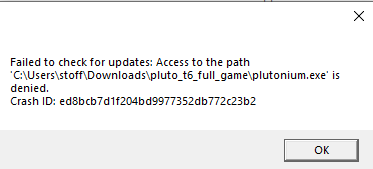
              05880957-99af-400f-afba-e5bba695563c-image.png

              Dss0undefined Offline
              Dss0undefined Offline
              Dss0
              Plutonium Staff
              wrote on last edited by
              #6

              Lil Swan delete the launcher and get it from here https://cdn.plutonium.pw/updater/plutonium.exe.
              That checkbox is in your torrent client.. it looks like this on qbittorrent:

              alt text

              On the new version of qbittorrent this will be called "keep top level folder" instead.

              1 Reply Last reply
              0
              • Lil Swanundefined Offline
                Lil Swanundefined Offline
                Lil Swan
                wrote on last edited by
                #7

                I do use that but when I download it it's not a torrent, it's just the exe, like this

                eda59002-2e8a-4b17-a060-3d6aee7493cb-image.png

                Dss0undefined 1 Reply Last reply
                0
                • Lil Swanundefined Lil Swan

                  I do use that but when I download it it's not a torrent, it's just the exe, like this

                  eda59002-2e8a-4b17-a060-3d6aee7493cb-image.png

                  Dss0undefined Offline
                  Dss0undefined Offline
                  Dss0
                  Plutonium Staff
                  wrote on last edited by
                  #8

                  Lil Swan huh? thats not what i told you to do.. i told you to download this https://dss0.cc/alterwarez/download/pluto_t6_full_game.torrent

                  1 Reply Last reply
                  0

                  Hello! It looks like you're interested in this conversation, but you don't have an account yet.

                  Getting fed up of having to scroll through the same posts each visit? When you register for an account, you'll always come back to exactly where you were before, and choose to be notified of new replies (either via email, or push notification). You'll also be able to save bookmarks and upvote posts to show your appreciation to other community members.

                  With your input, this post could be even better 💗

                  Register Login
                  Reply
                  • Reply as topic
                  Log in to reply
                  • Oldest to Newest
                  • Newest to Oldest
                  • Most Votes


                  • Login

                  • Don't have an account? Register

                  • Login or register to search.
                  • First post
                    Last post
                  0
                  • Recent
                  • Tags
                  • Popular
                  • Users
                  • Groups
                  • Donate
