Zombies DLC not working
-
Okay, so I'm pretty sure all the staff of Plutonium is tired of the zombie DLC topics but bare with me.
I have the steam version of BO2 and the basic zombie maps work just fine.
Now, I did double check the directory.""C:\Program Files (x86)\Steam\steamapps\common\Call of Duty Black Ops II""
The path I showed above have all the games, SP,MP,and Zombies. I've downloaded the DLC torrent and used qbittorrent (Quite sure I spelt it wrong). I merged it with my bo2 folder, is there a specific way I'm suppose to do this? Am i missing another DLC torrent?
DLC Torrent i am currently using "pluto_t6_dlcs" do i need to find a more up to date DLC torrent or is this okay?
The torrent i found and is referring to is this, found in the "Don't have all the dlc but kinda want to play all the dlc maps on zombies"
ADD ON---> Not sure if this helps at all, but I did buy one DLC the other day before i found out about plutonium, so only the only DLC that i bought is "Revolution" Should I uninstall Revolution and retry, I rather wait for answers before i try this, I don't want to mess anything up and set myself back further. Also, I haven't received a single error message, just a blue/grey checkboard like screen. I have went through the forums and did some research just to run into a dead end, I wanted to keep trying before posting on here, but, to save me the sanity, here I am.
Sorry for the long topic.
-
Okay, so I'm pretty sure all the staff of Plutonium is tired of the zombie DLC topics but bare with me.
I have the steam version of BO2 and the basic zombie maps work just fine.
Now, I did double check the directory.""C:\Program Files (x86)\Steam\steamapps\common\Call of Duty Black Ops II""
The path I showed above have all the games, SP,MP,and Zombies. I've downloaded the DLC torrent and used qbittorrent (Quite sure I spelt it wrong). I merged it with my bo2 folder, is there a specific way I'm suppose to do this? Am i missing another DLC torrent?
DLC Torrent i am currently using "pluto_t6_dlcs" do i need to find a more up to date DLC torrent or is this okay?
The torrent i found and is referring to is this, found in the "Don't have all the dlc but kinda want to play all the dlc maps on zombies"
ADD ON---> Not sure if this helps at all, but I did buy one DLC the other day before i found out about plutonium, so only the only DLC that i bought is "Revolution" Should I uninstall Revolution and retry, I rather wait for answers before i try this, I don't want to mess anything up and set myself back further. Also, I haven't received a single error message, just a blue/grey checkboard like screen. I have went through the forums and did some research just to run into a dead end, I wanted to keep trying before posting on here, but, to save me the sanity, here I am.
Sorry for the long topic.
@AkiraTorque the only important thing you have to pay attention to when installing the dlcs using the torrent is to not let your torrent client create a subfolder called "t6_dlcs" in your game folder (which is covered in the guide). If it did that simply move all folders from within t6_dlcs to your main bo2 folder to merge them with the existing ones.
-
@AkiraTorque the only important thing you have to pay attention to when installing the dlcs using the torrent is to not let your torrent client create a subfolder called "t6_dlcs" in your game folder (which is covered in the guide). If it did that simply move all folders from within t6_dlcs to your main bo2 folder to merge them with the existing ones.
Dss0 Got it, i love it how on so many fourms i see "do not let your torrent create a subfolder" but yet i did it anyway, it worked, thank you Dss0, Now to hide away in embarrassment. Have a good one.
-
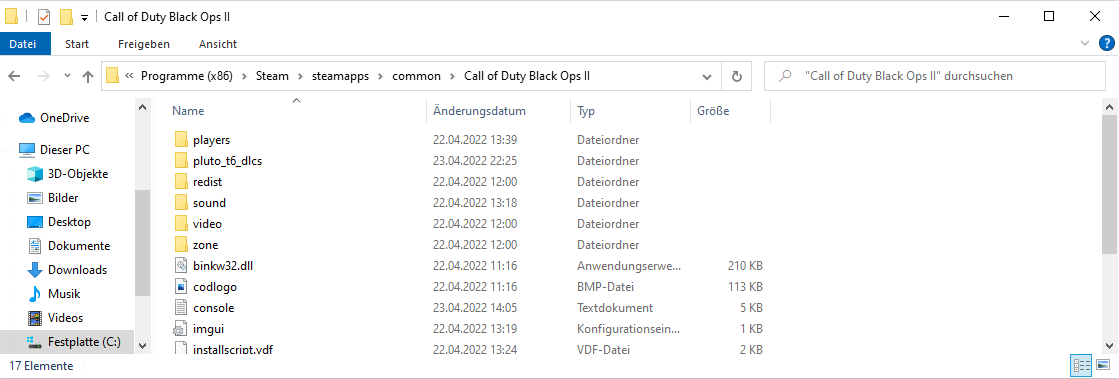 so when its like this i only have to put the data from the "pluto_d6_dlcs" out of it and copy it into the main folder?
 -
but the game has to be in english that its working or am I wrong?


Hello! It looks like you're interested in this conversation, but you don't have an account yet.
Getting fed up of having to scroll through the same posts each visit? When you register for an account, you'll always come back to exactly where you were before, and choose to be notified of new replies (either via email, or push notification). You'll also be able to save bookmarks and upvote posts to show your appreciation to other community members.
With your input, this post could be even better 💗
Register Login