Resolution bug
-
Our developers may be good but they aren't miracle workers. If your PC isn't capable of running the game at resolutions that aren't 4:3 in 2021 then wtf. The solution isn't a patch, the solution is to upgrade your toaster of a PC.
H3X1C I know, and I respect that. But it does not make any sense that before the update the game was more adapted to my screen on the same resolution. And now, it's way more stretched. Nothing to do with the pc. Because I play cod4 with even shittier resolution, yet it is more adapted to my screen than plutonium.
-
Our developers may be good but they aren't miracle workers. If your PC isn't capable of running the game at resolutions that aren't 4:3 in 2021 then wtf. The solution isn't a patch, the solution is to upgrade your toaster of a PC.
H3X1C RektInator thanks for your hard work. Please don't assume that everyone has the ability to change their hardware. I am on a non-gaming laptop and everything was fine before plutonium update even the original game didn't show this bug. Something was done and we are asking to reverse it.
-
-
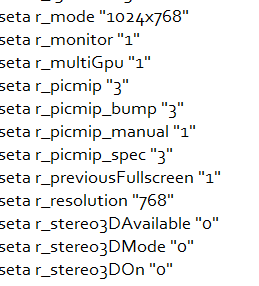 should we change something here to fix it?
 -
Our developers may be good but they aren't miracle workers. If your PC isn't capable of running the game at resolutions that aren't 4:3 in 2021 then wtf. The solution isn't a patch, the solution is to upgrade your toaster of a PC.
-
H3X1C
 should i change these
 -
Hello, I have the solution for this problem, what we have to do is enter
 \ Users \ Your User \ AppData \ Local \ Plutonium \ storage \ t6 \ players. We will enter the file that says plutonium_mp.cfg (if you want it for zombies open the same file but instead of mp it will be zm) we will open it with the notepad or with the text file that you prefer and we will look for the line of text that says seta r_aspectRatio and in the quotes that are there in front we will put the following: wide 16: 9 and we will give it to save and this is how it is solved.
 -
Hello, I have the solution for this problem, what we have to do is enter
\ Users \ Your User \ AppData \ Local \ Plutonium \ storage \ t6 \ players. We will enter the file that says plutonium_mp.cfg (if you want it for zombies open the same file but instead of mp it will be zm) we will open it with the notepad or with the text file that you prefer and we will look for the line of text that says seta r_aspectRatio and in the quotes that are there in front we will put the following: wide 16: 9 and we will give it to save and this is how it is solved.Neigh It works for me :DD thanks!
-
its not a game problem. try to search the "scaling mode" or ratio in you videocard settings. it has to be in screen settings tab. much more easy way than trying to type all of this by hand. it will have 3 options: force aspect ratio wich stretch the image, keep source ratio wich keep original 4:3 from your 800x600, and centered wich will center the image in your screen (not recommend)





Hello! It looks like you're interested in this conversation, but you don't have an account yet.
Getting fed up of having to scroll through the same posts each visit? When you register for an account, you'll always come back to exactly where you were before, and choose to be notified of new replies (either via email, or push notification). You'll also be able to save bookmarks and upvote posts to show your appreciation to other community members.
With your input, this post could be even better 💗
Register Login