Hey, just wondering if you'd be cool with me porting this into my mod overhaul project for BO2? If not then It's all good, just figured I'd check if you you'd be okay with it or not. Anyways, here's the forum post for my mod here:
https://forum.plutonium.pw/topic/46644/release-zombies-quality-of-life-mystery-box-overhaul-dlc5-wonder-weapons-bonus-survival-maps-in-game-settings-menu?page=1

DavidHiFi
@DavidHiFi
Posts
-
[Release] [ZM] Magmagat port for T6 -
[Release] [Zombies] Quality Of Life - Mystery Box overhaul, DLC5 wonder weapons, bonus Survival maps, in-game settings menuVeleroth ill sus it out and see what i can do. sorry for the inconvenience.
-
[Release] [Zombies] Quality Of Life - Mystery Box overhaul, DLC5 wonder weapons, bonus Survival maps, in-game settings menuIllIlIlIl as a standalone mod yes, but with my mod and it's entirety, no you cannot. bo2 is just limited and since those maps are already nearing their limits with how expansive my mod is, adding those in will just crash the game and/or give you a clientfield script error. Once i've fully stablized the mod i will look into creating separate standalone aspects taken from the mod so you can use them one at a time.
-
[Release] [Zombies] Quality Of Life - Mystery Box overhaul, DLC5 wonder weapons, bonus Survival maps, in-game settings menuSweatypossom im working on fixing dozens of issue at the moment, and as of right now you cannot play both at once. When the DLC5 mod is finished or at a good stable point then i will merge it with my mod, until then i'm just gonna wait.
-
[Release] [Zombies] Quality Of Life - Mystery Box overhaul, DLC5 wonder weapons, bonus Survival maps, in-game settings menudata404 when the mod is complete and is fully stable, I'm going to break down each individual part of the mod into separate pieces, either as a single GSC script or mod.
-
[Release] [Zombies] Quality Of Life - Mystery Box overhaul, DLC5 wonder weapons, bonus Survival maps, in-game settings menuFaZe Flick Links are back up, sorry about the inconvenience. I'll get to fixing any and all problems, please put any issues in the GitHub repository for better identification. Thanks.
-
[Release] [Zombies] Quality Of Life - Mystery Box overhaul, DLC5 wonder weapons, bonus Survival maps, in-game settings menuC0NFU510N All issues being worked on, thanks for reporting.
-
[Release] [Zombies] Quality Of Life - Mystery Box overhaul, DLC5 wonder weapons, bonus Survival maps, in-game settings menuFaZe Flick Hey sorry for the delayed response, been very busy lately - all issues will be resolved, don't know what happened nothing is wrong with the repo but I will edit it and fix all issues related to the mod ASAP.
-
[Release] [Zombies] Quality Of Life - Mystery Box overhaul, DLC5 wonder weapons, bonus Survival maps, in-game settings menu
Quality Of Life for BO2 Zombies [BETA]
A big overhaul for Black Ops II Zombies on Plutonium. It adds almost every Campaign and Multiplayer weapon to the Mystery Box, four unreleased DLC5 wonder weapons, bonus Survival maps, and an in-game settings menu. Everything can be switched on or off from that menu, no console commands needed.
It has been in development for about two months, with 50+ releases on GitHub. This is its first post here.
Download · Source code on GitHub · Changelog · Mod manager
The release zip is about 375 MB, well over the forum's upload limit, so it lives on GitHub.

Installation
Install Plutonium and run it once so its folders exist, then close it. Then pick one of the routes below. They all install the same mod.
Option 1: the mod manager (easiest)
Quality of Life Series is a small app that installs, updates and removes this mod for you. It also manages every other mod in your Plutonium folders.
- Download it. The setup installs it like any other program, or the portable zip runs as-is.
- Open it and choose Quality of Life in the sidebar.
- Press Install on Quality of Life for Black Ops II, then Install on HD texture pack.
- Launch Plutonium T6, then go to Zombies > Mods > Quality Of Life.
It backs up anything it replaces, keeps your saved menu settings across updates, and tells you when a new release is out.
Option 2: the release installer
- Download the latest release and unzip it anywhere.
- Run Windows Install.bat.
- Choose INSTALL > The mod and confirm. It installs the HD textures too, and downloads them if they are not in the folder.
- Launch Plutonium T6, then go to Zombies > Mods > Quality Of Life.
Use the arrow keys to move, Enter to choose, and Q to quit. You don't need admin rights. The installer can also add texture and sound packs, controller icons, ReShade, backups, Start menu shortcuts, and an uninstaller.
The optional Start menu shortcuts open the installer and the ReShade Watcher. They point to the folder you unzipped, so don't move or delete it while you use them.
Option 3: by hand (Windows and Linux)
On Linux (Wine, Proton, Lutris, Bottles) there is no automated installer, so install it by hand. It works like any other Plutonium mod.
- Download the release zip and open the Mod Files folder inside it.
- Make a folder called
zm_qolin%LOCALAPPDATA%\Plutonium\storage\t6\mods\. On Linux, use the same path inside your Plutonium prefix. - Copy these five files into it:
mod.ff,mod.iwd,mod.json,mod.all.sabl,mod.all.sabs. Nothing else is needed. - Launch Plutonium T6, then go to Zombies > Mods > Quality Of Life.
Standalone downloads
You don't need the mod for either of these. The mod already installs the HD textures, so you only need them if you want the art on its own.
Download Size What it is HD Texture Pack 514 MB The same higher-resolution textures the mod carries, for use without it. Unzip it and drop the imagesfolder into%LOCALAPPDATA%\Plutonium\storage\t6\.Controller Icons 184 KB PlayStation 5, Nintendo Switch and Xbox One button prompts. Pick one of the three folders inside and copy its .iwifiles into%LOCALAPPDATA%\Plutonium\storage\t6\images\.Virus scans
The mod itself has no
.exe. The installer is a.batand PowerShell script you can read in any text editor.- QualityOfLifeModManagerSetup.exe (mod manager setup): 1/69
- QualityOfLifeModManager.exe (mod manager, portable): 1/71
- dxgi.dll (the unmodified ReShade build the optional ReShade install uses): 1/69
Each single flag is a machine-learning guess (names ending in
ml.scoreor!ml), which is common for new, unsigned programs. The mod manager's full source is on GitHub if you want to read or build it yourself.
Notes
Plutonium removes ReShade when it starts. Launch with Play BO2 with ReShade.bat or the Plutonium ReShade Watcher shortcut, and leave its window open while you play.
Still in beta. Some of the newest features haven't had a full play-through yet. Anything that turns out broken gets fixed or pulled.
Known issue. Using INSTANT EXIT straight after FAST RESTART can cause a
LUI_ERROR. It comes from Plutonium'sMainMenuOG.lua, not the mod. INSTANT EXIT works normally otherwise.Cloning the repo does not give you a playable mod.
mod.iwdis a build output and isn't tracked in git, so use the release.
Weapons
Campaign and Multiplayer guns and equipment in the box
- Storm PSR, Dragunov, SPAS-12, SWAT-556, FAL OSW, Mk 48, QBB LSW, MP7, Vector K10, MSMC, Peacekeeper, Crossbow, Titus-6 and Tac-45
- XPR-50 on every map except Origins
Blundergat on every map
- Mob of the Dead's wonder weapon is in the Mystery Box on every map, one per match. It Pack-a-Punches into the Sweeper.
DLC5 wonder weapons
- The Wave Gun, Thundergun, Wunderwaffe DG-2 and Winter's Howl
- All four are in the Mystery Box on every map except Origins and Buried.
Black Ops 1 guns in the box
- M60, which Pack-a-Punches into The Pig
- L96A1, which Pack-a-Punches into the L115 Isolator
- Browning HP, which Pack-a-Punches into Bap
- RPG-7, which Pack-a-Punches into the Rocket Propelled Grievance
- The L96A1 is on every map. The other three are on every map except Origins, which doesn't have enough weapon precache slots.
Black Ops Cold War gun in the box
- The Blast-O-Matic, the Gallo SA12 mastercraft. It Pack-a-Punches into the H-NGM-N, with its own sounds, animations, and the stock and animated Pack-a-Punch camos.
- It is on every map except Origins, which doesn't have enough weapon precache slots.
Old-school guns in the box
- MM1 Grenade Launcher, the twelve-round revolver launcher from the Black Ops II campaign. It Pack-a-Punches into the Parasitic MIST.
- Browning HP Dual Wield, a Browning in each hand. It Pack-a-Punches into the Grand Puissances.
- Both are on Nuketown and Buried, including the Buried Maze. The MM1 is also on Die Rise, Origins, and the TranZit and Mob of the Dead survival maps. TranZit classic and Mob classic have no free room in the weapon table for either gun.
Faster reloads
- The Pack-a-Punched SPAS-12 loads all 24 shells in one go instead of one at a time.
- The Python loads all six rounds at once, the way its Pack-a-Punched version always has.
Bouncing Betties
- The Multiplayer proximity mines are in the Mystery Box on every map. Betties and Claymores replace each other and share the equipment button.
Jet Gun clean-up
- The Jet Gun uses a normal weapon slot and works with Mule Kick. It still overheats, but it no longer breaks.
Pack-a-Punchable Sliquifier
- Die Rise's Sliquifier upgrades into Treyarch's unused Sl1qu1f13r.
- The upgrade kills at any round and wears the Pack-a-Punch camo. The standard Sliquifier is unchanged.
Maps, power-ups and perks
Bonus Survival maps
- TranZit: Diner, Power Station, Tunnel, Cornfield
- Die Rise: Shopping Mall, Dragon Rooftop, Sweatshop
- Mob of the Dead: Cell Block, Docks
- Buried: Borough, Maze
- Origins: The Crazy Place, Trenches, Excavation Site, Church
Barricades in Survival
- Windows start boarded up, zombies tear the boards off to get in, and the Carpenter power-up drops. Brutus never smashes barricades.
Der Wunderfizz on every map
- The random perk machine is on every map, not just Origins.
Perk limit
- Set a cap from 1 to 12 in the pre-game lobby, or MAP MAX to carry every perk the map has. The default is the stock 4.
Better Speed Cola
- A BETTER SPEED COLA switch on the GAME 1 tab. With it on, Speed Cola also boards up windows faster and drinks perk bottles faster.
Solo Easter Eggs
- The SOLO EASTER EGGS option scales the main quests on TranZit, Die Rise, Buried, Origins and Mob of the Dead to the number of players. It is off by default and only shows in Classic mode.
Instant Pack-a-Punch
- Pack-a-Punch gives the gun back right away, like in Black Ops Cold War Zombies. You can turn it on or off in the settings menu.
Bonfire Sale
- BO1's Pack-a-Punch power-up from Five. Pick it up and Pack-a-Punch costs 1,000 points instead of 5,000 for thirty seconds. It is part of the Custom Power-Ups option. On Mob of the Dead and Buried it drops in Survival only.
Presentation
Animated Pack-a-Punch camo
- Every Pack-a-Punched gun gets the Dark Matter animated camo on all six maps. Switch it off and each map uses its own stock camo. The mod installs those textures too, so the option works out of the box.
Ray Gun skin
- Green Run, Die Rise and Nuketown use the newer Ray Gun model for the upgraded gun, the Mystery Box preview, dropped weapons, and other players.
Timers and counters
- Game and round timers with colours you can pick, plus a Cold War round counter.
Health bar
- A health bar that goes from green to yellow when you take damage, and to red near death. A second bar shows shield health.
Subtitles
- The HUD menu can show subtitles, with optional speaker names, on every map in solo and co-op. They cover characters, announcers, radios, quest dialogue and other map voices. Overlapping lines stack on screen. The text was transcribed by machine, so some words may be wrong.
- Easter egg songs show their title, and the sung ones show timed lyrics.
Scoreboard crew emblems
- The scoreboard shows the right crew emblem for each map and mode instead of a missing texture.
Hitmarkers
- Pick the hit, kill, crit and downed sounds, or turn them off.
In-game menu
- Mechanics, gameplay rules, HUD and audio options all switch on and off in game. That includes a VOICE LINES switch for your character's spoken lines.
Third person
- A THIRD PERSON switch on the GAME 3 tab puts the camera behind your character. Off is the normal view.
Knife lunge
- A KNIFE LUNGE switch on the GAME 3 tab. On is the normal game. Off removes the melee charge that pulls you onto a zombie, so you knife where you stand.
Mud
- A NO MUD SLOWDOWN switch on the GAME 3 tab. Turn it on and Origins mud stops slowing you down. You move at full speed through it on the main map and in every Origins survival and grief location.
Tap to Interact
- Controller support under the standard Gamepad menu.
Cinematic Colour Grading
- A ReShade preset that comes with the mod.
In-game chat commands
Use a
.,!or/prefix, or bind them to keys. Type.helpin game for the full list..help Show / hide the in-game command list .give <weapon> [pap] Give any weapon ('.give list' shows what's available) .round <n> / .endround Set or skip the current round .god / .ghost / .fly Invincibility, noclip, flight .infammo / .bclip Infinite reserves, or a magazine that never empties .infsprint Sprint without tiring .pack / .unpack Pack-a-Punch or unpack the held weapon .giveperks / .removeperks Grant or remove perks .pay <player> <amount> Send points to another player .character <1-4> Pick your own character (each player, not the host's choice) .shield / .staff <elem> Spawn a shield or an Origins elemental staff
Credits
Made by DavidHiFi.
Who What Synarxis Inspiration. This project wouldn't exist without their kindness and support. sehteria (T6-ZM-Expanded) The mod this one grew out of, with extra weapons and perks on all maps. SadSlothXL (t6-ports) The Death Machine power-up (the drop, the weapon swap and its sounds) and the Blast-O-Matic port: its models, animations, textures, sounds and camo table. Mario Woopsie (MOTD Old School Weapons, Nexus Mods) The MM1 and Browning HP Dual Wield ports: the zombies weapon definitions, the Browning's left-hand models and both Pack-a-Punch names. Logo2K (Zombies Declassified) The native T6 Wave Gun package: Treyarch's DLC5 models, animations, effects, weapon defs, sounds and script. Jbleezy (BO2-Reimagined) The extra Survival locations, the Bouncing Betty carry animations, the two lines that let Pack-a-Punch take the Sliquifier, and confirming which two checks stand between a solo player and Mob of the Dead's Final Flight. 5and5 (BO2-Remix) The Die Rise Semtex wall buy. Fraaagaaa (Strat Tester) Every destination in the teleport list except Nuketown's three, which are the map's own respawn points. B2ORG (T6-B2OP-PATCH), built with Astrox and NoMoleMan The basis for most of the patches, rebuilt against the game's own scripts rather than copied wholesale. Hadi77KSA (Any Player EE Scripts), building on work by CCDeroga, teh_bandit, DaddyDontStop, shyperson0/znchi and Stick Gaming/Nathan3197 The Solo Easter Eggs option: the quest steps that scale to the number of players on TranZit, Die Rise, Buried and Origins. Built on Plutonium, with OpenAssetTools and xensik's gsc-tool. The optional ReShade install ships unmodified work by crosire (ReShade), Barbatos Bachiko, Alex Tuduran, Marot Satil and the GShade project, Ioxa, Lord of Lunacy, prod80, and NVIDIA.
Missing or wrong credit? Reply here or open an issue on GitHub and I'll fix it.
Support the mod
The mod is free and always will be. Any support is appreciated, and I hope you enjoy my little project.


Most of this mod's code was written with several AI coding agents, including Claude Code, Codex and OpenCode. No single agent made the project. All artwork is made by people. I first built the mod for myself and later released it for others to use and improve.
Not affiliated with Activision or Treyarch. You need a legitimate copy of Black Ops II and Plutonium.
-
enhanced graphicsI'm currently working on a mod right now called "Quality Of Life" for Call Of Duty: Black Ops II that integrates ReShade and enhanced textures, still working on it though so yeah but it doesn't overhaul the game too drastically. Check my profile for when It's released
-
[Release] [ZM] Perk Machine Bonus PointsI didn't like the fact that origins already gave you 25 points so using the script gave you 125 points total, so I edited this script so that origins retains the 25 points and only gives 75 from the script (100 points total) so all maps get 100 points
Here's the script:#include maps\mp\_utility; #include common_scripts\utility; #include maps\mp\gametypes_zm\_hud_util; #include maps\mp\gametypes_zm\_hud_message; init() { level thread onPlayerConnect(); setBonusPoints(); } onPlayerConnect() { for(;;) { level waittill("connected", player); player thread onPlayerSpawned(); } } onPlayerSpawned() { self endon("disconnect"); level endon("game_ended"); for(;;) { self waittill("spawned_player"); self iprintln("^4Perk Machine Bonus Points ^7created by ^1techboy04gaming"); } } perk_trigger(x,y,z,points) { trigger = spawn( "trigger_radius", ( x,y,z ), 1, 50, 50 ); while(1) { trigger waittill( "trigger", i ); if ( i GetStance() == "prone" ) { i.score += points; i playsound( "zmb_cha_ching" ); trigger delete(); break; } } } setBonusPoints() { if ( getDvar( "g_gametype" ) == "zgrief" || getDvar( "g_gametype" ) == "zstandard" ) { if(getDvar("mapname") == "zm_prison") //mob of the dead grief { level thread perk_trigger(2811,9306,1336,100); //deadshot level thread perk_trigger(-500,8645,1336,100); //speedcola level thread perk_trigger(1164,9675,1545,100); //doubletap level thread perk_trigger(1768,10656,1336,100); //juggernog level thread perk_trigger(371,10652,1336,100); //phd } else if(getDvar("mapname") == "zm_buried") //buried grief { level thread perk_trigger(1429,2267,16,100); //quickrevive level thread perk_trigger(-131,-357,144,100); //speedcola level thread perk_trigger(2326,975,88,100); //doubletap level thread perk_trigger(-663,1030,8,100); //juggernog level thread perk_trigger(762,1503,-6,100); //staminup level thread perk_trigger(-712,-1210,144,100); //mulekick } else if(getDvar("mapname") == "zm_nuked") //nuketown { level thread perk_trigger(764,-71,-63,100); //perk 1 level thread perk_trigger(1581,947,-60,100); //perk 2 level thread perk_trigger(679,43,79,100); //perk 3 level thread perk_trigger(2028,192,-63,100); //perk 4 level thread perk_trigger(-2018,255,-61,100); //perk 5 level thread perk_trigger(-1676,954,-63,100); //perk 6 level thread perk_trigger(-124,725,-63,100); //perk 7 level thread perk_trigger(1347,626,-57,100); //perk 8 level thread perk_trigger(-427,664,-63,100); //perk 9 level thread perk_trigger(-857,100,-55,100); //perk 10 } else if(getDvar("mapname") == "zm_transit") //transit grief and survival { level thread perk_trigger(1850,141,88,100); //quickrevive level thread perk_trigger(835,85,-39,100); //speedcola level thread perk_trigger(2072,-1372,-49,100); //doubletap level thread perk_trigger(1046,-1521,128,100); //juggernog level thread perk_trigger(1745,479,-55,100); //staminup level thread perk_trigger(1752,-1097,-55,100); //tombstone level thread perk_trigger(8050,-5497,40,100); //quickrevive level thread perk_trigger(8136,-6340,117,100); //speedcola level thread perk_trigger(8037,-4632,264,100); //doubletap level thread perk_trigger(8183,-6430,245,100); //juggernog } } else { if(getDvar("mapname") == "zm_prison") //mob of the dead { level thread perk_trigger(4019,9526,1528,100); //deadshot level thread perk_trigger(-495,8646,1336,100); //speedcola level thread perk_trigger(325,9100,1132,100); //doubletap level thread perk_trigger(513,6646,208,100); //juggernog level thread perk_trigger(1146,9671,1545,100); //electric } else if(getDvar("mapname") == "zm_buried") //buried { level thread perk_trigger(-923,-255,288,100); //quickrevive level thread perk_trigger(142,636,176,100); //speedcola level thread perk_trigger(2426,48,88,100); //doubletap level thread perk_trigger(-664,1030,8,100); //juggernog level thread perk_trigger(6984,389,108,100); //staminup level thread perk_trigger(-712,-1210,144,100); //mulekick level thread perk_trigger(1432,2267,16,100); //vultureaid } else if(getDvar("mapname") == "zm_transit") //transit { level thread perk_trigger(-6707,5031,-55,100); //quickrevive level thread perk_trigger(-5508,-7857,0,100); //speedcola level thread perk_trigger(8043,-4632,264,100); //doubletap level thread perk_trigger(1047,-1521,128,100); //juggernog level thread perk_trigger(1848,475,-55,100); //staminup level thread perk_trigger(10907,8311,-407,100); //tombstone } else if(getDvar("mapname") == "zm_tomb") //origins { level thread perk_trigger(2358,5048,-303,75); //quickrevive level thread perk_trigger(885,3249,-170,75); //speedcola level thread perk_trigger(-2,-441,-493,75); //mulekick level thread perk_trigger(2327,-193,139,75); //juggernog level thread perk_trigger(-2381,-8,234,75); //staminup } } } -
[ZM] Bonus Points (Prone in front of perk machines)hzp13 Already exists (Not mine), here's the link:
https://github.com/techboy04/Bonus-Points-T6Zombies -
Add me if you want to play :pAdded
-
[ZM] Bonus Points (Prone in front of perk machines)GhostRider0125 Appreciate it
-
[ZM] Bonus Points (Prone in front of perk machines)Simple GSC script for black ops 1 zombies that adds prone for 100 points in front of perk machines mechanic just like in black ops 3 and up.
Preview

Download Link:
INSTALLATION
- 1. In file explorer, head over to this directory:
C:\Users(YourUsername)\AppData\Local\Plutonium\storage\t5\raw\scripts\sp\zom
(Create the folders if they dont exist, case sensitive.) - 2. Place the downloaded .gsc file into that location
- 3. Start up a map in zombies and enjoy!
Extra
- Add me on Discord for support, I don't be on this forum

- Discord username = davidhifi
- 1. In file explorer, head over to this directory:
-
[ZM] Five - Australian FlagHere's a preview of how it will look like:
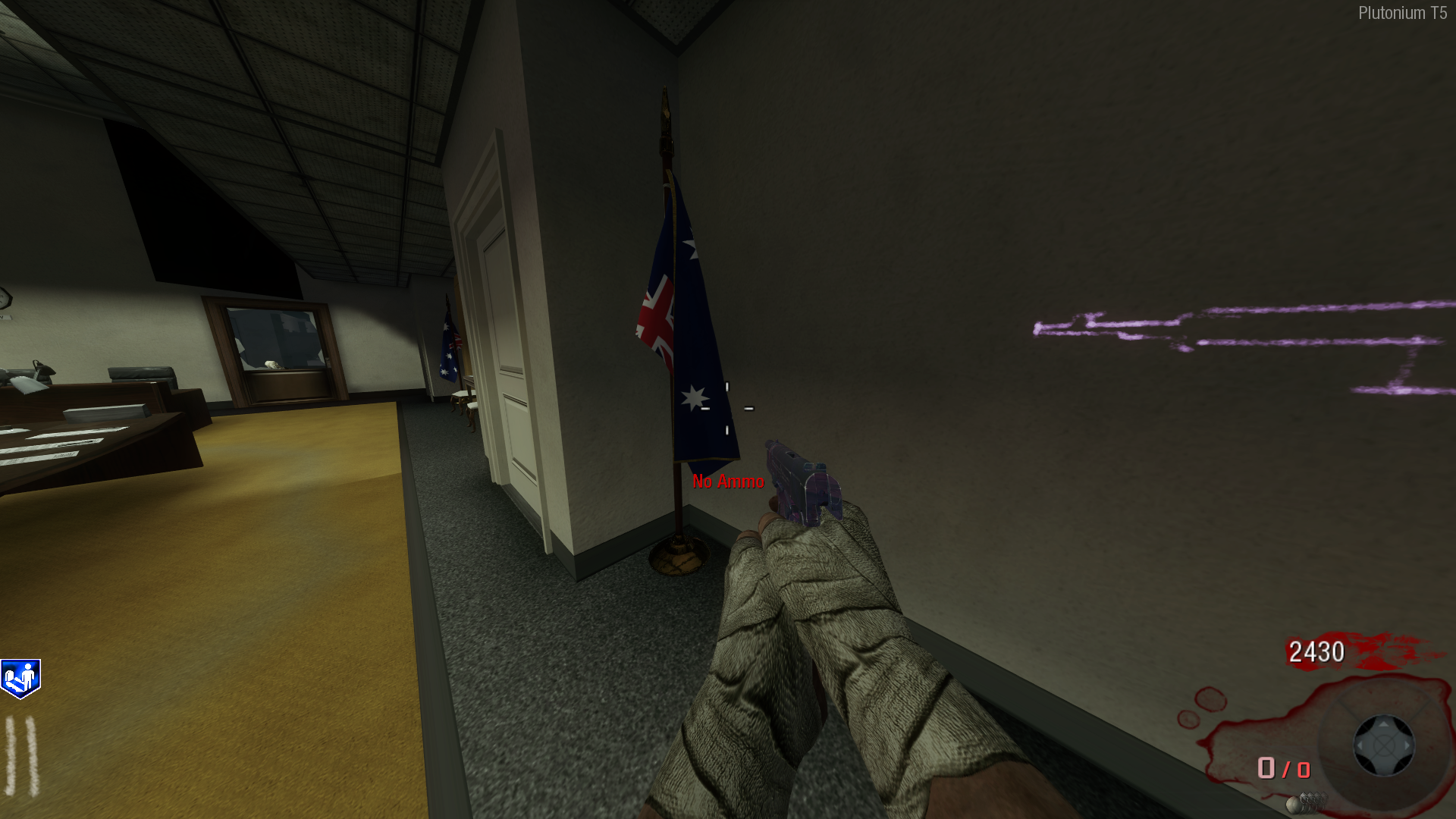
How to install:- Download from here | https://www.mediafire.com/file/elilrnrojy5di5s/Five_-_Aussie_Flag.rar/file
- Extract the compressed folder using an extraction tool eg. 7zip, WinRar etc.
- Win Key + R (It will open the run box)
- Enter this text into the run box:
%AppData% - From there navigate through this path in your file explorer Local, Plutonium, Storage, T6
- Create a folder within the "T6" folder and name it "images" (Case sensitive, without the quotations).
- drag all the .iwi files from the folder you extracted earlier into the newly created images folder.
- Boom. Done.
-
[ZM] Rock Bands Five TV ScreensHere's a preview of how it will look like:

How to install:- Download from here | https://www.mediafire.com/file/mj7y4cp728ajlqy/rock_screens.rar/file
- Extract the compressed folder using an extraction tool eg. 7zip, WinRar etc.
- Win Key + R (It will open the run box)
- Enter this text into the run box:
%AppData% - From there navigate through this path in your file explorer Local, Plutonium, Storage, T6
- Create a folder within the "T6" folder and name it "images" (Case sensitive, without the quotations).
- drag all the .iwi files from the folder you extracted earlier into the newly created images folder.
- Boom. Done.
-
(T6) | Zombies | GTA IV Menu Screen



