Skip to content

BO1 Client Support

Request support for the Plutonium T5 client, please wait at-least 1 day for a reply, it can get busy. The community is free to try to help in any thread.

1.9k Topics 5.7k Posts
  • BO1

    4
    0 Votes
    4 Posts
    337 Views
    No problem friend.
  • eror:failed to launch game

    4
    3
    0 Votes
    4 Posts
    255 Views
    @Samsung10 That's your solution. They don't support pirate files.
  • BO1

    1
    0 Votes
    1 Posts
    95 Views
    No one has replied
  • Need help finding the "dvar_defaults.cfg"

    1
    0 Votes
    1 Posts
    109 Views
    No one has replied
  • Disable ximput recognition on engine level

    2
    0 Votes
    2 Posts
    212 Views
    You can try HidHide on GitHub if you havent already. HidHide
  • Connection interrupted

    7
    0 Votes
    7 Posts
    1k Views
    @aska_ Well i've found one. I've quited the game xD. Let me know if you still have a problem ill install the launcher again since im already with a brand new machine and a different ISP so we can check. Hell even play it a little. EDIT: I think i did a bunch of stuff actually. Check do you have a public IP or you are behind CGNAT. See in your routers status page the IP it takes and then google my ip and compare them. If they are the same you have hope. If the IP in the router starts with 10 then its 100% private IP and you should continue to search for a solution. But If you have pub ip -> First make sure you have enabled the connection of bo1.exe in the firewall. make a an outbound and inbound rule in the firewall settings of windows or just disable the wall completely if you feel frisky enough. 2nd make sure you have a static ip assigned either in the Network Connection properties in windows or in the router settings assigned a static lan ip on the pc's mac address if you have dhcp enabled. 3rd Forward this ports on both TCP and UDP in the router. TCP 3074, 4976, 27014-27050, 28960 UDP 3074, 3478-4976, 27000-27030, 28960 Theres is a strange thing about windows sometimes you have the ports opened but they still appear to be closed. Thats perhaps because you need to forward them within windows also cause "Microsoft" inside Network>Router-Right Click>Properties You can make a DMZ for the specific ip of the pc if you dont wanna bother doing all the above ports but its not recommended of course for the security concerns. Make sure you have enabled uPNP in both windows services and your router. Restart the router and the machine. Make sure you limit the FPS cap. Strange things happen if you have high fps like above 600. Pray on salt if this works.

  • 0x000007b

    1
    0 Votes
    1 Posts
    119 Views
    No one has replied
  • dual Cz-75 crash

    12
    0 Votes
    12 Posts
    3k Views
    @_Epidemic_ yes
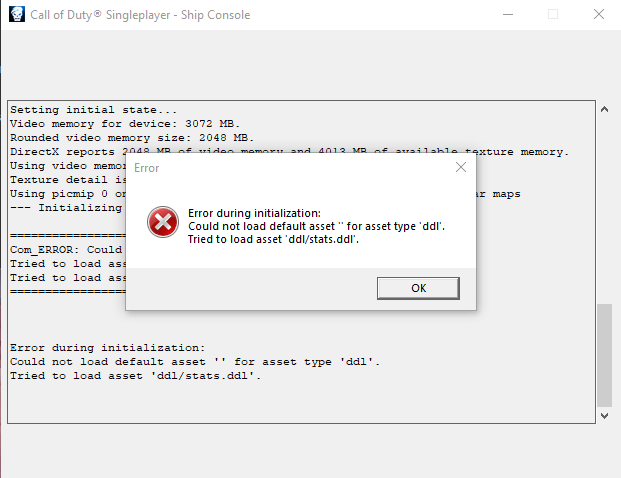
  • tried to load asset dll/stats.dll error

    11
    1
    0 Votes
    11 Posts
    3k Views
    @jotwice Hi! Yes, of course. I've sent you a friend request.
  • Kicked from any server with Custom Classes

    2
    0 Votes
    2 Posts
    158 Views
    Also, I have to unlockall every time I log into the game since this bug, can I fix that?
  • Lagging

    3
    0 Votes
    3 Posts
    282 Views
    @Xerxes Thank you for the tip, already had that setting turned on. Still getting frame drops apparently. I am tweaking the capped fps.
  • Bo1 4 Players not working

    1
    0 Votes
    1 Posts
    98 Views
    No one has replied
  • Lags Rog Ally

    2
    0 Votes
    2 Posts
    155 Views
    @Vin7er lag is a MOSTLY a function of internet connection... connect to a server closer to you or try a faster internet connection to help with your ping.
  • error bo1

    Moved
    2
    0 Votes
    2 Posts
    193 Views
    There's no actual error here That's just regular errors for devs that don't cause issues
  • crahs starting the game

    2
    1
    0 Votes
    2 Posts
    114 Views
    Can you at least read what it says?
  • Friends

    2
    0 Votes
    2 Posts
    211 Views
    https://plutonium.pw/docs/custom-games/
  • Screenshots coming out black

    2
    0 Votes
    2 Posts
    195 Views
    Play in windowed borderless Go in the bootstrapper command prompt (the console opened when you start the game) and paste this (right click) r_fullscreen 0;r_noborder 1;vid_ypos 0;vid_xpos 0;vid_restart then press Enter
  • Black screen

    4
    2
    0 Votes
    4 Posts
    311 Views
    @WolflexZ no i think
  • 0 Votes
    2 Posts
    535 Views
    I have the same issue when I open my mod tools. It says Getting Direct3D 9 interface... Using Direct3D9Ex interface Pixel shader version is 3.0 Vertex shader version is 3.0 Shader model 2.0 code path is available. Shader model 3.0 code path is available. Using Shader model 3.0 code path because it is the best available path on this hardware. Creating Direct3D device... Couldn't create a Direct3D device: An invalid parameter was passed to the returning function
  • Guns aren't... visible?

    3
    1
    0 Votes
    3 Posts
    223 Views
    its my default fov, i set my regular fov on 85 and its fine but i set it on default and my guns disappears, so uhh only use 90 and above