(white screen): Plutonium launcher incapable to load correctly MW3
-

Hi, today i am facing a new issue that i didn't have before which is that Plutonium launcher incapable to load correctly the MW3 game and what i found weird a bit is that i can still hear the background music of the game. check this image:
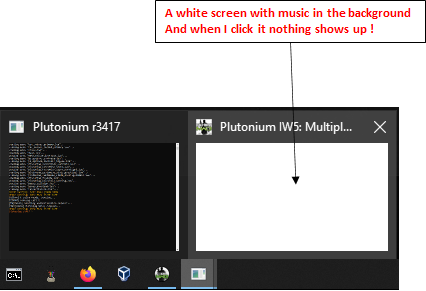 .
.I tried this method but didn't work for me
https://forum.plutonium.pw/topic/24454/launcher-not-opening/4Personal thought: i have the feeling that happen after the last Plutonium update. last release.
-

Make sure your game is closed before doing that.
Go in this folder%localappdata%\Plutonium\storage\iw5\players.
Then openconfig_mp.cfgwith the notepad to edit it.
Findr_displayModeand change it to be like this (you can use ctrl+f to search for it):
seta r_displayMode "windowed (no border)" -
Thanks, it worked with your solution,
i was actually doing this change on the wrong file which is plutonium.cfg from the main directory of the game.
-
Make sure your game is closed before doing that.
Go in this folder%localappdata%\Plutonium\storage\iw5\players.
Then openconfig_mp.cfgwith the notepad to edit it.
Findr_displayModeand change it to be like this (you can use ctrl+f to search for it):
seta r_displayMode "windowed (no border)"
Resxt Hi, I just made a post asking for help for this exact problem with the BO2, do you have any idea of what can I do?
Hello! It looks like you're interested in this conversation, but you don't have an account yet.
Getting fed up of having to scroll through the same posts each visit? When you register for an account, you'll always come back to exactly where you were before, and choose to be notified of new replies (either via email, or push notification). You'll also be able to save bookmarks and upvote posts to show your appreciation to other community members.
With your input, this post could be even better 💗
Register Login