Skip to content
  • 0 Unread 0
  • Recent
  • Popular
  • Users
  • Donate
Collapse
Home Docs Stats Discord Donate
Download
  1. Home
  2. BO2 Modding Releases & Resources
  3. [Release] Playstation Controller UI Buttons for T6

[Release] Playstation Controller UI Buttons for T6

Scheduled Pinned Locked Moved BO2 Modding Releases & Resources
71 Posts 47 Posters 99.5k Views 5 Watching
  • Oldest to Newest
  • Newest to Oldest
  • Most Votes
Reply
  • Reply as topic
Log in to reply
This topic has been deleted. Only users with topic management privileges can see it.
  • A Former User? A Former User

    I would like to know too. I tried doing it myself but I couldn't find any similar file names inside the IWD files.

    Clippy95
    Clippy95
    Clippy95
    VIP
    wrote on last edited by
    #30

    adam The icons are in gamefonts_pc.iwi which should be in the first iwd of whatever langauge you're playing in

    A Former User? 1 Reply Last reply
    0
    • Clippy95 Clippy95

      adam The icons are in gamefonts_pc.iwi which should be in the first iwd of whatever langauge you're playing in

      A Former User?
      A Former User?
      A Former User
      wrote on last edited by
      #31

      Clippy95 Gotcha, thank you!

      MrKSwITcH 1 Reply Last reply
      0
      • A Former User? A Former User

        Clippy95 Gotcha, thank you!

        MrKSwITcH
        MrKSwITcH
        MrKSwITcH
        wrote on last edited by
        #32

        adam Sorry to bug you, but did you happen to get the prompts working in BO1?

        A Former User? 1 Reply Last reply
        0
        • MrKSwITcH MrKSwITcH

          adam Sorry to bug you, but did you happen to get the prompts working in BO1?

          A Former User?
          A Former User?
          A Former User
          wrote on last edited by [[global:former-user]]
          #33

          MrKSwITcH I did, but it's just "unfinished". However the important ones or still there such as R/L 1&2 and the 4 standard PlayStation buttons.

          qoecs 1 Reply Last reply
          0
          • A Former User? A Former User

            MrKSwITcH I did, but it's just "unfinished". However the important ones or still there such as R/L 1&2 and the 4 standard PlayStation buttons.

            qoecs
            qoecs
            qoecs
            wrote on last edited by
            #34

            adam can you possibly release the files for the bo1 ui?

            1 Reply Last reply
            1
            • KHALYAN
              KHALYAN
              KHALYAN
              wrote on last edited by
              #35

              Gracias Pistakilla, voy a probarlo, yo uso DS4Windows y se agradece que te reconozca las teclas del mando de PS4 😄

              1 Reply Last reply
              0
              • Pistakilla Pistakilla

                Tired of looking at lame Xbox control buttons when you're playing on DS4?

                Say no more!

                alt text

                alt text

                alt text

                alt text

                This should help most people who really want Playstation UI buttons. By default, T6 doesn't support DS4/DS3 natively so I took the assets from T7. Yeah looks nice.

                Download:
                DS4_UI_Buttons.zip

                Install:
                Loading Camos/Textures into Plutonium

                Lemon
                Lemon
                Lemon
                Contributor
                wrote on last edited by
                #36

                Pistakilla the link doesnt work anymore

                Pistakilla 1 Reply Last reply
                1
                • Lemon Lemon

                  Pistakilla the link doesnt work anymore

                  Pistakilla
                  Pistakilla
                  Pistakilla
                  wrote on last edited by
                  #37

                  Lemonn_ its fixed

                  1 Reply Last reply
                  0
                  • Pistakilla Pistakilla

                    Tired of looking at lame Xbox control buttons when you're playing on DS4?

                    Say no more!

                    alt text

                    alt text

                    alt text

                    alt text

                    This should help most people who really want Playstation UI buttons. By default, T6 doesn't support DS4/DS3 natively so I took the assets from T7. Yeah looks nice.

                    Download:
                    DS4_UI_Buttons.zip

                    Install:
                    Loading Camos/Textures into Plutonium

                    LizsJ0
                    LizsJ0
                    LizsJ0
                    wrote on last edited by
                    #38

                    Pistakilla friend where do I put this? it does not come with readme fileCaptura de pantalla 2023-02-27 180051.png

                    1 Reply Last reply
                    0
                    • Resxt
                      Resxt
                      Resxt
                      Plutonium Staff
                      wrote on last edited by
                      #39

                      Pistakilla the link is down. Can you upload a new one?

                      Pistakilla 1 Reply Last reply
                      0
                      • Resxt Resxt

                        Pistakilla the link is down. Can you upload a new one?

                        Pistakilla
                        Pistakilla
                        Pistakilla
                        wrote on last edited by Pistakilla
                        #40

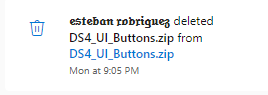
                        Resxt b12d3373-b195-4d62-a3ea-f76fbadfe8ca-image.png

                        Wow, I'm never using onedrive ever again...

                        Updated the link.

                        1 Reply Last reply
                        1
                        • FlamaLliure_
                          FlamaLliure_
                          FlamaLliure_
                          wrote on last edited by
                          #41

                          There is no readme file in the rar, how can i install it?

                          Resxt 1 Reply Last reply
                          0
                          • FlamaLliure_ FlamaLliure_

                            There is no readme file in the rar, how can i install it?

                            Resxt
                            Resxt
                            Resxt
                            Plutonium Staff
                            wrote on last edited by
                            #42

                            @DarthRevan770 like you would install any other texture
                            https://plutonium.pw/docs/modding/loading-textures/

                            1 Reply Last reply
                            0
                            • iWock
                              iWock
                              iWock
                              wrote on last edited by
                              #43

                              Hello, I really like the mod and because of that, I was wondering if there's a way to make it work on WAW and MW3. I know you said change the .iwi to bo1 for it to work on there, but I wasn't sure about the other games. I can't seem to find playstation mods for them anywhere. Thanks!

                              Resxt 1 Reply Last reply
                              0
                              • iWock iWock

                                Hello, I really like the mod and because of that, I was wondering if there's a way to make it work on WAW and MW3. I know you said change the .iwi to bo1 for it to work on there, but I wasn't sure about the other games. I can't seem to find playstation mods for them anywhere. Thanks!

                                Resxt
                                Resxt
                                Resxt
                                Plutonium Staff
                                wrote on last edited by Resxt
                                #44

                                iWock Quick forum search found this for BO1
                                MW3 should have it built-in within the gamepad options in the game's settings

                                1 Reply Last reply
                                1
                                • GoblinSatyr
                                  GoblinSatyr
                                  GoblinSatyr
                                  wrote on last edited by
                                  #45

                                  Based.

                                  1 Reply Last reply
                                  0
                                  • zezo3600
                                    zezo3600
                                    zezo3600
                                    wrote on last edited by
                                    #46

                                    you have the L2 on both toggle ADS and ADS and I can't adjust it

                                    1 Reply Last reply
                                    0
                                    • sahil315
                                      sahil315
                                      sahil315
                                      wrote on last edited by
                                      #47

                                      There's no readme in the ZIP

                                      Resxt 1 Reply Last reply
                                      1
                                      • sahil315 sahil315

                                        There's no readme in the ZIP

                                        Resxt
                                        Resxt
                                        Resxt
                                        Plutonium Staff
                                        wrote on last edited by
                                        #48

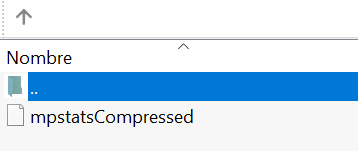
                                        sahil315 bro can you at the very least try to simply turn your brain on? How is being so blind so common? It's literally right under the download button you clicked like wth
                                        b9c4a6c3-2888-48c5-bbfc-1563815b7f2b-image.png

                                        1 Reply Last reply
                                        0
                                        • AdrX003 AdrX003

                                          Pistakilla i was still looking for DS3 buttons to add but couldnt find any good sources yet. but yea, that will do. tnx

                                          (do u have any place u can think of that haves good ds3 icons?)

                                          MDYT
                                          MDYT
                                          MDYT
                                          wrote on last edited by
                                          #49

                                          Galaxy_Drifterz C:\Users*your nickname*\AppData\Local\Plutonium\storage\t6

                                          1 Reply Last reply
                                          1

                                          Hello! It looks like you're interested in this conversation, but you don't have an account yet.

                                          Getting fed up of having to scroll through the same posts each visit? When you register for an account, you'll always come back to exactly where you were before, and choose to be notified of new replies (either via email, or push notification). You'll also be able to save bookmarks and upvote posts to show your appreciation to other community members.

                                          With your input, this post could be even better 💗

                                          Register Login
                                          Reply
                                          • Reply as topic
                                          Log in to reply
                                          • Oldest to Newest
                                          • Newest to Oldest
                                          • Most Votes


                                          • Login

                                          • Don't have an account? Register

                                          • Login or register to search.
                                          • First post
                                            Last post
                                          0
                                          • Unread 0
                                          • Recent
                                          • Popular
                                          • Users
                                          • Donate