Skip to content
  • 0 Unread 0
  • Recent
  • Tags
  • Popular
  • Users
  • Groups
  • Donate
Collapse

Plutonium

  1. Home
  2. BO2 Modding Releases & Resources
  3. [ZM] RM|T Zombies Menu V2.6 - Mod Menu
[ZM] RM|T Zombies Menu V2.6 - Mod Menu

Scheduled Pinned Locked Moved BO2 Modding Releases & Resources
89 Posts 51 Posters 217.6k Views 12 Watching
  • Oldest to Newest
  • Newest to Oldest
  • Most Votes
Reply
  • Reply as topic
Log in to reply
This topic has been deleted. Only users with topic management privileges can see it.
  • kev.exe kev.exe

    when you say you can use it online, is there limitations? can i only use it in a custom game? or can i use it playing in servers without running the risk of getting banned?

    Resxt Offline
    Resxt Offline
    Resxt
    Plutonium Staff
    wrote on last edited by
    #51

    @Keumm scripts are server side, only the host can load scripts. The official method of loading gsc scripts is safe to use for any scenario

    1 Reply Last reply
    0
    • Resxt Resxt

      justowen then you have conflictng scripts, or most likely you did it wrong

      justowen Offline
      justowen Offline
      justowen
      wrote on last edited by
      #52

      Resxt comment sa ?

      1 Reply Last reply
      0
      • Resxt Resxt

        justowen then you have conflictng scripts, or most likely you did it wrong

        justowen Offline
        justowen Offline
        justowen
        wrote on last edited by
        #53

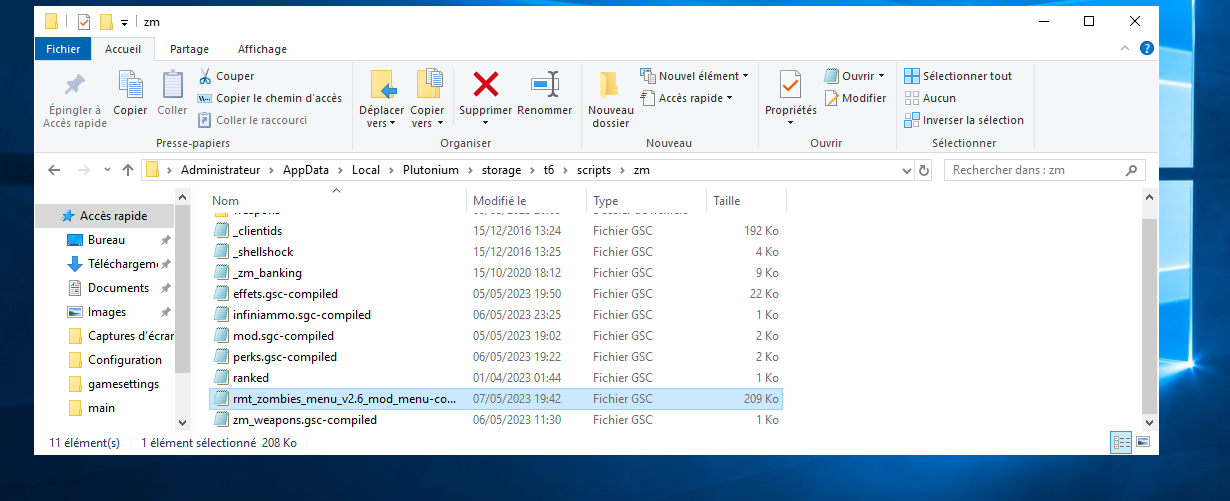
        Resxt image.png

        1 Reply Last reply
        0
        • Resxt Resxt

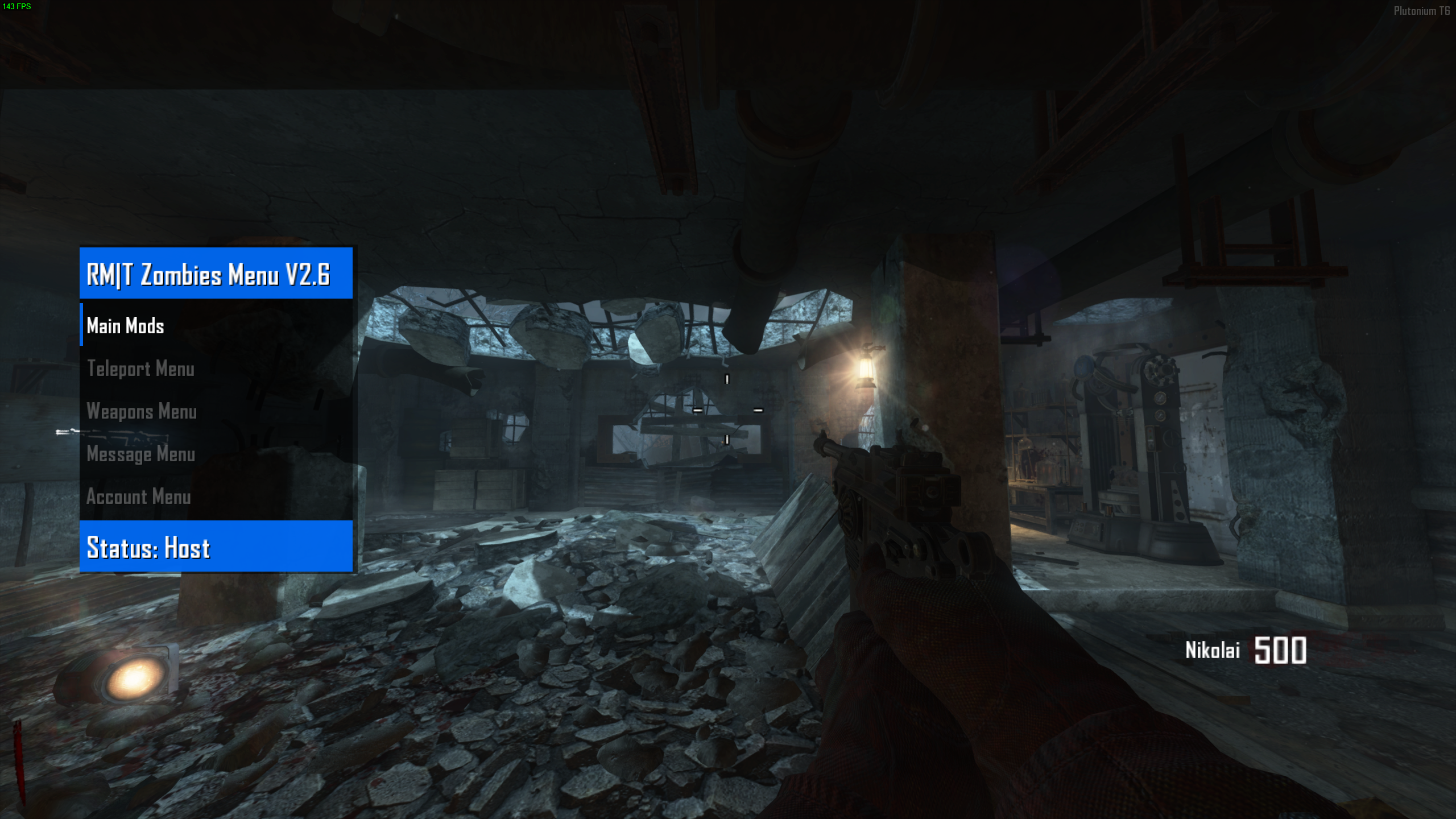
          Today I'm sharing RM|T Zombies Menu V2.6 which is a zombie mod menu for Black Ops II.
          Note that I am not the original author of this mod menu.

          It's already compiled so you just have to drag and drop it and enjoy!
          It's not recommended to mess with settings that weren't meant for PC or Plutonium like account settings, unlock trophies etc.


          3b159b5f-316f-47a1-b84e-758518b6b7d9-image.png


          How to use

          Open the menu: Aim key + Knife key
          Confirm: Jump key
          Cancel: Use key
          Go down: Previous scorestreak key
          Go up: Next scorestreak key


          Installation
          Follow the instructions on the T6 modding guide

          Download
          Proton Drive | Mediafire


          You can watch a preview of the mod menu here
          https://youtu.be/yJ0nR1OBMLk?t=11

          XBlood309 Offline
          XBlood309 Offline
          XBlood309
          wrote on last edited by XBlood309
          #54
          This post is deleted!
          Resxt 1 Reply Last reply
          0
          • XBlood309 XBlood309

            This post is deleted!

            Resxt Offline
            Resxt Offline
            Resxt
            Plutonium Staff
            wrote on last edited by
            #55

            XBlood309 what you're saying does not make any sense. Just do what the instructions provided says. It's the same for everyone

            1 Reply Last reply
            0
            • Budda400 Offline
              Budda400 Offline
              Budda400
              wrote on last edited by
              #56

              love the menu. i did end up crashing once. overall very fun! would suggest adding more guns to (weapon menu)

              Resxt 1 Reply Last reply
              0
              • deathgrippin Offline
                deathgrippin Offline
                deathgrippin
                wrote on last edited by
                #57
                This post is deleted!
                1 Reply Last reply
                0
                • Budda400 Budda400

                  love the menu. i did end up crashing once. overall very fun! would suggest adding more guns to (weapon menu)

                  Resxt Offline
                  Resxt Offline
                  Resxt
                  Plutonium Staff
                  wrote on last edited by
                  #58

                  Budda400 like I said I am not the author

                  1 Reply Last reply
                  0
                  • R4DiK_KoRyX Offline
                    R4DiK_KoRyX Offline
                    R4DiK_KoRyX
                    wrote on last edited by
                    #59

                    My game crashes after using it for a few minutes.

                    1 Reply Last reply
                    0
                    • Hadoom Offline
                      Hadoom Offline
                      Hadoom
                      wrote on last edited by
                      #60

                      it says I exceed canonical string limit

                      1 Reply Last reply
                      0
                      • Hadoom Offline
                        Hadoom Offline
                        Hadoom
                        wrote on last edited by
                        #61

                        this doesnt work for origins

                        Resxt 1 Reply Last reply
                        0
                        • Hadoom Hadoom

                          this doesnt work for origins

                          Resxt Offline
                          Resxt Offline
                          Resxt
                          Plutonium Staff
                          wrote on last edited by
                          #62

                          Hadoom it works as you can see on the screenshot
                          You probably have other scripts

                          1 Reply Last reply
                          0
                          • Hadoom Offline
                            Hadoom Offline
                            Hadoom
                            wrote on last edited by
                            #63

                            that's strange because it's the only script I have aside from the ranked.gsc file

                            Resxt 1 Reply Last reply
                            1
                            • Hadoom Hadoom

                              that's strange because it's the only script I have aside from the ranked.gsc file

                              Resxt Offline
                              Resxt Offline
                              Resxt
                              Plutonium Staff
                              wrote on last edited by
                              #64

                              Hadoom yeah seems like it throws an error now, must be an update. Just use another menu then 🤷

                              1 Reply Last reply
                              0
                              • Resxt Resxt

                                Today I'm sharing RM|T Zombies Menu V2.6 which is a zombie mod menu for Black Ops II.
                                Note that I am not the original author of this mod menu.

                                It's already compiled so you just have to drag and drop it and enjoy!
                                It's not recommended to mess with settings that weren't meant for PC or Plutonium like account settings, unlock trophies etc.


                                3b159b5f-316f-47a1-b84e-758518b6b7d9-image.png


                                How to use

                                Open the menu: Aim key + Knife key
                                Confirm: Jump key
                                Cancel: Use key
                                Go down: Previous scorestreak key
                                Go up: Next scorestreak key


                                Installation
                                Follow the instructions on the T6 modding guide

                                Download
                                Proton Drive | Mediafire


                                You can watch a preview of the mod menu here
                                https://youtu.be/yJ0nR1OBMLk?t=11

                                Mizzumbo79 Offline
                                Mizzumbo79 Offline
                                Mizzumbo79
                                wrote on last edited by
                                #65
                                This post is deleted!
                                1 Reply Last reply
                                0
                                • Resxt Resxt

                                  Today I'm sharing RM|T Zombies Menu V2.6 which is a zombie mod menu for Black Ops II.
                                  Note that I am not the original author of this mod menu.

                                  It's already compiled so you just have to drag and drop it and enjoy!
                                  It's not recommended to mess with settings that weren't meant for PC or Plutonium like account settings, unlock trophies etc.


                                  3b159b5f-316f-47a1-b84e-758518b6b7d9-image.png


                                  How to use

                                  Open the menu: Aim key + Knife key
                                  Confirm: Jump key
                                  Cancel: Use key
                                  Go down: Previous scorestreak key
                                  Go up: Next scorestreak key


                                  Installation
                                  Follow the instructions on the T6 modding guide

                                  Download
                                  Proton Drive | Mediafire


                                  You can watch a preview of the mod menu here
                                  https://youtu.be/yJ0nR1OBMLk?t=11

                                  Mizzumbo79 Offline
                                  Mizzumbo79 Offline
                                  Mizzumbo79
                                  wrote on last edited by
                                  #66

                                  Resxt Dude, I have a question like every time I downloaded mod menu they all worked in the solo room but not in the custom game because I wasn't the host so you can say oh but you just have to become a host, right? Not every time I start the game on the loading screen my friend's game crashes so I wanted to know does it work without me being the host? Well the mod menus I downloaded were Hells Vengeance v4 and Project Iconic V3 if you can help me I would appreciate it

                                  Resxt 1 Reply Last reply
                                  0
                                  • Mizzumbo79 Mizzumbo79

                                    Resxt Dude, I have a question like every time I downloaded mod menu they all worked in the solo room but not in the custom game because I wasn't the host so you can say oh but you just have to become a host, right? Not every time I start the game on the loading screen my friend's game crashes so I wanted to know does it work without me being the host? Well the mod menus I downloaded were Hells Vengeance v4 and Project Iconic V3 if you can help me I would appreciate it

                                    Resxt Offline
                                    Resxt Offline
                                    Resxt
                                    Plutonium Staff
                                    wrote on last edited by
                                    #67

                                    Mizzumbo79 scripts are only loaded by the host

                                    1 Reply Last reply
                                    0
                                    • Bot_Eve Offline
                                      Bot_Eve Offline
                                      Bot_Eve
                                      wrote on last edited by
                                      #68

                                      not working for origins just says server disconnected

                                      1 Reply Last reply
                                      0
                                      • Resxt Resxt

                                        Today I'm sharing RM|T Zombies Menu V2.6 which is a zombie mod menu for Black Ops II.
                                        Note that I am not the original author of this mod menu.

                                        It's already compiled so you just have to drag and drop it and enjoy!
                                        It's not recommended to mess with settings that weren't meant for PC or Plutonium like account settings, unlock trophies etc.


                                        3b159b5f-316f-47a1-b84e-758518b6b7d9-image.png


                                        How to use

                                        Open the menu: Aim key + Knife key
                                        Confirm: Jump key
                                        Cancel: Use key
                                        Go down: Previous scorestreak key
                                        Go up: Next scorestreak key


                                        Installation
                                        Follow the instructions on the T6 modding guide

                                        Download
                                        Proton Drive | Mediafire


                                        You can watch a preview of the mod menu here
                                        https://youtu.be/yJ0nR1OBMLk?t=11

                                        jerryrtx Offline
                                        jerryrtx Offline
                                        jerryrtx
                                        wrote on last edited by
                                        #69

                                        Resxt said in [ZM] RM|T Zombies Menu V2.6 - Mod Menu:

                                        Aim key + Knife key

                                        1 Reply Last reply
                                        0
                                        • WolflexZ WolflexZ referenced this topic on
                                        • WolflexZ WolflexZ referenced this topic on
                                        • Danielzxy_ Offline
                                          Danielzxy_ Offline
                                          Danielzxy_
                                          wrote on last edited by
                                          #70

                                          is it bannable?

                                          Resxt 1 Reply Last reply
                                          0

                                          Hello! It looks like you're interested in this conversation, but you don't have an account yet.

                                          Getting fed up of having to scroll through the same posts each visit? When you register for an account, you'll always come back to exactly where you were before, and choose to be notified of new replies (either via email, or push notification). You'll also be able to save bookmarks and upvote posts to show your appreciation to other community members.

                                          With your input, this post could be even better 💗

                                          Register Login
                                          Reply
                                          • Reply as topic
                                          Log in to reply
                                          • Oldest to Newest
                                          • Newest to Oldest
                                          • Most Votes


                                          • 1
                                          • 2
                                          • 3
                                          • 4
                                          • 5
                                          • Login

                                          • Don't have an account? Register

                                          • Login or register to search.
                                          • First post
                                            Last post
                                          0
                                          • Unread 0
                                          • Recent
                                          • Tags
                                          • Popular
                                          • Users
                                          • Groups
                                          • Donate