Skip to content
  • 0 Unread 0
  • Recent
  • Tags
  • Popular
  • Users
  • Groups
  • Donate
Collapse

Plutonium

  1. Home
  2. BO2 Modding Releases & Resources
  3. [ZM] RM|T Zombies Menu V2.6 - Mod Menu
[ZM] RM|T Zombies Menu V2.6 - Mod Menu

Scheduled Pinned Locked Moved BO2 Modding Releases & Resources
92 Posts 54 Posters 236.8k Views 12 Watching
  • Oldest to Newest
  • Newest to Oldest
  • Most Votes
Reply
  • Reply as topic
Log in to reply
This topic has been deleted. Only users with topic management privileges can see it.
  • Budda400 Budda400

    love the menu. i did end up crashing once. overall very fun! would suggest adding more guns to (weapon menu)

    Resxt Offline
    Resxt Offline
    Resxt
    Plutonium Staff
    wrote on last edited by
    #58

    Budda400 like I said I am not the author

    1 Reply Last reply
    0
    • R4DiK_KoRyX Offline
      R4DiK_KoRyX Offline
      R4DiK_KoRyX
      wrote on last edited by
      #59

      My game crashes after using it for a few minutes.

      1 Reply Last reply
      0
      • Hadoom Offline
        Hadoom Offline
        Hadoom
        wrote on last edited by
        #60

        it says I exceed canonical string limit

        1 Reply Last reply
        0
        • Hadoom Offline
          Hadoom Offline
          Hadoom
          wrote on last edited by
          #61

          this doesnt work for origins

          Resxt 1 Reply Last reply
          0
          • Hadoom Hadoom

            this doesnt work for origins

            Resxt Offline
            Resxt Offline
            Resxt
            Plutonium Staff
            wrote on last edited by
            #62

            Hadoom it works as you can see on the screenshot
            You probably have other scripts

            1 Reply Last reply
            0
            • Hadoom Offline
              Hadoom Offline
              Hadoom
              wrote on last edited by
              #63

              that's strange because it's the only script I have aside from the ranked.gsc file

              Resxt 1 Reply Last reply
              1
              • Hadoom Hadoom

                that's strange because it's the only script I have aside from the ranked.gsc file

                Resxt Offline
                Resxt Offline
                Resxt
                Plutonium Staff
                wrote on last edited by
                #64

                Hadoom yeah seems like it throws an error now, must be an update. Just use another menu then 🤷

                1 Reply Last reply
                0
                • Resxt Resxt

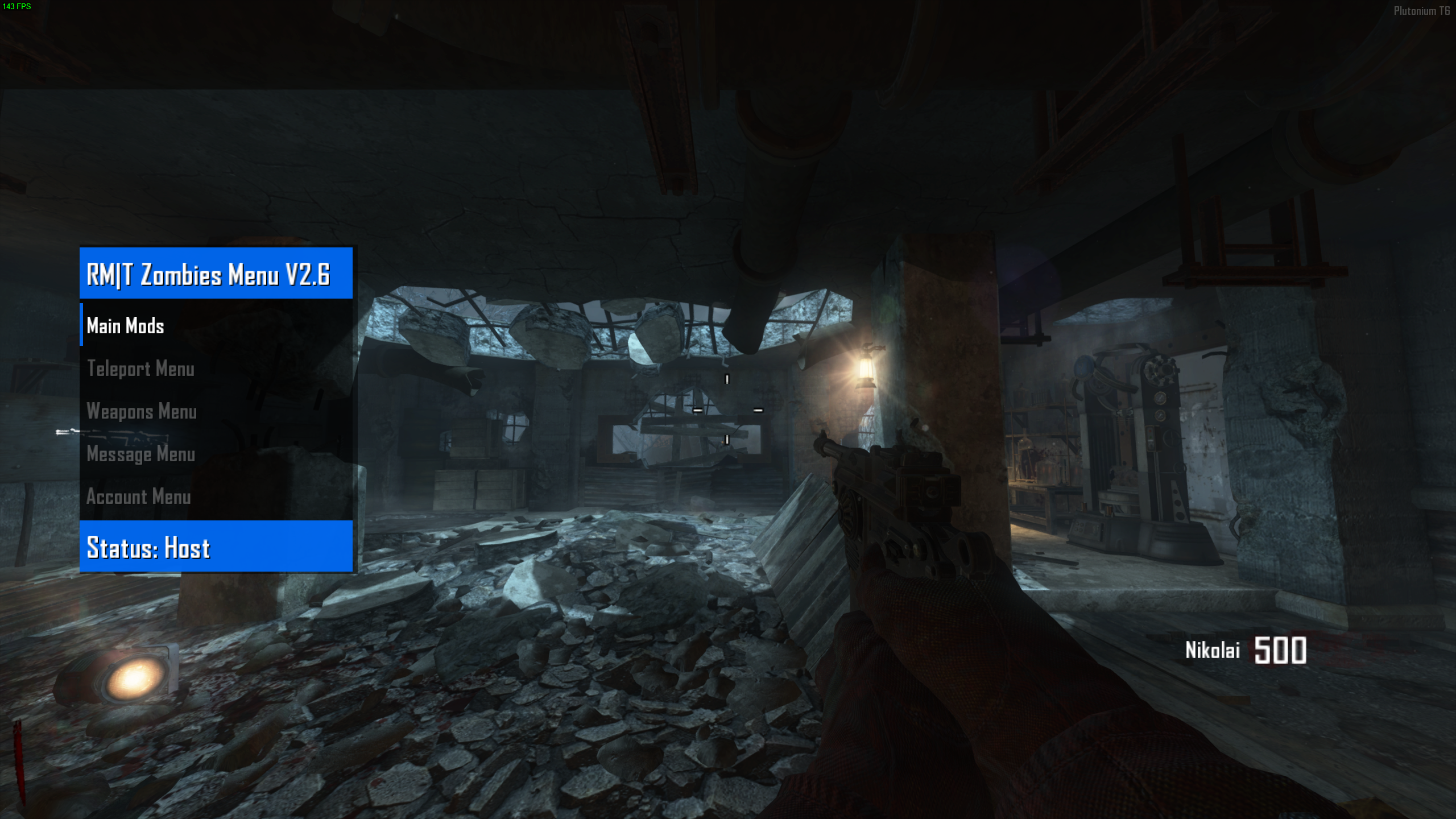
                  Today I'm sharing RM|T Zombies Menu V2.6 which is a zombie mod menu for Black Ops II.
                  Note that I am not the original author of this mod menu.

                  It's already compiled so you just have to drag and drop it and enjoy!
                  It's not recommended to mess with settings that weren't meant for PC or Plutonium like account settings, unlock trophies etc.


                  3b159b5f-316f-47a1-b84e-758518b6b7d9-image.png


                  How to use

                  Open the menu: Aim key + Knife key
                  Confirm: Jump key
                  Cancel: Use key
                  Go down: Previous scorestreak key
                  Go up: Next scorestreak key


                  Installation
                  Follow the instructions on the T6 modding guide

                  Download
                  Proton Drive | Mediafire


                  You can watch a preview of the mod menu here
                  https://youtu.be/yJ0nR1OBMLk?t=11

                  Mizzumbo79 Offline
                  Mizzumbo79 Offline
                  Mizzumbo79
                  wrote on last edited by
                  #65
                  This post is deleted!
                  1 Reply Last reply
                  0
                  • Resxt Resxt

                    Today I'm sharing RM|T Zombies Menu V2.6 which is a zombie mod menu for Black Ops II.
                    Note that I am not the original author of this mod menu.

                    It's already compiled so you just have to drag and drop it and enjoy!
                    It's not recommended to mess with settings that weren't meant for PC or Plutonium like account settings, unlock trophies etc.


                    3b159b5f-316f-47a1-b84e-758518b6b7d9-image.png


                    How to use

                    Open the menu: Aim key + Knife key
                    Confirm: Jump key
                    Cancel: Use key
                    Go down: Previous scorestreak key
                    Go up: Next scorestreak key


                    Installation
                    Follow the instructions on the T6 modding guide

                    Download
                    Proton Drive | Mediafire


                    You can watch a preview of the mod menu here
                    https://youtu.be/yJ0nR1OBMLk?t=11

                    Mizzumbo79 Offline
                    Mizzumbo79 Offline
                    Mizzumbo79
                    wrote on last edited by
                    #66

                    Resxt Dude, I have a question like every time I downloaded mod menu they all worked in the solo room but not in the custom game because I wasn't the host so you can say oh but you just have to become a host, right? Not every time I start the game on the loading screen my friend's game crashes so I wanted to know does it work without me being the host? Well the mod menus I downloaded were Hells Vengeance v4 and Project Iconic V3 if you can help me I would appreciate it

                    Resxt 1 Reply Last reply
                    0
                    • Mizzumbo79 Mizzumbo79

                      Resxt Dude, I have a question like every time I downloaded mod menu they all worked in the solo room but not in the custom game because I wasn't the host so you can say oh but you just have to become a host, right? Not every time I start the game on the loading screen my friend's game crashes so I wanted to know does it work without me being the host? Well the mod menus I downloaded were Hells Vengeance v4 and Project Iconic V3 if you can help me I would appreciate it

                      Resxt Offline
                      Resxt Offline
                      Resxt
                      Plutonium Staff
                      wrote on last edited by
                      #67

                      Mizzumbo79 scripts are only loaded by the host

                      1 Reply Last reply
                      0
                      • Bot_Eve Offline
                        Bot_Eve Offline
                        Bot_Eve
                        wrote on last edited by
                        #68

                        not working for origins just says server disconnected

                        1 Reply Last reply
                        0
                        • Resxt Resxt

                          Today I'm sharing RM|T Zombies Menu V2.6 which is a zombie mod menu for Black Ops II.
                          Note that I am not the original author of this mod menu.

                          It's already compiled so you just have to drag and drop it and enjoy!
                          It's not recommended to mess with settings that weren't meant for PC or Plutonium like account settings, unlock trophies etc.


                          3b159b5f-316f-47a1-b84e-758518b6b7d9-image.png


                          How to use

                          Open the menu: Aim key + Knife key
                          Confirm: Jump key
                          Cancel: Use key
                          Go down: Previous scorestreak key
                          Go up: Next scorestreak key


                          Installation
                          Follow the instructions on the T6 modding guide

                          Download
                          Proton Drive | Mediafire


                          You can watch a preview of the mod menu here
                          https://youtu.be/yJ0nR1OBMLk?t=11

                          jerryrtx Offline
                          jerryrtx Offline
                          jerryrtx
                          wrote on last edited by
                          #69

                          Resxt said in [ZM] RM|T Zombies Menu V2.6 - Mod Menu:

                          Aim key + Knife key

                          1 Reply Last reply
                          0
                          • WolflexZ WolflexZ referenced this topic on
                          • WolflexZ WolflexZ referenced this topic on
                          • Danielzxy_ Offline
                            Danielzxy_ Offline
                            Danielzxy_
                            wrote on last edited by
                            #70

                            is it bannable?

                            Resxt 1 Reply Last reply
                            0
                            • Danielzxy_ Danielzxy_

                              is it bannable?

                              Resxt Offline
                              Resxt Offline
                              Resxt
                              Plutonium Staff
                              wrote on last edited by
                              #71

                              Danielzxy_ as long as you load scripts the official way no script is bannable

                              1 Reply Last reply
                              0
                              • Ednts Ednts

                                Stackies Also having this issue any idea how to fix?

                                Facilix Offline
                                Facilix Offline
                                Facilix
                                wrote on last edited by
                                #72

                                Ednts resulotion problem, make it 1080p and it should be fine

                                1 Reply Last reply
                                0
                                • Resxt Resxt

                                  Today I'm sharing RM|T Zombies Menu V2.6 which is a zombie mod menu for Black Ops II.
                                  Note that I am not the original author of this mod menu.

                                  It's already compiled so you just have to drag and drop it and enjoy!
                                  It's not recommended to mess with settings that weren't meant for PC or Plutonium like account settings, unlock trophies etc.


                                  3b159b5f-316f-47a1-b84e-758518b6b7d9-image.png


                                  How to use

                                  Open the menu: Aim key + Knife key
                                  Confirm: Jump key
                                  Cancel: Use key
                                  Go down: Previous scorestreak key
                                  Go up: Next scorestreak key


                                  Installation
                                  Follow the instructions on the T6 modding guide

                                  Download
                                  Proton Drive | Mediafire


                                  You can watch a preview of the mod menu here
                                  https://youtu.be/yJ0nR1OBMLk?t=11

                                  T1RIDENT Offline
                                  T1RIDENT Offline
                                  T1RIDENT
                                  wrote on last edited by
                                  #73

                                  Resxt it doesn't work when i join my friend custom game lobby

                                  Resxt 1 Reply Last reply
                                  0
                                  • T1RIDENT T1RIDENT

                                    Resxt it doesn't work when i join my friend custom game lobby

                                    Resxt Offline
                                    Resxt Offline
                                    Resxt
                                    Plutonium Staff
                                    wrote on last edited by
                                    #74

                                    @Racoon_ scripts work for the hosts, you can't join a game or a server and load your own scripts

                                    You need to host or he install the scripts and give it to you through the menu

                                    s_zoq 1 Reply Last reply
                                    0
                                    • Malk Offline
                                      Malk Offline
                                      Malk
                                      wrote on last edited by
                                      #75

                                      how do i close the menu, being a host?

                                      1 Reply Last reply
                                      0
                                      • Resxt Resxt

                                        @Racoon_ scripts work for the hosts, you can't join a game or a server and load your own scripts

                                        You need to host or he install the scripts and give it to you through the menu

                                        s_zoq Offline
                                        s_zoq Offline
                                        s_zoq
                                        wrote on last edited by
                                        #76

                                        Resxt i need help

                                        1 Reply Last reply
                                        0
                                        • Camus90 Offline
                                          Camus90 Offline
                                          Camus90
                                          wrote on last edited by
                                          #77

                                          This is garbage, I was banned for using this, so why post it on the same page?

                                          Resxt 1 Reply Last reply
                                          0

                                          Hello! It looks like you're interested in this conversation, but you don't have an account yet.

                                          Getting fed up of having to scroll through the same posts each visit? When you register for an account, you'll always come back to exactly where you were before, and choose to be notified of new replies (either via email, or push notification). You'll also be able to save bookmarks and upvote posts to show your appreciation to other community members.

                                          With your input, this post could be even better 💗

                                          Register Login
                                          Reply
                                          • Reply as topic
                                          Log in to reply
                                          • Oldest to Newest
                                          • Newest to Oldest
                                          • Most Votes


                                          • 1
                                          • 2
                                          • 3
                                          • 4
                                          • 5
                                          • Login

                                          • Don't have an account? Register

                                          • Login or register to search.
                                          • First post
                                            Last post
                                          0
                                          • Unread 0
                                          • Recent
                                          • Tags
                                          • Popular
                                          • Users
                                          • Groups
                                          • Donate