Skip to content
  • 0 Unread 0
  • Recent
  • Popular
  • Users
  • Donate
Collapse
Home Docs Stats Discord Donate
Download
  1. Home
  2. BO2 Client Support
  3. how to fix unable to join game session

how to fix unable to join game session

Scheduled Pinned Locked Moved BO2 Client Support
59 Posts 55 Posters 164.7k Views 3 Watching
  • Oldest to Newest
  • Newest to Oldest
  • Most Votes
Reply
  • Reply as topic
Log in to reply
This topic has been deleted. Only users with topic management privileges can see it.
  • moussets
    moussets
    moussets
    wrote on last edited by
    #24

    same for me

    1 Reply Last reply
    0
    • bartoggy_v2
      bartoggy_v2
      bartoggy_v2
      wrote on last edited by
      #25

      Hi,

      Same problem here, i can play with friends on online, but not zombie at all, open port 3074 and 4976, disable firewall and same error

      1 Reply Last reply
      0
      • Cashewmilk
        Cashewmilk
        Cashewmilk
        wrote on last edited by
        #26

        same issue here

        1 Reply Last reply
        0
        • LobotomisedRat
          LobotomisedRat
          LobotomisedRat
          wrote on last edited by
          #27

          I have the same issues, seems like there's a problem with plutonium instead of everyone here having a common probleme

          1 Reply Last reply
          0
          • aaaAAAh.exe
            aaaAAAh.exe
            aaaAAAh.exe
            wrote on last edited by
            #28

            limit fps to 200

            1 Reply Last reply
            0
            • Totenkov
              Totenkov
              Totenkov
              wrote on last edited by
              #29

              i fixed it by unfollowing my friend (also he to me), then refreshing the page and following back again, then open plutonium and play as normal (We do this process everytime to play, its the only way we found to fix it. (We only tested this on T6 zombies so).

              sc00py Kasoruku 2 Replies Last reply
              2
              • Totenkov Totenkov

                i fixed it by unfollowing my friend (also he to me), then refreshing the page and following back again, then open plutonium and play as normal (We do this process everytime to play, its the only way we found to fix it. (We only tested this on T6 zombies so).

                sc00py
                sc00py
                sc00py
                wrote on last edited by
                #30

                Totenkov This worked for us, thanks!

                1 Reply Last reply
                0
                • BustenCider
                  BustenCider
                  BustenCider
                  wrote on last edited by
                  #31

                  Totenkov hey ive tried this method with a buddy but that didnt work for us. anyone ideas?

                  1 Reply Last reply
                  0
                  • Siegfread
                    Siegfread
                    Siegfread
                    wrote on last edited by
                    #32

                    one simple fix just see if your ip address

                    is not 0.255
                    if its starts like this just restart your game until it change it

                    1 Reply Last reply
                    2
                    • Frank52
                      Frank52
                      Frank52
                      wrote on last edited by
                      #33

                      Steam in background for everyone fixed it

                      1 Reply Last reply
                      0
                      • RoseyHearts
                        RoseyHearts
                        RoseyHearts
                        wrote on last edited by RoseyHearts
                        #34

                        I tried unfollowing my friend and refollowing them then reopening the game. Eventually, it works but not sure if it will for others.

                        1 Reply Last reply
                        0
                        • MOHAMAD73005
                          MOHAMAD73005
                          MOHAMAD73005
                          wrote on last edited by
                          #35

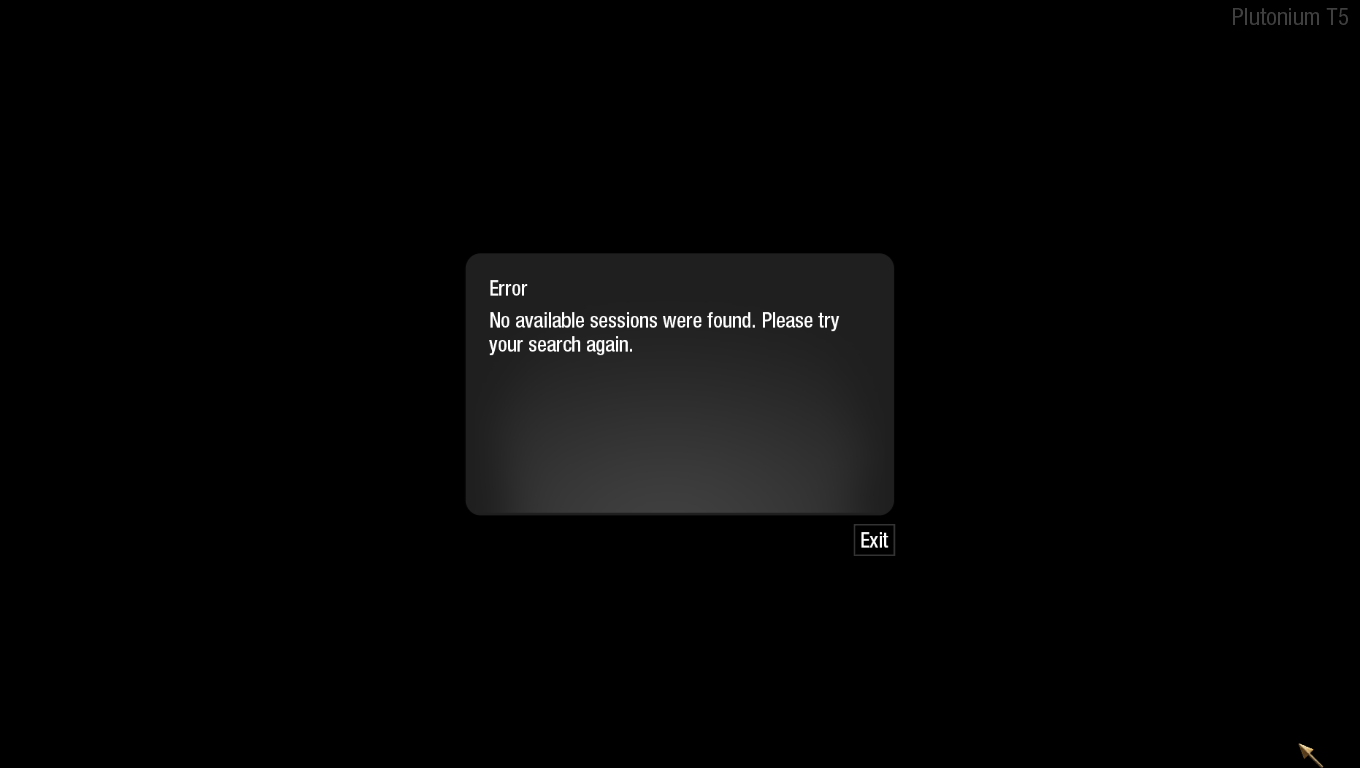
                          this is my error message

                          image.png

                          1 Reply Last reply
                          0
                          • Macaphony
                            Macaphony
                            Macaphony
                            wrote on last edited by
                            #36

                            lol skill issue (same issue)

                            1 Reply Last reply
                            0
                            • shiniggie
                              shiniggie
                              shiniggie
                              wrote on last edited by
                              #37

                              lol tried all the things still hasnt worked for us, it was working fine when we first started today but now its not.

                              Resxt 1 Reply Last reply
                              0
                              • shiniggie shiniggie

                                lol tried all the things still hasnt worked for us, it was working fine when we first started today but now its not.

                                Resxt
                                Resxt
                                Resxt
                                Plutonium Staff
                                wrote on last edited by
                                #38

                                shiniggie
                                https://forum.plutonium.pw/post/140610

                                1 Reply Last reply
                                0
                                • ThunderBoy.zx
                                  ThunderBoy.zx
                                  ThunderBoy.zx
                                  wrote on last edited by
                                  #39

                                  Hi guys i have found fix for the problem 99% if u have HDD don't work cuz slow loading but if u have ssd it will work fine that's what worked for me tell me guys

                                  1 Reply Last reply
                                  0
                                  • Quaonzz
                                    Quaonzz
                                    Quaonzz
                                    wrote on last edited by
                                    #40

                                    try restarting your game, and make your friends restart it too
                                    that worked for me

                                    1 Reply Last reply
                                    0
                                    • Soven
                                      Soven
                                      Soven
                                      wrote on last edited by
                                      #41

                                      spent the last couple hours trying to figure anything out, solved it by us both just closing steam and restarting the game
                                      idk why it works like that but it did for us at least

                                      1 Reply Last reply
                                      0
                                      • Resxt Resxt

                                        Make sure to read our doc, the blue box at the top explains it
                                        https://plutonium.pw/docs/custom-games/

                                        If you still can't get it to work then let your friend try to invite you instead.
                                        Otherwise open the app in your firewall and make sure the group is opened in game.

                                        If nothing works port forwarding port 3074 (UDP) on your router will make it work
                                        soupeee
                                        soupeee
                                        soupeee
                                        wrote on last edited by
                                        #42

                                        Resxt said in how to fix unable to join game session:

                                        /docs/custom-games/

                                        If you still can't get it to work then let your friend try to invite you instead.
                                        Otherwise open the app in your firewall and make sure the group is opened in game.

                                        If nothing works port forwarding port 3074 (UDP) on your ro

                                        1 Reply Last reply
                                        0
                                        • Totenkov Totenkov

                                          i fixed it by unfollowing my friend (also he to me), then refreshing the page and following back again, then open plutonium and play as normal (We do this process everytime to play, its the only way we found to fix it. (We only tested this on T6 zombies so).


                                          Kasoruku
                                          Kasoruku
                                          Kasoruku
                                          wrote on last edited by
                                          #43

                                          Totenkov holy shit this actually worked for us, thank you!

                                          Vilnirr 1 Reply Last reply
                                          0

                                          Hello! It looks like you're interested in this conversation, but you don't have an account yet.

                                          Getting fed up of having to scroll through the same posts each visit? When you register for an account, you'll always come back to exactly where you were before, and choose to be notified of new replies (either via email, or push notification). You'll also be able to save bookmarks and upvote posts to show your appreciation to other community members.

                                          With your input, this post could be even better 💗

                                          Register Login
                                          Reply
                                          • Reply as topic
                                          Log in to reply
                                          • Oldest to Newest
                                          • Newest to Oldest
                                          • Most Votes


                                          • Login

                                          • Don't have an account? Register

                                          • Login or register to search.
                                          • First post
                                            Last post
                                          0
                                          • Unread 0
                                          • Recent
                                          • Popular
                                          • Users
                                          • Donate