WAW Zombies Black Screen/ Infinite Loading Time (ONLY ZOMBIES)
-

When I launch WAW zombies I get an infinite black screen with a loading curser. I know it's infinite cause I let it run for 10 or so hours. When I check the (bootstrapper ?) I get these errors
Error: Waited 209 msec for missing asset "zombie_electric_shock_overlay".
Error: Could not load material "zombie_electric_shock_overlay".
Error: Could not load material "zombie_transporter_overlay".
Error: Could not load material "water_droplet".
Loading fastfile 'ui'
Error: Could not load material "water_dynamic_spray".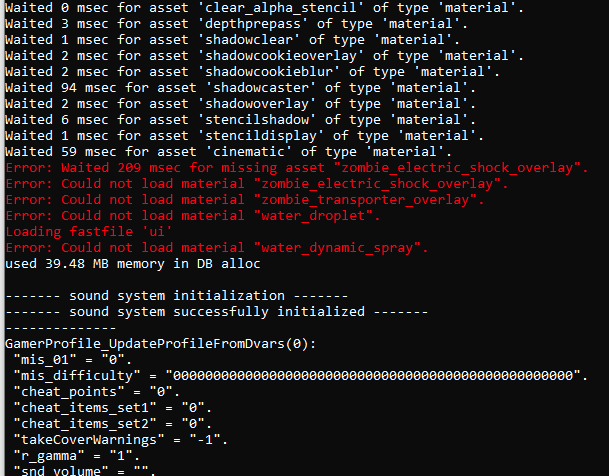
Along with this warningWARNING: Could not find zone 'D:\Games\pluto_t4_full_game\zone\english\localized_common.ff'

I have tried repairing game files, deleting the game and redownloading, along with repairing the files again. Multiplayer works fine as far as launching and changing the settings though. -
When I launch WAW zombies I get an infinite black screen with a loading curser. I know it's infinite cause I let it run for 10 or so hours. When I check the (bootstrapper ?) I get these errors
Error: Waited 209 msec for missing asset "zombie_electric_shock_overlay".
Error: Could not load material "zombie_electric_shock_overlay".
Error: Could not load material "zombie_transporter_overlay".
Error: Could not load material "water_droplet".
Loading fastfile 'ui'
Error: Could not load material "water_dynamic_spray".
Along with this warningWARNING: Could not find zone 'D:\Games\pluto_t4_full_game\zone\english\localized_common.ff'
I have tried repairing game files, deleting the game and redownloading, along with repairing the files again. Multiplayer works fine as far as launching and changing the settings though.
CrazyLoonitic don’t worry about the red words in the bootstrapper and have you tried switching to the next tab?
-

Try this
Change your video settings without crashing the game (borderless windowed)
Make sure your game is closed before doing that.
Go to%localappdata%\Plutonium\storage\t4\players
Open the config file with the notepad to edit it.
plutonium.cfgis for singleplayer/zombies andplutonium_mp.cfgis for multiplayer
Change these 4 dvars to be like below (you can use ctrl+f to search for them)seta r_fullscreen "0" seta r_noborder "1" seta vid_xpos "0" seta vid_ypos "0" -
Try this
Change your video settings without crashing the game (borderless windowed)
Make sure your game is closed before doing that.
Go to%localappdata%\Plutonium\storage\t4\players
Open the config file with the notepad to edit it.
plutonium.cfgis for singleplayer/zombies andplutonium_mp.cfgis for multiplayer
Change these 4 dvars to be like below (you can use ctrl+f to search for them)seta r_fullscreen "0" seta r_noborder "1" seta vid_xpos "0" seta vid_ypos "0"
Resxt there is no plutonium.cfg
-
-
 Xerxes locked this topic on
Hello! It looks like you're interested in this conversation, but you don't have an account yet.
Getting fed up of having to scroll through the same posts each visit? When you register for an account, you'll always come back to exactly where you were before, and choose to be notified of new replies (either via email, or push notification). You'll also be able to save bookmarks and upvote posts to show your appreciation to other community members.
With your input, this post could be even better 💗
Register Login