Skip to content
  • 0 Unread 0
  • Recent
  • Popular
  • Users
  • Donate
Collapse

Plutonium

  1. Home
  2. BO2 Modding Releases & Resources
  3. [Release] [ZM] Origins Robot Colors

[Release] [ZM] Origins Robot Colors

Scheduled Pinned Locked Moved BO2 Modding Releases & Resources
11 Posts 4 Posters 4.7k Views 2 Watching
  • Oldest to Newest
  • Newest to Oldest
  • Most Votes
Reply
  • Reply as topic
Log in to reply
This topic has been deleted. Only users with topic management privileges can see it.
  • HungryLumaLover HungryLumaLover

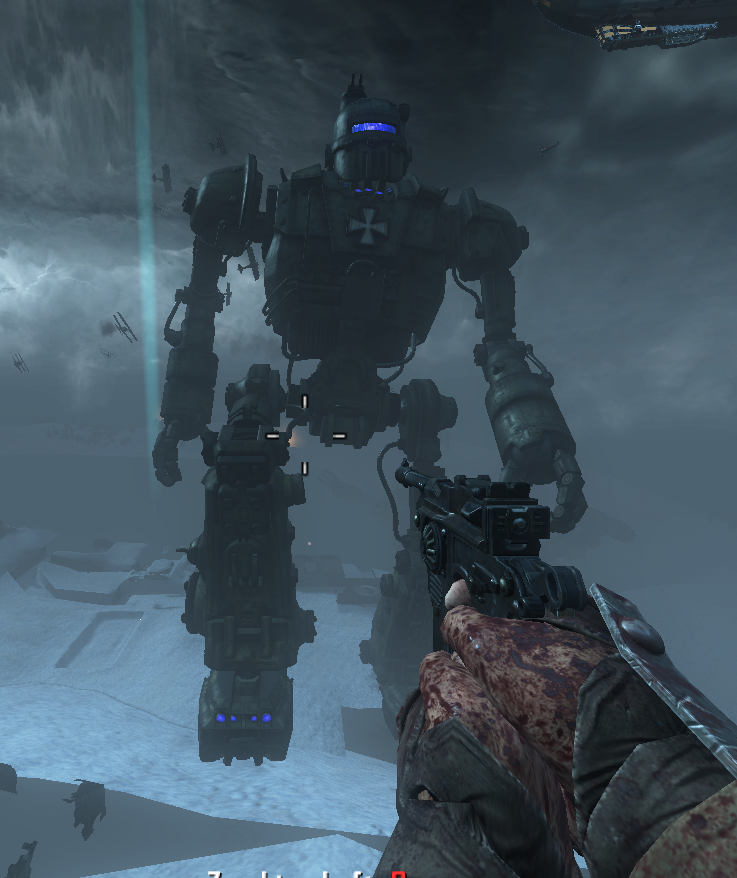
    so using this mod u can change the colors of the lights on the origins robots, Example:

    Red:
    red.png

    Orange:
    orange.png

    Green:
    green.png

    Blue:
    blue.png

    Purple:
    purple.png

    to use this mod, press win + r then type %localappdata%
    then look for plutonium then go to storage then t6 then images and drop the files u want from the download in there, but if there is no folder named "images" make one, drop the files from the folder corresponding to the color u want,
    and thats it, have fun!

    Download:https://www.mediafire.com/file/8f1locahon9a27w/Origins+Robot+Lights.zip/file

    hindercanrun Offline
    hindercanrun Offline
    hindercanrun
    Contributor
    wrote on last edited by
    #2

    @AquaEther nice release, but just to tell you t6r is an outdated method but it still works fine.

    HungryLumaLover 2 Replies Last reply
    1
    • hindercanrun hindercanrun

      @AquaEther nice release, but just to tell you t6r is an outdated method but it still works fine.

      HungryLumaLover Offline
      HungryLumaLover Offline
      HungryLumaLover
      wrote on last edited by
      #3

      hindercanrun how can i do it differently

      hindercanrun 1 Reply Last reply
      0
      • HungryLumaLover HungryLumaLover

        hindercanrun how can i do it differently

        hindercanrun Offline
        hindercanrun Offline
        hindercanrun
        Contributor
        wrote on last edited by
        #4

        @AquaEther press win + r then type %localappdata%
        then look for plutonium then go to storage then t6 then images,

        HungryLumaLover 1 Reply Last reply
        0
        • hindercanrun hindercanrun

          @AquaEther press win + r then type %localappdata%
          then look for plutonium then go to storage then t6 then images,

          HungryLumaLover Offline
          HungryLumaLover Offline
          HungryLumaLover
          wrote on last edited by
          #5

          hindercanrun i dont see it?

          1 Reply Last reply
          0
          • hindercanrun Offline
            hindercanrun Offline
            hindercanrun
            Contributor
            wrote on last edited by
            #6

            also if the images folder doesn’t exist make it

            1 Reply Last reply
            0
            • hindercanrun hindercanrun

              @AquaEther nice release, but just to tell you t6r is an outdated method but it still works fine.

              HungryLumaLover Offline
              HungryLumaLover Offline
              HungryLumaLover
              wrote on last edited by
              #7

              hindercanrun i fixed the decription so now it says to do the new way instead of the outdated way

              1 Reply Last reply
              3
              • Fancy Salad Offline
                Fancy Salad Offline
                Fancy Salad
                wrote on last edited by
                #8
                This post is deleted!
                hindercanrun 1 Reply Last reply
                0
                • Fancy Salad Fancy Salad
                  [[topic:post-is-deleted]]
                  hindercanrun Offline
                  hindercanrun Offline
                  hindercanrun
                  Contributor
                  wrote on last edited by
                  #9

                  Fruit salad yeah

                  Fancy Salad 1 Reply Last reply
                  0
                  • hindercanrun hindercanrun

                    Fruit salad yeah

                    Fancy Salad Offline
                    Fancy Salad Offline
                    Fancy Salad
                    wrote on last edited by
                    #10
                    This post is deleted!
                    1 Reply Last reply
                    0
                    • Bex0_0 Offline
                      Bex0_0 Offline
                      Bex0_0
                      wrote on last edited by
                      #11

                      You don't have the origins-reskin zip file?

                      1 Reply Last reply
                      0

                      Hello! It looks like you're interested in this conversation, but you don't have an account yet.

                      Getting fed up of having to scroll through the same posts each visit? When you register for an account, you'll always come back to exactly where you were before, and choose to be notified of new replies (either via email, or push notification). You'll also be able to save bookmarks and upvote posts to show your appreciation to other community members.

                      With your input, this post could be even better 💗

                      Register Login
                      Reply
                      • Reply as topic
                      Log in to reply
                      • Oldest to Newest
                      • Newest to Oldest
                      • Most Votes


                      • Login

                      • Don't have an account? Register

                      • Login or register to search.
                      • First post
                        Last post
                      0
                      • Unread 0
                      • Recent
                      • Popular
                      • Users
                      • Donate