Black Ops 2 Server Connection Problem
-

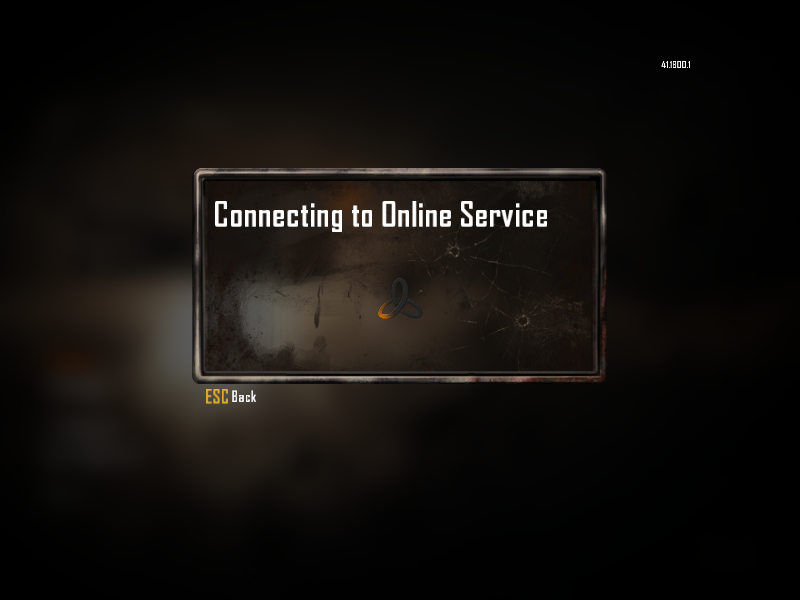
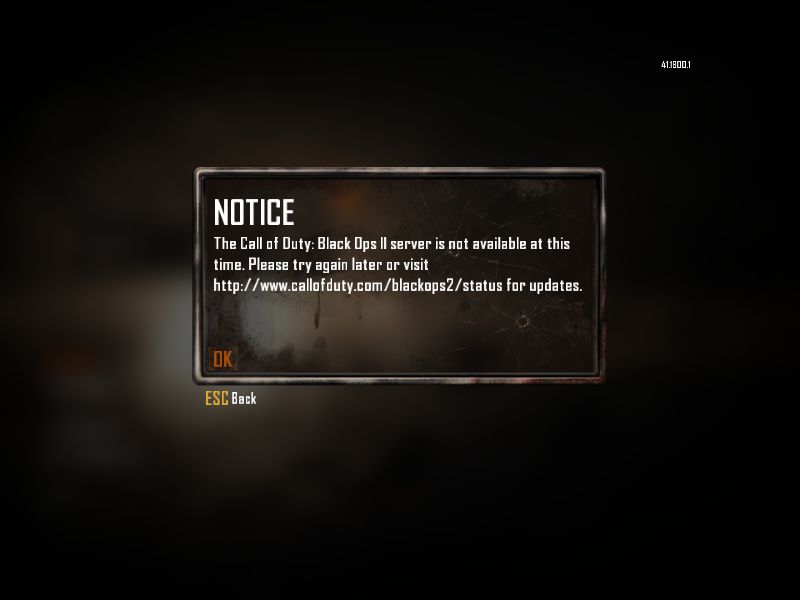
My friends and I have been trying to play Black Ops 2 Zombie mode over Plutonium for a long time, but when both me and my friend press the “Online” section, it gives an error after giving the “Connecting to Online Services” warning for a long time and we cannot play together. I have done a lot of research on the internet and I have adjusted the settings up to the firewall but I could not find the problem.
Thank you in advance for anyone who can help as we have been experiencing this problem for a long time.
-

hrmm. the only thing i can think of is a file is fucked up or something. where did you get your bo2? on steam or elsewwhere? id re-download and see if that worked. also make sure everything possible is up to date. and you say you both have this problem? i would ask your friend about his network setup and see if there could be any factors plaguing you both. (i.e.) firewalls etc, also is your isp using cg-nat? that could pose a problem possibly.. im sorry i couldnt give you the answer you probably wanted, but i still hope this helps you a little.
-
hrmm. the only thing i can think of is a file is fucked up or something. where did you get your bo2? on steam or elsewwhere? id re-download and see if that worked. also make sure everything possible is up to date. and you say you both have this problem? i would ask your friend about his network setup and see if there could be any factors plaguing you both. (i.e.) firewalls etc, also is your isp using cg-nat? that could pose a problem possibly.. im sorry i couldnt give you the answer you probably wanted, but i still hope this helps you a little.
nxs8739 said in Black Ops 2 Server Connection Problem:
hrmm. the only thing i can think of is a file is fucked up or something. where did you get your bo2? on steam or elsewwhere? id re-download and see if that worked. also make sure everything possible is up to date. and you say you both have this problem? i would ask your friend about his network setup and see if there could be any factors plaguing you both. (i.e.) firewalls etc, also is your isp using cg-nat? that could pose a problem possibly.. im sorry i couldnt give you the answer you probably wanted, but i still hope this helps you a little.
It's enough for you to take the time to respond, my friend. I downloaded BO2 from the Plutonium website and I'll delete it and reinstall it, I'll report back after I install it. Other than that, I've set up the firewall settings. By the way, I think my internet provider uses cg-nat.
-
You got the full BO2 game from Plutonium? I think you mean the client. Search for BO2 on Steam and buy it. If it's already purchased on Steam, verify the integrity of the game files. Open Steam and go to your library. Right-click on the game—in this case, "Black Ops 2 - Zombies"—then go to Properties -> Installed Files -> Verify Integrity of Game Files.
-
You got the full BO2 game from Plutonium? I think you mean the client. Search for BO2 on Steam and buy it. If it's already purchased on Steam, verify the integrity of the game files. Open Steam and go to your library. Right-click on the game—in this case, "Black Ops 2 - Zombies"—then go to Properties -> Installed Files -> Verify Integrity of Game Files.
nxs8739 said in Black Ops 2 Server Connection Problem:
You got the full BO2 game from Plutonium? I think you mean the client. Search for BO2 on Steam and buy it. If it's already purchased on Steam, verify the integrity of the game files. Open Steam and go to your library. Right-click on the game—in this case, "Black Ops 2 - Zombies"—then go to Properties -> Installed Files -> Verify Integrity of Game Files.
I downloaded the full game as a torrent from Plutonium, obviously I didn't want to pay $60 for an old game. I get this error when I download the game as a torrent.
-
-
ahhh. that might be why my friend. did your buddy also torrent it?
i understand it sucks paying for the game full price but sometimes it is needed. i suggest adding it to your steam wishlist and waiting for it to go on sale.
nxs8739 said in Black Ops 2 Server Connection Problem:
ahhh. that might be why my friend. did your buddy also torrent it?
i understand it sucks paying for the game full price but sometimes it is needed. i suggest adding it to your steam wishlist and waiting for it to go on sale.You are right, there is no justification for using Torrent, but when we download this Torrent at the internet cafe and enter the “Online” section, it works. But when we want to connect from our home computers, we get such an error. So if there is an error via Torrent, we should get the same error in the “Online” section in the internet cafe.
-
indeed. thre only thing i can think of then is cg-nat. i have a open NAT by default in most games and when i hopped on bo2 it was a moderate nat, so your home NAT very well might be strict. if that is the case that is exactly what the issue is. the game is having problems traversing your network and finding its destination.
cg-nat works well for everyday tasks on internet but for games and p2p applications it is a living hell/nightmare -
indeed. thre only thing i can think of then is cg-nat. i have a open NAT by default in most games and when i hopped on bo2 it was a moderate nat, so your home NAT very well might be strict. if that is the case that is exactly what the issue is. the game is having problems traversing your network and finding its destination.
cg-nat works well for everyday tasks on internet but for games and p2p applications it is a living hell/nightmare
nxs8739 said in Black Ops 2 Server Connection Problem:
indeed. thre only thing i can think of then is cg-nat. i have a open NAT by default in most games and when i hopped on bo2 it was a moderate nat, so your home NAT very well might be strict. if that is the case that is exactly what the issue is. the game is having problems traversing your network and finding its destination.
cg-nat works well for everyday tasks on internet but for games and p2p applications it is a living hell/nightmareNow that you said so, I tried it by connecting the phone internet and it connected directly to the “Online” section. So how do you think I can do this with home internet?
-
- Check for Server-Side NAT Solutions
NAT Traversal Techniques: Some dedicated servers and gaming platforms implement NAT traversal techniques. Verify if the dedicated server software or hosting service provides NAT traversal support or configuration options. - Utilize a VPN or Tunnel Service
VPN Tunnel: Use a VPN service with a public IP to create a tunnel between the clients and the dedicated server. Both the clients and the server can connect through this VPN, bypassing CGNAT restrictions.
VPN for Game Server: If the dedicated server is hosted on a VPS or cloud service, setting up a VPN on that server and having clients connect via the VPN can help. - Public IP from Hosting Provider
Request Public IP: If possible, ask the server hosting provider if they can offer a public IP address or a way to bypass CGNAT for the dedicated server. - Use a Proxy or Relay Server
Proxy Solutions: Implement a proxy or relay server that clients can connect to, which then forwards the connection to the dedicated server. This can help in scenarios where direct connectivity is restricted due to CGNAT. - Configure Firewall and Port Forwarding
Server Configuration: Ensure that the server's firewall is configured to allow traffic through the necessary ports. Even with CGNAT, properly configuring the firewall can sometimes help in managing connection issues. - Consult Hosting Provider for Solutions
Technical Support: Contact the server hosting provider’s technical support team for advice. They may have specific solutions for dealing with CGNAT and ensuring that clients can connect reliably. - Test Different Network Configurations
Alternate Networks: Test the connection from different networks, if possible. This can help determine if the issue is specific to certain network configurations or if it's a broader issue with CGNAT.
Since youve done most of these here im betting using a vpn will do the trick.
Basically it fools the game into thinking you dont have cg-nat because the vpn tunnel automatically finds the route for you.
- Check for Server-Side NAT Solutions
-
- Check for Server-Side NAT Solutions
NAT Traversal Techniques: Some dedicated servers and gaming platforms implement NAT traversal techniques. Verify if the dedicated server software or hosting service provides NAT traversal support or configuration options. - Utilize a VPN or Tunnel Service
VPN Tunnel: Use a VPN service with a public IP to create a tunnel between the clients and the dedicated server. Both the clients and the server can connect through this VPN, bypassing CGNAT restrictions.
VPN for Game Server: If the dedicated server is hosted on a VPS or cloud service, setting up a VPN on that server and having clients connect via the VPN can help. - Public IP from Hosting Provider
Request Public IP: If possible, ask the server hosting provider if they can offer a public IP address or a way to bypass CGNAT for the dedicated server. - Use a Proxy or Relay Server
Proxy Solutions: Implement a proxy or relay server that clients can connect to, which then forwards the connection to the dedicated server. This can help in scenarios where direct connectivity is restricted due to CGNAT. - Configure Firewall and Port Forwarding
Server Configuration: Ensure that the server's firewall is configured to allow traffic through the necessary ports. Even with CGNAT, properly configuring the firewall can sometimes help in managing connection issues. - Consult Hosting Provider for Solutions
Technical Support: Contact the server hosting provider’s technical support team for advice. They may have specific solutions for dealing with CGNAT and ensuring that clients can connect reliably. - Test Different Network Configurations
Alternate Networks: Test the connection from different networks, if possible. This can help determine if the issue is specific to certain network configurations or if it's a broader issue with CGNAT.
Since youve done most of these here im betting using a vpn will do the trick.
Basically it fools the game into thinking you dont have cg-nat because the vpn tunnel automatically finds the route for you.
nxs8739 said in Black Ops 2 Server Connection Problem:
- Check for Server-Side NAT Solutions
NAT Traversal Techniques: Some dedicated servers and gaming platforms implement NAT traversal techniques. Verify if the dedicated server software or hosting service provides NAT traversal support or configuration options. - Utilize a VPN or Tunnel Service
VPN Tunnel: Use a VPN service with a public IP to create a tunnel between the clients and the dedicated server. Both the clients and the server can connect through this VPN, bypassing CGNAT restrictions.
VPN for Game Server: If the dedicated server is hosted on a VPS or cloud service, setting up a VPN on that server and having clients connect via the VPN can help. - Public IP from Hosting Provider
Request Public IP: If possible, ask the server hosting provider if they can offer a public IP address or a way to bypass CGNAT for the dedicated server. - Use a Proxy or Relay Server
Proxy Solutions: Implement a proxy or relay server that clients can connect to, which then forwards the connection to the dedicated server. This can help in scenarios where direct connectivity is restricted due to CGNAT. - Configure Firewall and Port Forwarding
Server Configuration: Ensure that the server's firewall is configured to allow traffic through the necessary ports. Even with CGNAT, properly configuring the firewall can sometimes help in managing connection issues. - Consult Hosting Provider for Solutions
Technical Support: Contact the server hosting provider’s technical support team for advice. They may have specific solutions for dealing with CGNAT and ensuring that clients can connect reliably. - Test Different Network Configurations
Alternate Networks: Test the connection from different networks, if possible. This can help determine if the issue is specific to certain network configurations or if it's a broader issue with CGNAT.
Since youve done most of these here im betting using a vpn will do the trick.
Basically it fools the game into thinking you dont have cg-nat because the vpn tunnel automatically finds the route for you.
Dude, I'm sorry, I haven't turned on the computer for 2 days, so my answer is a bit late.
I thank you very much for your time and detailed help. I will get back to you after I try these methods. If there is a part that I am stuck afterwards, would you mind if I ask you again?
- Check for Server-Side NAT Solutions
-
-
For anyone else who found this thread and needed an answer, disable teredo/IPV6 in windows settings.
Win+R -> Type: "services.msc" -> Locate "IP Helper" service -> Right Click -> Stop
-
I was able to solve this problem by connecting to the phone's internet from the computer.
On 2 computers we had the same problem, but on both desktop and laptop we were able to get past the “Connecting to Online Service” section by connecting to the phone's internet. You can also connect to the phone's internet via cable on the desktop. Then you can continue by connecting to your normal internet after skipping the “Connecting to Online Service” section.
-
I was able to solve this problem by connecting to the phone's internet from the computer.
On 2 computers we had the same problem, but on both desktop and laptop we were able to get past the “Connecting to Online Service” section by connecting to the phone's internet. You can also connect to the phone's internet via cable on the desktop. Then you can continue by connecting to your normal internet after skipping the “Connecting to Online Service” section.
-
For anyone else who found this thread and needed an answer, disable teredo/IPV6 in windows settings.
Win+R -> Type: "services.msc" -> Locate "IP Helper" service -> Right Click -> Stop

For anyone else who found this thread and needed an answer, disable teredo/IPV6 in windows settings.
Win+R -> Type: "services.msc" -> Locate "IP Helper" service -> Right Click -> Stop
i know for sure my router has local network level NAT, disabling ipv6 via stopping this service worked,
worth also trying to turn it off from the network interface settings on windows, maybe the game's networking process binds directly to the network interface and accidently binds to an unsupported ipv6 interface ip -
For anyone else who found this thread and needed an answer, disable teredo/IPV6 in windows settings.
Win+R -> Type: "services.msc" -> Locate "IP Helper" service -> Right Click -> Stop

brysondev ty so much


Hello! It looks like you're interested in this conversation, but you don't have an account yet.
Getting fed up of having to scroll through the same posts each visit? When you register for an account, you'll always come back to exactly where you were before, and choose to be notified of new replies (either via email, or push notification). You'll also be able to save bookmarks and upvote posts to show your appreciation to other community members.
With your input, this post could be even better 💗
Register Login