How to make Custom Sounds w/o editing game files - TUTORIAL
-
You got tired of hearing a certain sound or voice line in its low quality, repetitive form? Heres how to replace it.
You will need the TomBoSoundTool (search up Tom crowley bo1 cause i cant post links)
You can use something like WinRaR to open iwd files aswell.So, go to your BO1 game directory folder and go into main. You will see all the images and sound files in .iwd format (you can open them with Winrar as said).
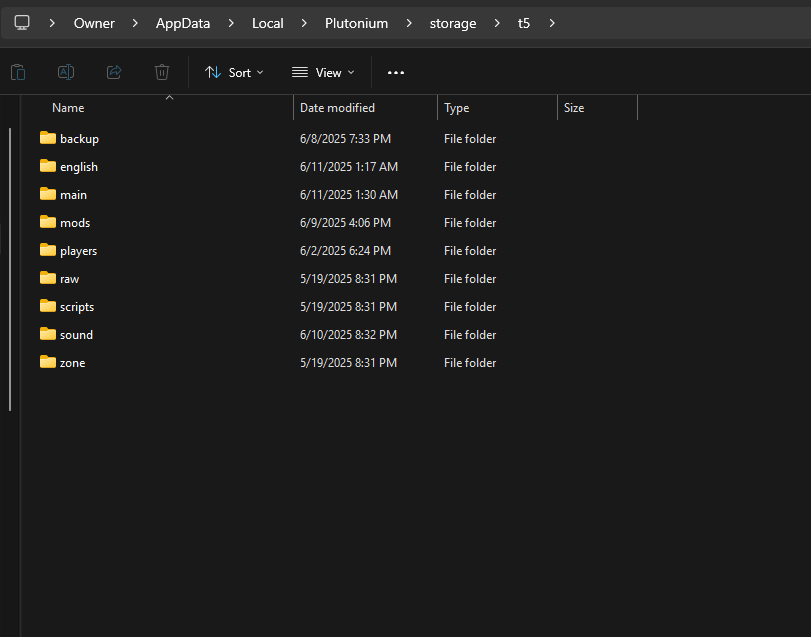
The Iwd with just the numbers are sounds, the one with english or your language are voice lines.Now, go to C:\Users\YOU\AppData\Local\Plutonium\storage\t5. What you want to do is make the folders that replicate the .iwd filesystem. So if you want to change, lets say the round change, you will have to do:
*t5\sound\mus\zombie\zombie_global*
Then, you need a .wav file of any sound or any round change sound, and drag that onto the BoSoundTool app and it will convert it to BO1s wav format.
Now, rename the .wav to what the sound you want to replace is called in the iwd is-
mus_zombie_round_over\start.wav
and put it in the zombie_global folder
Perk Jingles: t5\sound\mus\zombie\perksacola
jugganog_sting.wav
jugganog_jingle.wav,etcYou can do this for any sound in the game, but you will have to look at how to replace it yourself. Note that not every map uses the same filesystem either.
Samantha Power Up Lines:
t5\english\sound\voiceovers\zmb\ann\ann_name.wav
t5\english\sound\vox\scripted\zmb\ann\name.wav (Moon)
t5\english\sound\voiceovers\zmb\announcer (Firesale, Bonfire, Death Machine)
Heres how it should look:
-
 ATLANTAFX referenced this topic on
-
I will say I do not believe this works with .ff (Fast Files).
-
Yo nice tutorial
Late find for me

-
soo can i replace like,the factions themes or the songs that plays during the campaign levels?
-
moxegameng yes
@dont-wanna-die (i already know lol but still) awesome,if it is possible to change campaign level musics and other musics it would be perfect
-
is it possible to remove/replace the tinnitus sound effects?
-
i believe you'd have to put it into the mods folder but also everything else with it--so it loads your sounds and game file sounds but also rename the ones u want to change; if u can find game file sounds folder (idk where.) copy all the files and sounds--then throw it into a mod folder and throw in custom sounds after (these must replace actual file names of the original.)...then load the mod.
if ur messing with actual game files (not in plutonium folder)--its never advised unless u got backups--but it might be easier.
i see in the image u got some loose screws; if u want sounds to load its gotta be in a mod folder if not ur messing with some hefty stuff.
plutonium wont appreciate it -
i believe you'd have to put it into the mods folder but also everything else with it--so it loads your sounds and game file sounds but also rename the ones u want to change; if u can find game file sounds folder (idk where.) copy all the files and sounds--then throw it into a mod folder and throw in custom sounds after (these must replace actual file names of the original.)...then load the mod.
if ur messing with actual game files (not in plutonium folder)--its never advised unless u got backups--but it might be easier.
i see in the image u got some loose screws; if u want sounds to load its gotta be in a mod folder if not ur messing with some hefty stuff.
plutonium wont appreciate it -
henryak47 wym by they wont appreciate it? tf am i supposed to do consult some other modding forum for help with this admittedly niche change? seems silly
mummynapkin427 i mean u can do it bro, just online type stuff might glitch out....and mess with other players too.
im no staff but ive tried stuff like this and it does mess with other players trying to play aswell.
solo would be fine! but also ur changing the files itself so just make backups of original.
bottom-line: just do whatever you want...
-
 koishicat referenced this topic on
-
i believe you'd have to put it into the mods folder but also everything else with it--so it loads your sounds and game file sounds but also rename the ones u want to change; if u can find game file sounds folder (idk where.) copy all the files and sounds--then throw it into a mod folder and throw in custom sounds after (these must replace actual file names of the original.)...then load the mod.
if ur messing with actual game files (not in plutonium folder)--its never advised unless u got backups--but it might be easier.
i see in the image u got some loose screws; if u want sounds to load its gotta be in a mod folder if not ur messing with some hefty stuff.
plutonium wont appreciate ithenryak47 you arent messing with the game files you are just exploring them...
also plutonium doesnt care about custom sounds as other players just hear the normal sounds, nor are the original files filtered from the game in any way.
And no, it does not have to be in a mod folder or loaded mod to work, infact its the other way around -
do you know how to do this with weapon sounds? if u can with any other sound im sure you can do it with those. i wanted to try myself but i cant even find which iwd has them in it




Hello! It looks like you're interested in this conversation, but you don't have an account yet.
Getting fed up of having to scroll through the same posts each visit? When you register for an account, you'll always come back to exactly where you were before, and choose to be notified of new replies (either via email, or push notification). You'll also be able to save bookmarks and upvote posts to show your appreciation to other community members.
With your input, this post could be even better 💗
Register Login