Skip to content
  • 0 Unread 0
  • Recent
  • Tags
  • Popular
  • Users
  • Groups
  • Donate
Collapse

Plutonium

  1. Home
  2. BO2 Client Support
  3. BO2 Stuttering

BO2 Stuttering

Scheduled Pinned Locked Moved BO2 Client Support
18 Posts 2 Posters 2.6k Views
  • Oldest to Newest
  • Newest to Oldest
  • Most Votes
Reply
  • Reply as topic
Log in to reply
This topic has been deleted. Only users with topic management privileges can see it.
  • Rexxy Offline
    Rexxy Offline
    Rexxy
    wrote on last edited by
    #1

    I'm playing black ops 2 and its very laggy, everytime i enter a match, it always got 10-15FPS. I played BO1 multiplayer and everything is fine when i modify mp_config even with highest setting, is there any config file in the player folder where i can modify something, bcuz this game doesnt have it. sorry for my poor english

    Dss0 1 Reply Last reply
    0
    • Rexxy Rexxy

      I'm playing black ops 2 and its very laggy, everytime i enter a match, it always got 10-15FPS. I played BO1 multiplayer and everything is fine when i modify mp_config even with highest setting, is there any config file in the player folder where i can modify something, bcuz this game doesnt have it. sorry for my poor english

      Dss0 Offline
      Dss0 Offline
      Dss0
      Plutonium Staff
      wrote on last edited by
      #2

      Rexxy Nah you can't modify the config manually.
      Pc specs?

      Rexxy 1 Reply Last reply
      0
      • Dss0 Dss0

        Rexxy Nah you can't modify the config manually.
        Pc specs?

        Rexxy Offline
        Rexxy Offline
        Rexxy
        wrote on last edited by
        #3

        Dss0 ASUS X450JB :
        Processor : Intel Core i7 4720HQ
        VGA : NVIDIA GeForce GT 940M 2GB
        RAM : 4GB DDR3

        Dss0 1 Reply Last reply
        0
        • Rexxy Offline
          Rexxy Offline
          Rexxy
          wrote on last edited by
          #4

          Last time im playing bo1, running smoothly. Did Bo1 and Bo2 have same pc requirements ?

          1 Reply Last reply
          0
          • Rexxy Rexxy

            Dss0 ASUS X450JB :
            Processor : Intel Core i7 4720HQ
            VGA : NVIDIA GeForce GT 940M 2GB
            RAM : 4GB DDR3

            Dss0 Offline
            Dss0 Offline
            Dss0
            Plutonium Staff
            wrote on last edited by
            #5

            Rexxy Make sure the game is using your gt940m instead of your intel hd graphics:
            https://support.ubisoft.com/en-gb/faqs/000027100/Switching-to-the-laptop-s-dedicated-GPU/#:~:text=Switching to the dedicated Nvidia GPU&text=- Navigate to 3D Settings > Manage,as High performance Nvidia processor.

            Rexxy 1 Reply Last reply
            0
            • Dss0 Dss0

              Rexxy Make sure the game is using your gt940m instead of your intel hd graphics:
              https://support.ubisoft.com/en-gb/faqs/000027100/Switching-to-the-laptop-s-dedicated-GPU/#:~:text=Switching to the dedicated Nvidia GPU&text=- Navigate to 3D Settings > Manage,as High performance Nvidia processor.

              Rexxy Offline
              Rexxy Offline
              Rexxy
              wrote on last edited by
              #6

              Dss0 but my nvidia control panel not detect any bo2 application or games.

              Dss0 1 Reply Last reply
              0
              • Rexxy Rexxy

                Dss0 but my nvidia control panel not detect any bo2 application or games.

                Dss0 Offline
                Dss0 Offline
                Dss0
                Plutonium Staff
                wrote on last edited by
                #7

                Rexxy There should be an option to manually add an application, add the t6mp/t6zm.exe that is in

                C:\Users\YOURUSERNAME\AppData\Local\Plutonium\games
                
                Rexxy 2 Replies Last reply
                0
                • Dss0 Dss0

                  Rexxy There should be an option to manually add an application, add the t6mp/t6zm.exe that is in

                  C:\Users\YOURUSERNAME\AppData\Local\Plutonium\games
                  
                  Rexxy Offline
                  Rexxy Offline
                  Rexxy
                  wrote on last edited by
                  #8

                  Dss0 said in BO2 Stuttering:

                  C:\Users\YOURUSERNAME\AppData\Local\Plutonium\games

                  run with graphic processor -> High Performance Nvidia Processor, is that correct bro ?

                  Dss0 1 Reply Last reply
                  0
                  • Rexxy Rexxy

                    Dss0 said in BO2 Stuttering:

                    C:\Users\YOURUSERNAME\AppData\Local\Plutonium\games

                    run with graphic processor -> High Performance Nvidia Processor, is that correct bro ?

                    Dss0 Offline
                    Dss0 Offline
                    Dss0
                    Plutonium Staff
                    wrote on last edited by
                    #9

                    Rexxy yes

                    1 Reply Last reply
                    0
                    • Dss0 Dss0

                      Rexxy There should be an option to manually add an application, add the t6mp/t6zm.exe that is in

                      C:\Users\YOURUSERNAME\AppData\Local\Plutonium\games
                      
                      Rexxy Offline
                      Rexxy Offline
                      Rexxy
                      wrote on last edited by
                      #10

                      Dss0 not working, still lag ( 15 fps )

                      Dss0 1 Reply Last reply
                      0
                      • Rexxy Rexxy

                        Dss0 not working, still lag ( 15 fps )

                        Dss0 Offline
                        Dss0 Offline
                        Dss0
                        Plutonium Staff
                        wrote on last edited by
                        #11

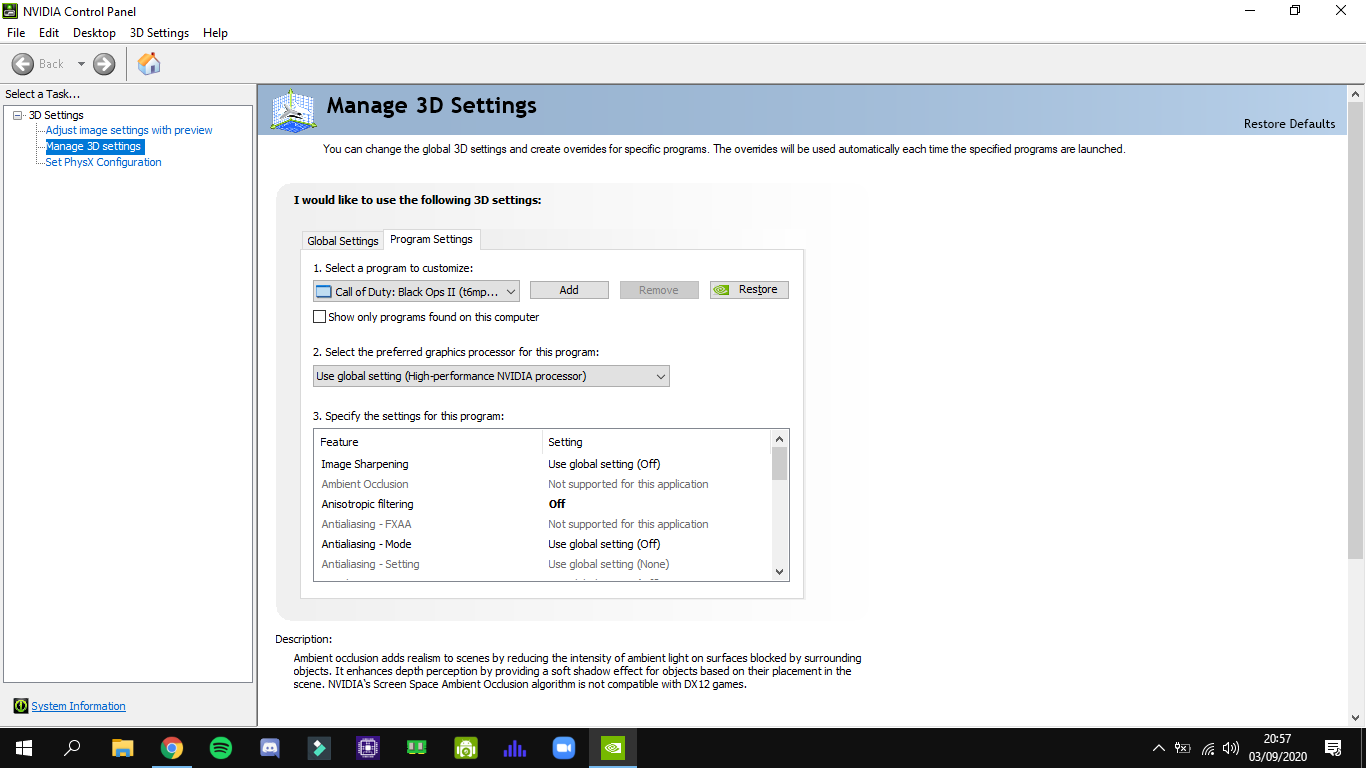
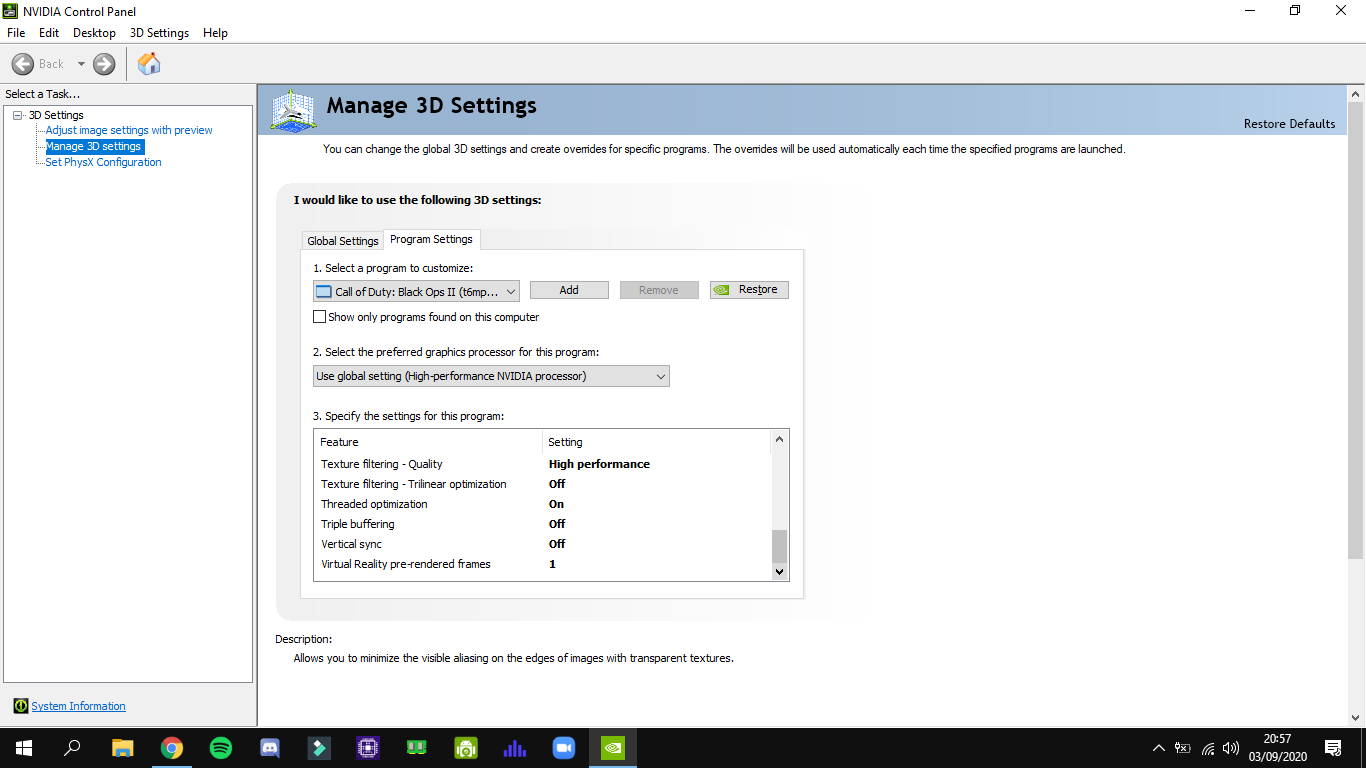
                        Rexxy Can you post a screenshot of the nvidia control panel settings?

                        Rexxy 1 Reply Last reply
                        0
                        • Dss0 Dss0

                          Rexxy Can you post a screenshot of the nvidia control panel settings?

                          Rexxy Offline
                          Rexxy Offline
                          Rexxy
                          wrote on last edited by
                          #12

                          Dss0 Screenshot (157).png Screenshot (156).png Screenshot (155).png Screenshot (154).png

                          1 Reply Last reply
                          0
                          • Rexxy Offline
                            Rexxy Offline
                            Rexxy
                            wrote on last edited by
                            #13

                            is it the game or my pc can't handle it ?

                            Dss0 1 Reply Last reply
                            0
                            • Rexxy Rexxy

                              is it the game or my pc can't handle it ?

                              Dss0 Offline
                              Dss0 Offline
                              Dss0
                              Plutonium Staff
                              wrote on last edited by
                              #14

                              Rexxy The game is using your intel hd graphics still, can you show the filepath to t6mp.exe? normally it should show smth like:
                              "call of duty black ops II(C:\users......\t6mp.exe) but in your case it just says t6mp.exe? Also is there a setting for "use high performance nvidia processor" in the dropdown menu? Try that instead of "Use global setting". If it still doesn't work try adding plutonium-bootstrapper-win32.exe (it's in the "bin" subfolder in the plutonium folder in appdata) and the plutonium launcher itself.

                              Rexxy 1 Reply Last reply
                              0
                              • Rexxy Offline
                                Rexxy Offline
                                Rexxy
                                wrote on last edited by
                                #15

                                Rexxy said in BO2 Stuttering:

                                C:\Users\YOURUSERNAME\AppData\Local\Plutonium\games

                                Screenshot (158).png

                                1 Reply Last reply
                                0
                                • Dss0 Dss0

                                  Rexxy The game is using your intel hd graphics still, can you show the filepath to t6mp.exe? normally it should show smth like:
                                  "call of duty black ops II(C:\users......\t6mp.exe) but in your case it just says t6mp.exe? Also is there a setting for "use high performance nvidia processor" in the dropdown menu? Try that instead of "Use global setting". If it still doesn't work try adding plutonium-bootstrapper-win32.exe (it's in the "bin" subfolder in the plutonium folder in appdata) and the plutonium launcher itself.

                                  Rexxy Offline
                                  Rexxy Offline
                                  Rexxy
                                  wrote on last edited by
                                  #16

                                  Dss0 thank you bro, work flawlessly, btw how to play with bots, i want to train my aim ?

                                  Dss0 1 Reply Last reply
                                  0
                                  • Rexxy Rexxy

                                    Dss0 thank you bro, work flawlessly, btw how to play with bots, i want to train my aim ?

                                    Dss0 Offline
                                    Dss0 Offline
                                    Dss0
                                    Plutonium Staff
                                    wrote on last edited by
                                    #17

                                    Rexxy You add bots normally through the private match menu and then you start the match by typing

                                    xpartygo
                                    

                                    into the console (you can open the console with the tilde key).
                                    Rexxy 1 Reply Last reply
                                    0
                                    • Dss0 Dss0

                                      Rexxy You add bots normally through the private match menu and then you start the match by typing

                                      xpartygo
                                      

                                      into the console (you can open the console with the tilde key).

                                      Rexxy Offline
                                      Rexxy Offline
                                      Rexxy
                                      wrote on last edited by
                                      #18

                                      Dss0 thank u for the help m8

                                      1 Reply Last reply
                                      0

                                      Hello! It looks like you're interested in this conversation, but you don't have an account yet.

                                      Getting fed up of having to scroll through the same posts each visit? When you register for an account, you'll always come back to exactly where you were before, and choose to be notified of new replies (either via email, or push notification). You'll also be able to save bookmarks and upvote posts to show your appreciation to other community members.

                                      With your input, this post could be even better 💗

                                      Register Login
                                      Reply
                                      • Reply as topic
                                      Log in to reply
                                      • Oldest to Newest
                                      • Newest to Oldest
                                      • Most Votes


                                      • Login

                                      • Don't have an account? Register

                                      • Login or register to search.
                                      • First post
                                        Last post
                                      0
                                      • Unread 0
                                      • Recent
                                      • Tags
                                      • Popular
                                      • Users
                                      • Groups
                                      • Donate