Skip to content
  • Recent
  • Tags
  • Popular
  • Users
  • Groups
  • Donate
Collapse

Plutonium

  1. Home
  2. BO2 Modding Releases & Resources
  3. [Release][ZM] Mod Menu | Healthbar | Weapons | Perks | Powerups | Upgrade | Night Mode | Teleport | Bank | Stats | Aimbot | Ufo | Freeze Zombies | Sound Menu | Legacy mods | Shader

[Release][ZM] Mod Menu | Healthbar | Weapons | Perks | Powerups | Upgrade | Night Mode | Teleport | Bank | Stats | Aimbot | Ufo | Freeze Zombies | Sound Menu | Legacy mods | Shader

Scheduled Pinned Locked Moved BO2 Modding Releases & Resources
41 Posts 14 Posters 21.6k Views 5 Watching
  • Oldest to Newest
  • Newest to Oldest
  • Most Votes
Reply
  • Reply as topic
Log in to reply
This topic has been deleted. Only users with topic management privileges can see it.
  • Ivobardolfundefined Offline
    Ivobardolfundefined Offline
    Ivobardolf
    wrote on last edited by
    #23

    doing the math for bank functions is simple at first glance, but then you have to account for every interaction.

    Littlegodsundefined 1 Reply Last reply
    1
    • Ivobardolfundefined Ivobardolf

      doing the math for bank functions is simple at first glance, but then you have to account for every interaction.

      Littlegodsundefined Offline
      Littlegodsundefined Offline
      Littlegods
      wrote on last edited by
      #24

      Ivobardolf
      Yes, the truth is I forgot about the bank limit. It was a disaster if the amount exceeded a million; the account would go into overdraft and the player would be ruined.

      1 Reply Last reply
      1
      • JYoung1undefined Offline
        JYoung1undefined Offline
        JYoung1
        wrote on last edited by JYoung1
        #25

        can i get a video of it getting installed im lowkey retarded and need to visually see it happen

        Littlegodsundefined 1 Reply Last reply
        0
        • JYoung1undefined JYoung1

          can i get a video of it getting installed im lowkey retarded and need to visually see it happen

          Littlegodsundefined Offline
          Littlegodsundefined Offline
          Littlegods
          wrote on last edited by Littlegods
          #26

          JYoung1
          Video
          https://www.youtube.com/watch?v=iy5rDO8fckE&t

          Direct download
          https://github.com/andr3xcl/littlegods-mod/releases/download/v4.0.0/v4.0.0.rar

          1 Reply Last reply
          0
          • Littlegodsundefined Littlegods

            Hello friends, it’s a pleasure to be active once again on this great forum. I know I left some projects unfinished, but it’s nothing serious; I simply wanted to restructure the way I share my projects and scripts into a more compact and user-friendly format. I’ve worked extensively on an interactive menu, and that’s what I’d like to announce here. This is one of the biggest projects I’ve personally made, and I hope you enjoy this new format.

            Also, I want to inform you that I’ve completely lost access to my old account andresito_20, so this will be my new official account.

            I’ve finished this new update so you can enjoy some of my most popular mods, such as:

            đŸ©ž HealthBar (New Design)

            💀 HealthBarZombie (New Design)

            🎹 New customizations for the menu itself

            From now on, if you’re looking for my mods, they’ll only be available through this new menu and not individually.

            Important: this menu is completely free. Upon release, it may not be sold or shared on other sites — this mod is exclusively for this community. It can be edited and improved if you’re an experienced programmer. If you’d like to help optimize it, enhance it, or add new features to improve the menu, you’re more than welcome to share your contributions on the release forum.
            Mods / Scripts

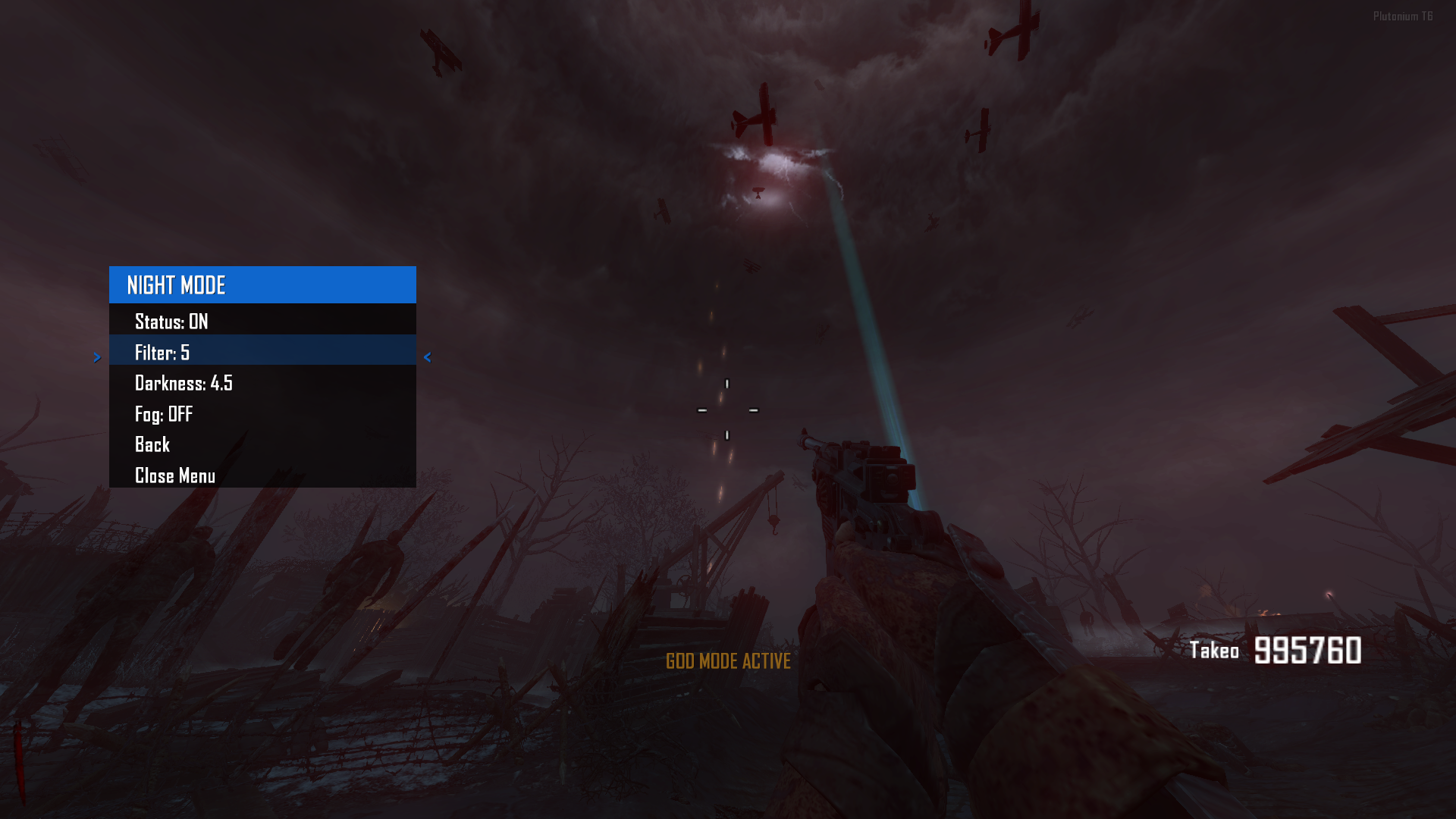
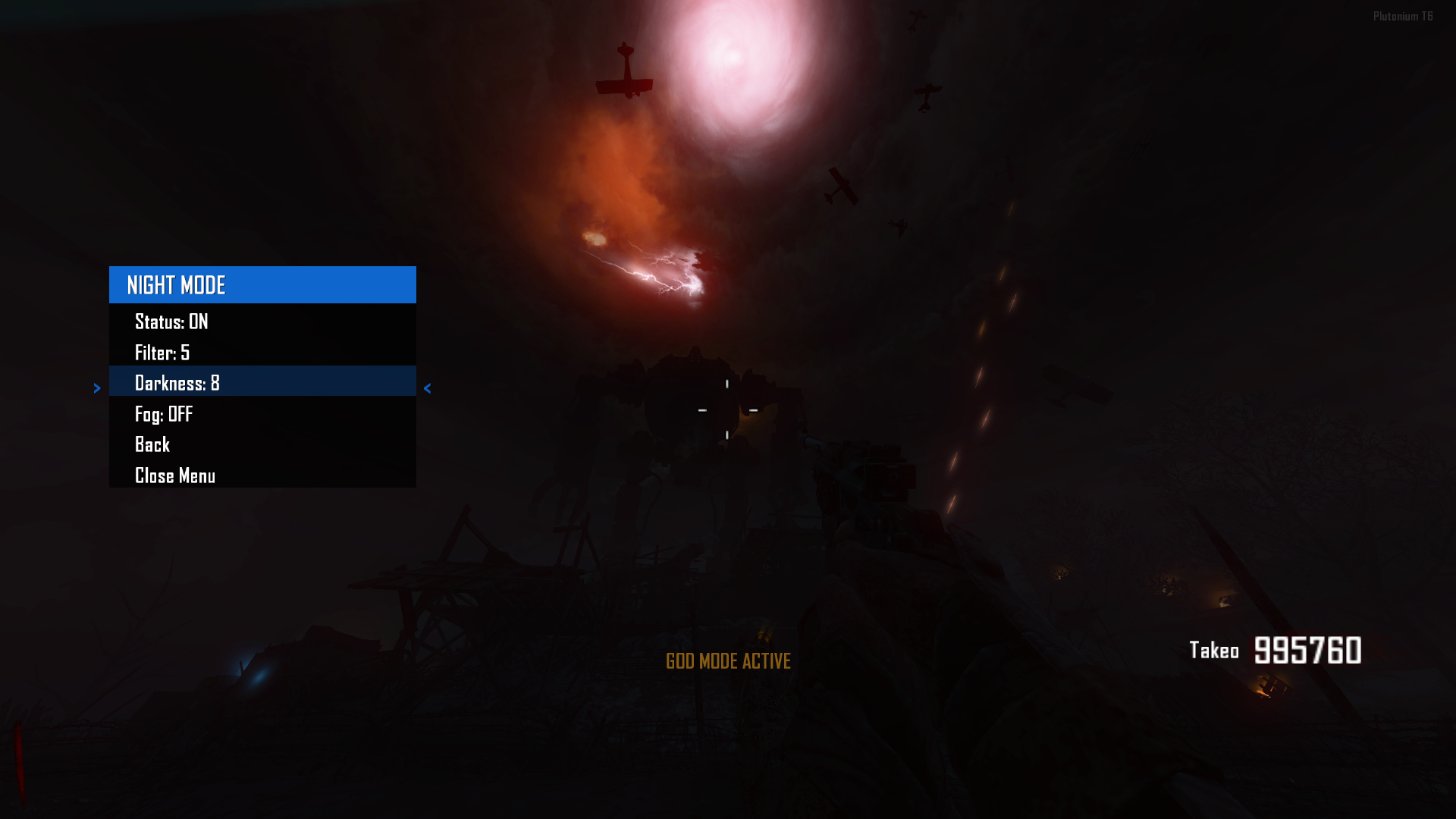
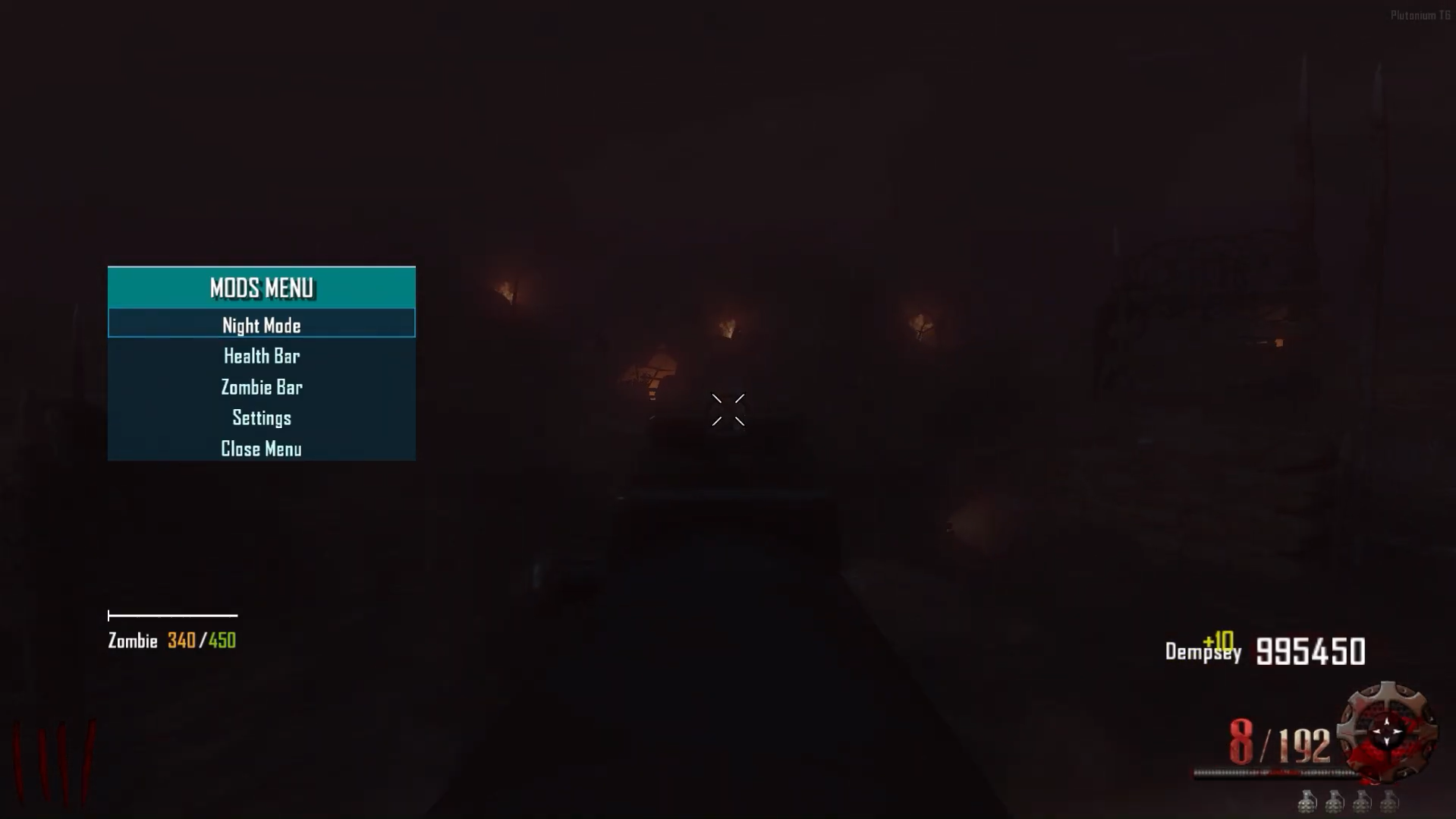
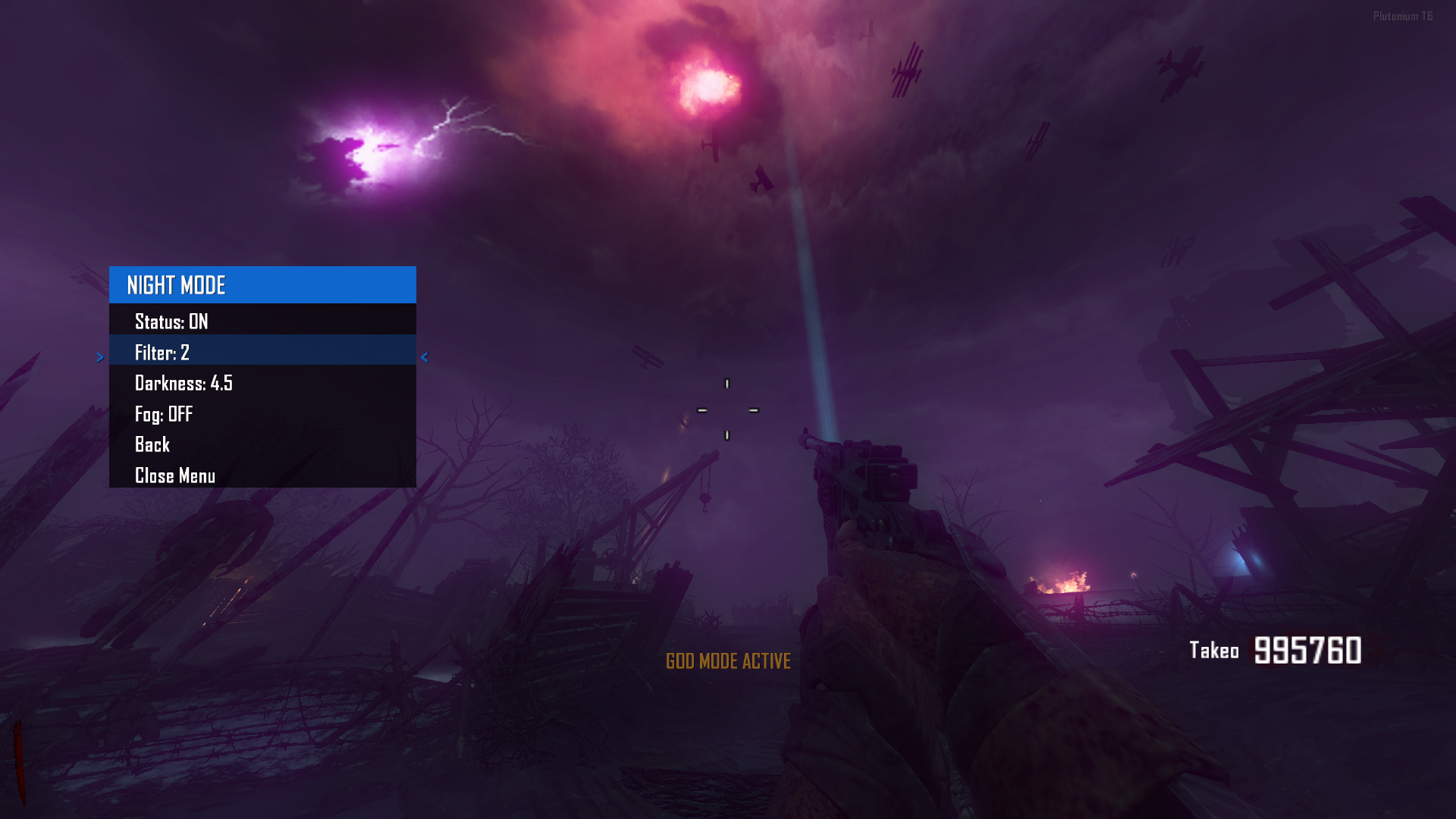
            NIGHTMODE -> This mod allows you to enable night mode across all maps in the game and also includes a set of filters to enhance the overall experience. Additionally, it lets you adjust the game’s darkness level, giving users full control to tailor the visual atmosphere to their preference.
            efaa7e04-5cdc-4551-876c-12abb67e0e50-image.png
            711e7f44-82d4-4050-8393-3b1f4a776590-image.png
            fb4feb6b-2828-4e34-b7fb-7c9aab830f65-image.png

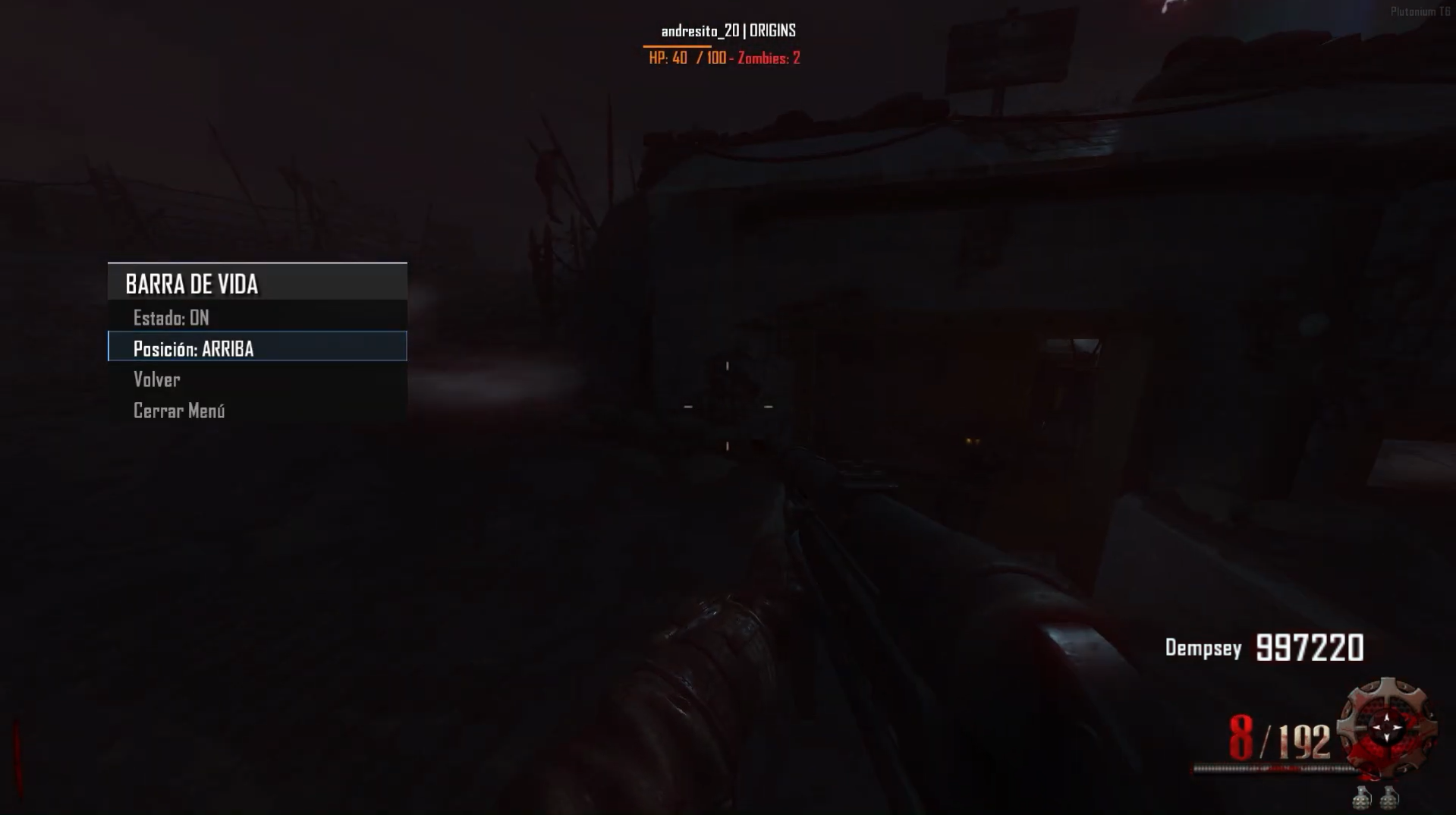
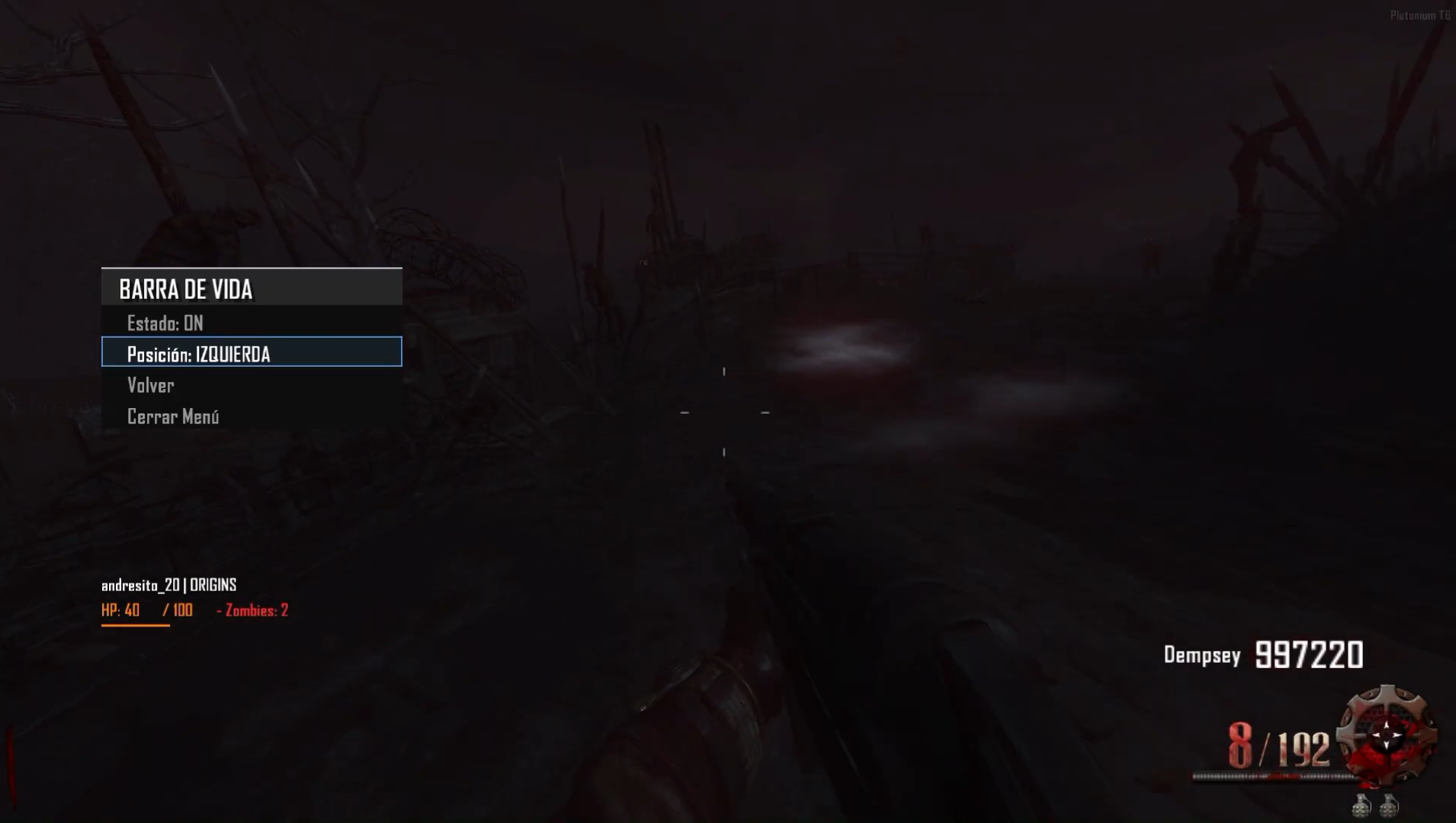
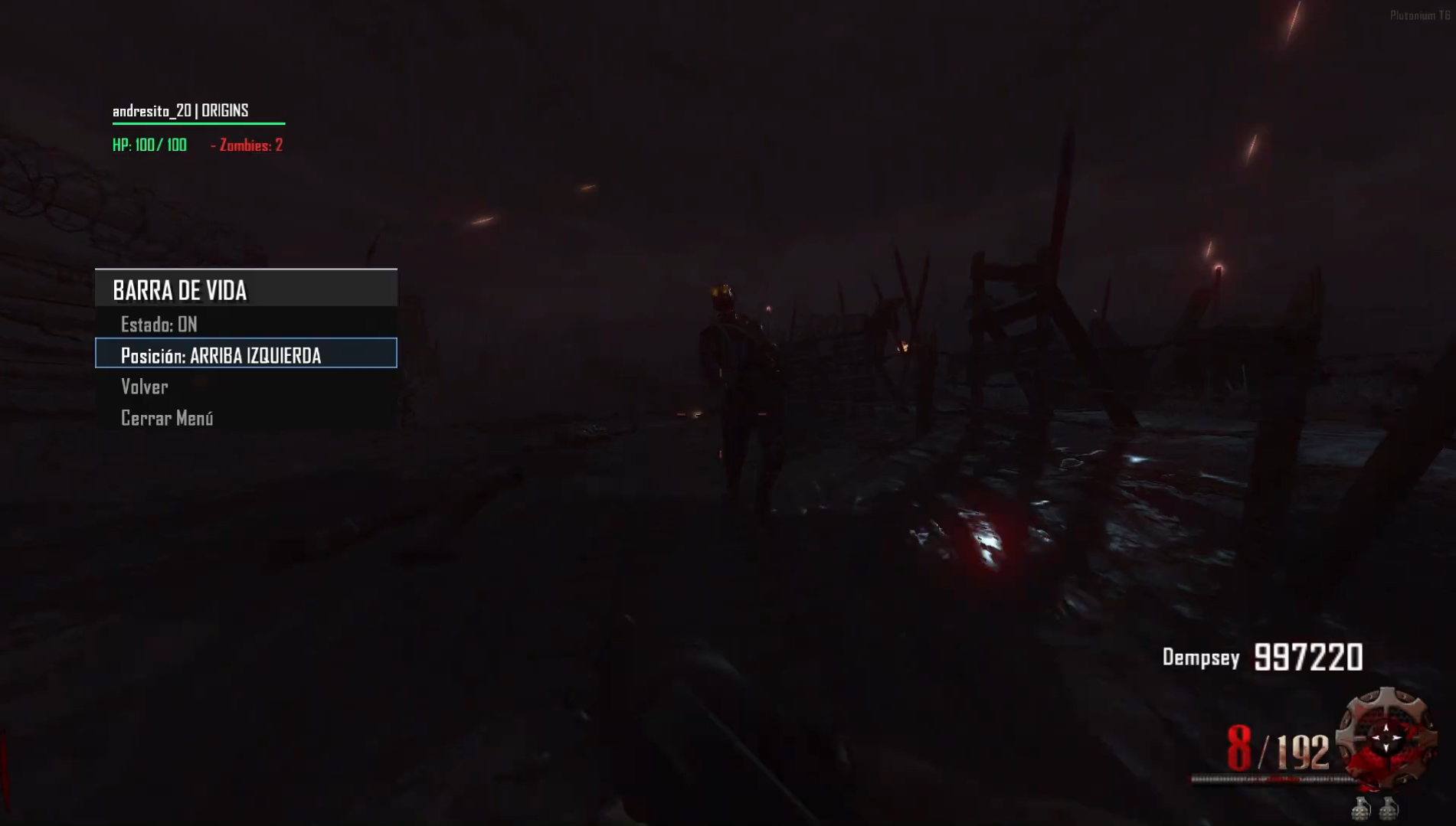
            HEALTHBAR -> The mod features a clean and visually appealing health bar that shows your own health. This version is optimized compared to the previous one shared on the forum. For now, the bar isn’t fully customizable like the zombie health bar — you can only move it between the top and bottom left of the screen. Extras include total zombie count and player name display. The health bar is currently in beta and will be updated in the future to include many more features.
            f2503019-217e-4eda-995f-13551f6a6daa-image.png
            d24ae1d5-43a3-49b5-8e8e-f8e4f46e4b7d-image.png
            84d58835-d647-45a7-bb66-4dae6a0ba81c-image.png

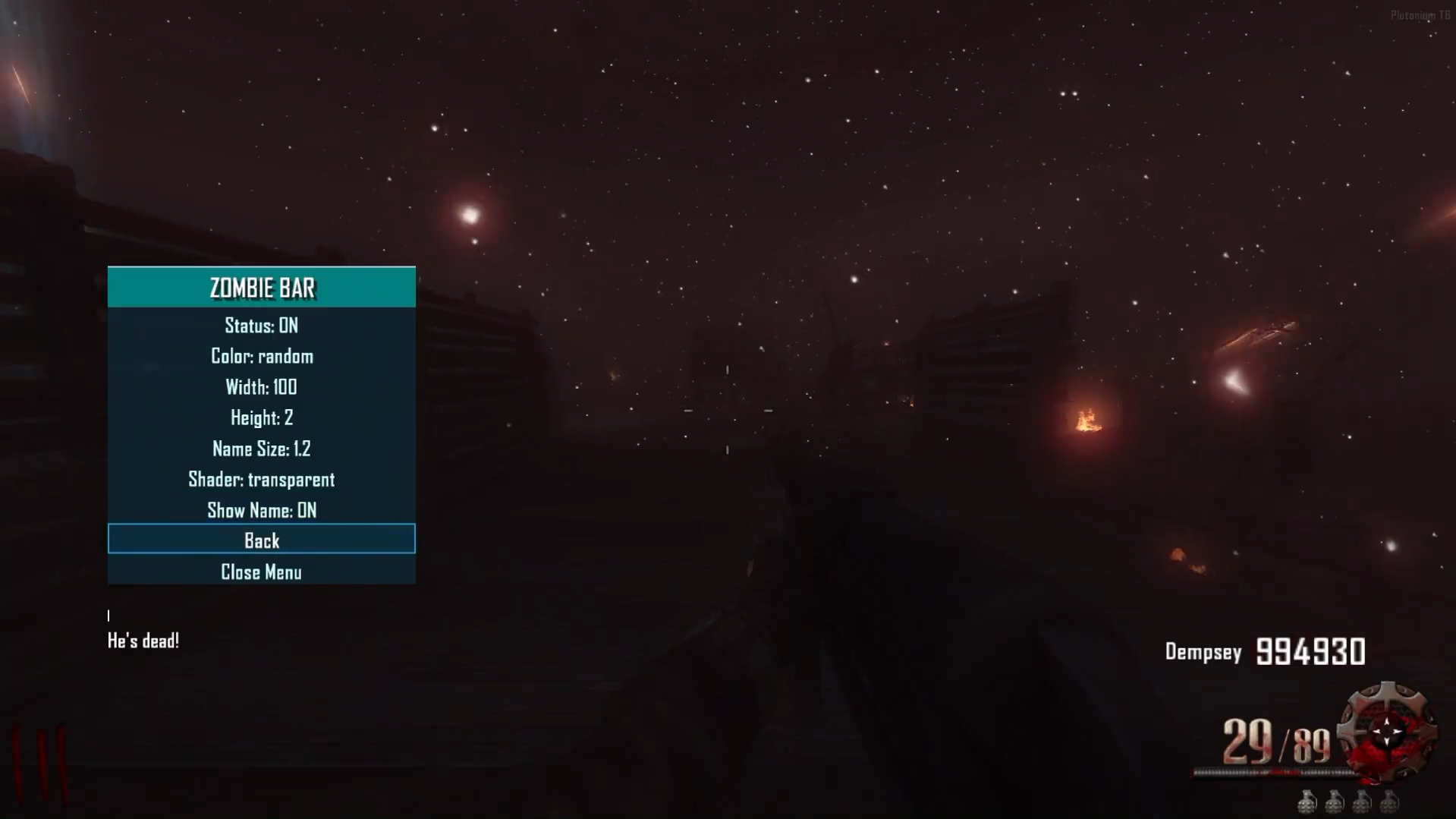
            HEALTHBARZOMBIE ->The mod features a clean, visually appealing, and fully customizable health bar that displays the health of zombies (including zombies and Panzer Soldat). Compared to the previous version released on this forum, I’ve updated the names of custom zombies and added full detection for both zombies and the Panzer Soldat. The health bar accurately shows the exact health and HP count of the targeted enemy and includes a hitmarker as well.
            724195a9-815f-433d-9eb3-8f1db52c59d4-image.png
            0a395ba6-9fa3-4130-be3e-551db7c65e73-image.png

            Menu

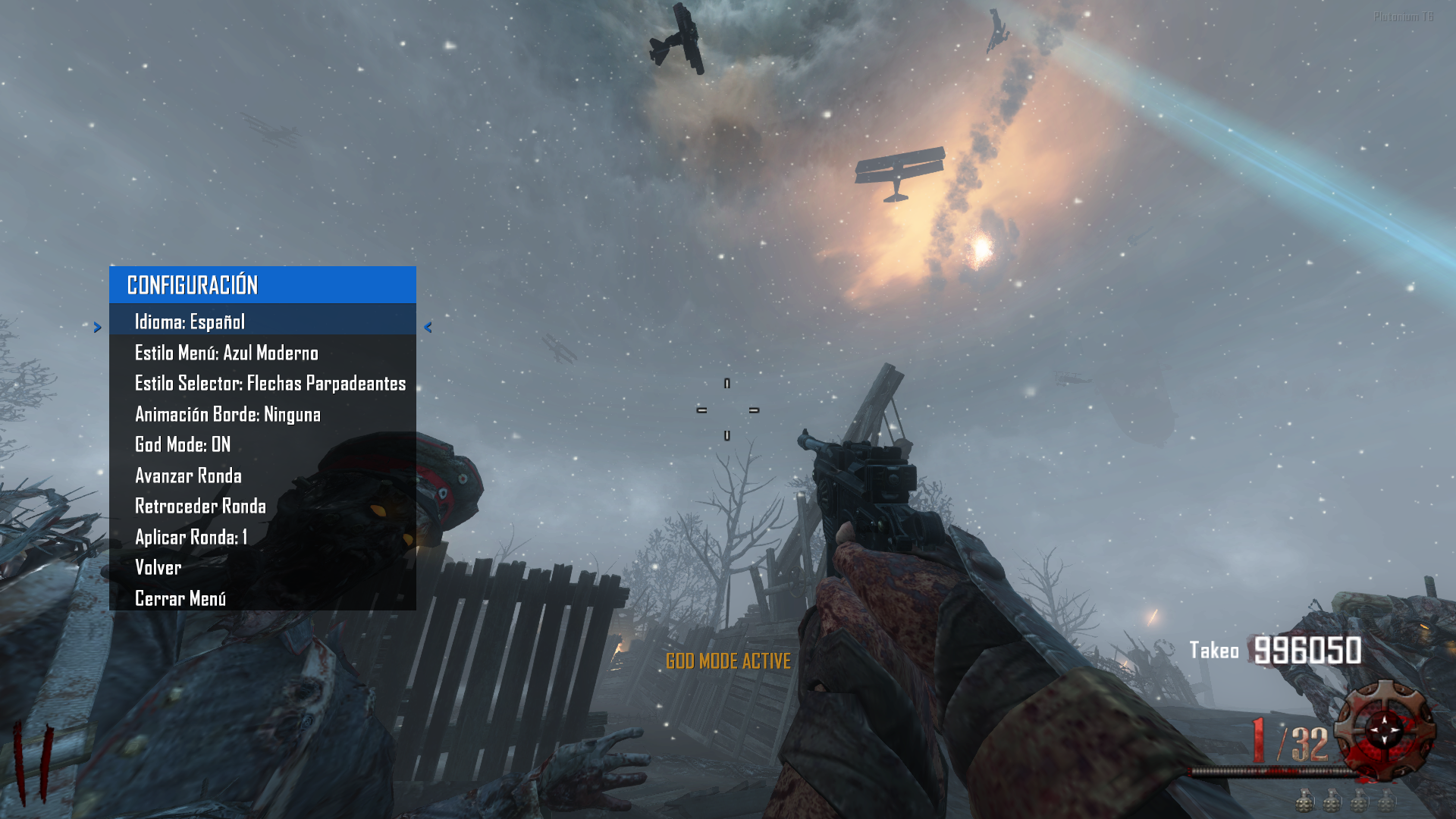
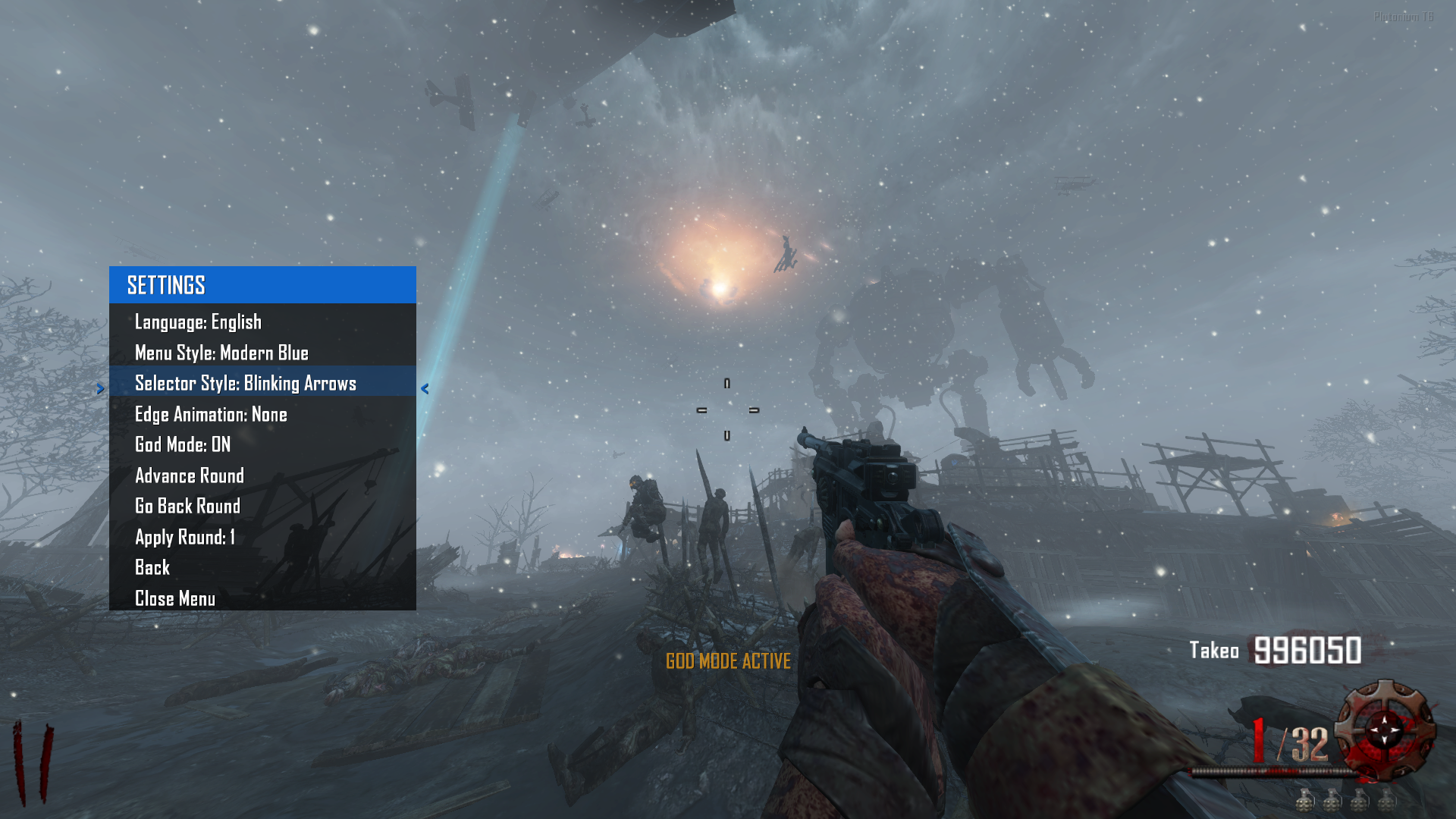
            Español y Ingles -> Now you’ll be able to switch the entire menu and messages between English and Spanish.
            8cba9c6b-256a-4503-a703-dd55378e7ea8-image.png
            e6eb798d-e5e5-482a-bd47-2861b04e3222-image.png
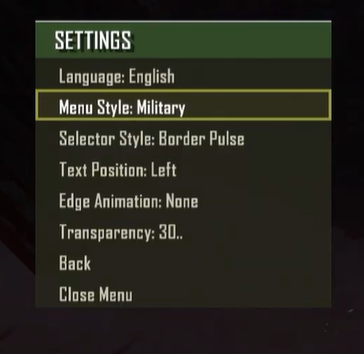
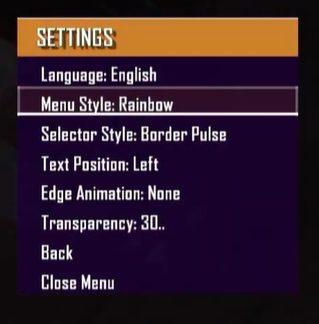
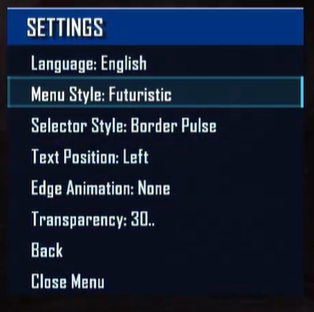
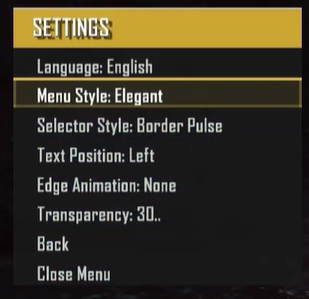
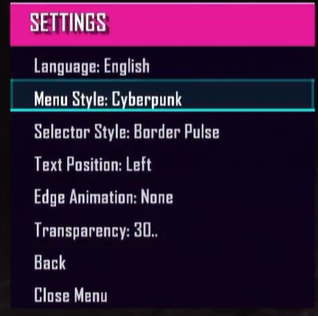
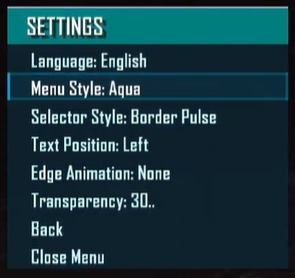
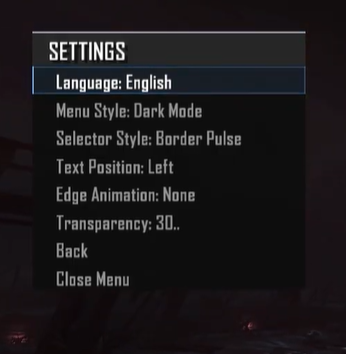
            StyleMenu -> You’ll be able to change a bunch of menu styles to your liking with tons of customizations. Here are some examples.
            d76b80ea-40bb-4bfc-a4ed-646d18651830-image.png
            c6b53590-c942-4867-a485-f586c1be4ffe-image.png
            38a7bc8b-0fed-4221-b8da-f68437e5e19a-image.png
            c9ea5f05-2a47-4a97-8be8-9b3e9411c045-image.png
            6e60e127-18e8-4540-981f-4b3985b1bda1-image.png
            a91fe293-319c-45ee-a3ca-1de6bf6a259b-image.png
            ec9c75f1-a92e-40aa-b64c-75459d35c459-image.png

            y muchos mas...

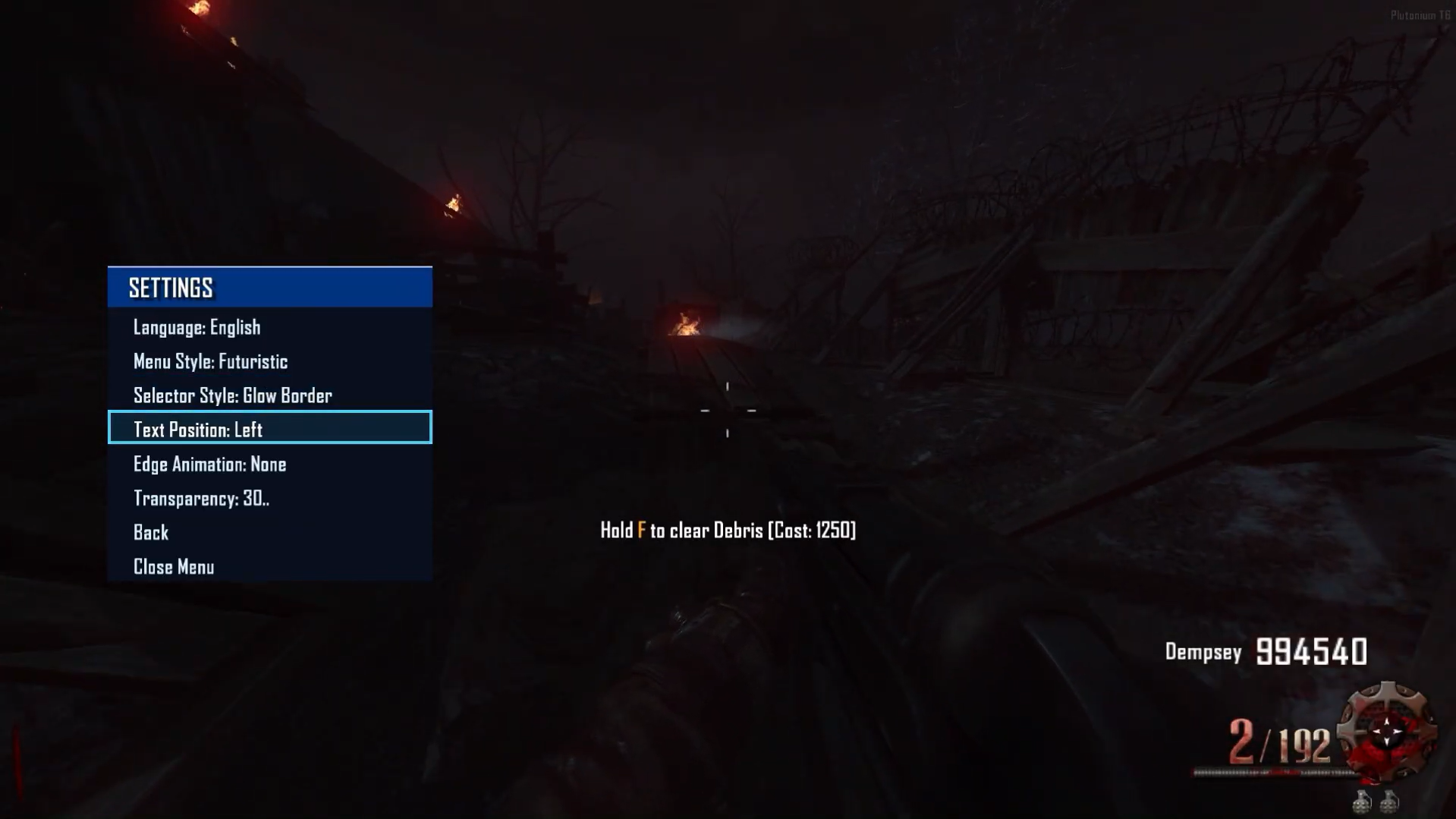
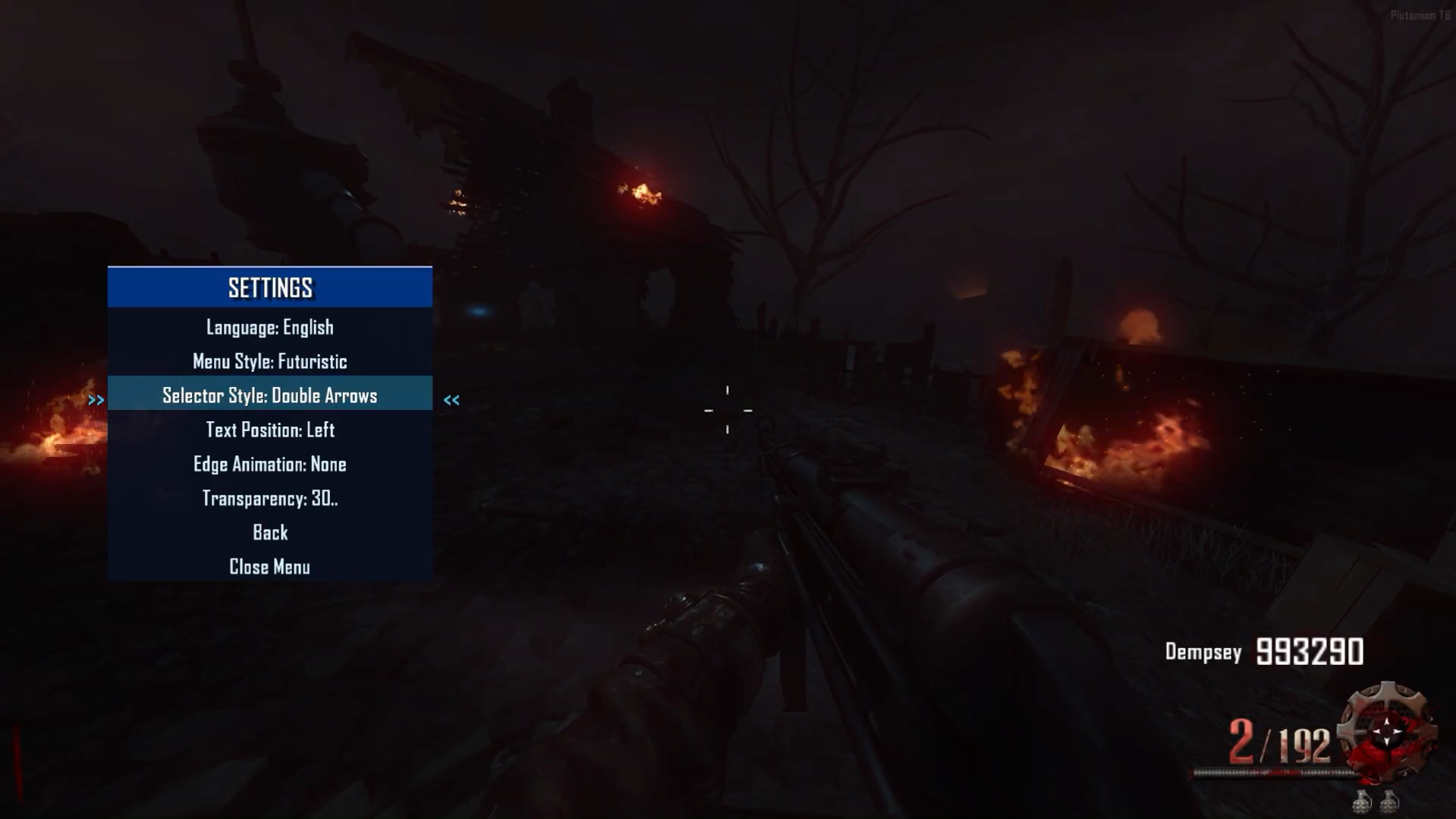
            StyleSelector → Customize the menu selector with various styles and animations.
            GIFs coming soon since the elements are animated.

            EdgeAnimation → Customize the menu border with a variety of styles and animations.
            GIFs coming soon as the elements are animated.

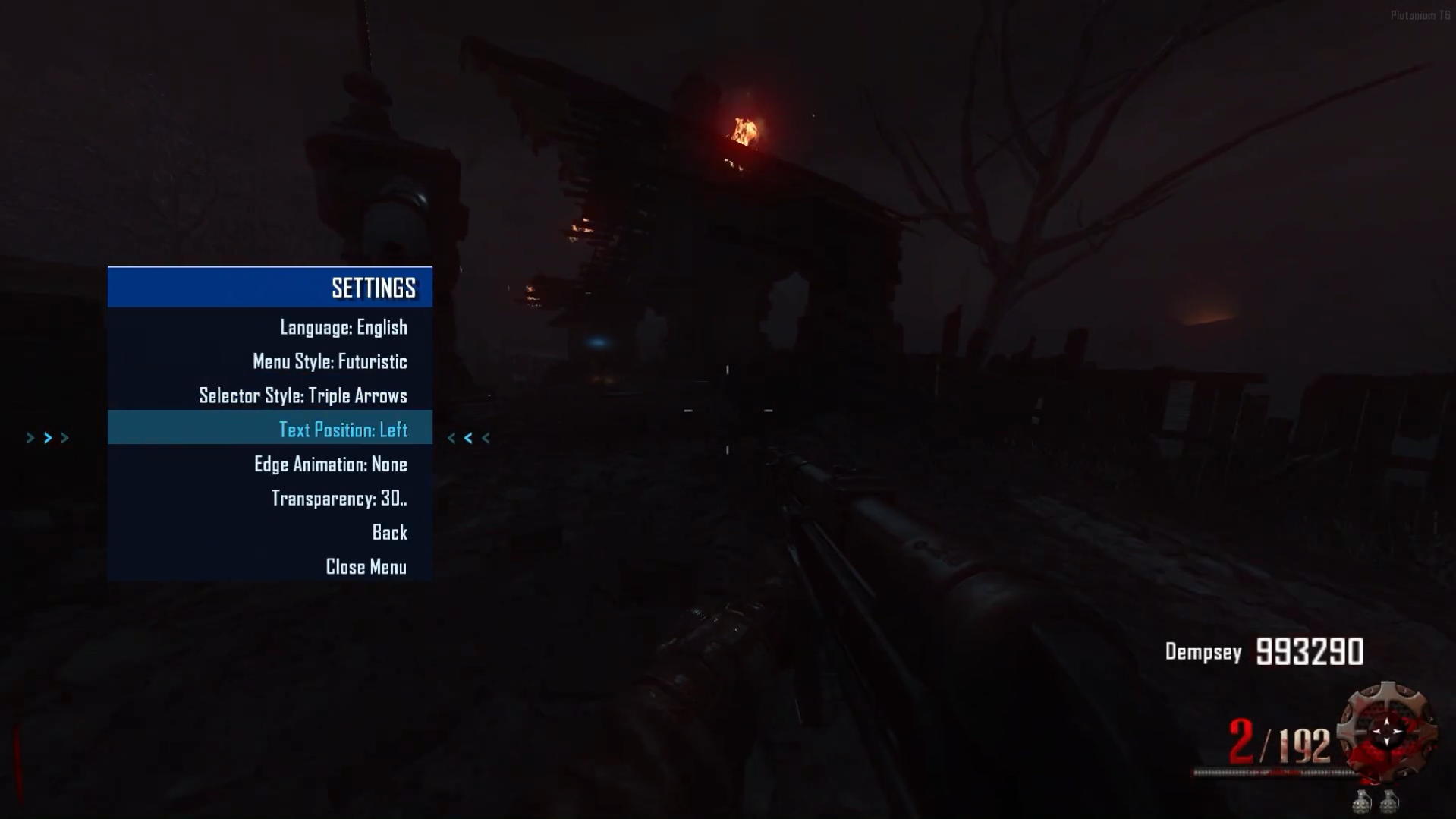
            TextPosition
            Left
            ccf1f886-6d51-4cb1-b167-8fbbf8d9b100-image.png
            Center
            3ec3f7bd-853f-46f9-abfb-e98e9ff810cb-image.png
            Right
            5c1113ac-3738-4ed5-8c5c-68d93cc7e880-image.png

            MODS I'M DEVELOPING
            Mod TimerRound - Timer, Coming soon.

            Mod RiotShieldBar will be implemented soon.

            Mod BankMenu coming soon.

            Mod TopRound and HighRound coming soon.

            Mod Stats coming soon.

            Reference
            -> https://forum.plutonium.pw/topic/38285/gsc-zm-healthbarzombie
            -> https://forum.plutonium.pw/topic/37109/gsc-zm-nightmode
            -> https://forum.plutonium.pw/topic/33928/gsc-zm-healthbarv2
            -> https://forum.plutonium.pw/topic/40769/preview-zm-gsc-mod-menu-littlegods-server

            Video:
            Menu Video
            Source Code:
            Github v3.5.0
            Install:

            new folder
            AppData\Local\Plutonium\storage\t6\raw\scripts\zm\
            old folder
            AppData\Local\Plutonium\storage\t6\scripts\zm\
            

            Maybe you don’t know how to use the mod menu?

            Here I’ll explain a few quick steps:
            To open the menu, you need to aim and knife at the same time.
            To move up, press the numeric key 1, and to move down, press the numeric key 2
            To enter a menu, press F on your keyboard.**
            

            vote topic ❀

            Alexoominundefined Offline
            Alexoominundefined Offline
            Alexoomin
            wrote on last edited by Alexoomin
            #27

            Littlegods Is there any way to disable god mode and restore the bank options? I activated it out of curiosity but I don't want to use it.

            Littlegodsundefined 1 Reply Last reply
            0
            • henryak47undefined Offline
              henryak47undefined Offline
              henryak47
              wrote on last edited by
              #28

              i like it bro!!

              1 Reply Last reply
              1
              • Alexoominundefined Alexoomin

                Littlegods Is there any way to disable god mode and restore the bank options? I activated it out of curiosity but I don't want to use it.

                Littlegodsundefined Offline
                Littlegodsundefined Offline
                Littlegods
                wrote on last edited by
                #29

                Alexoomin The menu has developer menu restrictions, which the bank disappears because it encourages the player to have a fair match without compromising the purpose of the implemented statistics. Even your stats are not saved if the developer mode is active or if sv_cheats is set to 1.

                1 Reply Last reply
                0
                • yDizziundefined Offline
                  yDizziundefined Offline
                  yDizzi
                  wrote on last edited by yDizzi
                  #30

                  Littlegods how do i download and install now that its on github?

                  Littlegodsundefined 1 Reply Last reply
                  0
                  • yDizziundefined yDizzi

                    Littlegods how do i download and install now that its on github?

                    Littlegodsundefined Offline
                    Littlegodsundefined Offline
                    Littlegods
                    wrote on last edited by Littlegods
                    #31

                    yDizzi
                    Well, my friend, you have two options: clone the project or simply download the release as a v4.0.0.rar file.
                    Here is the link: https://github.com/andr3xcl/littlegods-mod/releases/tag/v4.0.0
                    34e8636a-4058-46ee-a62d-1ea33b645996-image.png

                    1 Reply Last reply
                    0
                    • KillerKitten995undefined Offline
                      KillerKitten995undefined Offline
                      KillerKitten995
                      wrote on last edited by KillerKitten995
                      #32

                      Littlegods
                      Heya!
                      I just want to give a bit of feedback on your menu.

                      There are a few things that I think you should improve. First thing that kinda annoys me with the menu is that the speed to scroll up and down is rather slow. So moving between submenus is kinda slow. Secondly, letting go of the interact key to late when transitioning into a submenu instantly activates the first item of the new menu. An example would be going into the developer/player submenu. Clicking on the player submenu option, sometimes instantly and accidently enabling god mode. If you could make a slight delay or require a key release for selection, that would be nice. Another issue I've noticed is that on some of the submenus, there are non-filled options that you can scroll through instead of wrapping back to the opposite side of the submenu.

                      There are a feature request I would like to ask for. I would like a gui option to display weapon stats on screen (If this is impossible I understand). Things like, damage dealt, accuracy, movement speed change, penetration, ect. I often am stuck guessing and measuring weapon stats, because I cant find a consistent source anywhere to read from. I like debugging things and tools, and being able to test for changes would be nice.
                      I'd also like to request the ability to change the keybinds to open the menu. I often use the DSR .50 and the first PaP upgrade gives you variable zoom. The keybind to change the zoom level as well as change sights is ADS + Melee. If I could be able to change that, that'd be helpful.

                      Overall, it is a very nice menu, and it gets the job done. Other than the minor annoyances, it works as intended! I very much would like the requested features to be added if you could.
                      Keep up the good work!

                      Littlegodsundefined 1 Reply Last reply
                      1
                      • KillerKitten995undefined KillerKitten995

                        Littlegods
                        Heya!
                        I just want to give a bit of feedback on your menu.

                        There are a few things that I think you should improve. First thing that kinda annoys me with the menu is that the speed to scroll up and down is rather slow. So moving between submenus is kinda slow. Secondly, letting go of the interact key to late when transitioning into a submenu instantly activates the first item of the new menu. An example would be going into the developer/player submenu. Clicking on the player submenu option, sometimes instantly and accidently enabling god mode. If you could make a slight delay or require a key release for selection, that would be nice. Another issue I've noticed is that on some of the submenus, there are non-filled options that you can scroll through instead of wrapping back to the opposite side of the submenu.

                        There are a feature request I would like to ask for. I would like a gui option to display weapon stats on screen (If this is impossible I understand). Things like, damage dealt, accuracy, movement speed change, penetration, ect. I often am stuck guessing and measuring weapon stats, because I cant find a consistent source anywhere to read from. I like debugging things and tools, and being able to test for changes would be nice.
                        I'd also like to request the ability to change the keybinds to open the menu. I often use the DSR .50 and the first PaP upgrade gives you variable zoom. The keybind to change the zoom level as well as change sights is ADS + Melee. If I could be able to change that, that'd be helpful.

                        Overall, it is a very nice menu, and it gets the job done. Other than the minor annoyances, it works as intended! I very much would like the requested features to be added if you could.
                        Keep up the good work!

                        Littlegodsundefined Offline
                        Littlegodsundefined Offline
                        Littlegods
                        wrote on last edited by
                        #33

                        KillerKitten995
                        You are the first person to give me feedback, so first of all, thank you very much for using the mod 🙌
                        I am currently working on fixing and improving the things you mentioned.

                        Regarding your request about how to open the menu: by default, the keys are ADS + Melee, and the mod also includes a menu where you can change and configure the keybinds to whatever is most comfortable for you.

                        As for the weapon statistics, it is possible to display that kind of information as you described. If you can provide information or the name of another mod that uses a similar system, I will gladly investigate it and see how to implement it.

                        I will mention you in 3 to 4 hours, after posting this update, so you can see a preview of the Mod Menu 4.2.0 update.

                        1 Reply Last reply
                        0
                        • KillerKitten995undefined Offline
                          KillerKitten995undefined Offline
                          KillerKitten995
                          wrote on last edited by
                          #34

                          Littlegods
                          Np!
                          Though could you elaborate how to change the bind from ADS + Melee? I also dont have any examples for the weapon stat request. I've been looking for someone to help implement those for a personal project of mine (see here for my old post).

                          1 Reply Last reply
                          0
                          • meboopundefined Offline
                            meboopundefined Offline
                            meboop
                            wrote on last edited by
                            #35

                            love this mod so much! me and friends have so much fun

                            Littlegodsundefined 1 Reply Last reply
                            1
                            • damnson1302undefined Offline
                              damnson1302undefined Offline
                              damnson1302
                              wrote on last edited by damnson1302
                              #36

                              i dunno what i am doing wrong but i cannot get it to work.
                              i have put all of these files into: C:\Users\greum\AppData\Local\Plutonium\t6\raw\scripts\zm. but aim and knife dont seem to do anything. help would be appreciated.
                              pluto.PNG

                              Littlegodsundefined 1 Reply Last reply
                              1
                              • damnson1302undefined damnson1302

                                i dunno what i am doing wrong but i cannot get it to work.
                                i have put all of these files into: C:\Users\greum\AppData\Local\Plutonium\t6\raw\scripts\zm. but aim and knife dont seem to do anything. help would be appreciated.
                                pluto.PNG

                                Littlegodsundefined Offline
                                Littlegodsundefined Offline
                                Littlegods
                                wrote on last edited by Littlegods
                                #37

                                damnson1302 our load is excellent. To open the menu, you just need to aim and knife at the same time. If you changed the key for knifing, you must use the key you assigned.

                                Also, please provide the console log.

                                1 Reply Last reply
                                0
                                • meboopundefined meboop

                                  love this mod so much! me and friends have so much fun

                                  Littlegodsundefined Offline
                                  Littlegodsundefined Offline
                                  Littlegods
                                  wrote on last edited by
                                  #38

                                  meboop Thank you for playing my mod. Amazing updates are coming, I hope to see you here!

                                  1 Reply Last reply
                                  0
                                  • meboopundefined Offline
                                    meboopundefined Offline
                                    meboop
                                    wrote on last edited by
                                    #39

                                    also where can i find the auto revive mod?

                                    1 Reply Last reply
                                    0
                                    • OpticAuraundefined Offline
                                      OpticAuraundefined Offline
                                      OpticAura
                                      wrote on last edited by
                                      #40
                                      This post is deleted!
                                      1 Reply Last reply
                                      0
                                      • Littlegodsundefined Offline
                                        Littlegodsundefined Offline
                                        Littlegods
                                        wrote on last edited by Littlegods
                                        #41

                                        Update 4.5.0 (Profiles - Developer Categories - Config.gods - Teleport Menu Categories - Teleport Zone Locator - Account Menu - Password System - Weapon Camouflage Menu - Developer Settings - Smart Menu - Commands)

                                        Description

                                        Hello, new update with many improvements and fixes, and as always, with something surprising.
                                        This is a PRERELEASE v4.5.0.


                                        Fixes

                                        • Menu Scroll: The menu was very slow to scroll. It has now been improved and optimized to allow faster navigation between menus.
                                        • Menu Navigation: Fixed an annoying bug where entering some submenus caused multiple unwanted interactions.

                                        Improvements

                                        Profiles

                                        • You can now save multiple profiles with different menu layouts and load them at the start of each game.

                                        841837d1-1138-4555-822b-ae1725f7871f-Captura desde 2026-01-24 23-39-01.png
                                        c51df42f-4591-456f-bfa0-cdefce854e78-Captura desde 2026-01-24 23-39-07.png
                                        60ed92b0-12d2-49a1-b792-8d2501b65542-Captura desde 2026-01-24 23-39-23.png
                                        a10ee156-8170-426e-bb83-66f3c5c81e6c-Captura desde 2026-01-24 23-39-55.png
                                        404a9f1f-505c-49d6-b1d7-5839aaf662a6-Captura desde 2026-01-24 23-40-22.png
                                        e416cf5c-9dc5-42d9-b9f8-88fde936eb08-Captura desde 2026-01-24 23-40-51.png
                                        13d598e4-293c-4a8c-b2a4-2385755e01db-Captura desde 2026-01-24 23-40-58.png


                                        Developer Categories

                                        • You can now create shortcut categories inside the developer menu.
                                        • Add quick-access items such as godmode or specific weapons, allowing fast access without navigating through all menus.

                                        eab0c294-6af8-4bce-8994-6495de39ff59-Captura desde 2026-01-25 00-16-31.png
                                        18eee7ee-e4c3-4139-97b6-1ded53d9a04b-Captura desde 2026-01-25 00-16-38.png
                                        69573e1d-5d21-45b3-b8c5-71a0c1523b4b-Captura desde 2026-01-25 00-16-59.png
                                        66a04d79-b742-442d-9cb3-008c4fee9948-Captura desde 2026-01-25 00-17-19.png
                                        1fb63ce2-f510-47e0-a470-c61af4ded87a-Captura desde 2026-01-25 00-17-28.png
                                        b24c5938-7566-46a4-86c0-7207aab9202d-Captura desde 2026-01-25 00-17-55.png
                                        2565ba11-76cd-4c15-9424-3633ea05b415-Captura desde 2026-01-25 00-18-03.png


                                        Config.gods

                                        • Codename system that allows you to create your own match configuration.
                                        • Edit health, score, mystery box price, starting weapon (upgraded or not, with or without camouflage), and perks.
                                        • You can apply it during the match or at the beginning of the game from the Load Config menu.

                                        b28e9f16-9213-4a67-afb1-48c883e7be81-Captura desde 2026-01-24 23-51-17.png
                                        c2d408f7-165f-4fda-ac2a-43430fdb8185-Captura desde 2026-01-24 23-52-03.png
                                        8abb6196-ce79-4276-b246-6ac288b596cf-Captura desde 2026-01-25 00-07-16.png
                                        10385814-a7a8-4803-acb1-9af3f4784c3a-Captura desde 2026-01-25 00-07-29.png
                                        416c5c0b-ee17-4f51-916b-241987c387b4-Captura desde 2026-01-25 00-07-37.png


                                        Teleport Menu Categories

                                        • The teleport menu now supports categories.
                                        • You can create teleport points, save them into categories, and keep everything organized.

                                        6bf21ffd-f7cd-409c-b81e-a8559fea8d38-Captura desde 2026-01-25 00-18-48.png
                                        bcde4829-265d-409a-bcda-4c926a550ee0-Captura desde 2026-01-25 00-19-16.png

                                        7e4a8615-aa76-4fad-866f-db624122e6f0-Captura desde 2026-01-25 00-19-40.png
                                        d5688b86-64ea-41dd-8928-bf12ce8216cd-Captura desde 2026-01-25 00-19-50.png


                                        Teleport Zone Locator

                                        • Each map has a zone menu where you can view all zones and teleport to them.

                                        13a79ac0-0e17-4541-855f-6b5f46c0b71a-Captura desde 2026-01-25 00-20-15.png


                                        Account Menu

                                        • View detailed profile information.
                                        • Quickly switch between profiles.
                                        • Manage language settings and developer menu password.

                                        a8a203e4-e5eb-43dc-bf98-5ec967a7a466-Captura desde 2026-01-24 23-41-06.png


                                        Password System

                                        • You can change the default admin password.
                                        • Double confirmation is required.
                                        • Each profile has its own password.
                                        • If you create a profile from another profile, the password will be copied, but changing it later will not affect the original profile.

                                        Weapon Camouflage Menu

                                        • You can now apply camouflage to your weapons.

                                        af221ab2-2053-4f8f-92ec-14d047e08550-Captura desde 2026-01-25 00-36-41.png
                                        042c200b-5ca2-4320-a4cf-b99779c365a2-Captura desde 2026-01-25 00-36-51.png
                                        d22637b2-e9df-4042-b8d5-f1914babe92e-Captura desde 2026-01-25 00-37-08.png


                                        Developer Settings

                                        • You can change your password.

                                        8d1b2a29-3350-496d-a488-807da311254a-image.png


                                        Smart Menu

                                        • If you are a new player, the menu will ask for your language the first time you open it.
                                        • After setting it, it will not ask again.
                                        • Automatically detects config.gods and existing profiles.
                                        • Profile selection is always required at startup.
                                        • For now, there is no default profile option by design.

                                        Commands

                                        • *.menu* opens or closes the menu (toggle).

                                        Wall of Death

                                        • Completely removed.
                                        • You can now freely fly using UFO mode on all maps.

                                        Web Statistics Integration 2.0

                                        • Menu statistics are compatible with Web Stats v2.0.
                                        • Web stats are currently unavailable while the system is being fixed.

                                        Important Notice

                                        • Please avoid using fast_restart or map_restart.
                                        • Always start maps from the Main Menu to ensure scripts load correctly.

                                        Beta / Pre-release

                                        • Everything shown is in beta and may be kept, removed, or improved.

                                        Source Code

                                        Download v4.5.0
                                        Download v4.5.0


                                        Install

                                        new folder
                                        AppData\Local\Plutonium\storage\t6\raw\scripts\zm\
                                        old folder
                                        AppData\Local\Plutonium\storage\t6\scripts\zm\
                                        Aquí explicé algunos pasos råpidos:
                                        
                                        ingles
                                        To open menu command -> .menu
                                        To open the menu, you need to aim and knife at the same time.
                                        To move up, press the numeric key 1, and to move down, press the numeric key 2
                                        To enter a menu, press F on your keyboard.**
                                        
                                        spanish
                                        Para abrir el menu comando -> .menu
                                        Para abrir el menĂș, debes apuntar y apuñalar al mismo tiempo.
                                        Para moverte hacia arriba, presiona la tecla numérica 1, y para moverte hacia abajo, presiona la tecla numérica 2.
                                        Para entrar a un menĂș, presiona F en tu teclado.
                                        
                                        1 Reply Last reply
                                        0
                                        Reply
                                        • Reply as topic
                                        Log in to reply
                                        • Oldest to Newest
                                        • Newest to Oldest
                                        • Most Votes


                                        • 1
                                        • 2
                                        • 3
                                        • Login

                                        • Don't have an account? Register

                                        • Login or register to search.
                                        • First post
                                          Last post
                                        0
                                        • Recent
                                        • Tags
                                        • Popular
                                        • Users
                                        • Groups
                                        • Donate