Skip to content
  • 0 Unread 0
  • Recent
  • Tags
  • Popular
  • Users
  • Groups
  • Donate
Collapse

Plutonium

  1. Home
  2. Launcher Support
  3. failed to fetch info: non-success status code: 403 403 Forbidden

failed to fetch info: non-success status code: 403 403 Forbidden

Scheduled Pinned Locked Moved Launcher Support
7 Posts 7 Posters 1.1k Views
  • Oldest to Newest
  • Newest to Oldest
  • Most Votes
Reply
  • Reply as topic
Log in to reply
This topic has been deleted. Only users with topic management privileges can see it.
  • NoKarma_ Offline
    NoKarma_ Offline
    NoKarma_
    wrote on last edited by
    #1

    Hi guys,

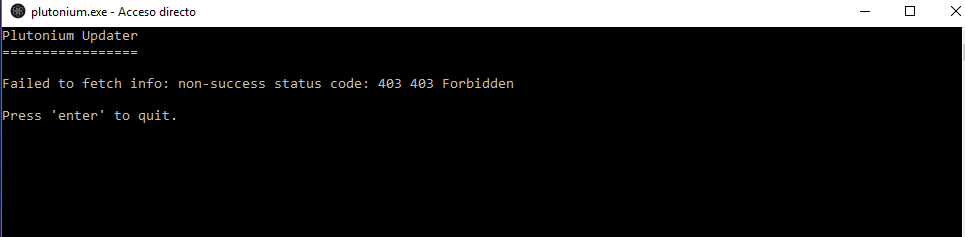
    i got this error... executing like admin, disabling AV or firewall, dont resolve the problem... any idea?... suggestions?
    pluto.PNG

    ArukuShi 1 Reply Last reply
    0
    • Tommieboy40 Offline
      Tommieboy40 Offline
      Tommieboy40
      wrote on last edited by
      #2

      yeah what does this mean i exaclty got the same

      1 Reply Last reply
      0
      • NoKarma_ NoKarma_

        Hi guys,

        i got this error... executing like admin, disabling AV or firewall, dont resolve the problem... any idea?... suggestions?

        pluto.PNG

        ArukuShi Offline
        ArukuShi Offline
        ArukuShi
        wrote on last edited by
        #3

        Octane x2

        diegope 1 Reply Last reply
        0
        • HannesC Offline
          HannesC Offline
          HannesC
          Plutonium Staff
          wrote on last edited by HannesC
          #4

          Check the firewall and ensure its not blocking pluto, and try a VPN.

          1 Reply Last reply
          0
          • t6r.dll Offline
            t6r.dll Offline
            t6r.dll
            wrote on last edited by t6r.dll
            #5

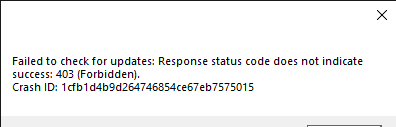
            this is happening to me tooScreenshot 9_3_2021 10_07_25 AM.png (pretty late ik)

            Dss0 1 Reply Last reply
            0
            • t6r.dll t6r.dll

              this is happening to me tooScreenshot 9_3_2021 10_07_25 AM.png (pretty late ik)

              Dss0 Offline
              Dss0 Offline
              Dss0
              Plutonium Staff
              wrote on last edited by
              #6

              @t6r-dll

              • try re-downloading the launcher from here https://cdn.plutonium.pw/updater/plutonium.exe
              • do what HannesC mentioned above
              • try changing your dns servers (https://www.windowscentral.com/how-change-your-pcs-dns-settings-windows-10)

              1 Reply Last reply
              0
              • ArukuShi ArukuShi

                Octane x2

                diegope Offline
                diegope Offline
                diegope
                wrote on last edited by
                #7

                I changed the dns, disabled norton security and the firewall still has the problem

                1 Reply Last reply
                0

                Hello! It looks like you're interested in this conversation, but you don't have an account yet.

                Getting fed up of having to scroll through the same posts each visit? When you register for an account, you'll always come back to exactly where you were before, and choose to be notified of new replies (either via email, or push notification). You'll also be able to save bookmarks and upvote posts to show your appreciation to other community members.

                With your input, this post could be even better 💗

                Register Login
                Reply
                • Reply as topic
                Log in to reply
                • Oldest to Newest
                • Newest to Oldest
                • Most Votes


                • Login

                • Don't have an account? Register

                • Login or register to search.
                • First post
                  Last post
                0
                • Unread 0
                • Recent
                • Tags
                • Popular
                • Users
                • Groups
                • Donate